

TikTok Data Scraper
Pricing
from $0.67 / 1,000 results
TikTok Data Scraper
TikTok Data Scraper extracts public TikTok data at scale: profiles, videos, followers, comments and replies, hashtags, music, playlists and single-video details. Export to JSON, CSV or Excel, or use via API.
Pricing
from $0.67 / 1,000 results
Rating
0.0
(0)
Developer

Social Data API
Maintained by CommunityActor stats
0
Bookmarked
2
Total users
1
Monthly active users
2 days ago
Last modified
Categories
Share
TikTok Data Scraper — Videos, Profiles, Comments & Hashtags
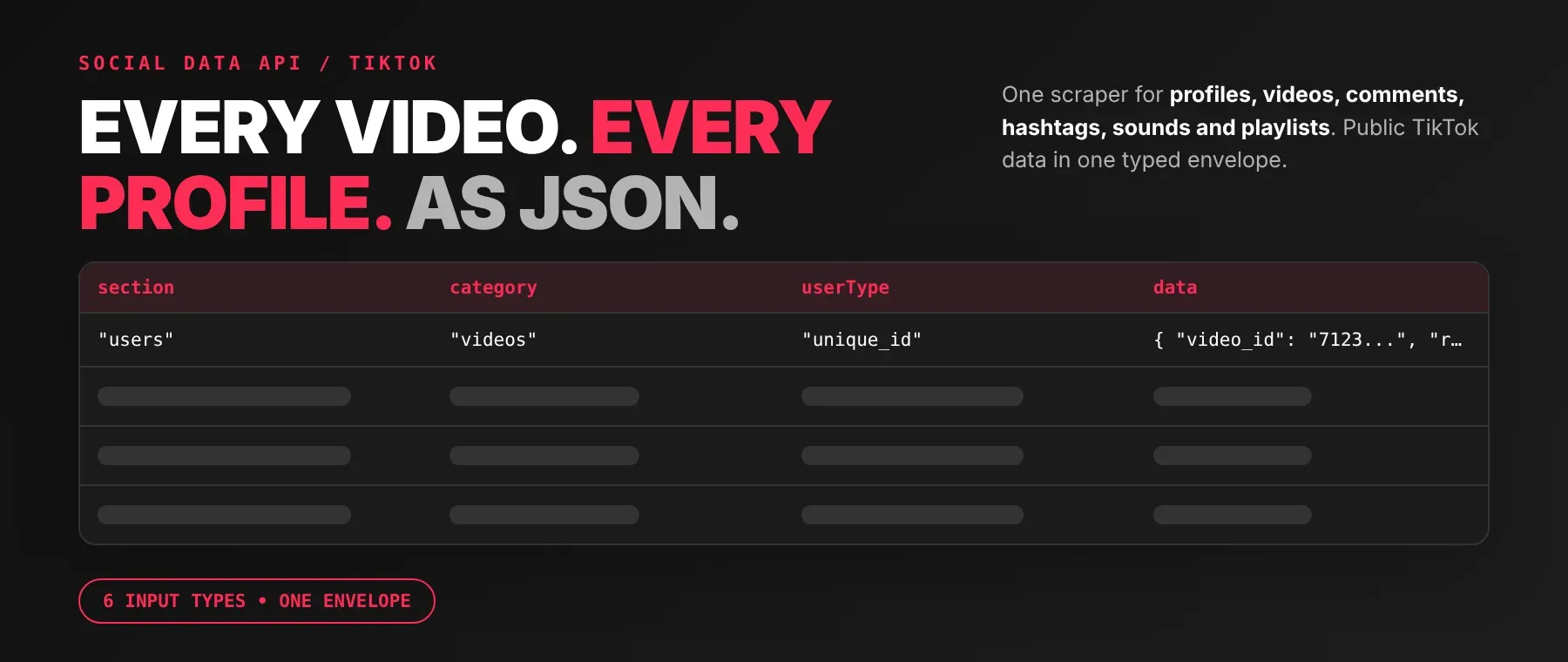
TikTok Data Scraper is an all-in-one TikTok scraper pulling public TikTok data across six input types — profiles, videos, comments and replies, hashtags, sounds and playlists — and returns every item as structured JSON. As a TikTok multi-category scraper, each record carries play counts, likes, comments, shares and follower counts exactly as TikTok shows them to a logged-out visitor. Every response is structured JSON — ready to pass directly to an LLM, index into a vector store, or feed a social-listening pipeline. No TikTok account or cookies are needed. Start with one profile or hashtag, then scale up.
What data can I extract with TikTok Data Scraper?
Using this TikTok Data API, you will be able to extract the following TikTok data:
| 👤 Profile bio, avatar & stats | 📹 Video stats (plays, likes, shares) | 💬 Comment text & reply counts | #️⃣ Hashtag video feed |
|---|---|---|---|
| 🎵 Sound video feed | ▶️ Playlist videos | 🖼️ Cover images (static, animated) | 🔗 Canonical video/profile links |
| 📅 Publish & scrape timestamps | 🌐 Cross-platform handles (Instagram, Twitter/X, YouTube) | 🚫 Followers list (platform restriction — see below) |
How to use TikTok Data Scraper
Anyone who needs public TikTok data without logging in — videos, profiles, comments, hashtag feeds, sounds or playlists — can run this Actor and get a JSON dataset back in one run.
Copy to your AI assistant:
TikTok Data Scraper MCP Server: use these Actors from ChatGPT, Claude or Cursor
Point your AI assistant at Apify's MCP server and it can read TikTok on its own: profiles, videos, comments, hashtags, sounds and playlists. No glue code, no scraping logic in your prompts.
Your agent can then search for, add and call this Actor directly through that server's own tools — no actor ID needs to be hardcoded.
Step by step
- Create a free Apify account.
- Open TikTok Data Scraper in the Apify Store.
- Enter the TikTok profile URL, username, video link, hashtag, sound link or playlist ID you want.
- Click Start (or send your API request).
- Download or stream your results in JSON, CSV or Excel.
How to scale TikTok Data Scraper to bulk
Every input field — userUrls, videoUrlsComments, hashtags, musicUrls, playlistIDs, videoDetailsList — is an array, so one run can queue many profiles, videos, hashtags, sounds or playlists instead of one run per item. Queued inputs are processed concurrently (several at once, up to an internal concurrency cap), not strictly one at a time, so a larger batch does not take proportionally as long as running each input separately.
✨ Features
TikTok Data Scraper fetches clean, structured TikTok records across six sources in one run. It's ideal for tracking a competitor's follower growth, auditing which videos on a trending hashtag are gaining traction, building a comment-sentiment dataset, and feeding fresh TikTok context to an AI agent instead of stale training data.
It extracts, per record:
- Play, like, comment and share counts – engagement numbers exactly as TikTok displays them publicly.
- Follower, following, heart and video counts – profile-level stats from profile-info runs.
- Comment and reply text – with the commenting user's bio, region and follower count attached.
- Cover images – static, original and animated cover URLs for every video.
- Canonical deep-links – direct video, profile, hashtag and sound links, built locally so you never have to construct them yourself.
- Publish and scrape timestamps – when TikTok says the video was published, and when this Actor collected the record.
⚡ Runs with no proxy by default and only escalates to a datacenter, then a residential, proxy if TikTok blocks the direct connection — most runs need no proxy setup at all.
Use cases 💡
- Growth marketer — track a competitor's follower and video count over time from profile-info runs.
- Social listening team — spot which videos on a trending hashtag are gaining plays and likes.
- Researcher — build a labeled dataset of comment text and reply counts for sentiment analysis.
- Music/label team — see which creators are driving a sound's reach via the music category's play counts.
- AI engineer — feed video captions and bio text into a RAG index as grounded, current TikTok context.
Building an AI agent? Connect it over MCP and let it call the actor on its own.
Why choose this actor?
- Six TikTok sources, one Actor. Profiles, videos, comments and replies, hashtags, sounds and playlists all come back through the same section/category/data envelope, so one parser covers all six instead of six separate ones.
- Over 30 fields on a single video record. A video item carries fields from engagement counts to cover images, music metadata and author details, all typed and named consistently run after run.
- No proxy needed to start. Every run begins on a direct connection with no proxy at all, and only escalates to Apify's own datacenter and then residential proxies if TikTok blocks it.
⬇️ Input
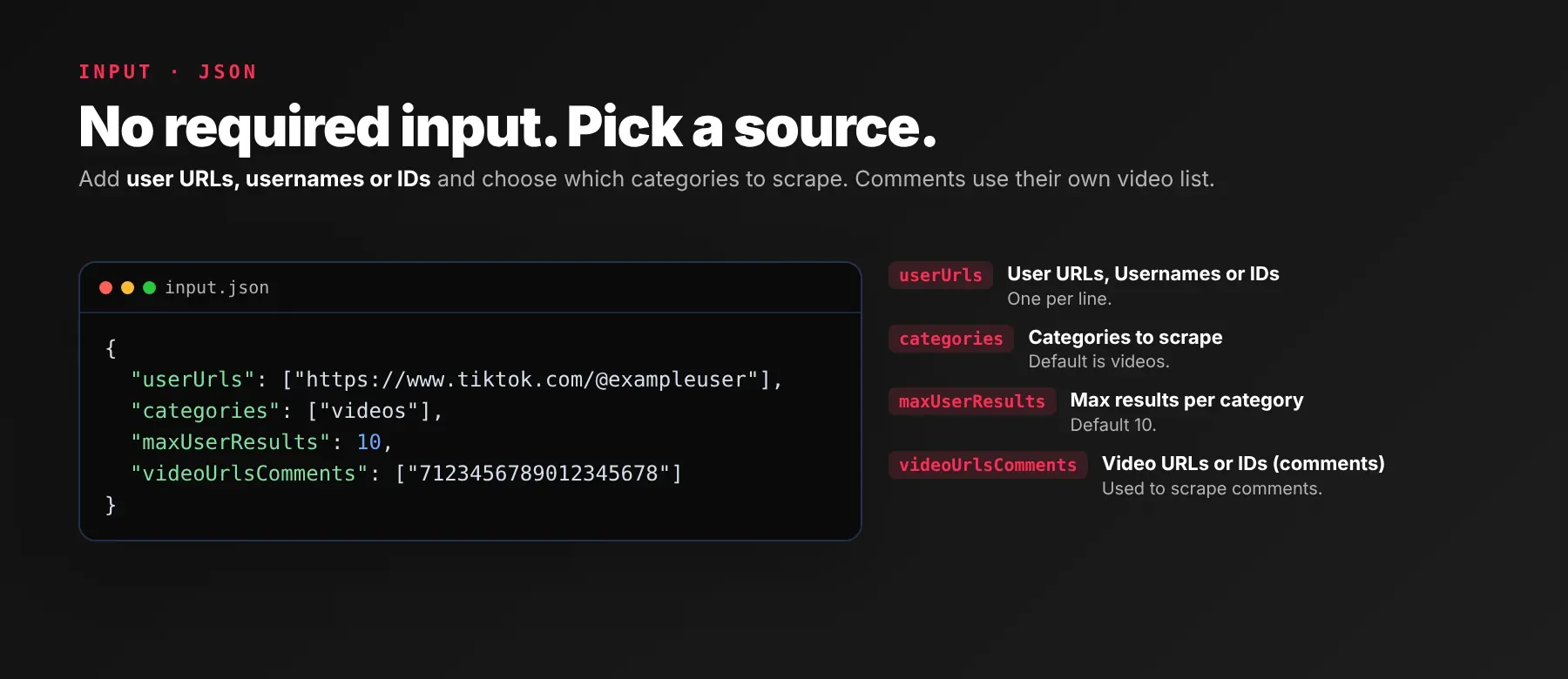
TikTok Data Scraper accepts six independent input lists — profiles, video URLs for comments, hashtags, sounds, playlists and single-video detail requests. Every field is optional; fill in only the section(s) you need and leave the rest empty.
| Parameter | Required | Type | Description | Example Value |
|---|---|---|---|---|
userUrls | No | Array of String | One or more profiles. Examples: https://www.tiktok.com/@taylorswift, taylorswift, @taylorswift, 107955 | ["https://www.tiktok.com/@taylorswift"] |
categories | No | Array of String (enum: videos, favourite_videos, followers, following, user_playlists, search, user_info) | Pick which kinds of content to collect for each profile above. Multiple selections are supported. Note: 'Followers' always returns 0 results — TikTok does not expose a public followers list to a logged-out visitor for any account — disclosed live in the run log, never silently empty. 'Following' is unaffected. Default: ["videos"] | ["videos", "user_info"] |
maxUserResults | No | Integer (minimum 1) | Maximum items to fetch per profile / section. Ignored when 'Scrape all available results' is enabled. The data source naturally returns at least ~40 items per fetch on paid plans. Free plan: up to 20 items per run (all input entries and categories together) and 200 per month; paid plans have no limit. Default: 10 | 25 |
scrapeAllUserResults | No | Boolean | Ignore the limit above and collect everything available for each profile. Default: false | false |
videoUrlsComments | No | Array of String | TikTok video URLs or IDs to scrape comments from. | ["https://www.tiktok.com/@taylorswift/video/7123456789012345678"] |
commentsPerUrl | No | Integer (minimum 1) | Maximum comments per video. Ignored when 'Scrape all comments' is on. Same free-plan cap as above. Default: 10 | 50 |
scrapeAllComments | No | Boolean | Collect every available comment per video (slower, more usage). Default: false | false |
repliesPerComment | No | Integer (minimum 0) | Maximum replies per comment. Set to 0 to skip replies entirely. Ignored when 'Scrape all replies' is on. Replies also count toward the free-plan 20-items-per-run cap. Default: 0 | 5 |
scrapeAllReplies | No | Boolean | Collect every available reply for each comment (slower, more usage). Default: false | false |
hashtags | No | Array of String | TikTok hashtag names or URLs to scrape videos from. | ["dance"] |
videosPerHashtag | No | Integer (minimum 1) | Maximum videos per hashtag. Ignored when 'Scrape all hashtag videos' is on. Same free-plan cap as above. Default: 10 | 20 |
scrapeAllHashtagVideos | No | Boolean | Collect every available video for each hashtag (slower, more usage). Default: false | false |
hashtagRegion | No | String (pattern: two letters) | Two-letter country code used for localization (e.g. US, GB, IN). Default: "US" | "US" |
musicUrls | No | Array of String | TikTok music URLs or IDs to scrape videos from. | [] |
videosPerMusic | No | Integer (minimum 1) | Maximum videos per music track. Ignored when 'Scrape all music videos' is on. Same free-plan cap as above. Default: 10 | 10 |
scrapeAllMusicVideos | No | Boolean | Collect every available video for each music track (slower, more usage). Default: false | false |
playlistIDs | No | Array of String | TikTok playlist IDs to scrape videos from. | [] |
videosPerPlaylist | No | Integer (minimum 1) | Maximum videos per playlist. Ignored when 'Scrape all playlist videos' is on. Same free-plan cap as above. Default: 10 | 10 |
scrapeAllPlaylistVideos | No | Boolean | Collect every available video for each playlist (slower, more usage). Default: false | false |
videoDetailsList | No | Array of String | TikTok video IDs or URLs to retrieve full details for. Each entry produces one record; counts toward the free plan's 20-items-per-run cap like every other category. | [] |
minRequestInterval | No | Number (minimum 0, maximum 10) | Seconds to wait between consecutive requests. Lower is faster but more likely to be rate-limited. Default: 1.2 | 1.2 |
maxRetries | No | Integer (minimum 0, maximum 10) | How many times to retry a failed/blocked request before giving up. Default: 3 | 3 |
apiKey | No | String | Optional key that lifts this Actor's own pacing for faster collection. Leave empty for the standard pacing; unrelated to Apify's free/paid plans. Default: "" | "" |
proxyConfiguration | No | Object | By default the scraper runs without a proxy. If TikTok blocks the direct connection, it automatically escalates from a datacenter proxy to a residential proxy, then sticks with residential. You can also force a proxy here. Default: {"useApifyProxy": false} | {"useApifyProxy": false} |
Free plan limits
Free plan: up to 20 items per run (all input entries and categories together) and 200 per month; paid plans have no limit.
Example input
⬆️ Output
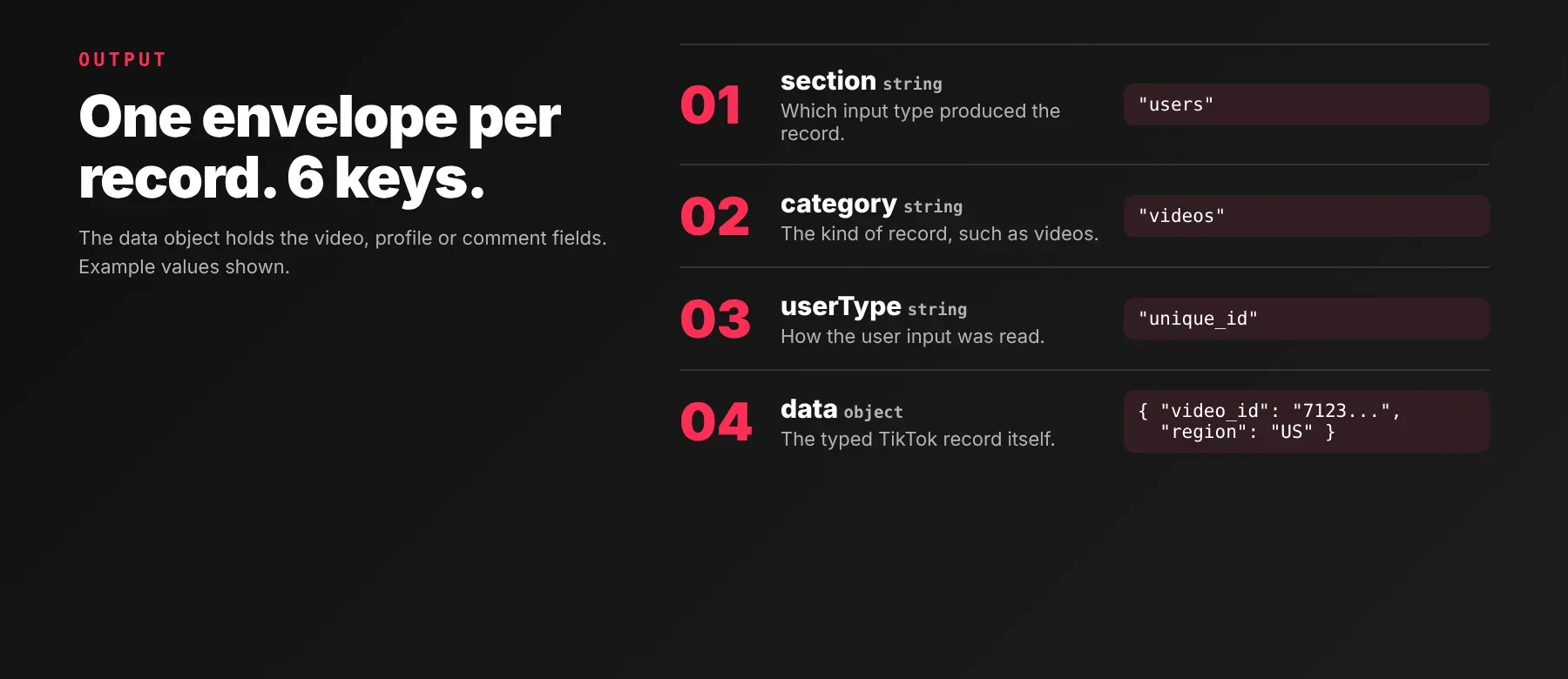
Every result is one typed, normalized JSON item with the same envelope shape on every run, pushed to the dataset live as it's collected — a crash mid-run still keeps whatever was saved so far. Export the dataset as JSON, CSV, Excel, XML, RSS or HTML from the Apify Console or via the API.
Example output
A video record (section: "users", category: "videos"):
A comment record (section: "videos", category: "comments"):
A profile record (section: "users", category: "user_info"):
How does it work?
TikTok Data Scraper reads the same public pages TikTok's own web app serves to a logged-out visitor viewing a profile, video, hashtag or sound page — no TikTok login, no cookies. Requests go out with a pacing delay between them and are retried with backoff if one is blocked. If a connection is blocked, it escalates automatically through an Apify datacenter proxy and then a residential proxy, and sticks with residential once that engages. Only what TikTok already serves to a logged-out visitor is returned — nothing behind a login wall. The output envelope (section, category, input, user, userType, data) stays the same shape run after run, so a change to TikTok's own page layout does not change your downstream schema. The Actor is maintained, and this schema stability is kept across TikTok's own layout changes.
How do you integrate TikTok Data Scraper into your stack?
This Actor works with what you already use: a REST API from any language, MCP for AI agents, and no-code tools.
MCP integration for AI agents
Point your AI assistant at Apify's MCP server and it can read TikTok on its own through this Actor — profiles, videos, comments, hashtags, sounds and playlists — without you writing any scraping logic into your prompts.
This registers it as a tool your agent can call directly. Your assistant finds it through the MCP server's search, add and call-actor tools, with no actor ID hardcoded in your setup. Works with Claude Code, Cursor and Windsurf.
No-code tools (n8n, Make, LangChain)
In n8n, use the Apify node's "Run an Actor" action, or the HTTP Request node pointed at the run-sync endpoint with your Apify token. In Make, use the Apify app's "Run an Actor" module followed by "Get Dataset Items". In LangChain, use langchain-apify and wrap this actor with ApifyActorsTool() once it is in your account, so an agent can request fresh TikTok data mid-conversation instead of relying on stale training data.
Is it legal to scrape TikTok data?
Scraping publicly available data — data anyone can see without logging in — is generally lawful. It returns only publicly available data: what any visitor sees without an account. The personal data mixed into TikTok profiles and comments (usernames, bios, follower counts, commenter identities) brings data-protection law into play once you store or use it: GDPR (EU/UK) and similar laws may require a lawful basis and a retention policy. Scraping also remains subject to TikTok's own Terms of Service. Consult legal counsel if your use case involves bulk storage of personal data.
Frequently asked questions
What fields does TikTok Data Scraper return?
The top fields are play count, like count, comment count, follower count and the video caption/description, alongside dozens more depending on category — see the data fields section above for the full breakdown.
Does TikTok Data Scraper require a TikTok account or login?
No. The Actor reads only public TikTok data and needs no TikTok credentials. The optional apiKey input field is this Actor's own premium key for lifting its internal pacing — it is unrelated to your TikTok account or to Apify's free/paid plans.
What happens if a profile, video, hashtag or sound is private, deleted, or doesn't exist?
The Actor logs a warning and skips that specific input — no record is pushed for it, and it is not charged. Other profiles, videos, hashtags, music or playlists queued in the same run are processed normally and unaffected.
Can I scrape multiple TikTok profiles, videos, hashtags, sounds or playlists at once?
Yes — userUrls, videoUrlsComments, hashtags, musicUrls, playlistIDs and videoDetailsList are all arrays, so a single run can queue any number of each, and queued inputs are processed concurrently rather than strictly one at a time.
Does TikTok Data Scraper work with Claude, ChatGPT and other AI agent tools?
Yes — TikTok Data Scraper is available as an MCP tool. Add Apify's MCP server (claude mcp add --transport http apify "https://mcp.apify.com?tools=socialdataapi/tiktok-data-scraper") in Claude Code, Cursor or Windsurf, and your agent can find and call this Actor on its own. Any agent that can call an HTTP endpoint can also use the REST API directly.
Does TikTok Data Scraper return data in a format LLMs can use directly?
Yes. Every record is typed, normalized JSON with consistent field names across runs — no HTML, no CSS selectors. Pass it straight to an LLM prompt, index it into a vector store, or hand it to an agent tool.
What happens when TikTok changes its layout or anti-bot system?
The Actor is maintained, and its output schema is designed to stay stable across TikTok's changes — your calls keep returning the same JSON schema with no changes on your end. It already includes an automatic proxy-escalation ladder and a secondary public-listing fallback to survive one class of upstream block.
Can I use TikTok Data Scraper without managing proxies or browser infrastructure?
Yes. It runs with no proxy at all by default and only escalates to Apify's datacenter and then residential proxies if TikTok blocks the direct connection — no browser is involved. You never have to configure any of this yourself, though proxyConfiguration lets you override it.
Which TikTok fields work best for AI training data and RAG indexing?
For RAG, index the text-rich fields: the video caption and description, the profile bio, and comment text. For structured training features, use the numeric fields: play count, like count, comment count, share count and follower count. All fields return as typed primitives (strings, integers, booleans), not embedded HTML.
Related scrapers
| Scraper | What it extracts |
|---|---|
| TikTok Profile Scraper | Public TikTok creator profiles by username, one row per video with views, likes, comments, shares and video metadata |
| TikTok Trending Hashtags Scraper | TikTok's trending-hashtag feed, discovered without needing a specific hashtag name |
| Tiktok Trending Hashtags Analytics Scraper | TikTok Creative Center trending-hashtag analytics by country and time window — rank, views, posts and top creators |
| TikTok Video Scraper | A single TikTok video or photo post by link, with full post detail |
Your feedback
Found a bug, or need a TikTok field this Actor doesn't return yet? Open an issue from the Actor's Issues tab on its Apify Store page, or message the developer through Apify Console — reports like these directly shape what ships in the next update.


