Brand DNA
Pricing
from $5.00 / 1,000 results
Brand DNA
Extract structured brand identity from any website — colors, fonts, tone, positioning, and reusable marketing templates — using deterministic heuristics with no AI hallucinations.
Pricing
from $5.00 / 1,000 results
Rating
5.0
(1)
Developer

Solutions Smart
Maintained by CommunityActor stats
1
Bookmarked
114
Total users
8
Monthly active users
2 months ago
Last modified
Categories
Share
🚀 Brand DNA Actor (No LLM)
Website Brand Analysis & Identity Extraction — Deterministic & Repeatable
Visual concept for Brand DNA live view, brand signal extraction, and campaign insight output.
Brand DNA Actor automatically analyzes any business website and builds a structured Brand DNA profile — visual identity, tone, positioning, and reusable marketing templates — using deterministic heuristics only.
No LLMs. No hallucinations. No unpredictable output.
Just repeatable brand intelligence you can plug into audits, automation, and marketing workflows.
👉 Extract brand signals in seconds.
🔍 Why Use Brand DNA Actor?
Understanding a brand manually takes time:
- visual style analysis
- tone detection
- positioning evaluation
- copy signal extraction
This actor automates the entire process — turning website content into structured brand intelligence.
Perfect for agencies, growth teams, analysts, and automation builders.
🆚 Brand DNA vs Creation Tools
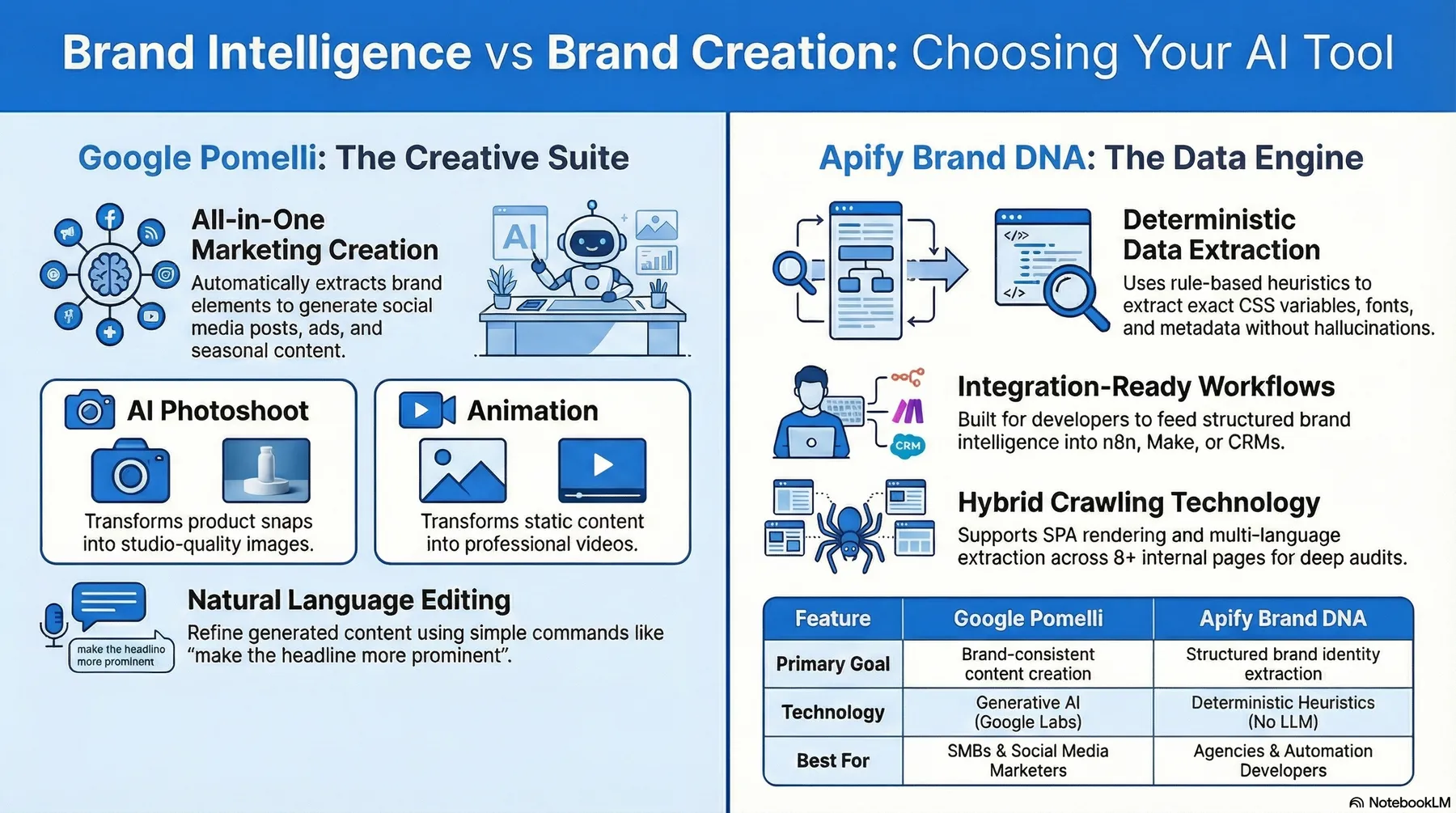
A positioning snapshot showing Brand DNA as a deterministic brand intelligence engine built for structured extraction, workflows, and automation use cases.
⚡ What Happens When You Run It
For each website:
✅ Crawl homepage + key internal pages
✅ SPA detection with Playwright fallback (new in v2.0)
✅ Extract colors, fonts, logo candidates
✅ CSS variable extraction for brand colors (new in v2.0)
✅ Detect tone and voice dimensions
✅ Identify positioning signals
✅ CTA extraction with weighted scoring (new in v2.0)
✅ Multi-signal extraction: JSON-LD, NEXT_DATA, meta tags (new in v2.0)
✅ Generate hero/tagline candidates
✅ Build reusable CTA & ad templates
✅ Produce a structured brand summary \
All deterministic. All repeatable.
🎯 Ideal Use Cases
- Competitor brand analysis
- Client onboarding audits
- Marketing template generation
- Website tone evaluation
- Creative direction baselines
- Automation pipelines (n8n / CRM workflows)
- Brand intelligence dashboards
🧠 Key Capabilities
Visual Identity Extraction
- Primary/secondary colors
- Accessibility contrast signals
- Typography detection
- Logo candidates
- CSS variables for brand colors
Copy & Voice Signals
- Top keywords & phrases
- CTA analysis with scoring
- Tone heuristics
- Voice dimensions
Positioning Intelligence
- Industry guess
- Audience signals
- Value propositions
- Brand attributes
- Positioning summary
Marketing Templates
- CTA rewrite variants
- Social post skeletons
- Short ad copy templates
Multi-Signal Extraction (new in v2.0)
- JSON-LD structured data (Organization, WebSite, LocalBusiness)
- Next.js
__NEXT_DATA__parsing - Nuxt data detection
- Meta/OpenGraph tag collection
📦 Output
Each run writes to the default dataset. The actor does not create separate datasets named "BrandKit" and "Templates".
Each analyzed website writes one type: "brandDNA" item to the default dataset.
Optional extras are nested into that same item:
brandKittemplatespageswhenoutputPagesis enableddeltawhenoutputDiffis enableddebugwhen debug output is enabledcampaignInsightsfor dashboard-ready monitoring, benchmarking, CTA prediction, localization, and automation cues 📊
The brandDNA.brandKit payload includes:
- Visual identity
- Tone & positioning
- Hero/tagline candidates
- Contacts
- Signals from JSON-LD, NEXT_DATA, meta tags
- Markdown brand summary
For multi-URL comparison runs, the side-by-side comparison is written to the key-value store as comparison.json instead of adding an extra dataset item.
The visual live view is written to the default key-value store for every successful run:
brand-dna-live.html- Sample live view: https://api.apify.com/v2/key-value-stores/7hwYhRVe1sq3aszvC/records/brand-dna-live.html
Optional extra file exports are written to the default key-value store, not the dataset:
brand-dna-output.jsonbrand-dna-report.mdbrand-dna-report.pdfRUN_SUMMARYhomepage-screenshot.pngwhen screenshots are enabled
The Actor now also defines a key-value store schema and an expanded output schema, so Apify Console can surface these files more clearly in the Output and Storage tabs. Collections are grouped as:
- HTML reports
- JSON exports
- Written reports
- Screenshots
- Comparison outputs
- Run summaries
Example Output
🆕 New in v2.0
Hybrid Crawling (HTML-First + Fallback Rendering)
- Fast HTML extraction by default using CheerioCrawler
- Automatic SPA shell detection with Playwright fallback
- Domain hit-rate tracking for adaptive rendering decisions
- Configurable rendering timeout and selector waiting
Anti-Bot & Stability
- Apify Proxy integration (Residential/Datacenter)
- Adaptive concurrency (starts low, scales on success)
- Exponential backoff for 403/429 responses
- Request pacing to avoid rate limiting
Enhanced CTA Extraction
- Weighted scoring based on position, class, text, and href
- Hero/main position bonus, nav/footer penalty
- Action verb detection and generic label filtering
- Top-N ranked results
Multi-Signal Extraction
- JSON-LD structured data (Organization, WebSite, LocalBusiness)
- Next.js
__NEXT_DATA__parsing - Nuxt data detection
- Meta/OpenGraph tag collection
- CSS variable extraction for brand colors
📥 Input Configuration
| Field | Type | Default | Description |
|---|---|---|---|
startUrl | string | required | Website URL to analyze |
startUrls | string[] | - | Optional batch mode input (1-20 URLs). When provided, startUrl is ignored. |
maxPages | integer | 8 | Maximum pages to crawl (1-50) |
respectRobotsTxt | boolean | true | Respect robots.txt rules |
timeoutSecs | integer | 120 | Maximum crawl duration |
includeBlog | boolean | true | Include blog pages |
🖥️ Rendering Options
| Field | Type | Default | Description |
|---|---|---|---|
useRenderingFallback | boolean | true | Enable Playwright for SPA shells |
renderingTimeoutMs | integer | 1200 | Rendering timeout in ms |
renderingWaitForSelectors | string | "main, h1, button" | Selectors to wait for |
🌐 Proxy Options
| Field | Type | Default | Description |
|---|---|---|---|
useProxy | boolean | true | Enable Apify Proxy |
proxyGroup | string | "DATACENTER" | Proxy group (RESIDENTIAL/DATACENTER) |
🚦 Concurrency Options
| Field | Type | Default | Description |
|---|---|---|---|
maxConcurrency | integer | 2 | Maximum concurrent requests (1-8) |
adaptiveConcurrency | boolean | true | Auto-adjust based on success |
requestDelayMs | integer | 0 | Delay between requests |
🔁 Retry Options
| Field | Type | Default | Description |
|---|---|---|---|
maxRequestRetries | integer | 3 | Max retries per request |
🛣️ Path filtering (new)
| Field | Type | Default | Description |
|---|---|---|---|
includePaths | string[] | — | Optional path allowlist (wildcards, e.g. /products/*). Start URL is always included. |
excludePaths | string[] | — | Optional path denylist (wildcards, e.g. /blog/*, /legal/*). |
🌍 Multi-language & translation
| Field | Type | Default | Description |
|---|---|---|---|
language | string | "auto" | Content language: auto (detect), en, de, es, fr, it, pt |
useLanguageDetector | boolean | true | When language is Auto, use Apify Language Detector for ML-based detection |
useTranslation | boolean | false | Translate page content to a target language before extraction |
translateToLanguage | string | "en" | Target language when translation is enabled |
translationActorId | string | — | Apify actor ID for translation (e.g. tkapler/deepl-actor) when Use translation is enabled |
translationBatchMode | boolean | true | Send all page texts in one batch to the translation actor; falls back to sequential mode if unsupported |
📦 Output extras (new)
| Field | Type | Default | Description |
|---|---|---|---|
outputFormat | string | "single" | single: one default-dataset item with type: brandDNA containing nested outputs. split is deprecated and Store runs are forced to single-item output for billing safety. |
outputComparison | boolean | false | When 2-5 URLs are provided, write side-by-side comparison output to comparison.json in the key-value store. |
outputPages | boolean | false | Push one dataset item per crawled page with page-level extracted fields. |
outputDiff | boolean | false | Compare current brandKit with previous cached snapshot and output a delta item. |
exportFormats | string[] | — | Optional extra file exports to KV store: json, markdown, html, pdf. The visual brand-dna-live.html live view is now written automatically for every successful run; html remains supported for backward compatibility. |
🔔 Webhook options (new)
| Field | Type | Default | Description |
|---|---|---|---|
webhook.url | string | — | Webhook destination URL (preferred over callbackUrl). |
webhook.events | string[] | ["completed","failed"] | Events to send: started, completed, failed. |
webhook.retries | integer | 1 | Retry attempts on network error / 5xx. |
webhook.retryDelayMs | integer | 2000 | Delay between retries. |
webhook.timeoutMs | integer | 10000 | Request timeout per attempt. |
webhook.secret | string | — | Optional HMAC signing secret (x-branddna-signature: sha256=...). |
webhook.headers | object | — | Optional custom headers map. |
callbackUrl | string | — | Legacy fallback URL used when webhook.url is not set. |
Cache & cost
| Field | Type | Default | Description |
|---|---|---|---|
cacheTtlSeconds | integer | 0 | Reuse a persisted cached result for the same URL and settings across runs within this many seconds. |
forceRefresh | boolean | false | Skip reading from cache and always perform a fresh crawl. |
Example Input
Use https://www.apify.com as the recommended demo and smoke-test URL. It produces a representative multi-page brand profile without requiring special handling.
Supported locales: English (en), German (de), Spanish (es), French (fr), Italian (it), and Portuguese (pt). Extraction uses locale-specific stopwords, tone markers, industry/audience keywords, CTA maps, and templates. Add more languages by adding a src/data/xx.js locale file and registering it in src/data/index.js.
🧾 Translation actor contract
When Use translation is enabled, Brand DNA calls your translation actor to translate page content before extraction. The actor must accept:
- Single-text input:
text(string),targetLanguage(e.g.en,de), and optionallysourceLanguage(e.g.auto). - Batch input (optional):
texts(array of strings),targetLanguage. If supported, Brand DNA will send one batch per run instead of one call per page.
The actor’s default dataset should return items where each item has a translated string in one of: translatedText, text, or translation. For batch mode, return either one item per text in the same order, or one item with a translations array.
Known-compatible actors include DeepL (AI translation). If batch mode fails (e.g. actor does not support texts), Brand DNA falls back to sequential single-text calls.
🔗 Integrations: n8n, Make, Slack/Teams
n8n & Make: Use the Apify node (n8n) or Apify module (Make) to run Brand DNA. Input: startUrl or startUrls (array, max 20), plus optional mode, maxPages, language, outputFormat, exportFormats, webhook, etc. Output goes to the default dataset primarily as type: brandDNA items, plus type: error when a URL fails. The visual live view is always exposed as brand-dna-live.html, and optional extra reports and summaries are exposed in the default key-value store and linked in the Actor Output tab.
Webhook: Set webhook.url to receive signed JSON events (started, completed, failed). Base payload includes { event, timestamp, runId, datasetId, status, startUrls, resultsCount, errorCount }. Configure retries/timeout/headers with webhook.retries, webhook.retryDelayMs, webhook.timeoutMs, and webhook.headers. If webhook.secret is set, the actor adds x-branddna-signature (HMAC-SHA256). callbackUrl remains supported as a fallback for backward compatibility.
🔄 Demo Workflow
Run → extract brand profile → feed into workflow:
Instant brand intelligence — no manual review required.
🎥 Video Walkthrough
See how the actor works and why to use it:
🔒 Deterministic by Design
Unlike AI-driven analysis:
✔ repeatable outputs ✔ explainable heuristics ✔ no hallucinations ✔ stable automation pipelines
Perfect for production workflows.
🛠 Integration Ready
Works seamlessly with:
- Apify scheduling
- n8n workflows (docs/n8n-integration.md, n8n-workflow-brand-dna.json)
- OpenClaw (docs/openclaw-integration.md, skills/brand-dna/SKILL.md)
- CRM pipelines
- Reporting dashboards
⭐ Rate This Actor
If this actor helped you, please rate it on Apify. Your rating helps others discover it and supports future improvements.
⚠ Limitations
- Rule-based approximations
Designed for structured automation — not creative AI writing.
🎯 Final Value
Instead of manually dissecting websites…
You get:
👉 automated brand intelligence
👉 reusable marketing assets
👉 structured identity signals
👉 repeatable analysis \
All in seconds.
💳 Pricing
Brand DNA uses Apify pay-per-event pricing and is billed per analyzed website.
- Base result: one analyzed website, including up to
8crawled pages. - Extended crawl: if a run crawls
9to20pages, one extraextended_pagesevent is charged. - High-volume crawl: if a run crawls
21+pages, the run chargesextended_pagesplushigh_volume_pages. - Single-result billing: each website still produces one main
type: "brandDNA"dataset item, so nested outputs do not multiply result charges. - Included in the same result:
brandKit,templates,campaignInsights, optionalpages, optionaldelta, and optionaldebugdata. - Not billed as extra dataset items: the visual live view (
brand-dna-live.html),RUN_SUMMARY, screenshots, andcomparison.jsonare written to the key-value store.
Current Store pricing is designed around these tiers:
1-8pages: base result price9-20pages: base result price + extended crawl21+pages: base result price + extended crawl + high-volume crawl
This keeps smaller runs affordable while letting deeper audits cover their additional crawl and extraction cost more fairly.