
MarkItDown Universal Document Converter
Pricing
from $5.00 / 1,000 document converteds
MarkItDown Universal Document Converter
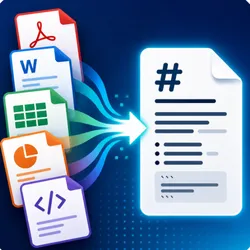
Convert PDF, Word, Excel, PowerPoint, and HTML files into clean, LLM-ready Markdown for RAG, AI agents, knowledge bases, search, and automation.
Pricing
from $5.00 / 1,000 document converteds
Rating
0.0
(0)
Developer

Solutions Smart
Maintained by CommunityActor stats
0
Bookmarked
2
Total users
1
Monthly active users
a month ago
Last modified
Categories
Security
Limited permissionsShare
Convert PDF and Office files to Markdown
Convert PDF, Word (DOCX), Excel (XLS/XLSX), PowerPoint (PPTX), and HTML documents to downloadable Markdown with Microsoft's MarkItDown. Add direct public file URLs, then use the Markdown files or Apify Dataset output in a RAG pipeline, AI agent, knowledge base, or search index. Optional English Tesseract OCR reads printed text in scanned PDFs. No external AI API or browser automation is required.
To try it, enter https://pdfobject.com/pdf/sample.pdf in startUrls and click Start. Leave OCR disabled for this sample because it already contains selectable text.
New version of MarkItDown Universal Document Converter is live: successful conversions now include downloadable .md files, and the run exposes a ZIP download for the complete batch.
Main features
- Batch conversion of public HTTP(S) file URLs or container-local files
- Optional OCR for scanned and mixed-content PDFs
- Best-effort preservation of detected Markdown tables
- File name, type, MIME type, size, extraction timestamp, and word count metadata
- Individual Markdown download links and a ZIP download for the run
- Up to three download attempts for network failures and server errors
- Independent conversion errors, so an unavailable document does not stop the batch
- Apify API access, schedules, run logs, webhooks, and Dataset exports
Supported document formats
| Format | Typical documents | Extraction behavior |
|---|---|---|
| Reports, manuals, scans | Extracts text; optional English OCR reads printed text in images | |
| DOCX | Word documents | Extracts document text and supported structure |
| XLS and XLSX | Excel spreadsheets | Converts spreadsheet content and detected tables |
| PPTX | PowerPoint presentations | Extracts presentation text and supported structure |
| HTML and HTM | Static web documents | Converts downloaded HTML without executing JavaScript |
Table and layout fidelity depends on the source document. OCR does not describe photographs or diagrams, and images embedded in Office or HTML documents are not OCR processed. Legacy .doc and .ppt files are not supported.
How to convert documents to Markdown
- Open the Actor in Apify Console.
- Add direct file URLs under Document URLs or file paths. Use
https://pdfobject.com/pdf/sample.pdffor a first test. - Enable OCR for PDFs when a PDF contains scanned pages or images of printed text.
- Leave Preserve tables enabled when detected table structure matters.
- Click Start, then open Output to browse or download the Markdown files.
The Actor processes documents sequentially to keep memory use predictable. Each processed source creates a Dataset item with either a success result or a conversion error. Successful items include a downloadUrl for the corresponding .md file. A run may stop before processing all inputs when it reaches its charge limit or is aborted.
Input and output
Input fields
| Field | Type | Default | Description |
|---|---|---|---|
startUrls | Array of strings | Required | Direct public HTTP(S) file URLs or paths available inside the Actor container. |
enableOcr | Boolean | false | Runs English Tesseract OCR on PDF bitmap content while preserving visible digital text. |
extractTables | Boolean | true | Keeps detected Markdown tables. Disable it to flatten table rows into plain text. |
Example input:
URLs must return files without requiring login credentials or custom request headers. Local paths are intended for development or files already available inside the Actor container. Files on your computer are not automatically uploaded to Apify Cloud.
Successful output
A successful result contains Markdown, structured metadata, and a direct file link. This example abbreviates the Markdown body; the word count refers to the full extracted text. The storage ID and timestamp are illustrative.
ocrRequested records the input setting. ocrProcessed means the OCR step completed; it does not guarantee that Tesseract found text. ocrMode is redo for a PDF OCR attempt, disabled when OCR is off, or not_applicable when OCR is enabled for a non-PDF file. If OCR fails, the Actor attempts conversion of the original PDF and adds a warning to metadata.warnings.
tablesPreserved reflects the requested table setting. It does not certify that all tables were detected or reconstructed accurately.
How do I download Markdown files?
Open a successful item's downloadUrl to retrieve its .md file. In the run's Output tab, Markdown files lists generated records and Download all Markdown files (ZIP) retrieves the batch. Markdown also remains in the Dataset for API workflows.
Error output
Unavailable, oversized, malformed, or unsupported inputs receive an error record. Other documents continue processing.
Markdown for RAG and automation
| Workflow | How to use the output |
|---|---|
| RAG document ingestion | Convert reports and manuals, then chunk and embed the Markdown in your retrieval pipeline. |
| AI agents and assistants | Supply document text and source metadata to your own agent or LLM. |
| Knowledge bases | Normalize Word files, presentations, and PDFs into Markdown records. |
| Search indexing | Index extracted text and keep the original source URL alongside it. |
| Recurring document processing | Schedule an Apify task and retrieve new results through the API or webhooks. |
Conversion prepares document text for downstream processing. The Actor does not generate embeddings, vector indexes, summaries, or RAG chunks. Use Apify's API and integrations to connect the results to your workflow.
How much does document conversion cost?
The Actor supports pay-per-event billing. See the Store Pricing tab for the active prices and any startup or platform usage charges.
| Event | When it is triggered |
|---|---|
document-converted | A document is successfully converted without a completed OCR step. This includes an OCR failure followed by a successful standard conversion. |
ocr-document-converted | A PDF is successfully converted after its OCR step completes. This event replaces the standard conversion event for that document. |
Conversion error records do not trigger either custom event. OCR completion is billable even when the PDF contains no additional text for Tesseract to recognize. A run's total depends on the number of each event and the charges displayed in the Pricing tab. You can set a maximum charge in Apify Console or through the API.
Limits and frequently asked questions
- Each input file is limited to 100 MB.
- PDF and Office table extraction is best effort; complex layouts and merged cells may lose structure.
- OCR supports PDFs with English printed text. OCR quality depends on scan resolution and layout.
- Images embedded in Word, Excel, PowerPoint, or HTML are not OCR processed.
- HTML content that appears only after JavaScript execution may be missing.
- Password-protected, corrupted, authenticated, or unsupported files may return an error.
Can I convert scanned PDFs to Markdown?
Yes. Set enableOcr to true to run English Tesseract OCR before PDF conversion. It can process scanned pages and bitmap text on pages that also contain selectable text. It extracts printed text rather than visual descriptions of images. Leave OCR off when all required text is already selectable.
Can I convert DOCX, XLSX, or PPTX to Markdown?
Yes. Add direct URLs for DOCX, XLS/XLSX, or PPTX files to the same startUrls list. OCR applies only to PDFs, so enabling it does not add OCR to Office documents. Save legacy .doc or .ppt files in a supported format before submitting them.
Is this a hosted MarkItDown API?
It is an Apify Actor built around Microsoft's MarkItDown library. You can run it through the Apify API, receive structured Dataset items, and retrieve Markdown files from the run's key-value store. It is independently maintained and is not an official Microsoft service.
Why does PDF Markdown sometimes look like plain text?
PDFs often store positioned text rather than semantic headings and paragraphs. Extraction can preserve words while losing reading order, heading levels, spacing, or table boundaries. Test representative documents before using the output in a production retrieval workflow.
Does the Actor upload files from my computer?
No. A local path must exist in the environment where the Actor runs. For Apify Cloud, provide a public or signed file URL, or make the file available inside the container through your own workflow.
Why did my URL fail?
Confirm that it returns a document directly and does not require cookies, login credentials, or custom headers. Check the Dataset item's errorMessage and the run log. Network failures and server errors receive up to three download attempts; missing files and unsupported formats are reported as errors.
Where can I get support?
Use the Actor's Issues tab in Apify Store. Include the document format, input settings, and error message. Share a non-confidential sample when possible, and keep private URLs or document contents out of public reports.


