
Document Text Extractor
Pricing
from $2.45 / 1,000 document processeds
Document Text Extractor
Extract text, Markdown, tables and metadata from PDF, Word, Excel, PowerPoint, EPUB, HTML and CSV files. Reads scanned pages with OCR in 19 languages and splits documents into RAG-ready chunks. Export data, run via API, schedule runs, or integrate with other tools or AI workflows.
Pricing
from $2.45 / 1,000 document processeds
Rating
0.0
(0)
Developer

Matvey
Maintained by CommunityActor stats
0
Bookmarked
33
Total users
21
Monthly active users
5 days ago
Last modified
Categories
Share
Turn any document into clean text, Markdown, tables and metadata. Document Text Extractor reads PDF, Word, Excel, PowerPoint, EPUB, HTML, CSV and plain text files, restores the heading structure, pulls out tables, reads scanned pages with OCR, and can split everything into retrieval chunks that keep their section context. No login, no API key and no official API needed.
What is Document Text Extractor?
Document Text Extractor is a document parsing API that converts files into LLM-ready Markdown and plain text. Give it a list of document URLs, upload a file, or pass base64 data from your own code, and every document comes back as one row with the full text, the Markdown, a page-by-page breakdown, detected tables and the file's own metadata.
It exists because most document extraction tools stop at PDF and hand back a wall of unformatted text. This Actor keeps headings, lists and tables, so a language model can tell a section title from a sentence, and a retrieval system can cite the section a passage came from.
| What you give it | What you get back |
|---|---|
| A PDF, Word, Excel, PowerPoint, EPUB, HTML or CSV file | Markdown, plain text, tables, chunks, metadata |
| A scanned PDF with no text layer | OCR text in 19 languages |
| A folder of mixed formats | One consistent row per document, same fields for every format |
Which file formats are supported?
| Format | Extensions | What is extracted |
|---|---|---|
.pdf | Text per page, headings by font size, tables, metadata, OCR for scans | |
| Word | .docx | Real heading levels, lists, tables, core properties |
| Excel | .xlsx, .xlsm | Every sheet as a Markdown table, sheet names |
| PowerPoint | .pptx | One section per slide, slide titles, tables, speaker notes |
| EPUB | .epub | One section per chapter, book title and author |
| HTML | .html, .htm | Article Markdown, page title, meta description |
| CSV | .csv, .tsv | Markdown table, delimiter detected automatically |
| Text | .txt, .md, .json | Content as-is |
Password-protected PDFs are supported: pass the password in the input.
What data can Document Text Extractor extract?
Every row in the dataset describes one document.
| Field | Type | Example |
|---|---|---|
source | string | https://example.com/report.pdf |
sourceType | string | url, upload or base64 |
fileName | string | report.pdf |
format | string | pdf |
fileSizeBytes | integer | 3471 |
pageCount | integer | 2 |
pagesProcessed | integer | 2 |
title | string | Annual Operations Report 2026 |
author | string | Malina Data |
subject | string | Sample document |
creator | string | Microsoft Word |
producer | string | ReportLab PDF Library |
documentCreatedAt | string | D:20260904T120000Z |
documentModifiedAt | string | 2026-09-04T12:00:00 |
markdown | string | # Annual Operations Report 2026\n\n## Revenue… |
text | string | Annual Operations Report 2026 Revenue grew… |
wordCount | integer | 198 |
charCount | integer | 1284 |
pages | array | [{"number": 1, "text": "…", "markdown": "…", "ocr": false}] |
tables | array | [{"page": 1, "markdown": "| Region | Q1 |…", "rows": [["Region","Q1"]]}] |
tableCount | integer | 1 |
chunks | array | [{"index": 0, "heading": "Revenue", "headingPath": ["Report","Revenue"], "text": "…", "charCount": 812}] |
chunkCount | integer | 4 |
sheetNames | array | ["Sales", "Notes"] |
ocrPageCount | integer | 0 |
status | string | ok or error |
errorCode | string | null, or http-error, no-text-content, too-large, … |
errorMessage | string | Plain-English reason a file could not be read |
warnings | array | ["3 page(s) have no text layer and look scanned."] |
extractedAt | string | 2026-09-04T16:20:11+00:00 |
How much does it cost to extract text from documents?
The Actor uses pay-per-event pricing, so the bill follows the work done, not the minutes the container was alive.
| Event | Price | When it is charged |
|---|---|---|
| Document processed | $0.0035 | Once per document that produced text |
| Page parsed | $0.00015 | Per page, sheet, slide or chapter that was read |
| OCR page | $0.010 | Only when OCR is on and the page has no text layer |
Nothing is charged for a document that failed. A dead link, a file above the size limit, a corrupt PDF or a scan with no readable text comes back as an error row at no cost. That includes the case where a scanned PDF is submitted with OCR switched off: you get a row telling you to switch OCR on, and you pay nothing for it.
Worked examples:
| Job | Cost |
|---|---|
| 100 born-digital PDFs, 10 pages each | $0.50 |
| 1,000 Word contracts, 3 pages each | $3.95 |
| 500 web pages to Markdown | $1.83 |
| 50 scanned PDFs, 5 pages each, OCR on | $2.71 |
The Apify Free plan comes with $5 of monthly usage, which is about 1,000 ten-page PDFs before you pay anything. Apify plans above the free tier get automatic discounts of 10% to 30% on every event above.
How the price compares
Comparable document Actors in Apify Store charge between $3.45 and $20 per 1,000 documents, and the most-used one with OCR charges $15 per 1,000 scanned pages (checked 25 September 2026). This Actor is built to sit below the middle of that range while doing more per document:
| For 1,000 documents | This Actor | Typical PDF-only Actor | Cheapest PDF-only Actor |
|---|---|---|---|
| 3 pages each | $3.95 | $5.00 | $3.45 |
| 10 pages each | $5.00 | $5.00 | $3.45 |
| 1,000 scanned pages, OCR | $10.00 | $15.00 | OCR not offered |
| Formats handled | 8 | 1 (PDF) | 1 (PDF) |
| Markdown, tables, RAG chunks | all three | some | text only |
The split between a document fee and a per-page fee is deliberate: a one-page invoice should not cost the same as a 300-page manual. If your documents are unusually long, the per-page part is what you are paying, and pageRange keeps it down when you only need the first pages.
There are no proxy costs: the Actor fetches files over plain HTTPS and parses them in memory, so almost none of the price is infrastructure.
Bulk export: what 50,000 documents actually cost
This Actor is built for bulk jobs — put hundreds of inputs into one run, or call it from the API on a schedule. There is no fee per run and no proxy charge: you pay for the documents you get back (plus the small per-page fee above), and error rows are free. That is what decides the bill once you pull a whole market rather than a single document.
| Job | This Actor | Most-used Actor in this category |
|---|---|---|
| 50,000 one-page documents across 100 runs | $182.50 | $250.50 |
Checked on the Apify Store on 25 September 2026 against the Actor with the most monthly users in this category; its per-run fee is counted in, as ours would be if we charged one. Some Actors here ask less per row — this table compares against the one buyers actually use most.
How to extract text from a PDF or Word file
- Click Try for free and sign in to Apify.
- Paste one or more document links into Document URLs, or use Upload a file to send a file from your computer.
- Leave Markdown output on if the text is going to an LLM; switch on Split into RAG chunks if it is going into a vector database.
- Press Start and wait a few seconds.
- Open the Output tab, or export the dataset as JSON, CSV or Excel.
For scanned documents, switch on OCR scanned pages and pick the language of the scan.
⬇️ Input
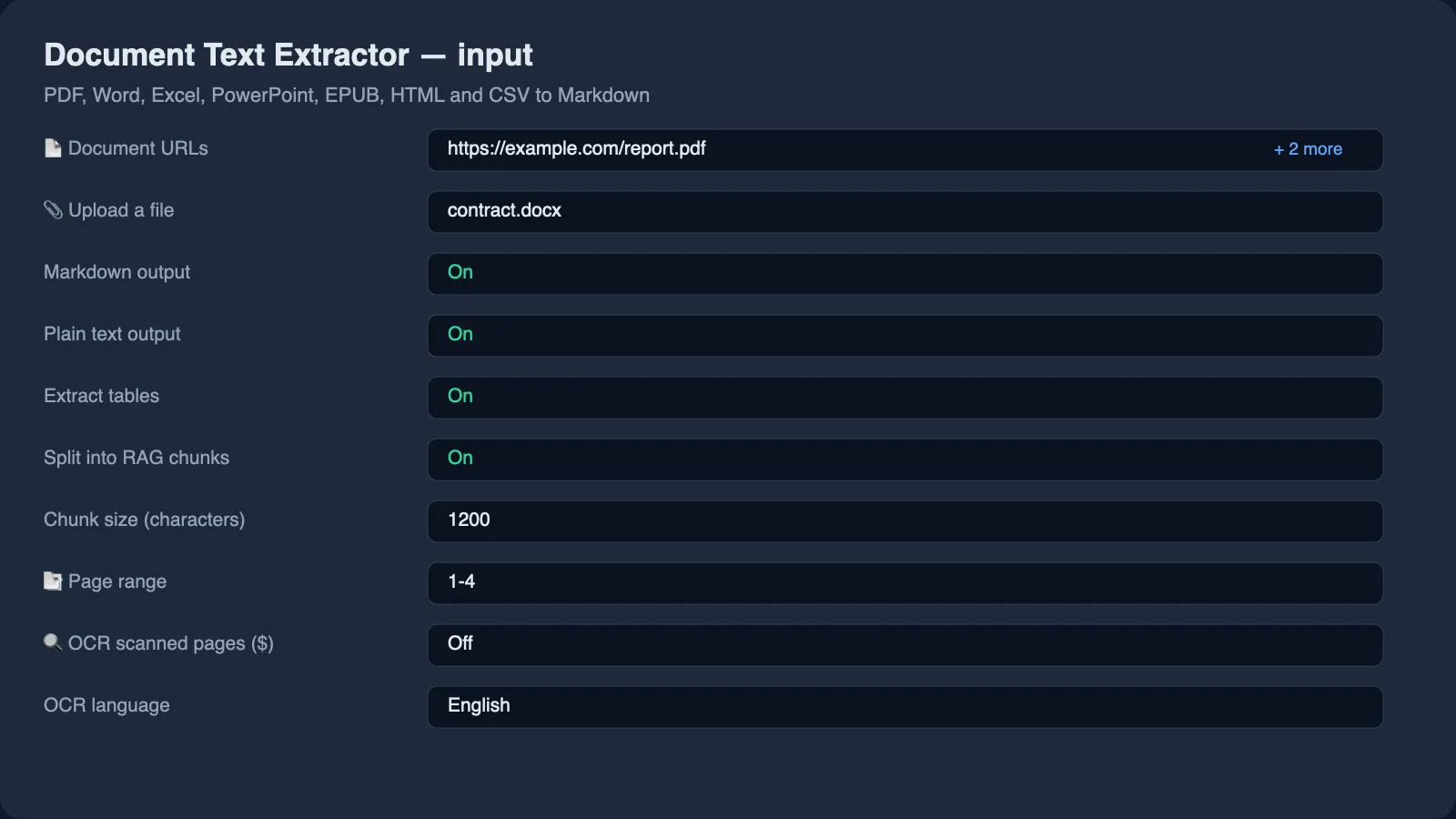
Only one thing is required: at least one document, given as a URL, an upload or base64 data.
Reading documents from URLs
Put direct file links in urls. The link has to point at the file itself, not at a viewer page: a Google Drive or Dropbox preview page returns HTML, not the document. Use the direct-download form of those links.
Uploading a file from your computer
Use the Upload a file field to send a single document without hosting it anywhere. This is the fastest way to test the Actor on a real file.
Passing base64 data from code or an AI agent
When your document only exists in memory, send it in base64Files. Each entry is either a plain base64 string or an object with a file name:
Reading only some pages
pageRange accepts 1-5, 8 or 12- (page 12 to the end). It applies to PDFs and keeps the bill down when you only need the first pages of long documents.
Splitting documents into RAG chunks
Switch on chunkForRag to get retrieval-ready chunks. Chunks break on headings and paragraphs rather than on a raw character count, tables are split by rows so every part keeps its header row, and each chunk carries the headingPath it belongs to:
That path is what lets a retrieval answer say where in the document it came from, instead of returning a paragraph with no context.
Reading scanned documents with OCR
A page with no text layer is detected automatically. With ocrScannedPages off, the Actor tells you the pages are scanned and charges nothing. With it on, those pages are read by the OCR engine in the language given in ocrLanguage: English, German, French, Spanish, Portuguese, Italian, Dutch, Polish, Russian, Ukrainian, Turkish, Indonesian, Vietnamese, Arabic, Hindi, Chinese (simplified and traditional), Japanese or Korean. ocrMaxPagesPerDocument caps how many scanned pages are read per file so a 400-page scan cannot surprise you.
⬆️ Output
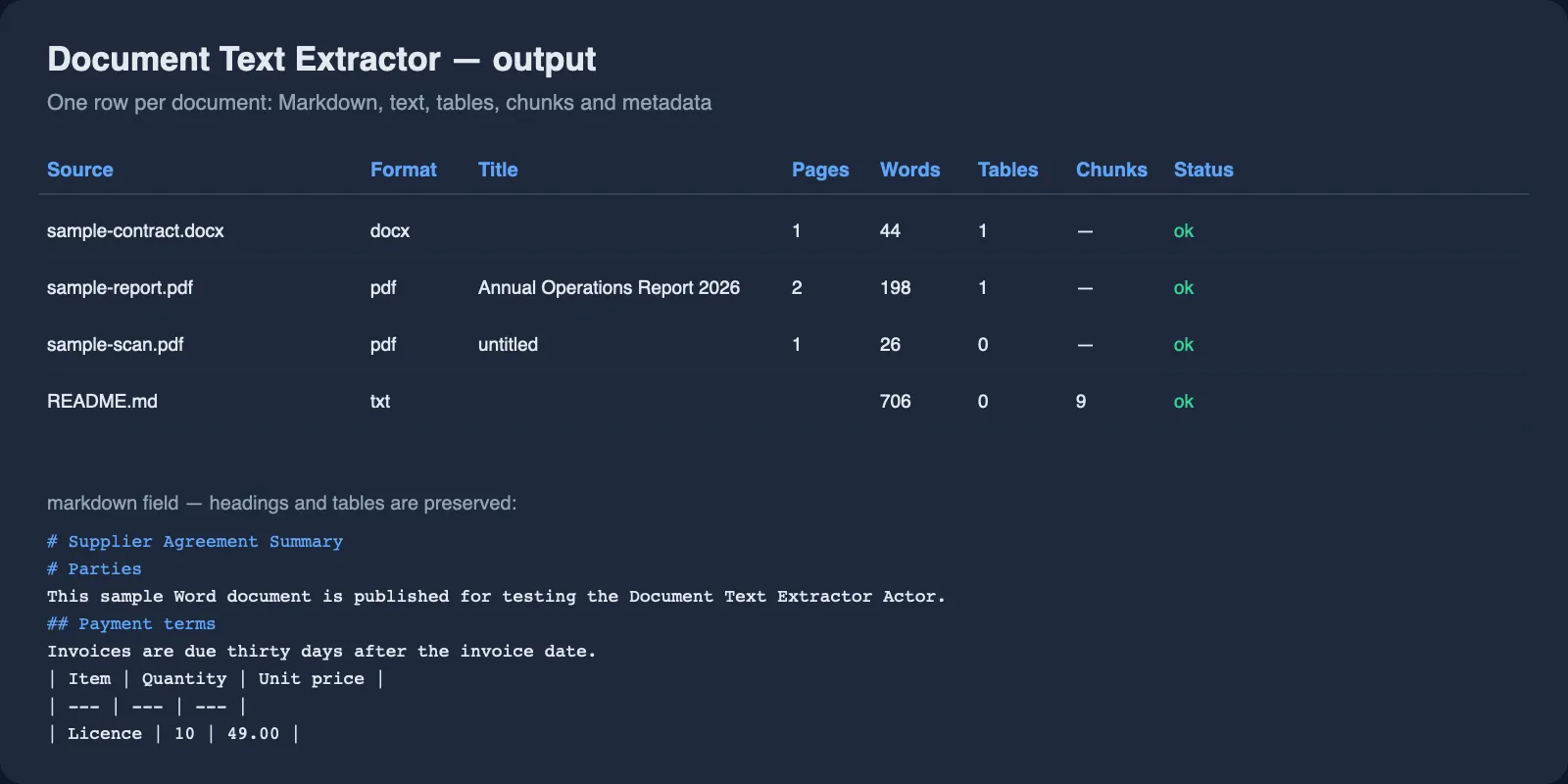
One row per document. Fields that were switched off in the input are simply absent.
Markdown that keeps the document's shape
In Word, PowerPoint and EPUB files the heading levels are already in the file, so they are used directly. PDFs carry no heading information at all, so headings are inferred from font size relative to the body text of the document, with page furniture, rotated stamps and glued-together tokens filtered out.
The same pass fixes a problem that affects academic and LaTeX-produced PDFs: when a file sets word spacing very narrow, the usual extraction returns Attentionisallyouneed instead of readable words. The Actor measures how often that happens on each page and re-reads the page with tighter word spacing when it does, so the text arrives as words rather than as one long string.
Tables
Every detected table is returned twice: as rows for code that wants arrays, and as a Markdown table for text that goes to an LLM. Columns that are empty in every row are dropped. Table detection in PDFs depends on how the table was drawn, so treat PDF tables as very good but not perfect; tables in Word, Excel, PowerPoint and CSV files are exact.
Error rows
A document that could not be read still produces a row, so a batch never silently loses a file:
errorCode | Meaning |
|---|---|
http-error | The server refused the download or the file is gone |
network-error | The host could not be reached |
timeout | The download took longer than the timeout |
too-large | The file is above maxFileSizeMb |
unsupported-format | The file is not one of the supported formats |
password-required | The PDF needs a password |
corrupt-file | The file is damaged or is not what its extension claims |
no-text-content | Nothing could be read, usually a scan with OCR switched off |
invalid-base64 | The base64 entry could not be decoded |
Use cases for document data
Feeding a RAG pipeline or a knowledge base
Convert a document library into Markdown with chunks that keep their heading path, then embed the chunks. Because the heading path travels with the chunk, retrieved passages can be cited by section instead of by page number.
Contract and report review
Pull the text out of hundreds of PDFs and Word files and run a language model over the result to find dates, parties, amounts or clauses. Metadata fields tell you who produced each file and when.
Migrating a document archive
Move a folder of mixed PDF, Word and Excel files into a wiki, a CMS or a static site. Every format comes back with the same field names, so one importer handles all of them.
Reading scanned paperwork
Invoices, permits and old records that arrive as scans become searchable text with the OCR option, in nineteen languages.
Spreadsheets and data files as text
Excel and CSV files come back as Markdown tables, which is the form language models read most reliably.
Integrations
Run the Actor from the Apify Console, or connect it to the tools you already use.
- API: start a run with
POST https://api.apify.com/v2/acts/lergassy~document-text-extractor/runsand read the dataset when it finishes. - Python:
ApifyClient(token).actor('lergassy/document-text-extractor').call(run_input={'urls': [...]}) - JavaScript:
await client.actor('lergassy/document-text-extractor').call({ urls: [...] }) - n8n: use the Apify node, pick this Actor, and set a max total charge so a run can never exceed a budget you chose.
- Make and Zapier: run the Actor and map the dataset straight into Sheets, Airtable or Notion.
- Google Sheets: export the dataset as CSV or push it with the Sheets integration.
- MCP: the Actor is available through the Apify MCP server, so Claude, Cursor and other MCP clients can call it as a tool.
- Webhooks: trigger a webhook when a run succeeds and pass the dataset to your own service.
🤖 For AI agents and LLM apps
Call the Actor with a single field and you already get useful output:
- One dataset row per document;
statusisokorerror, so a failed file is visible without parsing logs. markdownis the field to feed a model.chunks(withchunkForRag: true) is the field to embed.- Every chunk carries
headingPath, so an answer can name the section it used. - Failed documents are never charged, which keeps agent retries cheap.
- Documents can be passed as base64 in
base64Files, so an agent does not need to host a file to have it read.
Troubleshooting
The run returned http-error for a link that works in my browser. The host is refusing requests from data-centre IP addresses, or the link points at a viewer page rather than the file. Download the file and use Upload a file, or host it somewhere that allows direct downloads.
A PDF came back with no text. It is a scan. Switch on OCR scanned pages and choose the language.
The OCR text has mistakes. Check the language setting first. Low-resolution scans, handwriting and stamps are the usual limits of OCR.
My spreadsheet was cut off. Sheets are read up to 5,000 rows each, and a warning says so in warnings.
Headings are wrong in one PDF. Some PDFs set every line at the same size, and then no heading structure exists to recover. The plain text field is unaffected.
❓ FAQ
Is it legal to extract text from documents with this Actor?
The Actor only reads files you point it at. Whether you may use a given document depends on who owns it and how you obtained it, so use it on your own files, on files you are licensed to process, and on publicly available documents. It is not a substitute for legal advice.
Do I need an API key or a login?
No. There is no account, key or cookie to configure. You need an Apify account to run any Actor, and nothing else.
How much does it cost to extract text from 1,000 PDFs?
For 1,000 PDFs of ten pages each, $3.50 for the documents plus $1.50 for the pages, so $5.00 in total. Scanned pages cost $0.01 each on top, and only when OCR is on.
Can I use it with the Apify API?
Yes. Start a run with the API, then read the dataset. The Actor is a normal Apify Actor with a standard input schema.
Can I use it through an MCP server?
Yes. It is exposed through the Apify MCP server, so an MCP client such as Claude or Cursor can call it directly as a tool.
Can I integrate it with other apps?
Yes: n8n, Make, Zapier, Google Sheets, Slack, Airtable and anything that can call an HTTP API or receive a webhook.
Does one row mean one document or one page?
One row is one document. Pages live inside that row in the pages array when Per-page output is on, and chunks live in chunks.
What is the largest file it can read?
The default limit is 50 MB per file, adjustable up to 200 MB. Files above the limit are reported as too-large and are not charged.
Can it read password-protected PDFs?
Yes, if you supply the password in the PDF password field.
Does it work with Google Docs links?
Not with a share link, because that returns a web page. Use the Download as PDF or Word form of the link, or upload the exported file.
Your feedback
Found a document the Actor reads badly, or a format you need? Open an issue on the Issues tab or leave a review. Issues are answered quickly, and format requests are the main way this Actor grows.
You might also like
| Actor | What it does |
|---|---|
| Email & Phone Verifier | Validate e-mail addresses and phone numbers, find contacts on a website |
| US Business Leads | New business registrations from US state and city registries |
| Google Flights Scraper | Flight prices, airlines, layovers and booking links |
| Agoda Reviews Scraper | Hotel reviews and ratings from Agoda and Booking.com |


