
Google Trends Scraper — Google Trends Data, Interest Over Time
Pricing
from $2.25 / 1,000 trend reports
Google Trends Scraper — Google Trends Data, Interest Over Time
Google Trends data as JSON: interest over time, related queries and region breakdown by default; compare, related topics (billed as its own report) and trending now on request. One row per keyword and surface, API and MCP ready. No start fee, no minimum, never charged for a failed or empty fetch.
Pricing
from $2.25 / 1,000 trend reports
Rating
0.0
(0)
Developer

Steadyfetch Team
Maintained by CommunityActor stats
1
Bookmarked
78
Total users
23
Monthly active users
0.52 hours
Issues response
12 hours ago
Last modified
Share
What you get: Google Trends as clean, schema-stable JSON — the full 0–100 interest over time timeline, related queries (top + rising, with the growth number), a complete related topics set (opt-in — real topic entities with their knowledge-graph ids), interest by region, multi-keyword compare on one shared scale (2–5 terms, exactly like the Trends UI), and trending now by country. One row per keyword × surface, callable from the UI, the REST API, MCP clients, n8n, Make and Zapier.
See a real run before you spend anything: sample dataset — one keyword's interest over time, related queries and regions, plus ten US trending-now rows, 13 in all. Unedited.
Using an AI agent? Pin this actor in Apify's MCP server with one link: https://mcp.apify.com?tools=steadyfetch/google-trends-scraper
- Actor id:
steadyfetch/google-trends-scraper - Input:
{ "searchTerms": ["bitcoin"] }— the one field you have to set. - Cap the bill: set
maxTotalChargeUsdon the run (a run option, not Actor input), e.g.0.50— the run stops when it reaches it. - How often it changes: Google refreshes a 12-month interest-over-time answer about once a week, the daily windows (
now 1-d,now 7-d) about daily, and the hourly windows and trending-now through the day. - Run it on a schedule: save your input as a Task (Actor page → Save as a new task), then add it to an Apify Schedule (Console → Schedules → Create, pick the task) with a cron such as
0 7 * * 1(weekly) for a 12-month window or0 7 * * *(daily) fortoday 1-mand thenowwindows. Every rerun is a fresh read of Google, charged like any run — this actor keeps no memory of past runs — so match the cron to your window: a schedule faster than the window refreshes buys the same report again. More under How often is it worth re-asking? below.
What it costs: from $2.25 per 1,000 trend reports on paid Apify plans — Bronze $6.00, Silver $4.00, Gold and above $2.25 per 1,000 — and $9.00 per 1,000 on the Apify free plan. Platform usage is included, nothing is charged for starting a run, and there is no minimum and no subscription. A trend report is one keyword's whole report: the interest-over-time timeline, the complete related-queries set and the region table together — one report per keyword however many of those surfaces you ask for, so asking for all three costs the same as asking for one. Each trending-now row is its own report, because a trending feed has no keyword to belong to. Related topics bill on their own, $7.50 per 1,000 on every plan.
What you are never charged for: a failed, blocked or empty fetch. Those go to the run's ERRORS record with the exact reason, and you pay for delivered rows only. 99% of runs succeed — the run-stats box on this page is public, so check the live number yourself.
| You give it | You get back |
|---|---|
| a keyword (1–300 per run) | interestOverTime — the full 0–100 timeline, one row per keyword |
| …2–5 keywords with compare on | all of them scored on one shared scale, exactly like the Trends UI |
| …a country, time range, category or property | relatedQueries (top + rising, with % growth) and interestByRegion |
…relatedTopics in surfaces (opt-in) | the top + rising topic entities with their knowledge-graph ids — real rows, not the empty lists other tools ship. Google meters this one feed, so it can come back empty on a busy moment: never charged when it does, and a re-run a minute or two later normally delivers |
| …or just a country code | trendingNow — what is trending right now, traffic estimate + the news behind it |
Unofficial. This actor is not affiliated with, endorsed by, or sponsored by Google. "Google" and "Google Trends" are trademarks of Google LLC, used here only to describe what this tool reads.
Output
One dataset item = one keyword × one surface. This is the dataset table of a real run — bitcoin and ethereum, three surfaces, US, past 12 months — exactly as it appears in the Apify console:
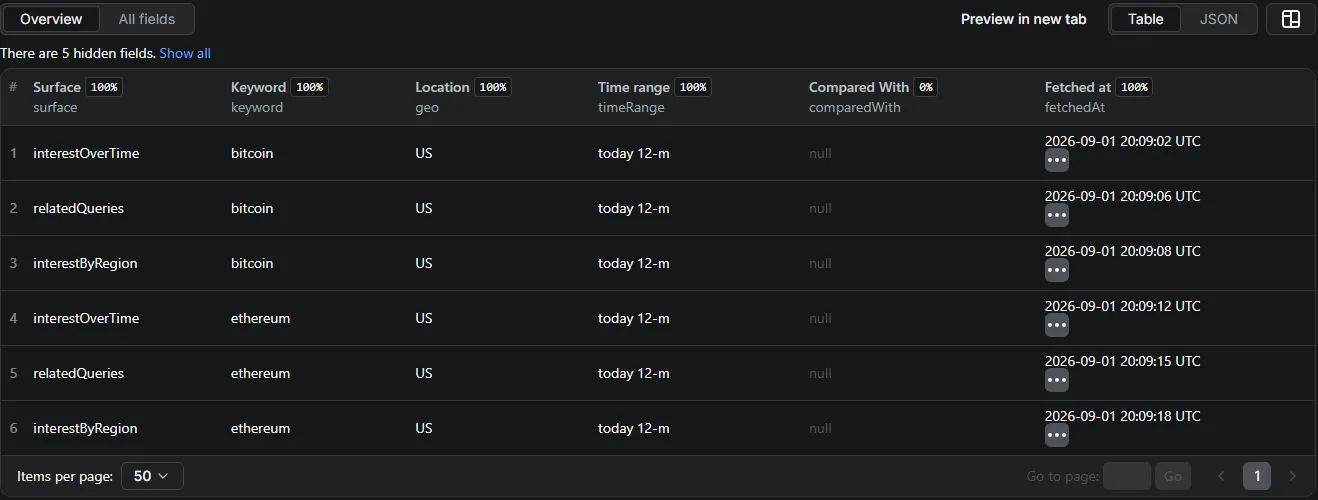
There are two row shapes, and the dataset says which is which in its surface field. Keyword rows all carry the same eleven-field envelope — schemaVersion, surface, keyword, geo, timeRange, category, property, comparedWith, sharedScale, fetchedAt, data — so a pipeline built on one surface reads the next without a rewrite. sharedScale: true marks a row from a compare run and changes what its numbers mean: they are that keyword's share of the compared set, not its own level (the row says so in data.note for region rows). Trending-now rows carry a five-field envelope — schemaVersion, surface, geo, fetchedAt, data — because a trending feed has no keyword, time range or comparison, and this actor will not pad a row with six columns that could only ever say "not applicable". Within each shape every field is always present: explicit null over silent omission, and a field that has nothing to say says so in words (a run with no location set reads "geo": "worldwide", never a blank). A CSV or Excel export unions the two shapes for you, so the trending columns come back blank rather than missing.
Two uncharged rows you will also see, both carrying charged: false. A result Google did not serve ships one notice row — surface: "notice", with data.status naming what happened (no_data, empty_answer, empty_upstream, invalid_request, proxy_unavailable), data.surface naming which surface it was owed on, and data.message saying what to do about it — so a run that delivers nothing still hands your code a row per result rather than an empty dataset. And the last row of every run is the run's own receipt: _summary: true, surface: "summary", charged: false, carrying delivered, resultsWithoutData, notDelivered, resultsLeft, chargedEvents and stoppedBy (exhausted · budget · deadline · upstream). Its chargedEvents["trend-report"] equals the number of trend reports the run actually charged, so the invoice reconciles from the dataset alone. Export with clean=true for a spreadsheet-ready CSV, and reconcile from the summary row immediately, or from the run's own charge counter once it settles (about 12 seconds after the run ends). Both rows are pushed uncharged, which is only possible on the named-event pricing this actor runs on today — they are the direct benefit of it.
Real rows from the live example run linked below:
| surface | keyword | geo | timeRange | what is inside data |
|---|---|---|---|---|
interestOverTime | bitcoin | worldwide | today 12-m | 54 weekly points — Aug 24 – 30, 2025 = 50 … Aug 30 – Sep 5, 2026 = 25 (isPartial: true) |
relatedQueries | bitcoin | worldwide | today 12-m | 25 top + 25 rising — top bitcoin price (100); rising bitcoin casino vodds (Breakout, +25,200%) |
interestByRegion | bitcoin | worldwide | today 12-m | 250 regions — CH Switzerland 100, AT Austria 84 … AI Anguilla 0 |
trendingNow | (no keyword field) | US | (no timeRange field) | kaleb johnson, traffic 10000+, with the news stories behind it — 10 trends in that run |
Full keyword row, as JSON:
Browse the full live example dataset → — one real run, every surface, unedited (13 rows: the three bitcoin surfaces worldwide plus the US trending-now feed). Or the 4-keyword compare run → — chatgpt vs claude vs gemini vs copilot on one shared scale (gemini peaks at 100, chatgpt 91, claude 19, copilot 5).
Failed and empty fetches never reach your dataset and are never charged — they land in the run's ERRORS record with the exact reason, and the run still finishes SUCCEEDED with an honest status message telling you what was delivered and what was not. A result Google has no data for is named in that same record — one entry per keyword × surface, with the surface, the region and the time window it was asked under and "charged": false — so a run that delivers nothing still hands your code a machine-readable answer, not an empty dataset, and what you asked for always reconciles: results asked for = results delivered + results reported.
A keyword charted at the edge of Google's volume floor is a delivered result, not an empty one. A term just above the floor comes back as a complete timeline that is mostly 0 — say 4 weeks measurable out of 53 — because Google measured it and found interest in only those weeks. That row is delivered and charged like any other charted keyword, and its data.note says exactly how many periods were measurable, so a mostly-zero timeline is never mistaken for a failed fetch. Even the extreme case is a delivered result: one measurable week and 52 zeros means Google charted the term, so that row arrives whole and is charged like any other delivered result, and it is never reported as a keyword with no data. The row's own data.note names how many periods were measurable and says the result is charged, so a paid row that looks empty explains itself where you are reading it. A term below the floor gets no row at all: it is named in the run's ERRORS record as a keyword with no data on that surface, and is never charged.
Related queries is the surface Google most often has nothing for — and that is Google's answer, not a fault here. Google computes related queries only where a term has enough search volume behind it, so a lower-volume keyword frequently has none at all, and narrowing a keyword to a smaller region or a shorter time window makes an empty answer more likely still. When that happens it is an honest no-data result: the keyword × surface is named in the run's ERRORS record with "kind": "no_data", nothing is charged for it, and the run carries straight on through the rest of your list. Re-running the same term does not change Google's answer — the same input returns the same empty result. What does answer those terms is the interest-over-time timeline, which is charted far further down the volume range: ask for interestOverTime alongside relatedQueries and a term with no related queries still comes back with its trend line. Widening the time range or dropping the region filter is the other thing worth trying.
For AI agents & LLMs — copy this block
Why this Google Trends scraper?
- Never charged for a miss. Google Trends has a degraded mode where it answers HTTP 200 with an empty payload. This actor detects it and retries; if a fetch ultimately fails it is reported in
ERRORS— no result fee. You are billed for delivered rows only. - A keyword with too little search volume is answered, not retried. Google charts nothing for a long-tail term below its volume floor, and it says so with a complete, empty answer. That is a result about your keyword, not a fault: it is named in the run's
ERRORSrecord as a keyword with no data, it is never charged, and the run carries on through the rest of your list. Try a broader time range or drop the region filter and the same term often charts. - 99% of runs succeed — the run-stats box on this page is public, so check the live number yourself; it has held above 99% across thousands of runs. Every request has a hard timeout and a bounded retry budget: a run either returns data or stops with an explicit reason. No infinite loops, no zombie runs.
- Schema-stable JSON. Every item carries
schemaVersionand, within its shape, every field is always present — explicitnullover silent omission. - Related topics, actually delivered. Google withholds the topics feed from most automated sessions, which is why tools that sell this surface typically ship empty topics lists — and why this actor refused to offer it until it could deliver it for real. Now it does: opt in with
relatedTopicsand get the real top + rising topic entities, each with its knowledge-graph id, title, type, score, and explore link. The one caveat, stated plainly: Google meters this feed and serves it to a limited number of lookups at a time, so on a busy moment a topics lookup can come back empty. When that happens the result is never shipped as an empty row and never charged —ERRORSsays so, and a re-run a minute or two later normally delivers. It is the only surface here with that caveat, and we would rather you read it before you buy than after. - Clean exits, honest partials. Hit your max-cost ceiling or the timeout and the run stops cleanly, telling you exactly how many results are left and how to get the rest.
How it compares
Read from the public Apify Store API and each vendor's own pricing page on September 1, 2026. Prices and success rates move — check the live listings before you decide. Units differ, so the per-1,000 prices are not directly comparable: Apify's official actor bundles a search term's surfaces into one result and bills platform usage on top; this actor bundles them too, and includes usage in the price. The columns that compare cleanly are the success rate and what happens on a failed fetch.
| Listed price | What one unit is | Platform usage | Start fee | Public success rate, last 30 days | |
|---|---|---|---|---|---|
| This actor | from $2.25 / 1,000 trend reports (paid plans); $9.00 / 1,000 on the Apify free plan | one keyword's whole report — timeline, related queries and region table together — plus one report per trending-now row; related topics billed separately | included | none | 99.7% (1,567 of 1,571 runs) |
| Apify's official Google Trends Scraper | from $0.30 / 1,000 results; $3.00 / 1,000 on the Apify free plan | one search term with all of its surfaces bundled | billed on top | none | 63.5% (13,535 of 21,319 runs) |
| Google Trends Fast Scraper | $0.02 per run + from $0.50 / 1,000 results; $2.00 / 1,000 on the Apify free plan | one result row | included | $0.02 per run | 99.1% (29,982 of 30,253 runs) |
| SerpApi Google Trends API | from $75 / month for 5,000 searches (≈ $15 / 1,000) | one API search | not applicable (hosted API) | monthly subscription | not published |
| pytrends (Python library) | free | one library call | not applicable | none | unmaintained — endpoints break without notice |
Just want to see what it does? An API call with no input at all runs a real, small sample — one example keyword (bitcoin) on the three default surfaces, worldwide, over the last 12 months, inside its own three-minute window — so you see today's data rather than a canned answer. It is charged like any run: one trend report, and nothing at all if Google does not serve it, in which case you still get one uncharged row per result and the run summary. Change a setting but still name no search terms and you get that same live sample run under what you set — your location, time window, category, search property and choice of surfaces — with one uncharged note naming the settings it ran under. The one thing it cannot do is compare, because a comparison needs two to five of your own terms on one shared scale; that asks you for search terms on an uncharged row instead.
What happens on a failed or empty fetch here: it is reported in ERRORS and no result fee is charged. A keyword Google has too little volume to chart is named in the same ERRORS record as a keyword with no data — also uncharged — and the run keeps working the rest of your list. Related topics is the one surface that can come back empty on a busy moment, and the same rule applies to it.
How to scrape Google Trends (no code)
- Click Try for free — the form is prefilled with a working example (
bitcoin, all three keyword surfaces). - Add your keywords and pick surfaces, location, and time range.
- Click Start. The first results usually land in the dataset within a minute.
- Export as JSON, CSV, or Excel — or put the input on a Schedule at the cadence your time range deserves (see How often is it worth re-asking? below).
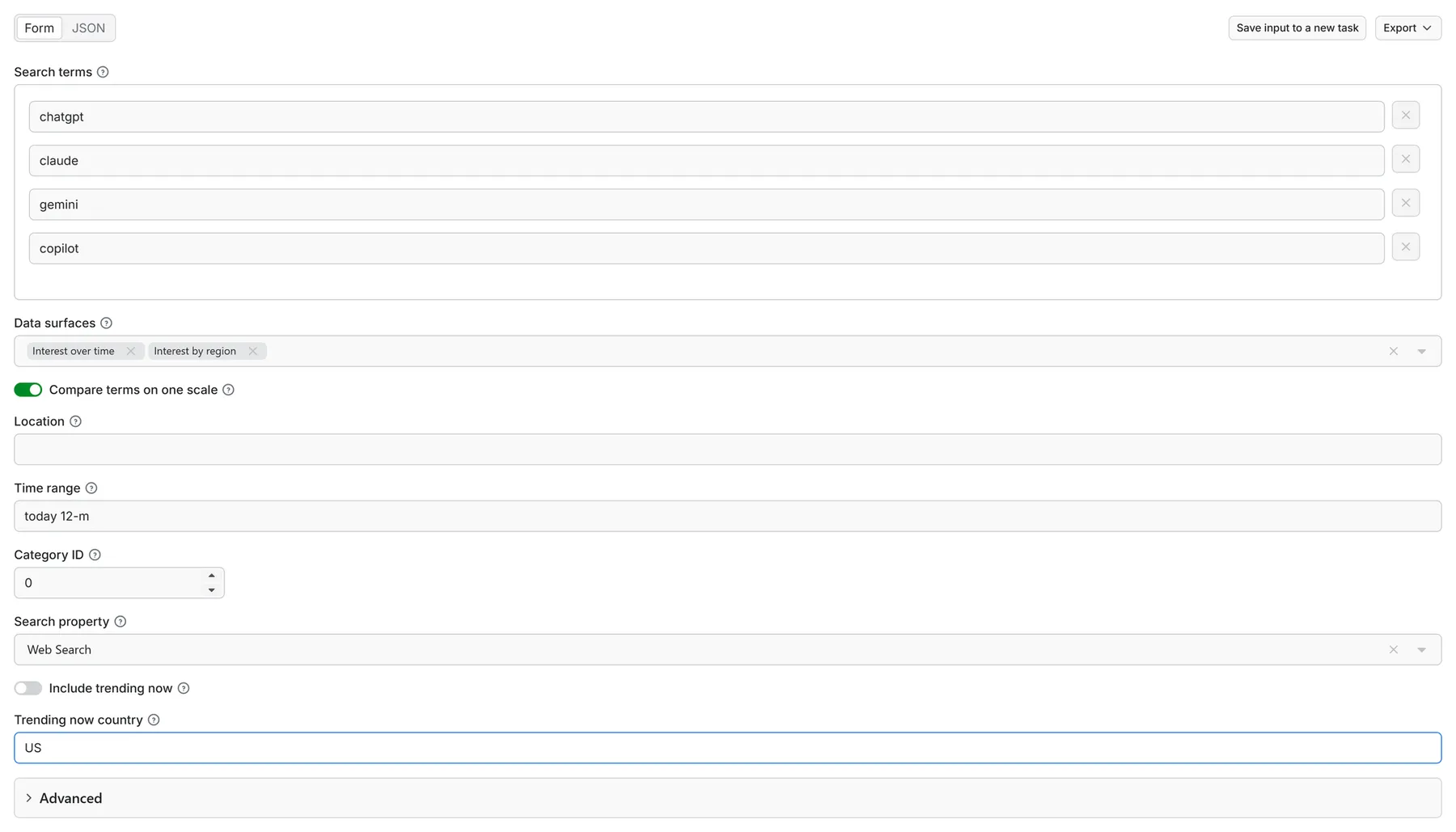
Comparing keywords? Turn compare on with 2–5 search terms and leave Related queries and Related topics out of the surfaces — they are per-keyword surfaces with no shared scale, so run them separately. If you leave them selected the compare run simply drops them, uncharged, and says so in its ERRORS record rather than leaving you to wonder where those rows went.
Compare changes what the numbers mean — including the regional ones. On a compare run every figure is a share of the compared set: each region is split between your terms, so a term with far more search volume reads close to 100 in nearly every region and a much smaller term reads close to 0 nearly everywhere. That is the comparison working, not a broken row, and the region rows say it in data.note. If you want each term's own regional spread — 100 in its strongest region, less elsewhere — run the terms without compare. A compared term Google has no volume for at all is not delivered as a line of zeros: it is reported in ERRORS as a keyword with no data on that surface, uncharged, exactly as it would be on its own — and on a single-term run, a region breakdown with nothing measurable in it is reported the same way rather than shipped as a page of zeros.
Explore a category with no keyword
Leave Search terms empty, set Category ID to a category, and the run explores that
category itself instead of a keyword: { "category": 7 } is Finance, 45 Health, 12
Business, 16 News, and 0 means all categories.
What you get. Google's own category view over the location and time range you set: the
category's interest-over-time series, and its ranked top 25 and rising 25 queries — what
people in that category are actually searching for right now, with each row's own rise
("Breakout", "+2,750%") beside it. The rows are the same schema-stable shape a keyword ask
returns; the keyword column reads whole category and the category column carries the ID.
What it costs. One trend report for the category, exactly as for one keyword — both surfaces together, on the same price ladder. There is no new charge and no new event.
The one limit, said plainly. Interest by region and Related topics are not served on a category with no search term — Google's category view carries no region table, and topics need a term to be about. A run that asked for either gets its rows for the surfaces that do work, plus one uncharged row naming what was left out and why; the Related topics fee is never charged on this route. Add a search term to get those two surfaces for that term.
Input example
How much does it cost to scrape Google Trends?
You are billed at most one trend report per keyword — that is the ceiling, and it is what the figures below use. One keyword's full 12-month timeline, its complete related-queries set (top + rising) and its region table settle together as one trend report, however many of those three you ask for. Each trending-now row is its own trend report, because a trending feed has no keyword to belong to. A complete related-topics set is a Related topics report, its own event at a flat $0.0075 on every plan, charged only when you put relatedTopics in surfaces. The same keyword is never billed twice for the same event.
The whole ladder, because an actor whose promise is billing honesty cannot have an undisclosed tier ladder:
| Your Apify plan | Trend report | Per 1,000 | Related topics report | Per 1,000 |
|---|---|---|---|---|
| Apify Free plan | $0.009 | $9.00 | $0.0075 | $7.50 |
| Bronze | $0.006 | $6.00 | $0.0075 | $7.50 |
| Silver | $0.004 | $4.00 | $0.0075 | $7.50 |
| Gold, Platinum, Diamond | $0.00225 | $2.25 | $0.0075 | $7.50 |
The store header shows the Gold price of the primary event: from $2.25 / 1,000 trend reports. Related topics is flat on every plan because it rides a different, dearer route.
Your Apify plan decides which column you pay, and the run itself tells you which one it was. A run billed at the Apify free plan column says so on its own run page and names what the same run costs on each paid rung — the plan is Apify's, not this actor's, and nothing about what is collected or delivered changes with it.
No start fee, no subscription, no minimum spend — you pay only for delivered results. Failed or empty fetches are never charged.
How often is it worth re-asking? Google refreshes a 12-month interest-over-time answer about once a week and a daily window (now 1-d, now 7-d) about daily, so the schedule that pays is the one that matches the window you chose: weekly for today 12-m and longer, daily for today 1-m and the now windows, and every hour or two only for now 1-H / now 4-H and trending-now. This actor deliberately keeps no memory of past runs — a fresh fetch is the product — so re-running the same keyword inside its refresh window buys the identical report again. To set it up: save the input as a Task, put the Task on an Apify Schedule, and add an integration on run succeeded; a Google Sheet with one row per keyword per run is the usual shape, and the fetchedAt field on every delivered row is the timestamp to chart by.
Pricing is all-inclusive: platform usage is included in the event price — one flat, predictable price per report, no separate usage line. The store header quotes the Gold paid-plan price; the table below shows all-in costs at the Apify free plan's price ($9.00/1,000), so every figure is an upper bound and a paid plan pays less:
| What you run | Trend reports | Max all-in cost* |
|---|---|---|
| 1 keyword, all 3 keyword surfaces | 1 | ~$0.009 |
| Track 100 keywords' interest weekly | 430/mo | ~$3.87/mo |
| Track 250 keywords daily | 7,500/mo | ~$67.50/mo (less on paid plans) |
| Trending now for 3 countries, daily | ~900/mo | ~$8.10/mo |
*Upper bounds, not estimates — you are never charged more than this, and never for a failed or empty fetch. Note what the first row does to the other three: because one keyword's timeline, related queries and region table settle as one report, adding the other two surfaces to any of these jobs costs nothing extra. You stay in control: set a Maximum cost per run (any amount from $0.05 up) and the run stops cleanly before exceeding it — and the Apify free plan ($5 monthly credit) is enough to evaluate seriously before paying anything.
Google Trends API alternative
There is no generally available official Google Trends API: Google's announced API is in closed alpha (waitlist, no trending-now surface). The popular Python library pytrends is unmaintained, with long-broken endpoints. This actor is a stable HTTP/JSON alternative: callable from any language, schedulable, monitored, exportable to CSV/Sheets — with the reliability engineering that one-off scripts and unmaintained libraries cannot sustain: rate limits absorbed and retried automatically, fail-fast behaviour on real outages, and an honest per-fetch error report instead of a silent empty answer.
Use it via API, MCP, and integrations
Pass the fields themselves as run_input — not wrapped in {"input": {...}}; a wrapped input is still read, and one uncharged note row says so.
Connect from any MCP client (Claude, Cursor, …) in one step — add the pin link at the top of this page as an MCP server URL, with your Apify token as an Authorization: Bearer header, and this actor is the only tool the client sees.
MCP-ready, including multi-keyword compare (verified end-to-end): every input works identically from the UI, the REST API, and MCP clients — the input is one flat JSON schema with no hidden flags. Quick calls (trending now, single keyword) return results inside the tool call; bigger jobs hand back a run you can poll with the bundled dataset tools. Scheduling, monitoring, webhooks, and Make/Zapier connections come with the Apify platform.
Steadyfetch trends & keyword suite
One actor per surface, one job each, the same contract everywhere: all-inclusive pay per event, nothing charged for starting a run, charged only on delivery — so a workflow built for one of them ports to the next. Keyword volume is the one exception: a run that buys fresh volume data adds one fresh-lookup fee of $0.19; runs answered from the 30-day cache pay none.
| What you want | Actor |
|---|---|
| Interest over time, related queries, regions, compare | this actor |
| What is trending right now, by country | Google Trends Trending Now Scraper — Live Trending Searches |
| Rising and Breakout queries, with the real growth number | Trending Keywords Scraper — Google Trends Rising Queries |
| Autocomplete suggestions across 5 engines | Google Autocomplete Scraper — Google Suggest, 5 Keyword Engines |
| Monthly search volume and CPC for a keyword list | Keyword Search Volume Scraper — Google Ads Keyword Planner, CPC |
| What is trending on social platforms | TikTok Trends Scraper — X, Pinterest, YouTube & Google Trends |
The rest of the steadyfetch shelf — same contract everywhere: all-inclusive pay per event, nothing charged for starting a run, charged only on delivery (three actors add a small delivery-conditional fee: keyword volume's fresh lookup, profile posts' profile lookup, Google Jobs' search fee — each README states it).
| Family | Actors |
|---|---|
| Ad creative intelligence | Facebook · Google Ads video · TikTok · LinkedIn · Google Ads text & OCR |
| Trends & keywords | Google Trends · Trends Now · Breakout keywords · Autocomplete keywords · Keyword volume & CPC · Social trends |
| YouTube transcripts | YouTube videos · YouTube channels |
| Reel transcripts · Profile posts | |
| Jobs | Indeed · Career sites by domain · Glassdoor · Multi-board · Google Jobs |
| Amazon | Products · Search · Bestsellers · Sellers |
| Any media file | Speech to Text · any link or file |
FAQ
Is there an official Google Trends API?
Google announced one, but it remains alpha/waitlist-only and does not cover trending now. This actor exists to fill that gap today.
Is it legal to scrape Google Trends?
This actor only collects public, non-personal, aggregated data — the same anonymized index anyone sees at trends.google.com. Courts have repeatedly held that scraping publicly accessible data is lawful (e.g., hiQ v. LinkedIn, Meta v. Bright Data). Still, consult your counsel for your specific use.
Why do values differ slightly from the Trends UI?
Trends is a sampled, relative 0–100 index; Google itself returns slightly different values across sessions. Differences of a few points are inherent to the source, not a scraper defect.
What happens when Google blocks a request?
The request is retried automatically after a short pause. In our own measurements every single rate-limited request that was retried this way came back with data. If Google keeps refusing across several keywords in a row, a run that still has time left waits a couple of minutes and tries those keywords again before it gives up — the status line says whether it waited. If a fetch still cannot be delivered, it is recorded in ERRORS with the exact reason and no result fee is charged for it. Those retries cost you nothing — platform usage is included in the event price.
Can I compare 5 keywords?
Yes — turn compare on with 2–5 searchTerms to get them on one shared scale. Related queries and related topics are per-keyword and have no shared scale, so leave those surfaces out of a compare run and fetch them separately (a compare run drops them uncharged and names them in ERRORS). Remember what the shared scale does to interest by region too: compared, each region is split between your terms, so the bigger term reads near 100 almost everywhere — run the terms separately for each one's own regional spread. A compared term with no volume is reported as a keyword with no data, never delivered as a row of zeros.
How many keywords can one run take?
Up to 300 search terms per run. Send more and the run still starts: it uses the first 300 and writes one uncharged row naming what you asked for and what bound it, so send the remainder as another run (or schedule them). Runs stop cleanly at your Maximum cost per run and before the run timeout, always reporting what was delivered and what remains.
Why did related queries come back empty for my keyword?
Because Google has none for it. Related queries are computed only where a term carries enough search volume, so lower-volume keywords often have no related queries at all — and asking under a smaller region or a shorter time window makes that more likely, not less. The run reports it as a keyword with no data on that surface, charges nothing for it, and keeps going through the rest of your list. Re-running the same term returns the same answer, so the things worth changing are the ask itself: widen the time range, drop the region filter, or read the interest over time timeline, which is charted for terms far below the level related queries needs.
Where are related topics?
Delivered — add relatedTopics to surfaces. It is opt-in rather than a default, so existing runs and their costs are unchanged. Google withholds the topics feed from most automated sessions (the reason other tools ship empty topics rows, and the reason this actor did not offer the surface until it could deliver it). Google also meters the feed, serving it to a limited number of lookups at a time — so a topics lookup can come back empty on a busy moment. It is then reported in ERRORS, never charged, and never shipped as an empty row; wait a minute or two and run the same input again, which normally delivers.
Feedback & support
Found an issue? Open it on the Issues tab — we usually reply within a couple of hours, always within a day, and fixes land in the changelog.
If it earned its keep, a rating helps other buyers find it, and saving the actor keeps it one click away.


