
App Store Reviews Scraper & Release Health
Pricing
from $0.10 / 1,000 reviews
App Store Reviews Scraper & Release Health
App Store reviews scraper: iOS app reviews in any country (rating, text, app version) at $0.10 per 1,000, plus an optional app report ($0.002 each): rating by version with bad-release alerts, what competitors shipped, complaint topics, subscription prices by country, chart ranks.
Pricing
from $0.10 / 1,000 reviews
Rating
0.0
(0)
Developer

Steadywren
Maintained by CommunityActor stats
0
Bookmarked
2
Total users
1
Monthly active users
20 minutes ago
Last modified
Categories
Share
App Store reviews scraper for your app and your competitors, in any country: export iOS app reviews (rating, title, text, app version) plus an app report for each app and country - yours and your competitors' - with rating by app version and bad-release alerts, what competitors shipped and how users reacted, the complaint topics behind the stars, subscription prices by country in USD, and chart ranks. Apple App Store reviews cost $0.10 per 1,000, the same as plain review scrapers; each app report costs $0.002 and can be switched off.
What you get
- Release health: average rating and complaint topics for each app version, the change against the previous version, and
badRelease: truewhen a release drops the rating by 0.5 stars or more. - What competitors shipped and how users reacted: the last 10 versions with release date, release notes, rating and complaint topics, plus release cadence (releases in the last 90 days, days between releases) over the ~25 versions Apple lists.
- Why users are unhappy: every review is tagged with topics -
crash,bugs,login,billing,ads,performance,ui,feature_request(English, German, French, Spanish, Ukrainian) - and each app gets its top complaints with their share. - Subscription and in-app prices by country: the price list Apple shows on the app page, parsed into numbers and converted to USD, so you can compare pricing across countries and competitors. Price changes between runs are listed and raise an alert.
- Chart ranks: position in the top free, paid and grossing charts (top 100) of the app's category, with changes between runs.
- App reports in their own table: one report per app and country in the App reports table of the Output tab; reviews stay in the main dataset.
- Competitor comparison: one table per country with all your apps side by side (
COMPARISONrecord in the run's Output tab). - Reviews: rating, title, text, version, date, helpful votes and topics. Reviewer names are never collected.
- Complete data, or honestly marked gaps: Apple's review feed often answers pages empty at random, and a simple scraper just returns fewer reviews without telling you. This Actor retries every empty page up to 20 times, tries the remaining ones again in a second pass a minute later, and reports any page that still did not come in
reviewPagesMissing. With history tracking, the next daily run usually fills those gaps, as long as the missed reviews are still among the newestmaxReviewsPerApp. - History and alerts: daily scheduled runs remember reviews, versions, prices and ranks in your account, so release statistics grow past Apple's 500-review limit and
alertstell you about bad releases, price changes and chart drops. Turn on Only new reviews to get just what is new since the last run.
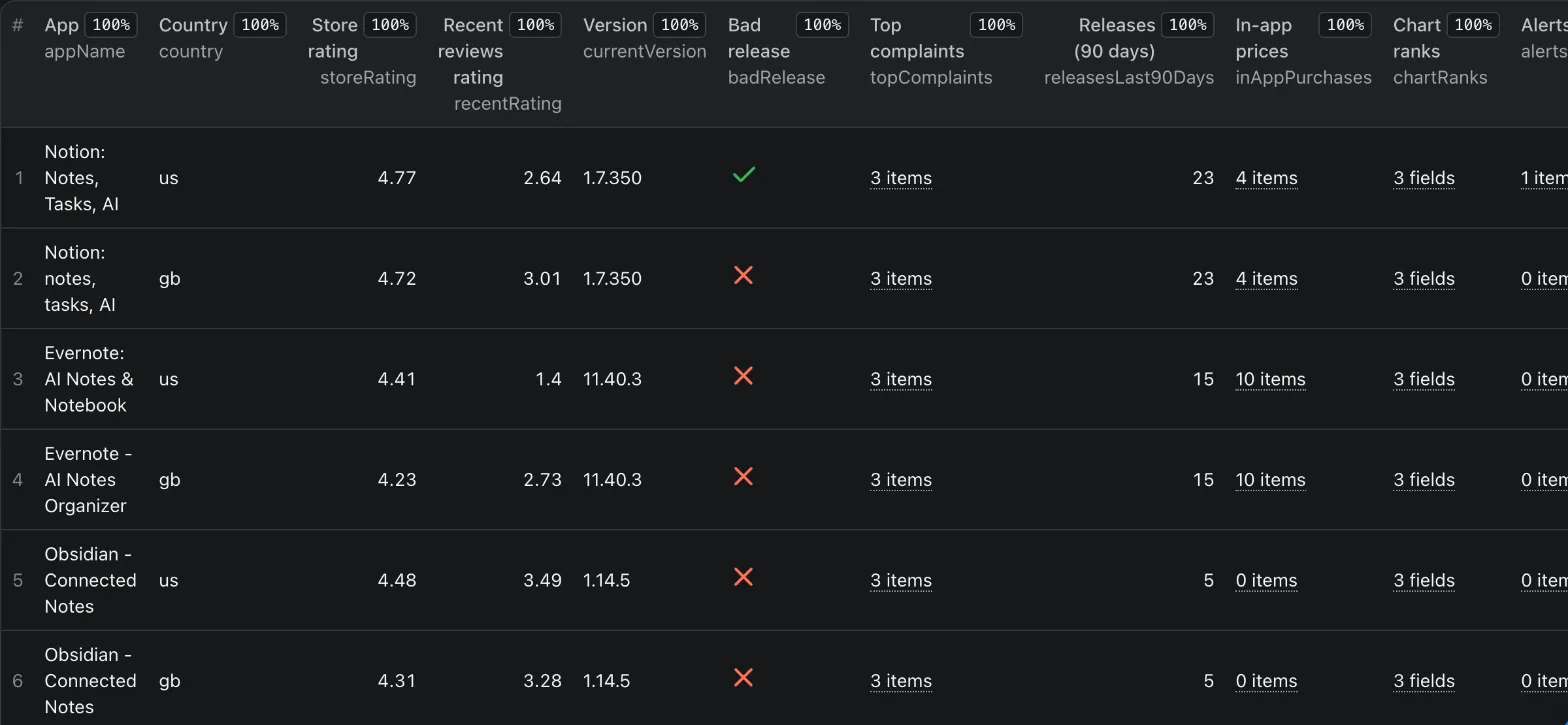
Example: app report
Reading it: Evernote shows 4.41 stars in the store, but its 100 newest reviews average 1.38, and 37% of them complain about billing and 28% about ads. It ships often (15 releases in 90 days) and sits at #36 in the top-grossing Productivity chart.
Example: review
(Illustrative text; real reviews carry the reviewer's own words.)
How much does it cost?
$0.10 per 1,000 reviews (the same as plain review scrapers) and $2 per 1,000 app reports ($0.002 each; one report = one app in one country), plus a small Actor start fee charged by Apify. Platform compute is included. Example: your app + 3 competitors in 2 countries with 100 new reviews each costs about $0.10 per run.
Use cases
- Release monitoring: schedule daily with your app and Only new reviews; act on
alertscontainingbad_release. - Competitor research: put your competitors next to your app and compare recent rating, complaints, release pace, prices and chart position.
- Pricing: compare subscription prices of your category across countries in USD and get notified when a competitor changes them.
- Product feedback: filter reviews by topic (
feature_request,crash,billing) and version.
Input
| Field | Type | Default | Description |
|---|---|---|---|
apps | array | Notion | App Store URLs, app ids or app names (the first search result is used). |
countries | array | ["us"] | Two-letter App Store countries (us, gb, de, fr, ua...). |
maxReviewsPerApp | integer | 100 | Newest reviews per app and country, up to 500 (Apple's limit). |
includeReviews | boolean | true | Output one result per review. |
includeReport | boolean | true | Output one app report per app and country. |
includeCharts | boolean | true | Look up the app's category chart ranks. |
trackHistory | boolean | true | Remember reviews, versions, prices and ranks between runs (key-value store app-store-review-history in your account). |
onlyNew | boolean | false | Output only reviews earlier runs have not returned (turns history on). |
proxyConfiguration | object | off | Not needed for the App Store. |
Monitor daily
- Console -> Schedules -> create a schedule for this Actor (or for a saved task with your apps and countries) and let it run daily.
- Turn on Only new reviews and set
maxReviewsPerApp: 500: each run outputs only reviews earlier runs did not return (isNew: true). - With history tracking, the app reports show price and chart-rank changes since the last run and
alertssuch asbad_release:<version>,price_change:<purchase>andrank_drop:<chart>. - Actor -> Integrations: send every finished run to Slack, email, Google Sheets or your own webhook.
FAQ
Where are the app reports? In their own table, so reviews and reports both have clean columns: run page -> Output tab -> App reports (or Storage -> Dataset -> reports). Reviews stay in the main dataset, which the Export button and the default API endpoint return. Via API: GET /v2/actor-runs/<runId> -> storageIds.datasets.reports gives the dataset id, then /v2/datasets/<id>/items.
Why at most 500 reviews? Apple's public review feed serves the newest 500 reviews per app and country. For big apps that is a few days. With history tracking, scheduled runs keep counting new reviews, so version statistics cover far more than 500 over time.
Is the history shared between my runs? Yes - all runs and tasks of your account use the same key-value store app-store-review-history. A manual run on the same app marks its reviews as seen, so a scheduled Only new reviews task will not return them again. Turn Track history off for one-off runs, or delete the store to start over.
Which settings for daily alerts? Schedule daily with Only new reviews and maxReviewsPerApp: 500. With 100, a busy app can get more than 100 new reviews a day and the rest would never be seen.
Why is priceUsd empty for some countries? Prices are converted with the European Central Bank's daily rates, which do not cover every currency (for example the Ukrainian hryvnia). The local price is always there in price and priceText.
What is reviewPagesMissing? Apple's review feed often answers a page empty at random, sometimes many times in a row. The Actor retries every empty page with a fresh request up to 20 times, then once more in a second pass at least a minute after the failure (Apple's failures come in streaks, so a minute later the page usually comes); apps without gaps are delivered right away. A page that is still empty is counted here (including the first page of an app that has ratings) instead of being silently skipped, so you know when a sample is smaller than asked. With history tracking, a missed page is usually picked up by the next run, as long as those reviews are still among the newest maxReviewsPerApp.
Why is recentRating so much lower than storeRating? The store rating includes years of in-app rating prompts (mostly 5 stars); written reviews are left mostly by unhappy users. The gap between the two, and its trend per version, is the signal.
How are topics found? By keywords and phrases in English, German, French, Spanish and Ukrainian. Reviews in other languages get no topics, but still count in ratings by version. Problem topics count only in reviews of 3 stars or less; feature_request counts at any rating.
How is badRelease decided? The newest version with at least 10 reviews averages 0.5 stars or more below the previous version with at least 10 reviews.
Where do the USD prices come from? Prices are parsed from the app page in the country's currency and converted with the European Central Bank's daily rates (see above for currencies without a rate).
Is it legal? The Actor reads only public App Store pages and Apple's public feeds - no login. Reviewer names are not collected. Check Apple's terms for your use case.
Something broke? Open an issue on the Actor page - we answer within 12 hours.
More from Steadywren
- Google Play Reviews Scraper - the same release health and complaint analytics for Android apps, plus developer reply rate and installs per day.
- Shopify App Store Scraper - Shopify app reviews with review trends, reply rate, category ranks and change alerts.
Who builds this? Steadywren - small tools, steady results. More products and custom builds on steadywren.com.
Changes
- 2026-11-02: app reports moved from the main dataset to their own App reports table (run dataset
reports), so both tables have clean columns. If you read reports through the API, usestorageIds.datasets.reportsof the run (see FAQ). Reviews did not move.
Technical details
- Sources: iTunes Lookup and Search API, Apple's customer-reviews RSS feed (50 reviews per page, 10 pages), the public app page (embedded JSON: star counts, version history, in-app purchases) and the category top-chart feeds. Plain HTTP, no browser, no proxy.
- Retries: network errors, 5xx, 403 and 429 are retried with backoff; 404 and other 4xx fail at once; empty review pages are retried with a fresh URL.
- Every run stores a
RUN_SUMMARYrecord and fails when no app is found or the key report fields (appName,storeRating,ratingHistogram) are empty in most results.


