
Google Play Reviews Scraper & Release Health
Pricing
from $0.10 / 1,000 reviews
Google Play Reviews Scraper & Release Health
Google Play reviews scraper: Play Store reviews of any Android app (rating, text, app version, developer reply) at $0.10 per 1,000, plus an optional app report ($0.002 each): rating by version with bad-release alerts, reply rate, complaint topics and spikes, installs per day, listing changes.
Pricing
from $0.10 / 1,000 reviews
Rating
0.0
(0)
Developer

Steadywren
Maintained by CommunityActor stats
0
Bookmarked
2
Total users
1
Monthly active users
19 minutes ago
Last modified
Categories
Share
Google Play reviews scraper for your app and your competitors: export the Play Store reviews of any Android app (rating, text, app version, developer reply) plus an app report per app - rating by app version with bad-release alerts, how fast the developer answers and which angry reviews are still unanswered, complaint topics and spikes, installs per day, listing and price changes between runs, and a comparison with similar apps. Android app reviews cost $0.10 per 1,000, the same as plain review scrapers; each app report costs $0.002 and can be switched off.
Why this Actor
Other Google Play scrapers give you raw reviews and leave the analysis to you. This one does it for you: reviews cost the same as theirs ($0.10 per 1,000), and the analysis comes in one app report per app ($0.002 each):
- Release health: which app version made users unhappy, and whether the newest version fixed the complaints of the previous one.
- Developer reply analytics: reply rate, median reply time and the most liked 1-2 star reviews still waiting for an answer.
- Change tracking: installs per day, new ratings, rating change, listing changes (title, descriptions, screenshots, icon) and price changes since your last run, with alerts.
- Every extra can be switched off: turn the analytics off and you get a plain, fast review scraper - and no app report charge.
What you get
- Reviews: rating, text, date, app version, thumbs up, the developer's reply with its date, and Google's per-feature ratings (
criteria). No limit of 500 per app - up to 15,000 reviews per app and run. Reviewer names are never collected. - Filters: star ratings, date range, keywords, answered / unanswered by the developer, minimum thumbs up, sort by newest, relevance or rating.
- App report (one per app, in its own App reports table in the Output tab): store rating and star counts, exact installs, price and in-app price range, content rating, last update and "What's new", plus the analytics below.
- Release health (
releaseHealth): rating and top complaints for each app version with at least 3 reviews, the change against the previous version,badRelease: truewhen a version drops the rating by 0.5 stars or more, release cadence, andfixCheck: complaint topics that went down (improved) or up (worsened) in the newest version. - Developer replies (
developerReplies):replyRate,negativeReplyRate(1-2 stars),medianReplyHours, andunansweredNegative: the 5 most liked 1-2 star reviews of the last 90 days without a reply. - Complaint topics and trends (
complaintTopics): every review tagged withcrash,bugs,login,billing,ads,performance,uiorfeature_request(English, German, French, Spanish, Ukrainian); top complaints with their share; rating per week;complaintSpikeswhen a topic jumps in the last 7 days. - Changes between runs (
trackChanges): installs per day, new ratings, rating change, listing changes and price changes since your previous run, andalertssuch asbad_release:v2.1,complaint_spike:crash,rating_drop,listing_changed:screenshots,price_changed. - Similar apps (
compareSimilarApps, off by default): an app report for the apps Google lists as "Similar apps", so you see your real competitors without looking them up. - Competitor comparison: all apps of a run side by side in the
COMPARISONrecord (Output tab) when the run has 2 or more apps.
The analytics read the newest 1,000 reviews of each app (analysisDepth). They are not output and not charged.
Example: app report
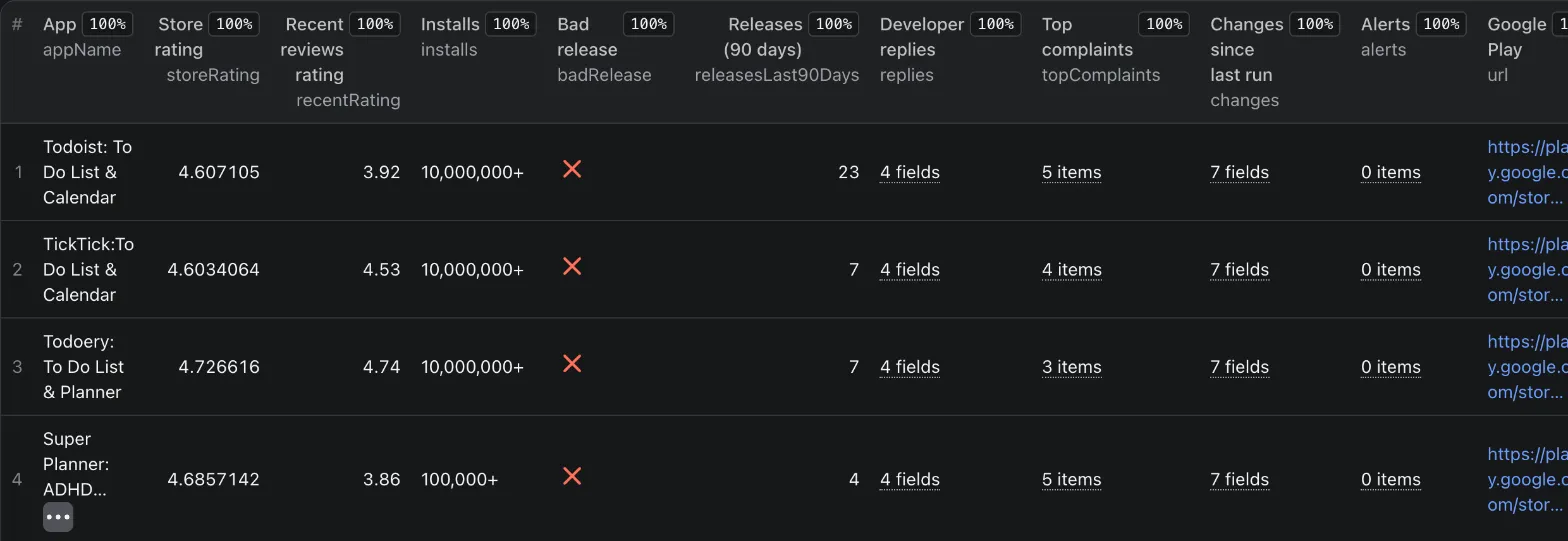
Reading it: Todoist answers 90% of reviews (88% of the angry ones) within about a day, ships a build every 4 days, and its newest reviews average 3.92 stars against 4.61 in the store. (Real run, shortened; the review text and the changes numbers are illustrative - changes is filled from the second run on.)
Example: review
How much does it cost?
$0.10 per 1,000 reviews (the same as plain review scrapers) and $2 per 1,000 app reports ($0.002 each; one report per app, none when every analytics option is off), plus a small Actor start fee charged by Apify. Platform compute is included. Example: your app + 3 competitors with 100 reviews each costs about $0.05 per run.
Use cases
- Release monitoring: schedule daily with your app and Only new reviews; act on
alertswithbad_releaseorcomplaint_spike. - Support quality: compare your reply rate and reply time with competitors; work through
unansweredNegativefirst. - Competitor research and ASO: add competitors (or turn on Compare similar apps) and follow their installs per day, rating, listing changes and prices.
- Product feedback: filter reviews by keyword, stars, version or topic (
feature_request,crash,billing).
Input
| Field | Type | Default | Description |
|---|---|---|---|
apps | array | Todoist | Google Play URLs or package names (e.g. com.todoist). |
language | string | en | Language of the reviews (en, de, fr, es, uk...). |
country | string | us | Store country for prices and app data. |
maxReviewsPerApp | integer | 100 | Reviews to output per app (0 = reports only), up to 15,000. |
sort | string | newest | newest, relevant or rating. |
stars | array | all | Only these star ratings. |
dateFrom, dateTo | date | - | Only reviews written in this range (inclusive). |
keywords | array | - | Only reviews mentioning any of these words. |
replyFilter | string | any | withReply or withoutReply. |
minThumbsUp | integer | 0 | Only reviews at least this many users found helpful. |
includeReviews | boolean | true | Output one result per review. |
releaseHealth | boolean | true | Rating per version, bad release, cadence, fix check. |
developerReplies | boolean | true | Reply rate, reply time, unanswered negative reviews. |
complaintTopics | boolean | true | Topics on reviews, top complaints, weekly rating, spikes. |
trackChanges | boolean | true | Remember each app between runs (key-value store google-play-review-history in your account) for changes and alerts. |
onlyNew | boolean | false | Output only reviews earlier runs have not returned. |
compareSimilarApps | boolean | false | Add reports for Google's "Similar apps" (charged per report). |
similarAppsCount | integer | 3 | Similar apps per app. |
analysisDepth | integer | 1000 | Newest reviews read per app for the analytics (not charged). |
proxyConfiguration | object | off | Not needed usually. |
When every analytics option is off, the Actor is a plain review scraper: no app reports, no extra requests.
Monitor daily
- Console -> Schedules -> create a schedule for this Actor (or for a saved task with your apps) and let it run daily.
- Turn on Only new reviews: each run outputs only reviews earlier runs did not return (
isNew: true). - Keep Track changes on: the app reports then show installs per day, rating and listing changes since the last run and
alertssuch asbad_release:<version>,complaint_spike:<topic>,rating_drop,listing_changed:<fields>andprice_changed. - Actor -> Integrations: send every finished run to Slack, email, Google Sheets or your own webhook.
FAQ
Where are the app reports? In their own table, so reviews and reports both have clean columns: run page -> Output tab -> App reports (or Storage -> Dataset -> reports). Reviews stay in the main dataset, which the Export button and the default API endpoint return. Via API: GET /v2/actor-runs/<runId> -> storageIds.datasets.reports gives the dataset id, then /v2/datasets/<id>/items.
Why is complaintSpikes empty (null) or weeklyRating short? A spike compares the last 7 days with the 4 weeks before, so the analyzed reviews must reach back 5 weeks; weeklyRating lists only weeks the reviews fully cover. For very popular apps 1,000 reviews can cover just a few days - raise analysisDepth (up to 5,000, not charged) or run on a schedule.
Why do the newest versions in versions have so few reviews? Many apps publish a new build every few days, and only a few users review each one. Versions with fewer than 3 reviews are left out, and ratingChange and badRelease need at least 10 reviews per version. With Track changes, daily runs keep counting, so busy versions fill up.
How is releasedAt found? Google Play does not publish a version history, so it is the date of the first review that mentions the version - close to the release date for apps with many reviews. Versions already out before the oldest analyzed review get no date.
Why is recentRating lower than storeRating? The store rating includes years of in-app rating prompts (mostly 5 stars); written reviews are left more often by unhappy users. The gap and its trend per version are the signal.
What is installsExact? Google shows installs in buckets ("10,000,000+") but the page also carries a more exact number. Installs per day are computed from it between your runs.
Is the history shared between my runs? Yes - all runs and tasks of your account use the key-value store google-play-review-history, one record per app, language and country. A manual run marks reviews as seen for a scheduled Only new reviews task too. Turn Track changes off for one-off runs, or delete the store to start over.
Why are some reviews without version? Google does not send the version for every review (about 10% in our checks).
What are criteria? Google's own per-feature ratings attached to some reviews (for example vaf_app_quality_ads_frequency). They are passed through as Google sends them.
How are topics found? By keywords and phrases in English, German, French, Spanish and Ukrainian. Problem topics count only in reviews of 3 stars or less; feature_request counts at any rating.
Is it legal? The Actor reads only public Google Play pages - no login. Reviewer names and avatars are not collected. Check Google's terms for your use case.
Something broke? Open an issue on the Actor page - we answer within 12 hours.
More from Steadywren
- App Store Reviews Scraper - the same release health and competitor analytics for iOS apps, in any country.
- Shopify App Store Scraper - Shopify app reviews with review trends, reply rate, category ranks and change alerts.
Who builds this? Steadywren - small tools, steady results. More products and custom builds on steadywren.com.
Changes
- 2026-11-02: app reports moved from the main dataset to their own App reports table (run dataset
reports), so both tables have clean columns. If you read reports through the API, usestorageIds.datasets.reportsof the run (see FAQ). Reviews did not move.
Technical details
- Sources: the public app page (embedded JSON: details, star counts, listing, similar apps) and Google Play's review data (150 reviews per request). Plain HTTP, no browser, no proxy by default.
- Retries: network errors, 5xx, 403 and 429 are retried with backoff; an app that does not exist is skipped with a warning.
- Every run stores a
RUN_SUMMARYrecord and fails when no app is found, when requests failed and nothing was delivered, or when the key report fields (appName,storeRating,ratingHistogram) are empty in most results. No new reviews, or no reviews matching the filters, is a successful run.


