

Designrush Bussiness Search Scraper
Pricing
from $1.50 / 1,000 results
Designrush Bussiness Search Scraper
Efficiently scrape business listings from DesignRush.com, the leading B2B marketplace for creative and marketing agencies. Extract company profiles, contact details, pricing, ratings, and reviews. Perfect for lead generation, competitive analysis, and agency research in design, marketing.
Pricing
from $1.50 / 1,000 results
Rating
0.0
(0)
Developer

Stealth mode
Maintained by CommunityActor stats
0
Bookmarked
4
Total users
0
Monthly active users
2 months ago
Last modified
Categories
Share
DesignRush.com Business Search Scraper: Extract Agency Directory Data
Understanding DesignRush.com and Its Value for Business Intelligence
DesignRush.com operates as a premier B2B marketplace connecting businesses with vetted creative agencies, marketing firms, design studios, and development companies. The platform features thousands of agencies across diverse specializations—logo design, web development, digital marketing, branding, SEO, and more. Unlike generic business directories, DesignRush provides curated agency profiles with verified reviews, portfolio showcases, and transparent pricing information.
The platform serves as a critical resource for businesses seeking service providers and for agencies competing for visibility. Each listing contains comprehensive information including contact details, service offerings, pricing ranges, client reviews, and aggregate ratings. This rich dataset offers invaluable insights for market research, competitive intelligence, lead generation, and industry analysis.
Manually collecting agency data across multiple categories, locations, and specializations requires extensive time navigating through filtered searches and copying information. The DesignRush.com Business Search Scraper automates this entire workflow, transforming search result pages into structured datasets ready for CRM integration, competitive analysis, or market intelligence.
What This Scraper Extracts and Who Should Use It
The DesignRush.com Business Search Scraper processes search result and category listing pages—the pages displaying multiple agencies after applying filters for location, specialization, or sorting criteria. This approach efficiently captures broad datasets across different agency categories and markets.
Core Data Extracted:
Name: Agency or business name as displayed on DesignRush. Essential for identification, database building, and outreach campaigns.
Telephone: Contact phone numbers when available. Direct calling channel for sales outreach and partnership inquiries.
URL: Link to the agency's full profile on DesignRush. Provides access to complete details, portfolios, case studies, and additional contact options.
Email: Contact email addresses for business inquiries. Critical for lead generation, partnership proposals, and direct communication.
Image: Agency logo or profile image URL. Visual asset for displaying in databases, presentations, or competitive analysis reports.
Address: Physical location or service area. Enables geographic segmentation, local market analysis, and location-based filtering.
Price Range: Pricing tier or hourly rate range (e.g., "$100-$149/hr", "$$-$$$"). Critical for budget matching, competitive pricing analysis, and market positioning research.
Aggregate Rating: Overall rating score (typically 1-5 stars). Quality indicator for agency evaluation, filtering high-performing providers, and benchmarking.
Review: Review count or review data. Social proof metric indicating client satisfaction and agency credibility.
Target Users:
Business Development Teams build targeted prospect lists of agencies for partnership opportunities or vendor selection. Sales & Marketing Professionals generate qualified leads in the agency services market for software, tools, or B2B services. Market Researchers analyze competitive landscapes, pricing trends, and geographic distribution of agencies. Investment Firms identify acquisition targets or investment opportunities in the creative services sector. Agency Owners monitor competitor positioning, pricing strategies, and market presence. Procurement Teams source and evaluate potential agency partners based on ratings, pricing, and specialization.
Input Configuration: Targeting Search and Category Pages
The scraper processes DesignRush search result and category listing pages where multiple agencies appear. These are the pages you see after filtering by category (logo design, web development), location (Massachusetts, New York), or sorting criteria (highest rated, most reviewed).
Example Input Configuration:
Example Screenshot:
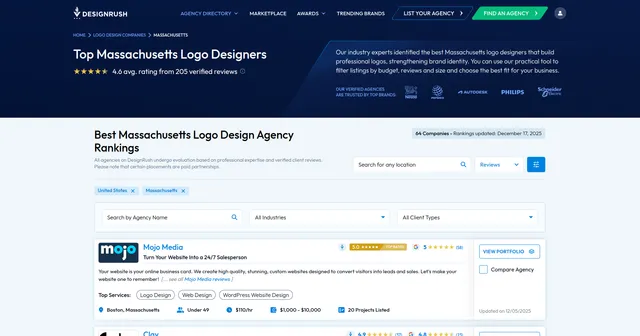
Parameter Breakdown:
proxy configuration: Set useApifyProxy: false if scraping doesn't require proxy rotation. For large-scale extraction or to avoid rate limiting, enable proxy with useApifyProxy: true and select appropriate proxy groups.
max_items_per_url: Controls how many agency listings to extract per page. Setting to 20 collects up to 20 agencies from each URL. DesignRush typically displays 10-20 agencies per page. Adjust based on page content and extraction needs.
ignore_url_failures: When true, continues processing remaining URLs even if some fail. Essential when scraping multiple category or location pages—prevents single broken URL from stopping entire run.
urls array: Contains DesignRush search or category page URLs. URL structure includes category path (/agency/logo-design), optional location filter (/massachusetts), and sorting parameters (?orderby=reviews_average).
Building Effective URL Lists:
-
Category URLs: Navigate to specific agency categories (logo design, web development, SEO, branding) to collect specialized agencies:
https://www.designrush.com/agency/[category] -
Location Filters: Add location segments to target geographic markets:
https://www.designrush.com/agency/[category]/[location] -
Sorting Options: Append sorting parameters to prioritize by ratings, reviews, or other criteria:
?orderby=reviews_average,?orderby=highest_rated -
Pagination: For comprehensive extraction across multiple pages, include pagination URLs:
?page=2,?page=3, etc.
Pro Tip: Test URLs manually in browser before scraping to verify they return desired results. DesignRush's URL parameters may include additional filters (price range, company size, project size)—incorporate these for precise targeting.
Complete Output Structure and Field Definitions
The scraper returns JSON data with each agency listing as a structured object. Understanding each field enables effective data utilization and analysis.
Name: Agency's business name exactly as listed on DesignRush (e.g., "Blue Fountain Media", "Lounge Lizard"). Purpose: Primary identifier for database records, outreach personalization, competitive tracking, and brand recognition analysis.
Telephone: Contact phone number in various formats. Purpose: Direct calling channel for sales outreach, partnership discussions, immediate inquiries. Enables phone-based lead qualification and personal touch in business development.
URL: Direct link to agency's full DesignRush profile page. Purpose: Access complete agency details including portfolio, case studies, client list, service breakdowns, team information. Essential for verification and deeper due diligence.
Email: Business contact email address when publicly displayed. Purpose: Primary channel for lead generation campaigns, partnership proposals, vendor inquiries, and automated outreach sequences. Critical for CRM integration.
Image: URL to agency logo or profile image hosted on DesignRush. Purpose: Visual assets for presentations, competitor analysis reports, internal databases, or sales materials. Enhances data visualization and brand recognition.
Address: Physical office location or service area description. Purpose: Geographic segmentation for local market analysis, regional competitor identification, location-based prospect filtering, and understanding agency distribution patterns.
Price Range: Pricing tier or hourly rate range indicator. Purpose: Budget qualification for vendor selection, competitive pricing analysis, market positioning research, and identifying premium vs. economy service providers. Formats may include hourly rates ($50-$99/hr) or project minimums ($10,000+).
Aggregate Rating: Numerical rating score (typically 0-5 scale) representing overall client satisfaction. Purpose: Quality filtering for vendor shortlisting, identifying top-performing agencies, benchmarking competitor reputation, and correlating ratings with pricing or size.
Review: Review count or review summary data. Purpose: Social proof indicator showing agency credibility and client volume. High review counts suggest established reputation and consistent client engagement. Useful for filtering proven providers vs. newer entrants.
Sample Output:
Step-by-Step Implementation Guide
1. Define Your Target Market: Identify which agency categories, locations, or specializations align with your goals. For lead generation, focus on high-growth categories. For competitive analysis, target your geographic market and service vertical.
2. Build URL Collection: Navigate DesignRush manually to construct filtered searches. Copy URLs for each category-location combination. Include sorting parameters to prioritize by rating, reviews, or recency based on your criteria.
3. Configure Input Parameters: Create JSON configuration with collected URLs. Set max_items_per_url based on typical page content (20 is standard). Enable ignore_url_failures for robustness when processing multiple URLs.
4. Launch Scraping Job: Execute via Apify console and monitor real-time progress. Processing 5-10 category pages with 20 items each typically completes within 2-4 minutes, varying with network conditions.
5. Validate Data Quality: Review dataset preview for completeness. Check that critical fields (name, contact info, ratings) are populated. Identify any patterns in missing data or formatting inconsistencies.
6. Export and Integrate: Export in preferred format—JSON for CRM systems, CSV for spreadsheet analysis, Excel for business reporting. Clean data by removing duplicates and validating contact information.
7. Handle Pagination Strategically: For exhaustive category coverage, either include multiple page URLs in one run or configure higher max_items_per_url to capture all listings. Most categories span 3-10 pages.
Error Handling: If URLs fail, verify they're listing pages not individual agency profiles. Check that filters and sorting parameters are valid. Activity log provides detailed error diagnostics for troubleshooting.
Strategic Applications for Business Growth
Lead Generation Pipeline: Build targeted prospect lists of agencies for B2B sales outreach. Filter by price range to match budget tiers, by location for regional focus, or by rating for quality-focused targeting. Export contact emails directly into outreach campaigns.
Competitive Intelligence: Monitor competitor agencies within your vertical and geography. Track their pricing positioning, review volume growth, rating trends, and market presence. Identify gaps in service offerings or geographic coverage.
Market Entry Analysis: Evaluate new markets before expansion by analyzing agency density, pricing levels, and competition intensity. High rating averages with few agencies suggest underserved markets with quality demands.
Partnership Opportunities: Identify complementary agencies for partnership or referral programs. Find agencies in adjacent verticals or different geographic markets with strong ratings, indicating reliable partners.
Pricing Strategy Research: Benchmark your pricing against market competitors. Analyze correlation between pricing tiers and ratings—do premium-priced agencies maintain higher ratings? Identify optimal pricing positioning.
Vendor Selection: Procurement teams can systematically evaluate potential agency partners. Filter by minimum rating thresholds, required price ranges, and geographic preferences. Build shortlists based on review volumes indicating experience.
Investment Due Diligence: Investment firms can identify high-performing agencies for acquisition consideration. Track review growth rates, rating consistency, and market positioning across competitive landscapes.
Sales Territory Planning: Map agency distribution geographically to identify dense markets (high competition, established demand) vs. sparse regions (potential expansion opportunities, less competition).
Maximizing Data Value: Best Practices
Regular Refresh Cycles: Agency data changes as businesses update profiles, accumulate reviews, and adjust pricing. Schedule weekly or monthly scraping to maintain current databases and track market dynamics over time.
Multi-Dimensional Segmentation: Don't rely on single category scraping. Cross-reference agencies appearing in multiple categories to identify full-service providers. Segment by location, pricing, rating tiers, and review volumes for nuanced analysis.
Enrichment Integration: Combine DesignRush data with LinkedIn company pages, Google Business profiles, or agency websites. Cross-reference to validate contact information, gather additional details, and build comprehensive agency profiles.
Quality Scoring Systems: Develop weighted scoring combining ratings, review counts, and price positioning. High ratings with many reviews indicate proven quality. Recent review activity suggests current client engagement.
Geographic Heatmapping: Visualize agency density and rating distributions across locations. Identify premium markets (high average ratings and pricing) vs. value markets (competitive pricing with moderate ratings).
Time-Series Tracking: Store historical scraping data to track agency growth trajectories. Monitor which agencies gain reviews fastest, improve ratings over time, or adjust pricing—indicators of business health and market positioning changes.
Competitive Alert Systems: Set up automated monitoring for specific competitor agencies. Track when they update pricing, receive new reviews, or change ratings. React quickly to market moves.
Contact Validation: Verify email addresses and phone numbers before large outreach campaigns. Use email verification services to clean datasets and improve deliverability rates.
Data Governance and Compliance Considerations
Privacy Compliance: Contact information may be subject to privacy regulations depending on jurisdiction. Implement appropriate data handling, storage security, and usage policies. Use data only for legitimate business purposes with proper consent mechanisms.
Rate Limiting Respect: While the scraper handles technical limitations, avoid excessive concurrent requests. Space out large scraping jobs to maintain sustainable access and platform relationships.
Data Accuracy Validation: Agency information updates periodically. Implement verification workflows before critical business use. Cross-check scraped data with original source URLs when making significant decisions.
Attribution and Source Tracking: Always store source URLs and scraping timestamps. This enables data freshness assessment, troubleshooting discrepancies, and proper attribution for business intelligence reports.
Duplicate Management: Agencies may appear in multiple categories or location pages. Implement deduplication logic based on name or URL to maintain clean databases and accurate counts.
Ethical Outreach Practices: When using contact information for lead generation, respect communication preferences. Provide clear opt-out mechanisms and honor unsubscribe requests promptly.
Conclusion
The DesignRush.com Business Search Scraper transforms a leading B2B marketplace into actionable business intelligence. Whether building sales pipelines, conducting competitive analysis, researching market opportunities, or evaluating potential partners, this tool delivers comprehensive agency data at scale. Stop manual data collection and start leveraging structured agency intelligence to drive business growth in the creative services industry.


![DesignRush Scraper [$2.50💰] | B2B Agency Leads | Email & Phone avatar](https://images.apifyusercontent.com/YlJviCNMn2DucVgoB6H6YBWqp_rJH6pBgmKSUMRKLzU/rs:fill:76:76/cb:1/aHR0cHM6Ly9hcGlmeS1pbWFnZS11cGxvYWRzLXByb2QuczMudXMtZWFzdC0xLmFtYXpvbmF3cy5jb20vZHRSN3FuVGJRck5pU0NtajctYWN0b3ItRTJDc0NhVll5QVhmbE9FVXMtRWI2amZSZTFNWC1kZXNpZ25ydXNoX2xvZ28uamZpZg.webp)
