

Trustpilot Bussiness Search Scraper
Pricing
from $1.50 / 1,000 results
Trustpilot Bussiness Search Scraper
Scrape business listings from Trustpilot.com search results to extract trust scores, review counts, company profiles, and category data. Perfect for competitive analysis, market research, reputation monitoring, and consumer sentiment analysis across industries.
Pricing
from $1.50 / 1,000 results
Rating
0.0
(0)
Developer

Stealth mode
Maintained by CommunityActor stats
0
Bookmarked
21
Total users
0
Monthly active users
19 days ago
Last modified
Categories
Share
Trustpilot.com Business Search Scraper: Extract Consumer Review Intelligence
Understanding Trustpilot and Its Value for Business Intelligence
Trustpilot operates as one of the world's largest consumer review platforms, hosting over 230 million reviews for businesses across virtually every industry. Unlike niche review sites, Trustpilot provides standardized trust metrics—star ratings, trust scores, and review volumes—that enable direct comparison across competitors, markets, and sectors.
The platform's search functionality aggregates businesses by keywords, locations, and categories, making it a goldmine for market researchers analyzing competitive landscapes, businesses monitoring reputation benchmarks, and investors evaluating customer satisfaction across portfolio companies. Each search result page displays core business metrics: trust scores reflecting overall satisfaction, review counts indicating engagement levels, category classifications showing market positioning, and location data for geographic analysis.
Manually collecting this data across hundreds of businesses means endless clicking, copying, and organizing fragmented information. The Trustpilot Business Search Scraper automates this workflow, converting search pages into structured datasets ready for competitive benchmarking, market entry analysis, or reputation monitoring.
What This Scraper Extracts and Who Benefits
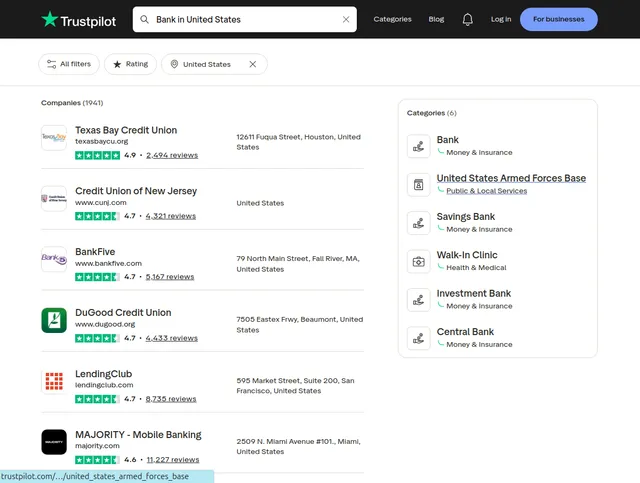
The Trustpilot Business Search Scraper processes search result pages—the listings displayed after searching for businesses on Trustpilot. Unlike detail page scrapers requiring individual company URLs, this tool efficiently captures multiple businesses from search queries.
Core Data Fields:
Business Unit ID: Trustpilot's unique identifier for each company. Essential for tracking businesses over time, linking to detailed reviews, and building relational databases.
Stars: Visual rating (1-5 stars) representing overall customer satisfaction. The primary metric for quick quality assessment.
Identifying Name: Internal business identifier, typically the domain name (e.g., "bankofamerica.com"). Useful for matching with other datasets and verifying company identity.
Display Name: Public-facing company name as shown on Trustpilot (e.g., "Bank of America"). Used for reporting, filtering, and customer-facing applications.
Logo URL: Direct link to company logo image. Provides branding assets for dashboards, reports, and competitive analysis presentations.
Number of Reviews: Total review count indicating engagement level and data reliability. High review counts signal established presence; low counts may indicate new businesses or limited customer feedback.
Trust Score: Numerical score (1.0-5.0) calculated from review ratings. More precise than star ratings, enabling statistical analysis and trend tracking.
Location: Geographic information (country, region, or city). Critical for local market analysis, regional benchmarking, and understanding geographic reputation variations.
Recommended in Categories: Industry classifications assigned by Trustpilot. Shows how businesses position themselves and enables cross-category competitive analysis.
Contact: Available contact information (email, phone, website). Facilitates direct outreach for partnerships, sales, or verification.
Categories: Primary business categories defining industry classification. Enables filtering, segmentation, and industry-specific trend analysis.
Target Users:
Market Researchers analyze competitive landscapes across industries using standardized trust metrics. Businesses benchmark their reputation against competitors and track market positioning. Investors evaluate customer satisfaction across potential investments or portfolio companies. Marketing Agencies monitor client reputation and identify improvement opportunities. Sales Teams prioritize leads based on reputation gaps or market positioning. Product Managers identify pain points through trust score patterns across competitor sets.
Input Configuration: Building Effective Search Queries
The scraper processes Trustpilot search result URLs — pages displaying business listings after performing searches. It supports two scraping modes — use only one at a time:
- Scrape by URLs — scrape data directly from a list of Trustpilot search result URLs.
- Scrape by search filters — scrape data using a keyword and additional filters (rating, number of reviews, etc.) instead of providing URLs.
There is also a General settings group that applies to both modes.
Example Screenshot:
1. Scrape by URLs
Use this mode when you already have specific Trustpilot search result URLs. When this mode is used, all options in the "Scrape by search filters" section will be disabled.
| Field | Type | Default | Description |
|---|---|---|---|
urls | array | (required) | One or more Trustpilot business list URLs to scrape. You can paste URLs one by one, or use the Bulk edit section to add a prepared list. Build these by performing searches on Trustpilot and copying the resulting URLs. |
ignore_url_failures | boolean | true | If true, the scraper continues processing remaining URLs even if some fail. Essential when scraping multiple searches — one broken URL won't halt the entire run. Set false only when every URL must succeed. |
2. Scrape by search filters
Use this mode when you want to search using a keyword and additional filter attributes instead of scraping by URLs. If you use this mode, leave the urls field above empty.
| Field | Type | Default | Description |
|---|---|---|---|
keyword | string | — | The keyword to search for (e.g. "Bank in United States", "Hotels London"). |
rating | string ("", 3.0, 4.0, 4.5) | — | Minimum rating filter: All (empty), 3 stars +, 4 stars +, 4.5 stars +. |
number_of_reviews | string ("", 25, 50, 100, 250, 500) | — | Minimum review count filter: All, 25+, 50+, 100+, 250+, 500+. |
page | integer | — | The page number to start scraping from. |
3. General settings
Applies to both scraping modes above.
| Field | Type | Default | Description |
|---|---|---|---|
max_items_per_url | integer | 20 | Controls the extraction limit per search page/URL. Default of 20 matches a standard Trustpilot search page (typically 20–24 businesses). Increase to 50–100 if a search returns more results or you want to capture extended listings. |
proxy | object | { "useApifyProxy": false } | Proxy configuration. Leave useApifyProxy: false for standard scraping — Trustpilot generally allows scraping without aggressive proxy rotation. Enable it (with residential proxies) if you experience blocks or need to appear as a user from a specific geographic location. |
Building Effective URL Lists:
- Industry Surveys: Create searches for each industry segment: "Hotels London," "SaaS companies," "Insurance providers UK"
- Competitive Sets: Search specific competitors by name or category to build comparison databases
- Geographic Analysis: Vary location parameters across searches to compare regional markets
- Quality Segmentation: Use the
ratingfilter to identify high-performers vs. struggling businesses
Pro Tips:
- Test searches manually on Trustpilot before scraping to verify relevant results
- For comprehensive industry data, create multiple searches with varied keywords rather than one broad query
- Save successful search URLs in a spreadsheet for reproducible data collection
Complete Output Structure: Field-by-Field Analysis
The scraper returns JSON data with each business as an object containing multiple fields. Understanding field meanings enables effective analysis.
Business Unit ID:
- Format: Alphanumeric string (e.g., "5baa4e2e0000ff00057c46e2")
- Purpose: Unique identifier for tracking businesses across time, building relational databases, constructing detail page URLs (https://www.trustpilot.com/review/[domain])
- Use cases: Deduplication, longitudinal tracking, linking search data to review details
Stars:
- Format: Numeric (1-5, may include decimals like 4.2)
- Purpose: Quick quality indicator, filtering, visual dashboards
- Analysis: Distribution analysis reveals market quality standards, outlier identification
Identifying Name:
- Format: Domain name or slug (e.g., "chase.com", "wells-fargo")
- Purpose: Technical identifier, cross-referencing with web analytics, matching with internal databases
- Use cases: Automated lookups, data enrichment from other sources
Display Name:
- Format: Human-readable company name (e.g., "Wells Fargo", "Chase Bank")
- Purpose: Reporting, customer-facing displays, presentation materials
- Analysis: Brand name variations across markets, subsidiary identification
Logo URL:
- Format: Direct image link (https://cdn.trustpilot.net/brand-assets/[id]/logo.png)
- Purpose: Visual assets for dashboards, reports, competitor comparison matrices
- Use cases: Automated report generation, brand recognition analysis
Number of Reviews:
- Format: Integer (e.g., 15420)
- Purpose: Reliability indicator, engagement metric, market presence signal
- Analysis: Review volume vs. trust score correlation, market saturation assessment, identifying underrepresented businesses
Trust Score:
- Format: Decimal (1.0-5.0, e.g., 4.3)
- Purpose: Precise quality metric for statistical analysis, trend tracking, benchmarking
- Analysis: Calculate averages by category/location, identify improvement/decline trends, competitive positioning
Location:
- Format: Country, region, or city (e.g., "United States", "London, UK")
- Purpose: Geographic segmentation, regional benchmarking, market entry analysis
- Analysis: Regional reputation differences, location-based competitive landscapes
Recommended in Categories:
- Format: Array of category names (e.g., ["Banking", "Financial Services"])
- Purpose: Understanding business positioning, cross-category analysis, market classification
- Analysis: Multi-category businesses (diversified players), category-specific trust patterns
Contact:
- Format: Object with email, phone, website fields
- Purpose: Direct outreach, verification, partnership development
- Use cases: Lead generation, fact-checking business information
Categories:
- Format: Array of primary categories (e.g., ["Banks", "Credit Unions"])
- Purpose: Industry classification, filtering, competitive set definition
- Analysis: Category-level benchmarking, identifying category leaders/laggards
Sample Output:
Step-by-Step Implementation Guide
1. Define Research Objectives: Identify what you need—competitive benchmarking (specific competitors), market overview (industry-wide), geographic analysis (location-specific), or quality segmentation (high vs. low performers).
2. Build Search URLs: Perform searches on Trustpilot matching your objectives. Copy URLs from browser address bar. Create multiple URLs for comprehensive coverage—vary keywords, locations, and filters.
3. Configure Input JSON: Add URLs to configuration. Set max_items_per_url based on needs (20 for standard pages, 50+ for extended extraction). Enable ignore_url_failures for robustness.
4. Execute Scraping Run: Launch through Apify console. Monitor progress. Processing 5-10 search URLs typically completes in 2-4 minutes, depending on result volumes.
5. Review Data Quality: Check dataset preview. Verify trust scores, review counts, and categories populate correctly. Identify any missing fields or systematic issues.
6. Export and Analyze: Export in preferred format—JSON for databases, CSV for Excel analysis. Filter by trust score, review count, or location for targeted analysis.
7. Handle Pagination: Trustpilot search results span multiple pages. To capture beyond first page, modify URLs with &page=2, &page=3, etc., or increase max_items_per_url beyond page limits to trigger automatic pagination.
Error Troubleshooting: If URLs fail, verify they're search result pages (contain /search?query=). Ensure proper URL encoding. Check that searches return results on Trustpilot directly.
Strategic Applications for Competitive Intelligence
Competitive Benchmarking: Compare your trust score and review volume against direct competitors. Identify performance gaps and market positioning. Track competitor reputation changes over time through periodic scraping.
Market Entry Analysis: Before entering new markets, scrape businesses in target categories/locations. Understand average trust scores, review engagement levels, and competitive density. Identify underserved segments with low average scores or few players.
Investment Due Diligence: Investors evaluating companies can assess customer satisfaction through trust scores and review analysis. Compare portfolio companies against industry benchmarks. Identify reputation risks before acquisition.
Category Leadership Identification: Scrape entire industries to identify category leaders—businesses with high trust scores AND high review counts. Study their positioning, categories, and customer feedback patterns.
Geographic Reputation Mapping: Compare location-based trust scores to identify regional reputation variations. Businesses strong in one region but weak in others reveal operational inconsistencies or market-specific challenges.
Review Volume Analysis: Low review counts despite market presence indicate limited customer engagement or difficulty generating feedback. High volumes with low scores signal systematic issues. Optimal businesses balance high volume with high scores.
Multi-Category Strategy Assessment: Businesses appearing in multiple "recommended categories" demonstrate successful diversification. Analyze whether category expansion correlates with maintained trust scores.
Sentiment Trend Forecasting: Scrape same searches monthly/quarterly. Track trust score movements across competitive sets. Declining scores signal emerging issues; improving scores indicate successful turnaround strategies.
Maximizing Data Value: Advanced Techniques
Time-Series Analysis: Schedule weekly/monthly scraping of identical searches. Build historical databases tracking trust score evolution, review volume growth, and competitive position changes.
Correlation Studies: Combine Trustpilot data with financial metrics, stock performance, or website traffic. Identify relationships between customer satisfaction and business outcomes.
Outlier Investigation: Flag businesses with unusual patterns—high reviews + low scores (systematic problems), low reviews + high scores (new/niche players), significant score changes (investigate causes).
Category Cross-Analysis: Compare trust scores across categories. Example: "E-commerce platforms" vs. "E-commerce clothing stores" reveals whether specialization drives higher satisfaction.
Contact Data Enrichment: Use extracted contact information to enrich CRM systems, validate business databases, or build outreach lists for partnerships/sales.
Logo Asset Collection: Build branded competitor databases using logo URLs for presentations, monitoring dashboards, and competitive intelligence reports.
Market Saturation Metrics: Calculate businesses per capita in geographic markets. High saturation with low average scores indicates commoditized markets with differentiation challenges.
Review Volume Benchmarking: Establish industry-specific "review volume standards." Businesses below standards despite market maturity may have customer engagement problems or poor review generation strategies.
Data Governance and Best Practices
Scraping Frequency: Balance freshness needs against resource consumption. Weekly scraping for active competitive monitoring, monthly for market trend analysis. Trustpilot data changes gradually—trust scores shift over weeks/months.
Data Validation: Implement checks for missing critical fields (business_unit_id, trust_score). Flag unrealistic values (scores outside 1-5 range). Verify location data consistency.
Privacy Compliance: Contact information is business data, generally not subject to personal data regulations. However, maintain ethical usage—don't spam businesses extracted from scraping.
Attribution Practices: Store source URLs and scrape timestamps. Enables verification, troubleshooting, and understanding data freshness for analysis.
Duplicate Management: Same businesses may appear in multiple searches. Use business_unit_id for deduplication. Track which searches returned each business for search effectiveness analysis.
Error Logging: Monitor failed URLs. Common issues: searches returning no results, URL encoding problems, temporary Trustpilot outages. Retry failed URLs separately.
Data Refresh Strategy: Archive historical data when re-scraping. Comparing current vs. historical snapshots reveals reputation trends impossible to detect from single extractions.
Conclusion
The Trustpilot Business Search Scraper transforms consumer review intelligence into actionable competitive insights. From benchmarking reputation against competitors to identifying market entry opportunities and tracking satisfaction trends, this tool delivers standardized metrics across any industry. Whether conducting market research, monitoring brand reputation, or evaluating investment opportunities, Trustpilot data provides the customer satisfaction intelligence driving strategic decisions. Start extracting review intelligence today.


