

Flipkart Product Search Scraper
Pricing
from $2.00 / 1,000 results
Flipkart Product Search Scraper
Scrape product listings from Flipkart.com search results efficiently. Extract pricing, analytics, availability, images, and product details from India's largest e-commerce platform. Perfect for price monitoring, market research, competitor analysis, and inventory tracking across millions of products
Pricing
from $2.00 / 1,000 results
Rating
0.0
(0)
Developer

Stealth mode
Maintained by CommunityActor stats
1
Bookmarked
155
Total users
4
Monthly active users
2 months ago
Last modified
Categories
Share
Flipkart.com Product Search Scraper: Extract E-commerce Data from India's Leading Marketplace
Understanding Flipkart.com and Its E-commerce Dominance
Flipkart.com stands as India's leading online marketplace, competing directly with Amazon in one of the world's fastest-growing e-commerce markets. With over 150 million products across 80+ categories—from electronics and fashion to home goods and groceries—Flipkart represents a massive dataset of consumer trends, pricing strategies, and market dynamics in South Asian e-commerce.
The platform's search results pages contain rich product information including real-time pricing, discount flags, availability status, seller details, ratings, and promotional banners. For businesses operating in or targeting the Indian market, this data provides unmatched insights into competitive pricing, product positioning, seasonal trends, and consumer preferences.
Manually tracking products across multiple searches, categories, and price points would require endless scrolling and data entry. The Flipkart.com Product Search Scraper automates this process entirely, transforming search result pages into structured datasets ready for price comparison, market analysis, or competitive intelligence.
What This Scraper Extracts and Who Should Use It
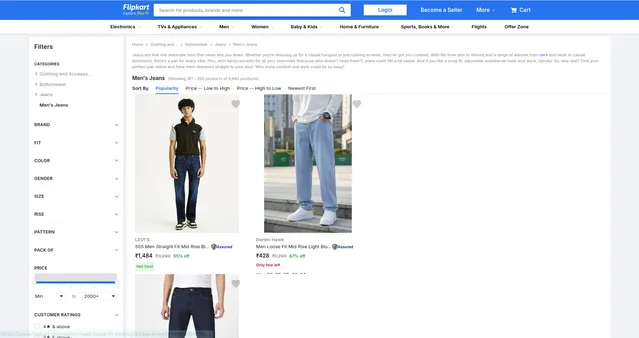
The Flipkart.com Product Search Scraper processes search result page URLs—the pages displaying multiple products after performing a search or browsing a category. Unlike detail page scrapers that require individual product URLs, this tool efficiently collects data from entire search pages with multiple listings.
Key Data Categories:
Analytics Data: Traffic and engagement metrics that reveal product popularity and visibility trends across the platform.
Base URL: Product page links for deeper analysis or redirecting customers to specific items.
Buyability: Real-time availability status indicating whether products are in stock, out of stock, or temporarily unavailable—critical for inventory tracking.
ID & Listing ID: Unique identifiers for tracking specific products across time, avoiding duplicates, and building relational databases.
Titles: Product names as they appear in search results, essential for categorization, search functionality, and understanding product positioning.
Pricing: Complete pricing information including original prices, discounted prices, discount percentages, and special offer indicators—the most critical data for competitive analysis.
Flags: Promotional indicators like "Bestseller," "Assured," "Plus," or "Limited Time Deal" that signal Flipkart's merchandising priorities and product quality tiers.
Media: Product images and visual assets used in search results, valuable for visual analysis, catalog building, or automated product matching.
Target Users:
E-commerce Sellers monitor competitor pricing and adjust their own strategies dynamically. Price Comparison Platforms aggregate Flipkart data alongside other marketplaces for comprehensive consumer tools. Market Researchers analyze pricing trends, product availability, and promotional patterns across categories. Retail Brands track how their products are positioned and priced by various sellers on Flipkart. Dropshipping Businesses identify trending products and optimal price points for their own stores.
Input Configuration: Targeting Search Result Pages
The scraper processes Flipkart search result and category page URLs, not individual product detail pages. These are the pages showing multiple product listings with filters and pagination.
The Actor supports two scraping modes — use only one at a time:
- Scrape by URLs — scrape data directly from a list of Flipkart search result / category page URLs.
- Scrape by search filters — scrape data using a keyword and additional filters (sort order, brand, gender, color, price range, rating, discount) instead of providing URLs.
There is also a General settings group that applies to both modes.
Example Screenshot:
1. Scrape by URLs
Use this mode when you already have specific Flipkart search result or category page URLs. When this mode is used, all options in the "Scrape by search filters" section will be disabled.
| Field | Type | Default | Description |
|---|---|---|---|
urls | array | (required) | One or more Flipkart search result or category page URLs to scrape. You can paste URLs one by one, or use the Bulk edit section to add a prepared list. The URL structure includes category identifiers (sid), merchandising parameters (fm), and pagination (page). Add multiple URLs to target different categories, keywords, or price ranges in a single run. |
ignore_url_failures | boolean | true | If true, the scraper continues running even if some URLs fail to be scraped, instead of stopping the entire run. Essential when scraping multiple category or pagination URLs where individual page errors shouldn't stop your job. |
Building URL Lists: Perform test searches on Flipkart with your desired filters (price range, brand, rating, discount percentage). Copy the resulting URLs. For datasets spanning multiple pages, systematically increment the page parameter (page=1, page=2, page=3) across your URL list.
2. Scrape by search filters
Use this mode when you want to search using a keyword and filter attributes instead of scraping by URLs. If you use this mode, leave the urls field above empty.
| Field | Type | Default | Description |
|---|---|---|---|
keyword | string | — | The keyword to search for. |
sort_by | string (relevance, popularity, price_asc, price_desc, recency_desc) | — | Sort results by Relevance, Popularity, Price (asc), Price (desc), or Recency (desc). |
brand | string (large enum) | "" (Any) | Filter results by brand — e.g. PUMA, ADIDAS, NIKE, REEBOK, CAMPUS, Skechers, and hundreds more. Leave as "Any" to include all brands. |
gender | string (Men, Women, Boys, Girls, Boys & Girls, Baby Boys & Baby Girls, Unisex, Baby Girls, Baby Boys) | "" (All) | Filter results by target gender/age group. |
color | string (large enum) | "" (All) | Filter results by product color — e.g. Black, Blue, White, Red, Multicolor, etc. |
price_from | string (500, 1000, 1500, 2000, 3000) | "" (All) | Minimum price filter. |
price_to | string (500, 1000, 1500, 2000, 3000) | "" (All) | Maximum price filter. |
rating | string (4, 3) | "" (All) | Minimum customer rating filter — "4 stars and above" or "3 stars and above". |
discount | string (30, 40, 50, 60, 70) | "" (All) | Minimum discount percentage filter. |
page | integer | — | The page number to start scraping from. |
3. General settings
Applies to both scraping modes above.
| Field | Type | Default | Description |
|---|---|---|---|
max_items_per_url | integer | 20 | The maximum number of products to extract per search page or URL. Flipkart typically displays 20-40 products per page, so 20 captures most listings efficiently. Increase to 40-50 for comprehensive extraction, or decrease to 10 for quick sampling. |
proxy.useApifyProxy | boolean | false | Set to false if not using Apify's proxy service. For large-scale scraping or to avoid IP blocking, consider enabling residential proxies (true) with appropriate proxy groups. Flipkart implements bot detection, so proxies improve reliability for high-volume extraction. |
Note: The
brandfield's underlying enum is very large (1000+ options covering major brands like Nike, Adidas, Puma as well as many smaller/generic sellers) — search or type to filter it down when selecting a value in the UI.
Output Structure: Understanding Product Data Fields
The scraper returns JSON data with each product as an object containing multiple fields organized into logical categories.
Analytics Data: Contains engagement metrics like view counts, wishlists, or popularity scores that Flipkart tracks internally. Use case: Identify trending products, gauge consumer interest, predict inventory velocity, prioritize products for your own marketplace.
Base URL: Direct link to the product's detail page on Flipkart. Use case: Enable click-through to full product information, verify scraped data, build product catalogs with deep links, track URL structure changes.
Buyability: Object indicating stock status with fields like available (boolean), stock_status (in stock/out of stock/limited), and availability messages. Use case: Real-time inventory monitoring, identifying stock-out patterns, alerting when competitors run out of popular items, tracking restocking frequency.
ID: Flipkart's unique product identifier, typically alphanumeric. Use case: Primary database key, tracking price changes over time for specific products, avoiding duplicates when merging datasets, linking to external data sources.
Listing ID: Unique identifier for this specific search result appearance (may differ from product ID). Use case: Tracking how products appear across different searches or categories, analyzing merchandising strategies, understanding product positioning.
Titles: Product name as displayed in search results, including brand, model, key features, and specifications. Use case: Product categorization, keyword extraction for SEO analysis, matching products across platforms, understanding naming conventions and marketing language.
Pricing: Object containing multiple price-related fields:
current_price: Actual selling priceoriginal_price: MRP or list price before discountsdiscount_percentage: Calculated discountcurrency: INR (Indian Rupees)special_price: Additional promotional pricing
Use case: Competitive price monitoring, discount pattern analysis, margin calculation, dynamic repricing strategies, identifying loss-leader products, seasonal pricing trends.
Flags: Array of promotional badges and indicators such as:
- "Flipkart Assured" (quality guarantee)
- "Bestseller" (top-selling item)
- "Plus" (premium delivery)
- "Limited Time Deal"
- "Bank Offer"
- "Exchange Available"
Use case: Identifying Flipkart's merchandising priorities, understanding quality tiers, tracking promotional campaigns, analyzing which flags correlate with sales success, optimizing your own product listings.
Media: Object containing image URLs, typically including:
thumbnail: Small preview imagemain_image: Standard search result imageimage_urls: Array of additional product images
Use case: Visual product catalogs, image-based product matching, quality assessment through visuals, automated image download for your own platform, analyzing visual merchandising strategies.
Sample Output:
Step-by-Step Usage Guide
1. Define Your Research Goals: Determine what products or categories you need to track. Consider whether you need broad category overviews or deep dives into specific product segments. Test searches on Flipkart to ensure filters return relevant results.
2. Build Search URLs: Perform searches on Flipkart with desired filters (category, brand, price range, rating, discount). Copy the resulting URLs. For comprehensive datasets, create multiple URLs with pagination: manually change page=1 to page=2, page=3, etc.
3. Configure Input JSON: Set up your configuration with collected URLs. For testing, start with max_items_per_url: 10 and 2-3 URLs. For production, increase to 20-40 items and include all relevant pages. Enable ignore_url_failures when scraping many pages.
4. Launch Scraping Job: Execute through Apify console or API. Monitor real-time progress in the logs. Processing 10 search pages with 20 items each typically completes in 2-4 minutes, depending on proxy performance and Flipkart's response times.
5. Validate Data Quality: Preview results in the dataset tab. Check that critical fields (pricing, titles, buyability) are populated correctly. Verify product IDs are unique and URLs are valid. Identify any patterns in missing data.
6. Export and Analyze: Download in your preferred format—JSON for database integration, CSV for spreadsheet analysis, Excel for business reporting. Apply filters to focus on specific price ranges, availability status, or promotional flags.
7. Schedule Regular Updates: E-commerce pricing changes rapidly. Set up scheduled runs (hourly, daily, or weekly) to track price fluctuations, stock changes, and promotional patterns over time. Store historical data to identify trends and seasonal variations.
Strategic Applications for E-commerce Intelligence
Dynamic Pricing Strategies: Monitor competitor prices in real-time and adjust your own pricing automatically. Identify price points where products sell fastest. Track discount patterns to time your own promotions effectively.
Inventory Management: Track buyability status across competitors. Identify when popular items go out of stock, revealing supply chain issues or demand spikes. Use stock patterns to optimize your own inventory levels.
Product Opportunity Analysis: Analyze analytics data and flags to identify bestselling products in your niche. Discover high-demand items with limited competition. Find gaps in the market where consumer demand exceeds supply.
Competitive Benchmarking: Compare your products against competitors on pricing, promotional strategies, and product positioning. Track how competitors use Flipkart's merchandising tools (Assured, Plus, Bestseller badges) to drive sales.
Market Trend Forecasting: Combine pricing and availability data over time to predict seasonal trends. Identify emerging product categories before they reach peak demand. Adjust your product portfolio based on data-driven insights.
Promotional Campaign Analysis: Track which products receive special offers, bank deals, or limited-time promotions. Analyze the effectiveness of different promotional flags on product visibility and sales velocity. Optimize your own promotional strategies based on what works in your category.
Best Practices for Maximum Data Value
Segment Your Scraping: Rather than one massive scrape, create targeted jobs by category, brand, or price range. This produces cleaner datasets that are easier to analyze and faster to process.
Implement Change Detection: Scrape the same products regularly and compare results. Alert when prices drop significantly (restock opportunity), when competitors stock out (competitive advantage), or when new flags appear (promotional activity).
Enrich With External Data: Combine Flipkart data with Amazon India pricing, offline retail prices, or manufacturer MSRPs. Cross-reference with social media sentiment or Google Trends to understand demand drivers.
Respect Rate Limits: Space out large scraping operations to avoid overwhelming Flipkart's servers. For very large datasets (1000+ pages), split into multiple smaller jobs over several hours or days.
Validate Pricing Accuracy: Implement sanity checks for suspicious prices (too high or too low), missing discount calculations, or currency inconsistencies. Flag anomalies for manual review before making business decisions.
Store Historical Snapshots: Maintain time-series data showing how products evolve over weeks or months. Track average prices, discount frequencies, stock-out durations, and promotional cycles. This temporal analysis reveals patterns invisible in single snapshots.
Conclusion
The Flipkart.com Product Search Scraper transforms India's leading e-commerce marketplace into actionable business intelligence. Whether you're optimizing prices, tracking competitors, researching markets, or building shopping comparison tools, this scraper delivers the comprehensive product data you need. Start extracting e-commerce insights from one of the world's fastest-growing markets today.


