

Fravega Product Search Scraper
Pricing
from $1.50 / 1,000 results
Fravega Product Search Scraper
Scrape product listings from Fravega.com, Argentina's leading electronics and home appliance retailer. Extract prices, brands, SKUs, stock status, installment plans, and product images from search pages. Ideal for price monitoring, market analysis, and competitive intelligence in Latin American.
Pricing
from $1.50 / 1,000 results
Rating
0.0
(0)
Developer

Stealth mode
Maintained by CommunityActor stats
0
Bookmarked
10
Total users
0
Monthly active users
17 days ago
Last modified
Categories
Features
Share
Fravega.com Products Search Scraper: Extract Argentine E-Commerce Data
Understanding Fravega.com and Its Market Position
Fravega.com is Argentina's premier electronics and home appliance retailer, operating both physical stores and a robust e-commerce platform. The site offers thousands of products across categories including laptops, smartphones, TVs, refrigerators, washing machines, and small appliances. As a market leader in Argentine retail, Fravega's pricing and inventory data provides critical insights into consumer electronics trends, competitive positioning, and market dynamics in Latin America.
The platform features comprehensive product information including multiple seller options, detailed pricing with Argentine peso installment plans (cuotas), stock availability, and rich product imagery. For businesses operating in or expanding to Latin American markets, Fravega data reveals pricing strategies, product availability patterns, and consumer demand signals.
Manual product data collection across multiple categories and search pages is time-intensive. This scraper automates extraction of search result pages, delivering structured datasets for price tracking, competitive analysis, and market research.
What This Scraper Extracts and Key Users
The Fravega.com Products Search Scraper processes search result page URLs, capturing multiple product listings per page. Unlike detail page scrapers requiring individual product URLs, this tool efficiently collects broad datasets across categories, brands, and search queries.
Extracted Data Fields:
Sellers: Marketplace seller information when products are offered by multiple vendors, revealing marketplace dynamics and third-party seller activity on Fravega's platform.
Stock Labels: Availability indicators ("in stock," "limited stock," "out of stock") essential for inventory monitoring and demand forecasting.
ID: Unique product identifier in Fravega's system, critical for tracking specific items over time and avoiding duplicates.
Title: Product name as displayed in listings, containing brand, model, and key specifications.
Katalog Category ID: Internal category classification enabling product segmentation and category-level analysis.
Brand: Manufacturer or brand name, essential for brand-focused competitive analysis and market share tracking.
SKUs: Stock Keeping Units identifying specific product variants (color, size, configuration), crucial for inventory management.
GTIN: Global Trade Item Number (barcode/EAN) for universal product identification and cross-platform price comparison.
Images: Product image URLs for visual catalogs, automated listing creation, or visual analysis.
Collections: Product groupings or promotional collections (e.g., "Black Friday," "Summer Sale"), revealing merchandising strategies.
Installments: Argentine-specific payment plan data showing installment options (cuotas), a critical purchasing factor in the local market.
List Price: Original/MSRP pricing before discounts, used for discount calculation and perceived value analysis.
Sale Price: Current selling price, the primary data point for competitive pricing and market positioning.
Slug: URL-friendly product identifier used in product page links.
Primary Users:
E-commerce Competitors track Fravega's pricing, promotions, and inventory to maintain competitive positioning. Price Intelligence Firms monitor thousands of products for dynamic pricing insights. Market Researchers analyze product availability, pricing trends, and category performance in Argentine retail. Brands and Manufacturers monitor how their products are priced and promoted by major retailers. International Retailers planning Latin American expansion benchmark Fravega's strategies.
Input Configuration
The Actor supports two scraping modes — use only one at a time:
- Scrape by URLs — scrape data directly from a list of Fravega search result page URLs.
- Scrape by search filters — scrape data using a keyword and additional filters (sort order, price range, discount) instead of providing URLs.
There is also a General settings group that applies to both modes.
Example Screenshot:
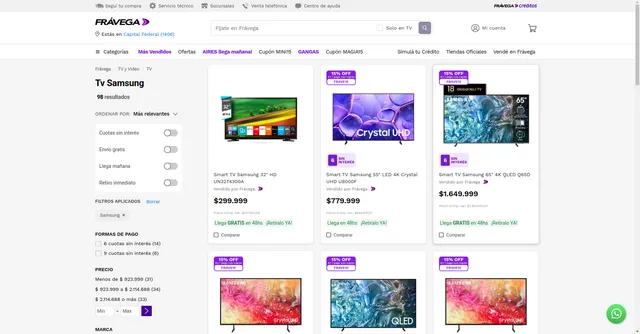
1. Scrape by URLs
Use this mode when you already have specific search result URLs. When this mode is used, all options in the "Scrape by search filters" section will be disabled.
| Field | Type | Default | Description |
|---|---|---|---|
urls | array | (required) | One or more Fravega product search list URLs to scrape. You can paste URLs one by one, or use the Bulk edit section to add a prepared list. Format: https://www.fravega.com/l/?keyword=[search_term]&page=[number]. Build URL lists by performing searches on Fravega and copying URLs, then increment page numbers for pagination. |
ignore_url_failures | boolean | true | If true, the scraper continues running when a URL fails instead of stopping the entire run. Essential for batch processing of multiple URLs. |
URL Construction Tips: Use category URLs (/l/tecnologia/notebooks), brand filters, or keyword searches. Test URLs in a browser first to ensure they return relevant products.
2. Scrape by search filters
Use this mode when you want to search using a keyword and additional filter attributes instead of scraping by URLs. If you use this mode, leave the urls field above empty.
| Field | Type | Default | Description |
|---|---|---|---|
keyword | string | — | The keyword to search for. |
sort_by | string ("", LOWEST_SALE_PRICE, HIGHEST_SALE_PRICE, HIGHEST_DISCOUNT) | — | Sort results by Relevance (empty), Lowest sale price, Highest sale price, or Highest discount. |
price_range | string | — | Price range to filter items by, in the format min-max (e.g. 100-200). |
discount | string ("", 10–70) | — | Minimum discount filter: All, or from 10% off up to 70% off, in steps of 10. |
page | integer | — | The page number to start scraping from. |
3. General settings
Applies to both scraping modes above.
| Field | Type | Default | Description |
|---|---|---|---|
max_items_per_url | integer | 20 | Maximum number of products extracted per search page/URL. Keep at 20 for standard pages; increase to 50–100 for comprehensive extraction if pages display more results. |
proxy | object | { "useApifyProxy": false } | Proxy configuration used by the scraper. Set useApifyProxy: false for standard scraping. Enable proxies (useApifyProxy: true with apifyProxyGroups: ["RESIDENTIAL"] and a country such as apifyProxyCountry: "AR") if you experience blocking or need high-volume extraction. |
Complete Output Structure and Field Definitions
The scraper returns JSON data with each product as an object containing detailed fields. Understanding field purposes enables effective analysis and application.
Product Identification
Product Code: Public product code of the listing on Frávega. Purpose: Database indexing, tracking products over time, avoiding duplicates, building product URLs.
Item ID: Unique platform identifier of the item. Purpose: Joining datasets, deduplication, linking records across scrapes.
Listing URL: Direct link to the product page on Frávega. Purpose: Accessing complete details, sharing products with clients, verification of scraped data.
Title: Product name as displayed on the listing. Purpose: Product matching, keyword analysis, catalog building.
Slug: URL-friendly product identifier. Purpose: Constructing product URLs, alternative identifier.
Type: Item type on the platform (e.g., Product). Purpose: Separating products from other item kinds.
Is Active: Whether the product is currently active on the platform. Purpose: Filtering out inactive listings.
GTIN: Global Trade Item Number (barcode), null when not provided. Purpose: Matching the same product across stores and marketplaces.
Brand
Brand ID: Platform identifier of the brand. Purpose: Joining and grouping by brand.
Brand Name: Name of the product brand. Purpose: Brand-level analysis, market share and price positioning.
Brand Slug: URL-friendly brand identifier. Purpose: Building brand page URLs and filters.
Brand Image URL: Link to the brand logo (null if unavailable). Purpose: Branding in reports and dashboards.
Seller
Seller ID: Platform identifier of the seller. Purpose: Grouping products by seller, competitor tracking.
Seller Name: Commercial name of the seller. Purpose: Seller analysis, lead generation, marketplace monitoring.
Seller Slug: URL-friendly seller identifier. Purpose: Building seller page URLs.
Is Marketplace: Whether the product is sold by a third-party marketplace seller. Purpose: Separating marketplace sellers from the retailer's own inventory.
Category
Category: Name of the most specific category of the product. Purpose: Product segmentation and category-level analysis.
Category ID: Platform identifier of the most specific category. Purpose: Joining and filtering by category.
Category Slug: Full category path used in URLs. Purpose: Building category URLs and hierarchical filtering.
Category Breadcrumb: Category hierarchy from top level to most specific level as readable text. Purpose: Quick display and grouping at any hierarchy level.
Categories: Ordered list of category objects (level, id, name, slug) from top level to most specific. Purpose: Hierarchical analysis and multi-level aggregation.
Category Paths: All category paths of the product as readable text. Purpose: Handling products assigned to more than one category tree.
Pricing
Price: Current sale price as a number. Purpose: Price comparison, market monitoring, budget filtering.
List Price: Original price before discount. Purpose: Measuring real discount depth and price history.
Discount Pct: Discount percentage applied to the list price. Purpose: Identifying deals and promotional intensity.
Price Without Tax: Sale price excluding tax. Purpose: Net price comparison and B2B analysis.
Currency: Currency of the prices (ARS). Purpose: Correct financial interpretation when merging datasets from multiple markets.
Sales Channel: Sales channel the price applies to. Purpose: Distinguishing channel-specific pricing.
Promotions and Availability
Promotions: List of promotions attached to the product, each with name, slug and tags (e.g., installments without interest). Purpose: Analyzing financing offers and promotional strategies.
Stock Labels: Stock availability labels shown on the listing (empty if none). Purpose: Monitoring availability and low-stock signals.
Triggers: Special triggers or conditions attached to the item (empty if none). Purpose: Identifying special offers or rules affecting the listing.
Seller Conditions: Seller-specific sales conditions (empty if none). Purpose: Understanding shipping, warranty or purchase restrictions.
Is Sponsored: Whether the listing appears as a paid or sponsored placement. Purpose: Analyzing advertising investment and search visibility.
Media
Image Count: Total number of product images. Purpose: Evaluating listing quality and completeness.
Thumbnail URL: Link to the small preview image used in listings. Purpose: Lightweight previews in dashboards and catalogs.
Image URLs: List of direct links to product images in original order. Purpose: Downloading images, visual inspection, computer vision analysis.
Raw Data
Raw Data: Complete original JSON object of the product as scraped, without modification. Purpose: Auditing, debugging, accessing fields not included in the cleaned output, and reprocessing without re-scraping.
Sample Output:
Implementation Guide
1. Define Target Products: Identify categories, brands, or keywords to track. Test searches on Fravega.com to verify results match your needs.
2. Build URL List: Copy search result URLs from Fravega. For pagination, create multiple URLs incrementing page numbers (page=1, page=2, page=3). Organize in spreadsheet or JSON file.
3. Configure Input: Set max_items_per_url based on page content (typically 20-48 products per page). Enable ignore_url_failures for robustness.
4. Run Scraper: Launch via Apify. Monitor progress. Processing 10 search pages typically completes in 2-4 minutes.
5. Validate Data: Check output for completeness. Verify prices are current, stock labels are present, and critical fields (title, brand, prices) are populated.
6. Export Results: Download as JSON (database integration), CSV (spreadsheet analysis), or Excel (business reporting).
Error Handling: Failed URLs may indicate removed search pages, changed URL structure, or temporary site issues. Check activity log for details. Validate URLs in browser before troubleshooting.
Strategic Applications
Dynamic Price Monitoring: Track competitor pricing across thousands of products. Identify price changes, promotional periods, and pricing patterns. Automate repricing strategies based on market data.
Stock Availability Intelligence: Monitor stock labels to identify high-demand products (frequent stock-outs), slow movers (perpetual availability), and restock patterns. Inform inventory planning.
Discount Analysis: Compare list_price vs sale_price to calculate discount percentages. Identify deep discounts signaling clearance, seasonal promotion timing, and aggressive competitive pricing.
Brand Market Share: Count products per brand across categories. Track brand presence, shelf space (digital equivalent), and new product introductions.
Installment Plan Strategy: Analyze installment offerings across price points. Argentine consumers heavily rely on cuotas—understanding competitive financing is crucial for pricing strategy.
Category Performance Tracking: Monitor product counts, average prices, and discount rates by category. Identify growing categories and declining segments.
New Product Detection: Compare scrapes over time. Products with new IDs indicate launches. Track time-to-market and competitive response timing.
Image Asset Collection: Build visual product catalogs using scraped images. Useful for marketplace sellers, comparison sites, or competitive visual merchandising analysis.
Maximizing Data Value
Schedule Regular Scraping: Argentine e-commerce is dynamic with frequent price changes and promotions. Daily scraping captures price volatility, weekly scraping tracks broader trends.
Currency Considerations: Argentine peso experiences inflation and devaluation. Store prices with scrape timestamps. Convert to USD for temporal comparisons using historical exchange rates.
Segment by Collections: Track products in promotional collections to analyze campaign effectiveness. Measure discount depths during events like Hot Sale, Black Friday, or Cyber Monday.
Cross-Reference GTINs: Use GTIN codes to match Fravega products with other retailers (MercadoLibre, Garbarino). Build comprehensive cross-platform price comparison databases.
Analyze Installment Impact: Correlate installment plan availability with price points. Products offering interest-free plans may sell at higher base prices—total cost analysis reveals true competitiveness.
Brand-Level Dashboards: Create brand-specific views showing all your products on Fravega. Monitor pricing compliance, stock status, and promotional inclusion.
Historical Price Databases: Store every scrape with timestamps. Calculate price elasticity, identify seasonal patterns, and measure promotion effectiveness over time.
Quality Checks: Flag anomalies—prices of $0, missing brands, placeholder images. Implement data validation rules ensuring analysis accuracy.
Best Practices
Respect Scraping Limits: Space out large runs. Process 100-200 URLs per run with delays between runs to avoid overwhelming Fravega's servers.
Data Freshness: Label datasets with scrape date/time. Argentine e-commerce changes rapidly—undated data loses value quickly.
Handle Currency Formatting: Argentine prices use periods for thousands (899.999) and may include "$" symbol. Clean numeric data for calculations.
Stock Label Standardization: Stock status text may vary. Normalize to standard categories (available/limited/unavailable) for consistent analysis.
Seller Marketplace Growth: Track seller diversity over time. Increasing third-party sellers indicates marketplace expansion—new competition and assortment dynamics.
Combine with Detail Scraping: Search scrapers provide breadth; detail scrapers provide depth. Use search scraper for discovery, then scrape detail pages for specifications, reviews, and extended descriptions.
Regional Variations: Fravega operates physical stores nationwide. Some products may show regional availability differences—note that online scraping captures national e-commerce view.
Conclusion
The Fravega.com Products Search Scraper delivers comprehensive Argentine e-commerce intelligence from Latin America's leading electronics retailer. From dynamic pricing and installment plans to inventory tracking and brand positioning, this tool transforms public product listings into actionable market insights. Essential for competitors, brands, and researchers operating in or analyzing Argentine retail markets.


