

Homes Property Search Scraper
Pricing
from $1.00 / 1,000 results
Homes Property Search Scraper
Efficiently scrape property listings from Homes.com search results. Extract property details, images, prices, locations, and structured real estate data for market analysis, lead generation, and investment research across the U.S. housing market.
Pricing
from $1.00 / 1,000 results
Rating
0.0
(0)
Developer

Stealth mode
Maintained by CommunityActor stats
2
Bookmarked
22
Total users
1
Monthly active users
2 months ago
Last modified
Categories
Share
Homes.com Property Search Scraper: Extract Real Estate Listings Data
Understanding Homes.com and Its Real Estate Data Value
Homes.com aggregates property listings across the United States, providing comprehensive real estate search capabilities. The platform displays homes for sale with detailed filtering options—bedrooms, bathrooms, price ranges, property types, and locations—making it a valuable data source for real estate professionals, investors, and market analysts.
The platform's search results contain structured property data essential for understanding local housing markets, identifying investment opportunities, and generating qualified leads. Manually collecting property information across multiple searches and pages is time-consuming and error-prone. This scraper automates the extraction process, converting search results into structured datasets ready for analysis.
What This Scraper Extracts and Target Users
The Homes.com Property Search Scraper processes search result pages—the listings displayed after applying filters on Homes.com. It captures property data from multiple listings efficiently, ideal for building databases across different markets, price ranges, or property characteristics.
Key Users:
Real Estate Agents generate leads and monitor market inventory across territories. Property Investors identify opportunities matching investment criteria and track market trends. Market Analysts research pricing patterns, inventory levels, and neighborhood dynamics. Real Estate Tech Companies power property recommendation engines and valuation models with fresh listing data.
Input Configuration: Search URLs and Parameters
The scraper processes Homes.com search result URLs with applied filters. These are pages displaying multiple property listings after performing a search.
Example Input:
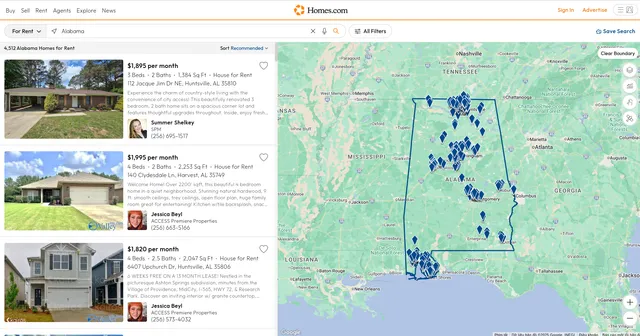
Example Screenshot:
Parameter Breakdown:
proxy: Controls proxy usage. Set useApifyProxy: true with residential proxies if experiencing access issues. For basic usage, false works for most searches.
max_items_per_url: Limits properties extracted per search page (typically 20-40 listings per page). Set to 20 for standard pages, higher (50-100) for comprehensive extraction across pagination.
ignore_url_failures: When true, continues processing remaining URLs if some fail. Essential for batch scraping multiple search URLs.
urls array: Contains search result page URLs. Build these by performing searches on Homes.com, applying filters (bedrooms, bathrooms, price, location), then copying the URL. The example URL searches Alabama properties with 2-5 bedrooms and 2-5 bathrooms on page 2.
Building Search URLs: Apply filters on Homes.com (location, bedrooms, bathrooms, price range, property type), then copy the URL from your browser. For multi-page datasets, increment the page parameter (/p2/, /p3/, etc.) or include multiple search URLs for different markets.
Complete Output Structure and Field Definitions
Position: Listing's rank in search results (1, 2, 3...). Purpose: Tracking listing prominence, analyzing which properties appear first, monitoring position changes over time.
Image: Primary property photo URL. Purpose: Visual assets for displaying listings, image analysis for property features, enhancing user interfaces.
Offers: Structured data about property offers, typically containing price, availability, and listing type information. Purpose: Extracting asking prices, identifying price changes, filtering by listing status (active, pending, sold).
URL: Direct link to the full property listing page on Homes.com. Purpose: Accessing complete property details, sharing listings with clients, verification of scraped data.
Main Entity: Core property data object containing structured information following schema.org/RealEstateListing format. Includes detailed property attributes like address, number of rooms, square footage, and listing agent information. Purpose: Complete property specifications for database storage, comparative market analysis, matching properties to buyer criteria.
Potential Action: Structured data indicating available actions (viewing, inquiring, scheduling tours). Purpose: Understanding listing engagement options, tracking how properties can be contacted.
At ID: Schema.org identifier for the property entity. Purpose: Unique reference for linking related data, maintaining data consistency across scrapes.
Name: Property title or address as displayed in listing. Purpose: Primary identifier for humans, search functionality, quick property recognition.
Description: Property description text highlighting features, location benefits, and selling points. Purpose: Keyword extraction for feature analysis (e.g., "updated kitchen," "pool"), understanding property marketing strategies, natural language processing for automated matching.
Sample Output:
Step-by-Step Usage Guide
1. Define Search Criteria: Determine target properties—location, price range, bedrooms, bathrooms, property types. Perform test searches on Homes.com to ensure filters return relevant results.
2. Build URL List: Copy URLs from test searches. For comprehensive datasets, include multiple URLs covering different locations or price ranges. For deep market coverage, add paginated URLs (/p2/, /p3/, etc.).
3. Configure Input: Set up JSON with URLs. Adjust max_items_per_url based on needs (20 for standard extraction, higher for complete page capture). Enable ignore_url_failures for batch processing.
4. Execute Scraping: Launch through Apify console. Monitor real-time progress. Typical run processing 5-10 search pages with 20 items each completes in 2-4 minutes.
5. Review and Export: Preview dataset for quality. Verify critical fields (price, address, bedrooms) are populated. Export in preferred format—JSON for databases, CSV for spreadsheet analysis.
6. Handle Pagination: For large market datasets, either include multiple page URLs in one run or set max_items_per_url higher to automatically capture more listings per search.
Error Handling: If URLs fail consistently, verify they're search result pages, not individual property pages. Check that filters remain valid (Homes.com may update parameter formats). Activity logs provide detailed error information.
Strategic Applications for Real Estate Intelligence
Lead Generation: Build continuously updated property databases filtered by investment criteria. Identify new listings matching buyer profiles. Track days on market to find motivated sellers.
Market Analysis: Compare pricing across neighborhoods, property types, and bedroom counts. Track inventory levels to gauge market temperature. Identify pricing outliers signaling opportunities.
Competitive Intelligence: Monitor which properties competitors list, their pricing strategies, and marketing descriptions. Analyze successful listing patterns—what features get highlighted, which photos appear first.
Investment Research: Screen markets for cash flow properties by filtering price ranges and bedroom counts. Track price-per-square-foot trends. Identify undervalued neighborhoods through comparative analysis.
Geographic Targeting: Analyze listing density by location to identify hot markets. Track new construction areas through description keywords. Map property features to neighborhood characteristics.
Portfolio Monitoring: Track properties matching portfolio expansion criteria. Monitor market entry points for new geographic markets. Analyze comparable properties for portfolio valuations.
Maximizing Data Value and Best Practices
Schedule Regular Scraping: Real estate markets update daily with new listings, price changes, and status updates. Weekly scraping captures market dynamics. Daily scraping enables real-time lead generation.
Segment Searches: Create targeted URLs by market segment—luxury homes, starter homes, investment properties. Cleaner datasets simplify analysis. Example segments: "Birmingham 3BR under $200K," "coastal properties $500K+," "multi-family units."
Enrich with External Data: Combine Homes.com listings with school ratings, crime statistics, walkability scores, and historical price data. Cross-reference with tax assessor records for ownership history and assessment values.
Quality Assurance: Implement checks for missing critical fields (price, address, bedrooms). Flag unusual patterns (suspiciously low prices, incomplete addresses). Validate URLs before sharing with stakeholders.
Temporal Analysis: Store historical scrapes to track price changes, time on market, and listing modifications. Identify properties with multiple price reductions signaling negotiation opportunities.
Respect Rate Limits: Space out large scraping runs. Avoid overwhelming Homes.com with excessive concurrent requests. Sustainable practices ensure continued access.
Conclusion
The Homes.com Property Search Scraper transforms real estate search results into actionable market intelligence. Whether generating leads, conducting market research, or identifying investment opportunities, this tool delivers comprehensive property data across U.S. housing markets. Start extracting real estate insights today and gain competitive advantage in property markets.


![Realtor.com [$1.5💰] [Download All Agents] [No 3K Limit] avatar](https://images.apifyusercontent.com/CwDgmxDI8Ux8DHELzo1MEad3PZ4pjba6QwY4maZleWQ/rs:fill:76:76/cb:1/aHR0cHM6Ly9hcGlmeS1pbWFnZS11cGxvYWRzLXByb2QuczMudXMtZWFzdC0xLmFtYXpvbmF3cy5jb20vWktuNUxuSmtLTUxleXd3cFMvWW8zUzdVYm5maEY0bUFxTmQtcmVhbHRvci5wbmc.webp)


![Land.com Search [Bypass Limits][PPE] · Emails avatar](https://images.apifyusercontent.com/mMgvkDn0UXXS7hV55869uWVo6uIfnZQ6N6JNqSj-zFo/rs:fill:76:76/cb:1/aHR0cHM6Ly9hcGlmeS1pbWFnZS11cGxvYWRzLXByb2QuczMudXMtZWFzdC0xLmFtYXpvbmF3cy5jb20vbmduOHZSRVNUa3NleVdFNnAtYWN0b3ItQ0pPUmhEMm9DRjZIT3VZS2MtSHI5QmdEMUs3WS1sYW5kLnBuZw.webp)
