

Jobstreet Jobs Search Scraper
Pricing
from $1.00 / 1,000 results
Jobstreet Jobs Search Scraper
Scrape job listings from JobStreet.com, Southeast Asia's largest online employment company. Extract detailed job data including salaries, company profiles, work arrangements, and classifications across Singapore, Malaysia, Philippines, and more. Essential for recruitment analytics.
Pricing
from $1.00 / 1,000 results
Rating
0.0
(0)
Developer

Stealth mode
Maintained by CommunityActor stats
1
Bookmarked
19
Total users
1
Monthly active users
2 months ago
Last modified
Categories
Share
JobStreet.com Jobs Search Scraper: Extract Singapore & Southeast Asia Job Market Data
Understanding JobStreet.com and Its Regional Significance
JobStreet.com stands as Southeast Asia's most prominent online recruitment platform, serving millions of job seekers and employers across Singapore, Malaysia, Philippines, Indonesia, Thailand, and Vietnam. Unlike Western-focused job boards, JobStreet.com specializes in the unique dynamics of Asian employment markets, including diverse work visa requirements, regional salary expectations, and local labor regulations.
The platform's importance in the region cannot be overstated. For Singapore alone, JobStreet.com hosts thousands of active listings spanning finance, technology, healthcare, logistics, and manufacturing sectors. The data available through these listings provides unparalleled insights into hiring trends, salary benchmarks, skill requirements, and company expansion patterns across one of the world's most dynamic economic regions.
However, gathering this information manually across multiple search pages, categories, and locations would require enormous time investment. The JobStreet.com Jobs Search Scraper automates this process, enabling you to collect structured data from search results pages efficiently, whether you're analyzing ten positions or ten thousand across the entire Southeast Asian market.
What This Scraper Delivers and Target Users
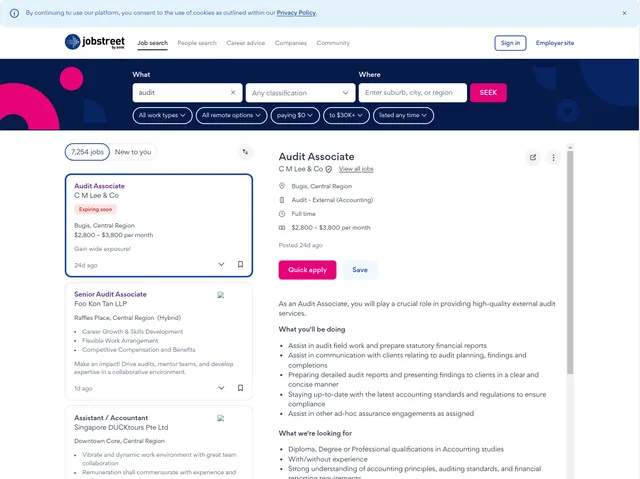
The JobStreet.com Jobs Search Scraper extracts comprehensive information from job search result pages rather than individual job detail pages. This approach allows you to quickly gather broad market overviews, identify hiring patterns, and build extensive job databases without needing to visit each individual listing.
The scraper captures all key information displayed in search results, including job titles, employer details, locations, work arrangements (remote, hybrid, on-site), classifications (industry categories), salary information when disclosed, and branding elements that indicate featured or premium listings. This provides an efficient snapshot of the job market without the overhead of deep scraping individual pages.
This tool serves multiple professional needs effectively. Recruitment agencies can monitor competitor activity, identify high-volume hiring companies, and spot emerging job categories. Market analysts gain visibility into regional employment trends, salary disclosure practices, and geographic distribution of opportunities. Business development teams can identify expanding companies by tracking their hiring velocity. HR departments benchmark their job postings against market standards and optimize their own listings for better visibility.
Input Configuration and Requirements Explained
The scraper accepts JobStreet.com search result page URLs, which are the pages you see after performing a search on the platform. These URLs typically contain search parameters like keywords, locations, and pagination information. The format generally follows: https://[country].jobstreet.com/[keyword]-jobs?page=[number].
Here's a detailed breakdown of the input configuration:
Example Screenshot:
Proxy Configuration: The useApifyProxy setting determines whether to route requests through Apify's proxy network. While set to false in this example, enabling proxies (true) is recommended for larger scraping operations to prevent rate limiting or IP blocking, especially when collecting data across multiple countries or categories.
Max Items Per URL: This parameter controls how many job listings to extract from each search page URL. JobStreet.com typically displays 20-30 results per page, so setting this to 20 ensures you capture most visible listings without overloading requests. Adjust this based on your needs—lower values for quick sampling, higher for comprehensive collection.
Ignore URL Failures: When set to true, the scraper continues processing remaining URLs even if some fail due to network issues or page changes. This is crucial for large-scale operations where you don't want one problematic URL to halt the entire scraping job.
URLs Array: Include one or multiple search result page URLs. You can add various searches covering different keywords, locations, or countries. For example, combine searches for "data analyst jobs" in Singapore, "software engineer jobs" in Malaysia, and "marketing manager jobs" in Philippines within a single run.
To collect paginated results, include multiple page URLs from the same search (page=1, page=2, page=3, etc.), or the scraper may handle pagination automatically depending on your max items configuration.
Output Structure and Field Descriptions
The scraper returns data as an array of job listing objects in JSON format. Each object represents one job from the search results, containing all information JobStreet.com displays at the search level. Understanding each field's purpose enables effective data analysis and application.
Advertiser: Identifies the entity posting the job, which may differ from the actual employer (e.g., recruitment agencies posting on behalf of clients). This field helps distinguish between direct company postings and agency-mediated listings, valuable for response rate predictions and application strategies.
Bullet Points: Contains key highlights or selling points about the position, typically 2-5 items that JobStreet.com displays as quick attention-grabbers. These might include "Flexible working hours," "Career progression opportunities," or "Competitive salary package." Analyzing these reveals what benefits employers emphasize to attract candidates.
Branding: Indicates whether the listing includes premium branding elements like company logos, custom colors, or enhanced visual presentation. This field helps identify companies investing heavily in recruitment marketing, often correlating with competitive compensation and strong employer brands.
Classifications: An array containing the industry and job function categories assigned to the listing. For example, a position might be classified under ["Accounting", "Financial Services", "Audit"]. This structured categorization enables filtering, grouping, and trend analysis across industries and specializations.
Company Name: The employer's name as displayed in the search results. This is your primary identifier for grouping jobs by employer, tracking which organizations are hiring actively, and building company-specific hiring profiles.
Company Profile Structured Data ID: A unique identifier linking to the company's JobStreet.com profile page. This enables you to cross-reference multiple listings from the same employer or fetch additional company information in subsequent scraping operations.
Display Style and Display Type: These fields describe how the listing appears visually in search results. Values might indicate standard listings versus featured placements, helping you understand which postings receive premium visibility and potentially correlate this with response rates.
Employer: Contains detailed employer information, potentially including company size, industry, and other attributes that may differ from the basic company name. This structured data provides richer context about the hiring organization.
ID: The unique job listing identifier within JobStreet.com's system. This is crucial for tracking specific positions over time, detecting when jobs are reposted, and avoiding duplicate entries in your database.
Is Featured: A boolean flag indicating whether this is a premium, featured listing that receives enhanced visibility. Featured jobs typically appear at the top of search results and may include additional branding. This helps identify employers willing to invest more in recruitment.
Listing Date: The timestamp when the job was originally posted or last updated. This enables freshness analysis, helps identify stale listings, and allows calculation of time-to-fill metrics when combined with removal dates.
Listing Date Display: A human-readable version of the listing date (e.g., "Posted 2 days ago" or "Posted today"). While less precise than the timestamp, this field shows exactly what candidates see, which can influence their perception of opportunity urgency.
Locations: An array of geographic locations where the job is based. Jobs may list multiple locations (e.g., ["Singapore", "Kuala Lumpur"]) for positions with flexibility or companies hiring for similar roles across offices. This enables geographic analysis and location-based filtering.
Role ID: An identifier specific to the job role or position type, potentially used by JobStreet.com for categorization or recommendation systems. This differs from the listing ID and may group similar roles together.
Salary Label: Displays the salary information when disclosed, formatted as JobStreet.com presents it (e.g., "SGD 5,000 - 7,000 per month" or "Competitive salary"). Many listings don't disclose specific figures, making this field particularly valuable for compensation benchmarking when available.
Sol Metadata: Contains search optimization and listing metadata used by JobStreet.com's ranking algorithms. While primarily technical, this data may reveal insights into how the platform prioritizes certain listings or what factors influence job visibility.
Teaser: A brief excerpt or preview of the job description, typically 1-2 sentences providing a quick overview of the role. This summary gives candidates (and your analysis) a snapshot of responsibilities without reading the full description.
Title: The job position title as displayed in search results. This is your primary field for categorizing jobs by role type, seniority level, and specialization. Titles follow varied formats across employers but generally indicate the core position.
Tracking: Contains analytics and tracking identifiers used by JobStreet.com to monitor listing performance, user interactions, and referral sources. While primarily for internal platform use, these IDs can help you understand how jobs are categorized within their system.
Work Types: An array specifying employment types such as "Full Time", "Part Time", "Contract", "Temporary", or "Casual". This enables filtering by employment arrangement and analyzing which work types dominate different industries or locations.
Work Arrangements: Indicates the physical working model, with values like "Remote", "Hybrid", "On-site", or "Work from home". This field has become increasingly important post-pandemic and enables analysis of remote work adoption across industries and regions.
Here's an example of the scraped output:
Step-by-Step Usage Guide
Start by identifying the job searches relevant to your research or business needs. Visit JobStreet.com and perform searches using keywords, locations, and filters that match your target criteria. Note that different country domains (sg.jobstreet.com, my.jobstreet.com, ph.jobstreet.com) will return region-specific results.
Copy the URLs from your search results pages. If you want comprehensive data, include multiple page URLs from each search (page 1, 2, 3, etc.). Consider the trade-off between breadth and depth—searching many keywords shallowly versus fewer keywords more thoroughly.
Configure your input JSON with the collected URLs. Set max_items_per_url based on how many results you need per search. For quick market scans, 20-50 items may suffice. For comprehensive databases, increase this number or include more page URLs. Enable useApifyProxy if you're scraping large volumes or multiple country domains to avoid rate limiting.
Launch the scraper through the Apify console and monitor progress. Processing time varies based on the number of URLs and items per URL, but typically handles 100-200 job listings within 5-10 minutes. The scraper respects reasonable rate limits to avoid overloading JobStreet.com's servers.
Once completed, access your data through the dataset tab. Preview results to verify data quality and completeness. Export in JSON for programmatic analysis, CSV for spreadsheet tools, or directly integrate with your database systems using Apify's API.
For ongoing monitoring, schedule regular scraper runs (daily or weekly) to track new postings, removed listings, and changing market conditions. This time-series data reveals hiring velocity, seasonal patterns, and emerging skill demands before they become common knowledge.
Practical Applications and Strategic Value
The breadth of data from JobStreet.com search results enables numerous strategic applications across recruitment, market intelligence, and business development functions. Understanding these use cases helps maximize your return on investment in automated data collection.
Recruitment agencies can build real-time competitive intelligence by monitoring which companies are hiring for similar roles, what language they use in job titles and teasers, and how they structure their offerings. The isFeatured and branding fields reveal which competitors are investing heavily in visibility, potentially indicating urgent hiring needs or strong recruitment budgets.
Salary benchmarking becomes possible when analyzing the salaryLabel field across similar positions, locations, and seniority levels. While not all listings disclose compensation, those that do provide concrete market data points. Cross-referencing disclosed salaries with company size, industry classifications, and work arrangements reveals compensation patterns and helps establish competitive salary ranges.
Market researchers can track employment trends across Southeast Asian markets by running regular scrapes across multiple country domains. Comparing the volume of listings in different classifications over time indicates which industries are expanding or contracting. The workArrangements field provides insights into remote work adoption rates by industry and country, valuable for understanding regional labor market evolution.
Business development teams identify high-growth companies by monitoring hiring velocity. Companies posting multiple jobs across various functions are typically expanding, making them prime targets for B2B services, partnerships, or investment opportunities. The companyProfileStructuredDataId enables tracking all positions from specific employers.
Skills trend analysis emerges from examining job titles, classifications, and teasers at scale. Natural language processing on these fields reveals which technical skills, soft skills, and qualifications appear most frequently, helping educational institutions design relevant programs and professionals plan their skill development paths.
Geographic analysis using the locations field shows where job opportunities concentrate, informing relocation decisions, office location planning, and talent availability assessments. Comparing job volumes across Singapore's districts or between Malaysian cities provides granular insights into regional economic activity.
Best Practices for Sustainable and Effective Scraping
To maximize value while maintaining responsible data collection practices, implement these proven strategies in your scraping workflows.
Establish a reasonable collection schedule that balances data freshness with platform respect. For most use cases, daily scrapes of key searches or weekly comprehensive collections provide sufficient insight without excessive requests. JobStreet.com updates listings continuously, but daily changes are typically incremental rather than revolutionary.
Use targeted searches rather than attempting to scrape the entire platform. Focus on specific industries, locations, or role types relevant to your needs. This improves data quality by reducing noise and minimizes computational resources and scraping time.
Implement data deduplication based on the id field, as the same job may appear in multiple search results. Store historical data to track when listings appear and disappear, enabling time-to-fill analysis and detection of reposted positions that may indicate difficulty finding candidates.
Validate and clean your data systematically. Check that required fields are present, classify missing salary information appropriately, and standardize location names that may appear in various formats. Set up alerts for scraping failures or significant drops in result counts that might indicate platform changes.
Enrich scraped data with additional context. Combine JobStreet.com data with company financial information, employee reviews from platforms like Glassdoor, or competitive intelligence from other job boards to build comprehensive employer profiles.
Consider legal and ethical implications. Ensure your use of scraped data complies with local data protection regulations, particularly Singapore's PDPA and similar laws across Southeast Asian countries. Use the data for legitimate purposes like market research or recruitment operations rather than spamming job applicants.
Enable proxy rotation for large-scale operations. While small scrapes may work without proxies, significant data collection benefits from distributing requests across multiple IP addresses to avoid rate limiting and ensure consistent access.
Conclusion
The JobStreet.com Jobs Search Scraper unlocks Southeast Asia's largest employment platform as a structured data source, transforming scattered job listings into actionable market intelligence. Whether you're optimizing recruitment strategies, conducting regional market analysis, or identifying business opportunities, this tool provides the comprehensive data foundation needed for informed decision-making in one of the world's fastest-growing economic regions. Begin extracting insights from Southeast Asia's job market today and gain competitive advantage through data-driven intelligence.


