

Zomato Reviews Scraper
Pricing
from $3.00 / 1,000 results
Zomato Reviews Scraper
Scrape comprehensive restaurant reviews from Zomato.com including ratings, user profiles, photos, comments, and engagement metrics. Extract customer feedback, sentiment data, and dining experiences for market research, reputation management, and competitive analysis in the food service industry.
Pricing
from $3.00 / 1,000 results
Rating
0.0
(0)
Developer

Stealth mode
Maintained by CommunityActor stats
0
Bookmarked
21
Total users
1
Monthly active users
5 months ago
Last modified
Categories
Share
Zomato.com Reviews Scraper: Extract Restaurant Review Data at Scale
Understanding Zomato Reviews and Their Business Value
Zomato is one of the world's largest restaurant discovery and food delivery platforms, operating across 24 countries with millions of user-generated reviews. These reviews represent authentic customer experiences, detailed ratings, dining preferences, and service quality assessments that drive consumer decisions in the restaurant industry.
Restaurant reviews on Zomato contain rich data beyond simple star ratings: detailed feedback text, photo documentation of dishes and ambiance, user engagement metrics (likes, comments), timestamp patterns showing peak dining times, and management responses revealing customer service approaches. For restaurant owners, this data enables reputation monitoring and service improvement. For food industry analysts, it provides consumer sentiment trends and competitive intelligence. For hospitality consultants, it reveals operational strengths and weaknesses across establishments.
Manually collecting review data means clicking through hundreds of pages, copying text, downloading images, and tracking engagement metrics—a process taking days or weeks for comprehensive analysis. The Zomato Reviews Scraper automates this entirely, transforming review pages into structured datasets ready for sentiment analysis, competitive benchmarking, or customer intelligence platforms.
What This Scraper Extracts and Who Should Use It
The Zomato Reviews Scraper processes restaurant review pages—the dedicated review sections found on each restaurant's Zomato profile. It extracts complete review data including text content, ratings, user information, photos, engagement metrics, and management interactions.
Key Data Captured:
Review Content: Full review text and condensed versions provide customer feedback and dining experiences. Review tags categorize feedback by themes (great food, poor service, romantic ambiance).
User Data: User names, profile pictures, URLs, review counts, and follower counts reveal reviewer credibility and influence. High-follower reviewers carry more weight in consumer decisions.
Ratings & Sentiment: Numerical ratings, color-coded rating displays, and experience indicators (positive/negative) enable quantitative sentiment analysis across thousands of reviews.
Engagement Metrics: Like counts, comment counts, and liked-by-user flags measure review impact and audience resonance. Popular reviews indicate widely-shared opinions.
Visual Evidence: Review photos provide visual documentation of food quality, presentation, portion sizes, and restaurant ambiance—critical data for quality assessment.
Temporal Data: Timestamps enable time-series analysis of rating trends, identifying service improvements or declines over specific periods.
Management Responses: Management comments and reply counts show restaurant engagement with customer feedback, response times, and issue resolution approaches.
External References: External URLs and host information capture cross-platform mentions, enabling multi-source reputation tracking.
Target Users:
Restaurant Owners & Managers monitor customer feedback, track rating trends, identify service issues, and benchmark against competitors. Market Research Firms analyze consumer preferences, dining trends, and brand sentiment across restaurant categories and regions. Hospitality Consultants assess operational performance through customer feedback, identifying training needs and service gaps. Food Delivery Platforms integrate review data for restaurant recommendations and quality scoring. Investment Analysts evaluate restaurant chain performance through customer satisfaction metrics before making investment decisions.
Input Configuration: Targeting Restaurant Review Pages
The scraper processes restaurant review page URLs—the specific pages showing all reviews for a particular establishment on Zomato.
Example Input:
Example Screenshot:
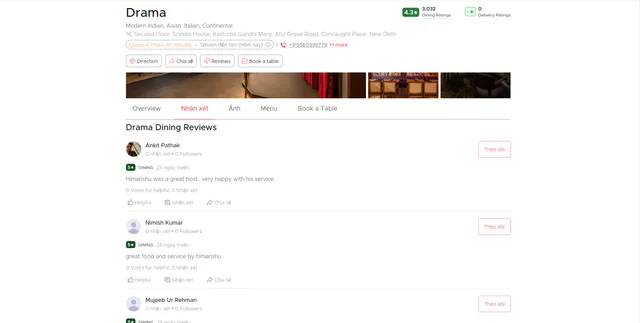
Parameter Explanations:
proxy: Uses Apify residential proxies to avoid bot detection. Leave apifyProxyGroups empty for automatic selection, or specify groups like ["RESIDENTIAL"] for specific proxy types. Essential for reliable scraping at scale.
max_items_per_url: Limits reviews extracted per URL. Set to 20 for testing, higher (50-100) for comprehensive extraction. Zomato displays reviews in batches, so this controls extraction depth per page.
ignore_url_failures: When true, continues processing remaining URLs if some fail. Critical for batch processing multiple restaurants where some pages may be unavailable.
offset: Starting point for review pagination. Use 0 to start from newest reviews, or increment (20, 40, 60) to access older reviews across multiple scraping runs.
urls: Array of restaurant review page URLs. Format: https://www.zomato.com/[locale]/[city]/[restaurant-name]/reviews. Collect URLs by browsing Zomato or from restaurant listing scrapers.
Building URL Lists: Use Zomato restaurant listing scrapers to gather review URLs for multiple establishments, or manually compile URLs for targeted analysis. Verify URLs in browser before batch scraping.
Complete Output Structure: Field Definitions
Status: API response status code. Purpose: Verifying successful data retrieval, error handling.
Message: Response message from API. Purpose: Troubleshooting failures, understanding data availability.
Review ID: Unique identifier for each review. Purpose: Tracking specific reviews, avoiding duplicates, linking to source pages.
Review Text: Complete review content written by user. Purpose: Sentiment analysis, keyword extraction, identifying specific complaints/praise, training NLP models.
Review Text Small: Abbreviated version of review text. Purpose: Preview displays, quick scanning in dashboards.
User Name: Reviewer's display name. Purpose: Identifying repeat reviewers, credibility assessment.
User Profile Pic / User Image Placeholder: Profile image URLs. Purpose: Visual user identification, detecting fake accounts (generic placeholders).
User Profile URL: Link to reviewer's Zomato profile. Purpose: Accessing complete reviewer history, assessing review patterns.
Review User ID: Unique user identifier. Purpose: Tracking reviewer activity across restaurants, identifying power users.
User Reviews Count: Total reviews written by user. Purpose: Credibility indicator—users with 100+ reviews are experienced critics.
User Followers Count: Number of followers on Zomato. Purpose: Influence metric—high-follower reviewers impact more consumers.
Is Followed: Boolean indicating if current user follows reviewer. Purpose: Social graph analysis, influence network mapping.
Timestamp: Review posting date/time. Purpose: Time-series analysis, identifying rating trends, seasonal patterns, correlating with operational changes.
Like Count: Number of likes on review. Purpose: Review popularity, identifying most resonant feedback, weighting reviews by community agreement.
Liked By User: Boolean showing if current user liked review. Purpose: User engagement tracking.
Comments: Array of user comments on review. Purpose: Community discussion analysis, identifying controversial opinions.
Management Comments / More Management Comments: Restaurant responses to reviews. Purpose: Assessing customer service quality, response rates, issue resolution effectiveness.
Comment Count: Total comments on review. Purpose: Engagement metric, controversy indicator (high comments often mean debate).
More Comments: Boolean indicating additional comments exist. Purpose: Flagging reviews needing deeper investigation.
Review Photos: Array of images attached to review. Purpose: Visual quality assessment, food presentation analysis, ambiance documentation.
Review Tags: Categorization labels (e.g., "Great Food", "Poor Service"). Purpose: Structured feedback categorization, quick filtering by issue type.
Review URL: Direct link to review on Zomato. Purpose: Source verification, sharing specific reviews.
External URL / External Host / External Host Text: Cross-platform references. Purpose: Multi-platform reputation tracking, identifying viral reviews.
Is Editable: Boolean showing if review can be modified. Purpose: Understanding data mutability, tracking review updates.
Experience: Positive/negative/neutral sentiment indicator. Purpose: Quick sentiment classification, aggregate sentiment scoring.
New Rating Color / Background Color V2: Visual rating display colors. Purpose: UI rendering, visual sentiment representation.
Rating V2 / Rating V2 Text: Structured rating data. Purpose: Numerical analysis, averaging calculations.
Rating: Numerical score (typically 1-5 scale). Purpose: Primary quantitative metric for restaurant quality assessment.
Sample Output:
Step-by-Step Usage Guide
1. Identify Target Restaurants: Determine which restaurants to analyze. Create URL list by browsing Zomato or using restaurant listing scrapers for specific cuisines, locations, or price ranges.
2. Configure Input: Build JSON with restaurant review URLs. Set max_items_per_url based on needs—20 for quick sampling, 100+ for comprehensive analysis. Enable ignore_url_failures for bulk processing.
3. Execute Scraping: Launch via Apify console. Monitor progress. Processing 10 restaurant review pages (20 reviews each) typically completes in 2-4 minutes.
4. Review Data Quality: Check for complete review text, valid ratings, and user profile data. Verify timestamps are recent if targeting current sentiment.
5. Export & Analyze: Export as JSON for databases or CSV for spreadsheet analysis. Filter by rating ranges, dates, or engagement metrics based on analysis goals.
6. Handle Pagination: For restaurants with 500+ reviews, use offset parameter to access older reviews across multiple runs (offset: 0, 20, 40, 60...).
Strategic Applications for Restaurant Intelligence
Reputation Monitoring: Track rating trends over time, identifying service improvements or declines. Set up weekly scraping to catch negative reviews quickly for rapid response.
Competitive Benchmarking: Compare your restaurant's reviews against competitors—average ratings, review frequency, common praise/complaints, management response rates.
Menu Optimization: Analyze review text for dish mentions. Identify most-praised items (menu highlights) and criticized dishes (candidates for removal or recipe adjustment).
Service Quality Assessment: Extract feedback about specific service aspects—wait times, staff friendliness, cleanliness, ambiance. Correlate with operational changes to measure impact.
Sentiment Analysis: Use review text and ratings for NLP-based sentiment scoring. Track sentiment shifts following menu changes, staff training, or renovations.
Influencer Identification: Identify high-follower reviewers whose opinions significantly impact bookings. Prioritize responding to their reviews.
Photo Analysis: Review photos provide visual evidence of food quality, portion sizes, and presentation consistency. Compare your food photos against competitors.
Management Response Optimization: Analyze effective management responses from top-rated competitors. Benchmark your response rate and resolution approaches.
Best Practices for Maximum Value
Schedule Regular Scraping: Reviews accumulate daily. Weekly scraping for popular restaurants, monthly for smaller establishments. Store historical data to track trends.
Segment by Time Period: Compare pre/post periods around major changes (new chef, menu refresh, renovation) to quantify impact through review sentiment shifts.
Cross-Reference with Reservations Data: Correlate negative review spikes with booking declines. Positive review increases should drive reservation growth.
Combine with Other Platforms: Scrape Google Reviews, TripAdvisor alongside Zomato for comprehensive reputation view. Different platforms attract different demographics.
Automate Alert Systems: Set up monitoring for sudden rating drops or negative keyword spikes (food poisoning, rude staff) triggering immediate management alerts.
Reviewer Credibility Weighting: Weight reviews by user review count and follower count. A negative review from a 500-follower food blogger matters more than a one-time reviewer.
Visual Quality Control: Systematically review photos attached to low-rated reviews. Inconsistent plating or poor presentation visible in photos requires kitchen intervention.


