

Website Change Monitor Pro – Visual Evidence
Pricing
from $0.90 / 1,000 standard page checks
Website Change Monitor Pro – Visual Evidence
Monitor any public website for pricing, stock, content, SEO and visual changes. Get clear before-and-after values, a branded evidence report, focused screenshots for each detected visible change, severity scoring, noise suppression, and email, Slack or webhook alerts. No external AI key required.
Pricing
from $0.90 / 1,000 standard page checks
Rating
0.0
(0)
Developer

Troy Hendrick
Maintained by CommunityActor stats
0
Bookmarked
2
Total users
1
Monthly active users
2 months ago
Last modified
Categories
Security
Limited permissionsShare
Website Change Monitor & Visual Diff Alerts
Know what changed. See where it changed. Decide whether it matters.
Monitor public websites for pricing, availability, content, SEO and visual changes. Every meaningful change is returned as structured data with a plain-English summary, severity, confidence, before/after values and audit-ready visual evidence.
Run Website Change Monitor on Apify →
No OpenAI key, external AI service or separate monitoring account is required.
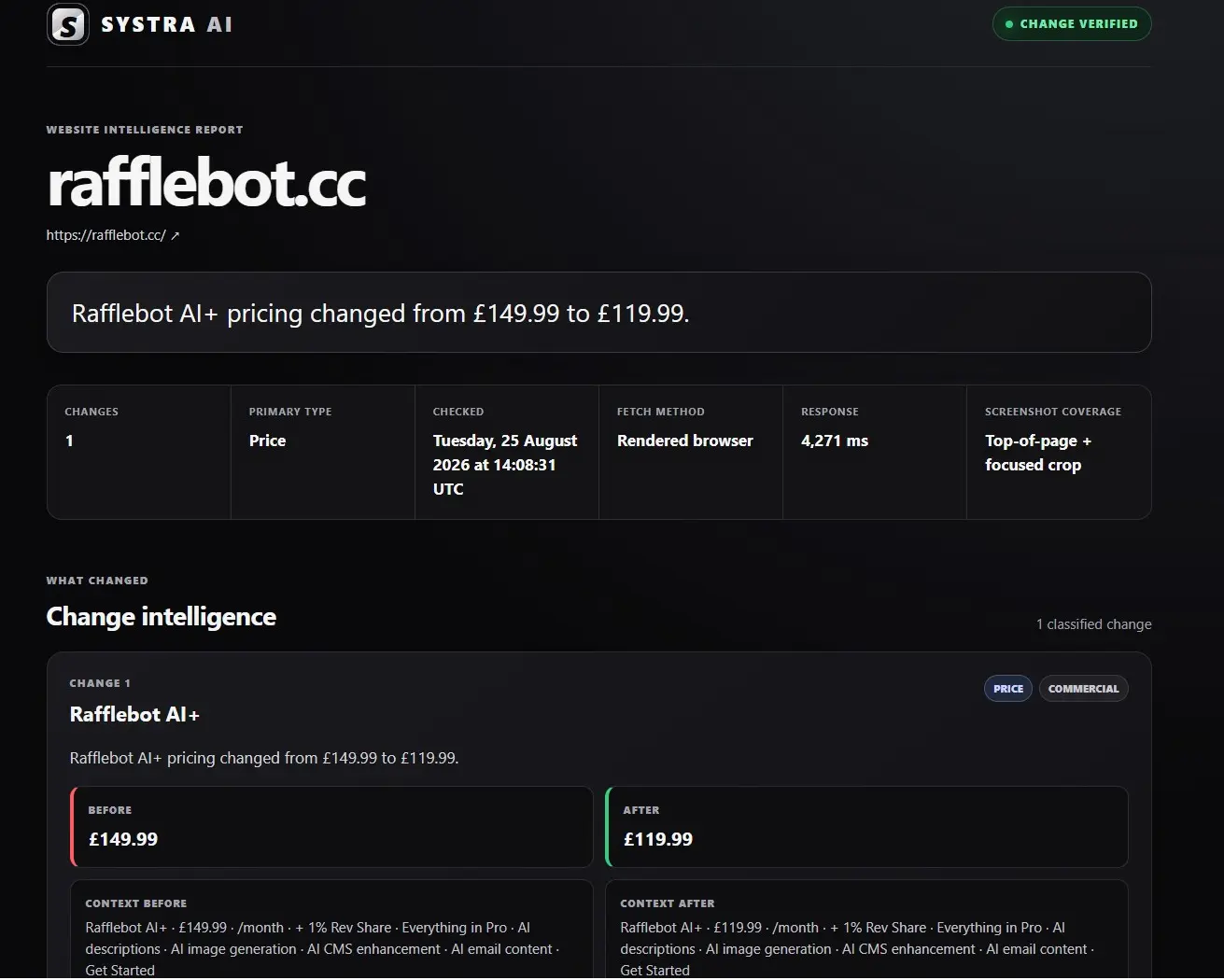
A commercial price change identified, classified and presented with clear before-and-after values. Select the image to view it full size.
What you get
- Clear change intelligence: results explain the affected product, plan, page section or property—not merely that a hash changed.
- Focused visual proof: every detected visible change can receive its own before, after and difference screenshots with a red
SYSTRA · CHANGEframe. - Branded evidence reports: each changed row links to a responsive SYSTRA evidence centre with summaries, values, context, screenshots and technical provenance.
- Commercial and availability monitoring: recognize prices, plans, offers and stock-state changes with structured previous and current values.
- SEO monitoring: detect titles, descriptions, canonical URLs, robots directives, Open Graph content, headings and important links.
- Explainable prioritization: severity, confidence, impact, recommended action and noise reasons are calculated deterministically.
- Useful alerts: send only qualifying changes through email, Slack or a signed custom webhook.
- Lower-cost automatic operation: use HTTP for ordinary checks and launch a browser only when rendering or visual evidence is required.
- Persistent baselines: scheduled runs compare against the last successful observation using a named Apify key-value store.
Example result
The dataset stays useful for people, spreadsheets, dashboards, webhooks and downstream automation.
Popular use cases
| Use case | What it can detect | Recommended mode |
|---|---|---|
| Competitor intelligence | Pricing, packages, offers, product copy and CTAs | auto or price |
| Product availability | In-stock, out-of-stock and availability text | stock |
| SEO monitoring | Titles, descriptions, canonicals, robots, headings and links | auto |
| Compliance and policy watch | Terms, policies, disclosures and regulated copy | text or element |
| Product and release monitoring | Release notes, documentation and feature pages | text or element |
| Visual QA | Layout, styling, images, creative and interface changes | visual |
| Procurement and vendor watch | Pricing, service status, policy and product-page changes | auto |
Quick start
- Open the Actor and add one or more public URLs under Web pages.
- Leave Automatic selected for the best general-purpose starting point.
- Run it once. Successful first observations return
BASELINE. - Create an Apify Task and schedule it hourly, daily or weekly.
- Later runs return
UNCHANGED,CHANGEDorERROR.
Keep stateStoreName and stateNamespace unchanged between runs. Changing either intentionally creates a separate set of baselines.
Minimal input
Ready-to-run recipes
1. Competitor pricing monitor
Use a narrow selector when you know the price element. This gives the cleanest comparison and lowest noise.
2. SEO and landing-page monitor
Automatic mode monitors visible page content and important metadata together.
3. Mixed website watchlist
Different targets and modes can run together while retaining independent baselines.
Evidence that explains the change
With captureOnChange: true, changed rows include a clickable SYSTRA-branded HTML report. Instead of returning only added and removed text, the Actor identifies nearby semantic labels and context—for example:
AI+ pricing changed from £149.99 to £119.99.
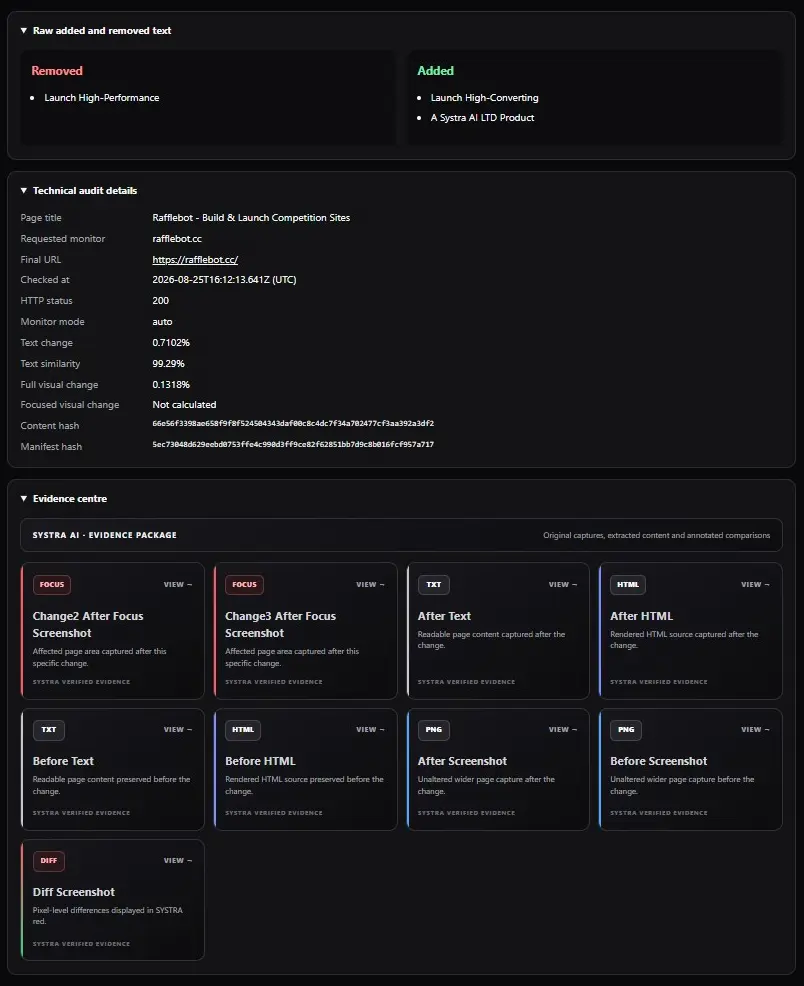
The evidence centre keeps the normalized content, rendered HTML, wider captures and focused visual evidence together in one inspection interface.
The report can include:
- an executive summary and impact classification;
- structured before and after values;
- surrounding content before and after the change;
- a separate focused evidence set for every detected visible change;
- annotated before, after and pixel-difference screenshots;
- wider page captures for audit context;
- content hashes, response information and a tamper-evident manifest chain;
- notification delivery status and attempt history.
Before browser screenshots, the Actor performs a bounded page walkthrough to activate lazy-loaded images, intersection observers and scroll-reveal sections. Focused image selection favours the complete surrounding product, pricing plan, card, offer, list item or section—not an isolated text node.
For a newly detected area, the first focused capture may contain only an accurate after image because a historical crop cannot be reconstructed honestly. That run seeds an independent rolling visual baseline. The next change to the same labelled area can include before, after and difference images.
Each changeVisualEvidence item reports one of four honest coverage states:
complete— before, after and difference evidence is available;after-only— the current evidence is available and a visual baseline has now been seeded;unavailable— a reliable DOM target could not be captured;not-visual— the change affects metadata or another non-visible property.
How it differs from a basic change detector
| Capability | Basic text monitor | SYSTRA Website Change Monitor |
|---|---|---|
| Detect page-text changes | ✓ | ✓ |
| Monitor prices, stock, SEO and visuals | Limited | ✓ |
| Explain what changed in plain English | — | ✓ |
| Return structured previous/current values | Limited | ✓ |
| Separate focused evidence for each visible change | — | ✓ |
| Annotated before/after/difference screenshots | — | ✓ |
| Severity, confidence and recommended action | — | ✓ |
| Dynamic-noise assessment and suppression | Limited | ✓ |
| Email, Slack and signed webhook alerts | Limited | ✓ |
| Alert delivery audit | — | ✓ |
| External AI key required | Varies | No |
Monitoring modes
| Mode | Best for | Change rule |
|---|---|---|
auto | Comprehensive general monitoring | Visible text plus headings, links, CTAs, images and page metadata |
text | Articles, policies and release notes | Normalized text hash |
element | A specific section or component | Text and structured content inside a supplied CSS selector |
price | Product or plan prices | Parsed numeric price and currency |
stock | Product availability | IN_STOCK, OUT_OF_STOCK or UNKNOWN |
visual | Layout, creative or UI changes | Rendered PNG hash plus pixel-change percentage |
For price and stock monitoring, a narrow selector produces the most stable results. Visual mode always uses the rendered-check event.
Result statuses
BASELINE— the first successful observation for this URL, mode, selector and namespace.UNCHANGED— the monitored value matches the stored baseline.CHANGED— the value changed and the new observation becomes the next baseline.ERROR— the page could not be checked. The previous baseline is retained and the row is free.
The default dataset contains one row per attempted page. The OUTPUT key-value-store record contains totals, run status, state-store name and event names.
Intelligent alert rules
By default, notifications are eligible for commercial, availability, SEO or high-impact CHANGED results. Configure categories with:
alertCommercialChangesalertAvailabilityChangesalertSeoChangesalertHighImpactChangesalertOtherChanges
High impact means the result reaches either highImpactChangeCount (default 3) or highImpactPercent (default 5) across text, full-page visual or per-change focused visual differences.
Two final safeguards reduce alert fatigue:
minimumAlertSeveritydefaults tomedium; available values areinfo,low,medium,highandcritical.suppressLikelyNoisedefaults totrueand suppresses timestamp, counter, identifier and similar volatile-content alerts.
Nothing is discarded. Dataset rows still include severity, confidence, recommendedAction, likelyNoise, noiseReasons, alertMatched, alertCategories, alertReasons and an explainable signalRationale.
Notification channels
Configure any combination:
notificationEmails— 1–20 comma-separated recipients receive a responsive SYSTRA email with before/after values and a verified-evidence button. Delivery uses the officialapify/send-mailActor; its platform and recipient limits apply.slackWebhookUrl— a Slack incoming webhook receives structured severity, confidence, action, summary, page and evidence blocks.webhookUrl— a custom public HTTPS endpoint receives the complete dataset record as JSON.webhookSecret— optionally signs custom webhook bodies with HMAC-SHA256. Verify the raw body againstX-Systra-Signature: sha256=<hex>.
Custom webhook requests also include X-Systra-Delivery-Id and X-Systra-Event: website.change. Slack and custom webhooks retry transient failures up to three times. Email is sent once to avoid ambiguous duplicate delivery.
An eligible result includes deliveryId, deliveryChannels and deliveryAuditUrl. The audit record lists each channel, attempt count, final status, delivery time and a sanitized error when delivery fails.
Pricing
Pay only for successfully processed checks. Platform usage is included and failed rows do not call a paid custom event.
| Event | Free | Starter | Scale | Business |
|---|---|---|---|---|
| Standard page check | $1.20 / 1,000 | $1.10 / 1,000 | $1.00 / 1,000 | $0.90 / 1,000 |
| Rendered page check | $6.00 / 1,000 | $5.50 / 1,000 | $5.00 / 1,000 | $4.50 / 1,000 |
| Actor start | $0.00005 | $0.00005 | $0.00005 | $0.00005 |
Example costs at the Free-plan event rate:
| Schedule | Checks per month | Standard | Rendered |
|---|---|---|---|
| 10 pages checked daily | About 300 | About $0.36 | About $1.80 |
| 50 pages checked daily | About 1,500 | About $1.80 | About $9.00 |
| 10 pages checked hourly | About 7,200 | About $8.64 | About $43.20 |
Automatic and text-heavy monitoring can remain on the lower-cost standard event. A check is charged as rendered when it requires browser rendering or screenshot evidence.
Scheduling tips
- Save a dedicated Apify Task for each customer, project or watchlist so its input remains fixed.
- Hourly checks suit important prices and availability; daily checks suit competitor pages, SEO and policies.
- Start with direct access. Enable Apify Proxy only when a target blocks data-centre traffic.
- Use one state namespace per logically independent monitor set.
- Keep concurrency at 1–3 for visual-heavy runs and increase it for HTTP-only batches.
- Add
ignoreSelectorsor ignore patterns for known clocks, counters, rotating testimonials and other volatile content.
Evidence retention and security
Historical evidence is saved under unique keys in the named state store so later runs do not overwrite it. Restricted evidence records use signed URLs generated by the Apify SDK, allowing report links to open without manually adding an API token. Evidence remains available while the named state store and its records are retained.
Change manifests form a SHA-256 hash chain to expose later modification. This is tamper-evident provenance, not a legal timestamping or certification service.
The Actor blocks private, loopback, link-local, documentation and metadata-network targets. Redirects and browser subrequests are revalidated. Do not put credentials in monitored URLs; webhook URLs and signing secrets are encrypted secret inputs in saved Actor configurations.
Responsible use and limitations
This Actor monitors changes observable in a public HTML response or rendered page. It does not log in, complete user journeys, inspect private APIs, accept consent on a user's behalf, solve CAPTCHAs or access intranets. Backend behaviour that produces no observable page, DOM, metadata, destination, image or screenshot change cannot be detected.
Sites can change markup or block automated traffic, so selectors may occasionally need maintenance. Ensure your monitoring complies with the target website's terms, robots expectations, applicable law and reasonable request rates.
FAQ
Why did my first run return BASELINE?
A change needs two observations. The first successful run stores the original state. The next scheduled or manual run compares the page against it.
Why was a page charged as rendered in Automatic mode?
Automatic mode starts with the lower-cost HTTP path. It can launch a browser when the static response has too little usable content, the page needs JavaScript, or screenshot evidence is required for a detected change.
Why is focused evidence marked after-only?
The changed area did not yet have a matching historical crop. The current run stores one, so the next change to the same area can return a complete before/after comparison.
Why did I receive no alert for a detected change?
The dataset still records every result. Check alertMatched, alertReasons, severity, likelyNoise and the configured category switches. By default, low-severity or likely-noise results are not sent.
Can it monitor any URL?
It can monitor most publicly accessible HTTP or HTTPS pages. Login-protected pages, CAPTCHAs, private networks and sites that block automated traffic are outside the supported scope.
Does it require an OpenAI key?
No. Classification, prioritization and summaries are deterministic and do not call an external AI model.
How do I reset a baseline?
Use a new stateNamespace, a different stateStoreName, or delete the relevant baseline records from the existing state store. Changing the namespace is the safest way to preserve the old evidence while starting fresh.
Where should I report a problem?
Use the Issues tab on the Actor's Apify Store page and include the run ID, target domain, selected mode and any relevant selector. Never post tokens or private webhook URLs.
Output fields
Important fields include status, changeSummary, severity, confidence, recommendedAction, likelyNoise, noiseReasons, signalRationale, changeCount, changeTypes, changeImpact, changes, affectedSections, changeLabel, previousValue, currentValue, contextBefore, contextAfter, changeVisualEvidence, alertMatched, alertCategories, alertReasons, deliveryId, deliveryChannels, deliveryAuditUrl, pageTitle, responseTimeMs, screenshotCoverage, monitorId, url, checkedAt, mode, method, contentHash, similarity, changePercent, focusedVisualChangePercent, visualChangePercent, evidenceReportUrl, evidence, manifestHash and error.
monitorId is deterministic from namespace + canonical URL + mode + selector, so reordered inputs continue using the correct baseline.
Local development
Node.js 22 is required. The production Docker image includes Playwright Chrome. Email uses the caller's Apify account through apify/send-mail.
License
MIT


