

AI Image Upscaler 4x — Sharp Photos up to 8K, Bulk URLs
Pricing
$20.00 / 1,000 upscaled 100,000 pixels
AI Image Upscaler 4x — Sharp Photos up to 8K, Bulk URLs
Upscale photos 4x or 2x with RealPLKSR, a 2024 super-resolution model trained on real photos: sharper fur, hair and fabric than Real-ESRGAN copies. Outputs up to 8K. Paste a list of links, Google Drive and Dropbox included. Failed images are free.
Pricing
$20.00 / 1,000 upscaled 100,000 pixels
Rating
0.0
(0)
Developer

Talvok Studio
Maintained by CommunityActor stats
0
Bookmarked
2
Total users
1
Monthly active users
2 days ago
Last modified
Categories
Features
Share
AI Image Upscaler 4x — sharp photos up to 8K
Upscale photos 4x or 2x with RealPLKSR (4xNomos2_realplksr_dysample), a 2024 super-resolution model trained on
real photographs. It rebuilds fur, hair, eyes and fabric texture instead of smoothing them over, so the result looks
sharper than the Real-ESRGAN models most upscalers run. Paste image links, get download links to the upscaled files.
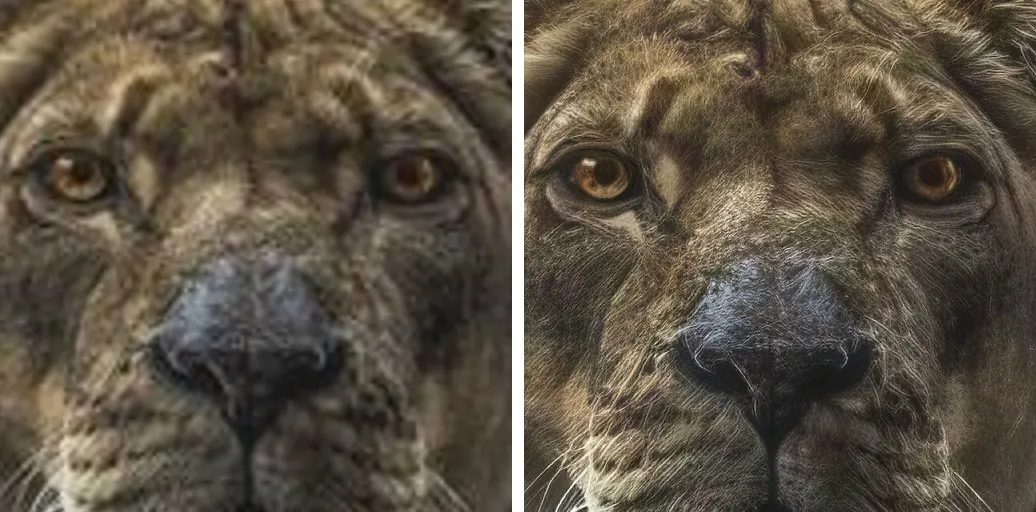
Left: a 256×256 photo enlarged 4x with an ordinary (bicubic) resize. Right: the same photo upscaled 4x by this Actor. Both show the same 512×512 detail of the 1024×1024 result.
- Up to 8K: any image up to 2.1 megapixels, e.g. 1920×1080 → 7680×4320.
- Many images in one run: up to 1,000 links, one result row per image.
- Google Drive and Dropbox links work: paste the share link of a file shared with "Anyone with the link".
- Failed images are free: you pay only for files that were saved. A broken link never stops the other images.
- Your colours are kept: the result takes the colours of your image and only the new detail from the model.
- Transparency is kept in PNG and WebP.
Price
$0.02 per started 100,000 pixels of the image you send, the same for 2x and 4x.
| Your image | Result at 4x | Units | Price |
|---|---|---|---|
| 256×256 | 1024×1024 | 1 | $0.02 |
| 300×300 | 1200×1200 | 2 | $0.04 |
| 512×512 | 2048×2048 | 3 | $0.06 |
| 640×480 | 2560×1920 | 4 | $0.08 |
| 1024×1024 | 4096×4096 | 11 | $0.22 |
| 1280×720 | 5120×2880 | 10 | $0.20 |
| 1920×1080 | 7680×4320 | 21 | $0.42 |
Two rules behind the table: a side shorter than 256 px counts as 256 px (the model works on 256×256 blocks), and an
image larger than 256×256 on both sides costs at least 2 units. Images that fail are not charged. The units of each
image are in its result row (billedUnits).
How long it takes
The model runs on 256×256 blocks of your image; neighbouring blocks overlap by 16 px and are blended, so there are no seams. With the default memory (4 GB, one CPU) each block takes about 20 seconds: a 256×256 image is one block, a 512×512 image is 9 blocks (about 3 minutes), a 1024×1024 photo is 25 blocks (about 8 minutes). Set the run memory to 8 GB to go twice as fast at the same price (two CPUs, about 10 seconds per block). The run's status line shows the block being worked on.
How to use it
- Paste your image links into Image URLs, one per line.
- Pick the Scale (4x or 2x) and the Output format (JPEG, PNG or WebP).
- Click Start. Each row of the result table has the upscaled image and its download link (
outputUrl).
Input
| Field | What it does | Default |
|---|---|---|
imageUrls | Image links, one per line (JPG, PNG, WebP, GIF, AVIF, TIFF). Up to 2.1 MP and 4096 px per side each. | — |
scale | "4" or "2" | "4" |
outputFormat | "jpeg" (quality 92), "png" or "webp" (quality 92) | "jpeg" |
colorFix | Keep the colours of the original | true |
Output
One row per image in the dataset, and the file in the run's key-value store.
status is done, failed (the reason is in error, nothing charged) or skipped (the run's spending limit was
reached before that image).
Use it from the API, a schedule or an AI agent
Start it from the Apify API with the input above and read the dataset when the run finishes, or connect it to Make, Zapier or n8n. AI agents can call it as a tool through the Apify MCP server.
Limits
- Up to 2.1 megapixels and 4096 px per side per image, 50 MB per file, 1,000 links per run.
- A link that does not deliver the file within 30 seconds fails (not charged). Sites that answer "too many requests" or a server error get two more tries. After 25 links in a row that cannot be downloaded the run stops, so a wrong list does not keep you waiting.
- The link must download the image itself: a web page that shows the image is not enough.
- Animated GIF and WebP: the first frame is upscaled.
- The model is made for photos. Drawings, text and screenshots get sharper edges but can look slightly painted.
Credits
Model: 4xNomos2_realplksr_dysample by Philip Hofmann (Helaman), licensed CC BY 4.0. Architecture: RealPLKSR from neosr.


