lemon8-scraper
Pricing
from $1.90 / 1,000 results
lemon8-scraper
Lemon8 Scraper lets you download posts, profiles, and search results from Lemon8 — ByteDance's Pinterest-meets-Instagram lifestyle platform, and save them as structured data (spreadsheet, JSON, or database) Please contact if you need more data from lemon8 ! I'm open to custom requests for this actor
Pricing
from $1.90 / 1,000 results
Rating
5.0
(5)
Developer

Banea Teodor
Maintained by CommunityActor stats
1
Bookmarked
68
Total users
16
Monthly active users
2 months ago
Last modified
Categories
Share
Lemon8 Scraper
What does Lemon8 Scraper do?
Lemon8 Scraper lets you download posts, profiles, and search results from Lemon8 — ByteDance's Pinterest-meets-Instagram lifestyle platform — and save them as structured data (spreadsheet, JSON, or database).
No coding required. Just pick a mode, enter your keywords or URLs, and click Run.
What can I use it for?
- Find trending content — discover what's going viral in any Lemon8 category (fashion, food, beauty, fitness, and more)
- Influencer research — pull posts and engagement metrics for any Lemon8 creator
- Competitor analysis — track what content performs well in your niche
- Content inspiration — browse the top posts for any keyword before creating your own
- Market research — compare Lemon8 trends across different countries (US, UK, Japan, and more)
The four scraping modes
🏠 Feed mode — browse category feeds
Pulls posts from Lemon8's built-in categories (For You, Fashion, Food, Beauty, Fitness, etc.) — and keeps paging through the feed until it reaches your maxResults.
Best for: Getting a snapshot of what's trending in a category right now.
What you get: Post titles, images, like counts, author usernames, hashtags.
Note: The feed API returns likes only. Saves and comment counts are not available in this mode — use Discover mode for fuller engagement data.
🔍 Discover mode — search by keyword
Searches Lemon8 for any keyword you choose (e.g. "skincare routine", "summer outfits", "easy recipes").
Best for: Finding posts about a specific topic, trend, or product.
What you get: Full engagement data — likes, saves, comment count, follower count, images, hashtags.
Tip: Popular lifestyle keywords (fashion, beauty, home decor) return complete data. Very niche or non-English keywords may return fewer fields — this is a Lemon8 limitation, not a bug.
Note: Lemon8's website serves up to ~58 posts per keyword (there is no "next page" on the web version). To collect more posts, add more keywords — they're scraped in parallel.
Note: Lemon8's search is semantic, not exact-match. Broad lifestyle keywords return highly relevant posts; very niche or nonsense queries may return loosely related content instead of zero results. Skim your first small run before scaling up.
👤 Profile mode — scrape a creator's full post history
Downloads posts from one or more Lemon8 creator profiles — paging through the creator's entire post history (up to your maxResults), not just the first screen.
Best for: Auditing a creator's content library or tracking their posting history.
What you get: Public posts with titles, images, likes, and hashtags — plus a full creator record with follower count, following count, total likes, post count, bio, email (when in bio), and external links (Instagram/TikTok).
Creator records are stored in the run's key-value store under the
PROFILESkey (one JSON array with a record per profile). They're a free bonus — only posts count toward your billed results.
📄 Post mode — extract a specific post
Downloads the full details of individual posts from their URLs.
Best for: Getting the complete data on specific posts you've already found.
What you get: Everything — full content text, all slide images, likes, saves, comment count, author followers.
Note: Comment text is loaded only inside Lemon8's mobile app, so no scraper can get it from the website. The
topCommentsfield is kept in the output for stability but is always empty.
How much does it cost?
Lemon8 Scraper charges a small fixed fee per run (Actor start) plus $0.0025 per result — that's 1,000 posts for $2.50, with no separate compute or proxy charges. What you see is what you pay.
| What you're doing | Posts | Result cost |
|---|---|---|
| Quick test run | 20 posts | $0.05 |
| Keyword research session | 100 posts | $0.25 |
| Influencer content audit (3 profiles) | ~150 posts | ~$0.38 |
| Bulk trend research | 1,000 posts | $2.50 |
| Large dataset | 5,000 posts | $12.50 |
The default is set to 20 posts so your first run costs nearly nothing while you check the output looks right. Proxies (including residential, when Lemon8 requires them) are included in the price — you never pay extra for them.
The "unlimited" mode and the safety cap
If you set maxResults to 0, the Actor treats that as "give me everything". To keep accidental unlimited runs from going on forever, we automatically stop at 500 results ($1.25) and log a message:
Want more than 500? Just set maxResults to the number you actually want — 1000, 5000, up to 10000. The cap only applies when you leave it at 0.
Input settings
| Setting | What it does |
|---|---|
| Mode | Choose what to scrape: Feed, Discover, Profile, or Post |
| Country / region | Which Lemon8 market to scrape (us, uk, jp, th, id, ph, vn, my, sg). Also sets the proxy country — always match it to your target market |
| Feed categories | Which Lemon8 categories to browse (Feed mode only) |
| Keywords | What to search for — add as many as you like (Discover mode only) |
| Profile URLs | Paste one or more Lemon8 profile links (Profile mode only) |
| Post URLs | Paste one or more Lemon8 post links (Post mode only) |
| Max results | How many posts to collect. Start small (20–50) for a test run |
No proxy settings needed. Proxies are fully managed: the Actor starts on fast datacenter proxies and automatically escalates to residential proxies in your selected country the moment Lemon8 blocks a request. You don't configure anything and you don't pay extra for it.
What the output looks like
Every post comes back as a clean row of data with these fields:
Which fields are available by mode?
| Field | Feed | Discover | Profile | Post |
|---|---|---|---|---|
| Title, content, hashtags | ✅ | ✅ | ✅ | ✅ |
| Images | ✅ | ✅ | ✅ | ✅ |
| Likes | ✅ | ✅ | ✅ | ✅ |
| Saves | ❌ | ✅ | ❌ | ✅ |
| Comment count | ❌ | ✅ | ❌ | ✅ |
| Author followers | ❌ | ✅ | ❌ | ✅ |
| Full post content | ❌ | ❌ | ❌ | ✅ |
❌ = Lemon8 doesn't include this in their feed/profile API response. Use Discover or Post mode if you need the full engagement picture.
In Profile mode, the creator record (
PROFILESkey-value record) does include follower count, following count, and total likes — the ❌ above only applies to the individual post rows.
Video posts: Lemon8 plays videos only inside its mobile app, so
videoUrlis almost always null. Video posts still includethumbnailUrl(the video cover image) and all text/engagement fields.
Troubleshooting
"Lemon8 blocked or failed every request" — the run automatically retried on fresh sessions and escalated to residential proxies, but Lemon8 still refused to serve data. This is usually temporary: wait a few minutes and run again, or split large runs into smaller ones.
Fewer results than maxResults — the source ran out of posts: a profile has only so many posts, Discover serves at most ~58 per keyword, and feed categories eventually stop returning new items. The run log says which limit was hit.
Region matters — scraping Japanese keywords with region: us returns US content or nothing. Always set the region to the market you're researching.
Tips for getting great results
Start with a small test. Set maxResults to 20 on your first run. Check the output looks right, then scale up.
Discover mode gives the richest data. If you need saves, comment counts, and follower data, Discover mode is your best choice — it returns the fullest picture of any post.
Scrape multiple keywords at once. In Discover mode you can add 5, 10, or 20 keywords in one run — they're all scraped in parallel, so it doesn't take any longer.
Region changes everything. A "beauty" feed in Japan (jp) shows completely different content to the US (us). If you're researching a specific market, always set the matching region.
For creator research, combine modes. Use Profile mode to get a creator's post list, then feed the post URLs into Post mode to get the full engagement data for each one.
Connect to your tools
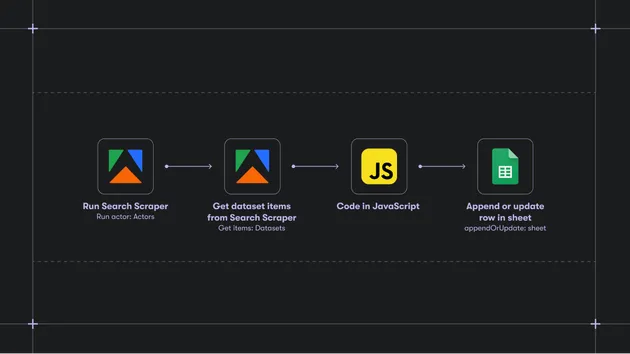
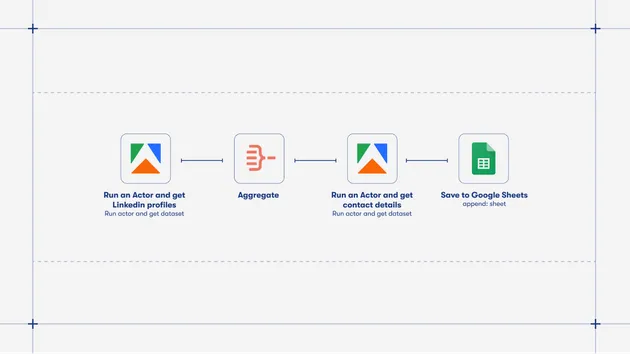
- Google Sheets — stream results directly into a spreadsheet using the built-in Apify → Google Sheets integration
- Zapier / Make — trigger workflows (Slack alerts, CRM updates) when new posts are scraped
- Apify API / Webhooks — consume results programmatically in your own app
- Actor chaining — pipe post URLs into a sentiment analysis or translation Actor for deeper processing