

Golden Pages (goldenpages.be) API
Pricing
from $10.00 / 1,000 results
Golden Pages (goldenpages.be) API
Scrape and extract business listings from Golden Pages (goldenpages.be), the English edition of Belgium's largest yellow pages and business directory. Extract company names, addresses, phone numbers, emails, websites, opening hours, and categories.
Pricing
from $10.00 / 1,000 results
Rating
0.0
(0)
Developer

Thodor
Maintained by CommunityActor stats
1
Bookmarked
3
Total users
0
Monthly active users
2 months ago
Last modified
Categories
Share
A Golden Pages scraper tool for goldenpages.be, the English edition of Belgium's largest business directory. Search dentist in Ghent and get every matching Belgian business as a spreadsheet row, with phone, email, website, opening hours, and the company's VAT registration, all labeled in English. No Dutch required.
That's the point of this edition: Belgium's business data is locked behind Dutch and French directories, and this actor is the way into it for an English-speaking team. Categories come back as Funeral directors instead of Begrafenisondernemingen, KBO statuses as Active file, weekdays as Monday. If your team works in Dutch, the sibling Gouden Gids Scraper reads the Dutch edition of the same directory.
📋 How to scrape Belgian businesses in English
- Type an English search term into What:
restaurant,plumber,dentist,lawyer. - Optionally type a city into Where:
antwerp,ghent,brussels. Empty searches all of Belgium. - Click Start.
- Open the Output tab and click Export for CSV, Excel, JSON, or HTML.
🎁 So what do you get?
| 📧 Email and website | 📞 Every listed phone number | 🧾 Belgian VAT number: with KBO record in English |
| 📍 Address: street to province | 🕐 Opening hours: Monday, not Maandag | ⭐ Ratings and reviews |
| 🏷️ English categories | 📱 Social media links | 🆔 Listing ID shared across the NL, FR, and EN editions |
⚖️ Which edition should you run?
The Belgian directory publishes in three languages; the listings and IDs are the same, the labels and a few fields differ.
| This actor (goldenpages.be) | Gouden Gids Scraper (goudengids.be) | |
|---|---|---|
| 🔍 Search terms | ✅ English: plumber, dentist | 🇳🇱 Dutch: loodgieter, tandarts |
| 🏷️ Output labels | ✅ English: Active file, Monday | 🇳🇱 Dutch: Actieve dossier, Maandag |
| 📝 Company description, logo, verified badge | ❌ Not published on the English site | ✅ Included |
| 🗃️ Listings and IDs | Same businesses, same listing_id | Same businesses, same listing_id |
There is no actor for the French edition (pagesdor.be), but every row from either sibling carries alternate_urls.fr pointing at it.
🎯 Three things people run this for
| How | |
|---|---|
| 🌍 Prospect Belgium without speaking Dutch | One category, one city, straight into your CRM: the flat columns map onto Lead and Account objects, and your English-speaking SDRs can read every field |
| 🧾 Vendor and partner due diligence | Each row links the company's public KBO record with its status in English. Active file means the registration is alive; anything else is a flag before you sign |
| 🗺️ Market mapping | Count businesses per category per city, compare ratings and opening hours across regions, and find the underserved ones |
📥 Input
what: an English search term, at least 3 characters. Category words work best (restaurant,electrician); legal-form abbreviations (bv,nv,sprl) are not searchable and return nothing.companylists everythingwhere: a city name. Empty searches all of BelgiummaxResults: default10, the form prefills it.0= every result
⚠️ A few things stay local. Most cities take English names (
Antwerp,Ghent,Brussels), but a handful only exist under their Dutch name on the site (Ukkel,Mol): use whatever the goldenpages.be address bar shows. And free-text content written by the business itself, longer descriptions and review bodies, arrives in whichever language it was written, often Dutch or French.
📤 Output
One row per company, every record with the same keys in the same order and null where the site has no value, so typed pipelines and CRM imports can rely on a single shape.
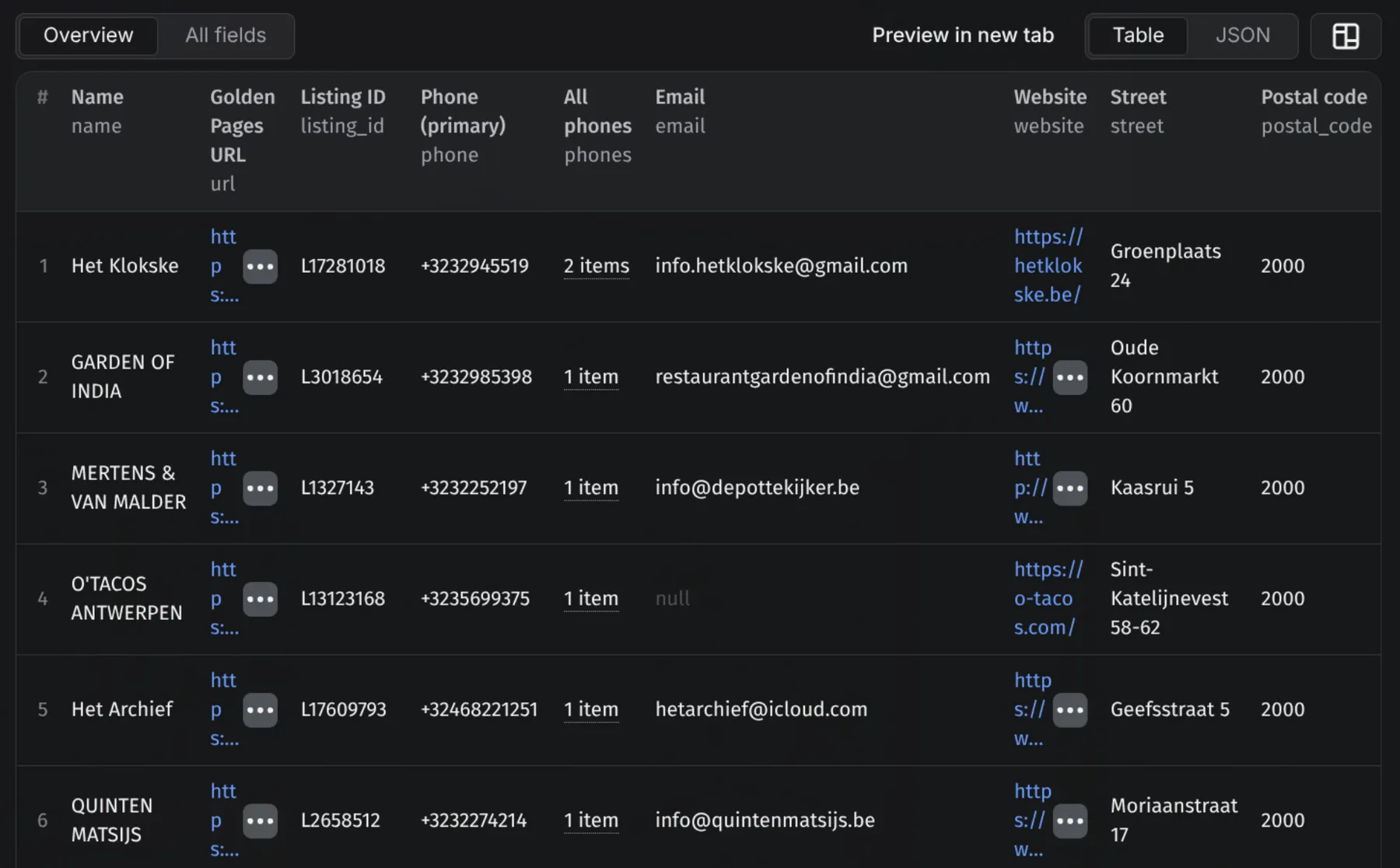
Fields
| Field | What it holds |
|---|---|
url, listing_id | The listing on goldenpages.be and the ID it shares with the NL and FR editions |
name | Trading name |
phone, phones, whatsapp | Primary number, every number deduped, WhatsApp when listed |
email, website | email is null when the listing hides it behind a click-to-reveal control |
street, postal_code, city, province, country | Address components |
ondernemingsnummer, btw | Belgian enterprise/VAT number and the raw VAT line |
kbo_status, kbo_url, founding_date | The public KBO registration: status in English, link, founding date |
rating, rating_count, reviews | Aggregate rating and the review list {author, rating, text, date} |
category, categories | Primary English category and every tag |
opening_hours | {day, hours} per weekday, English day names |
employees_min, employees_max, employees_raw | Headcount band |
languages, social_media, parking | Spoken languages, social profiles, parking info |
images | Listing photos |
alternate_urls | The same listing on goudengids.be (NL) and pagesdor.be (FR) |
⚙️ Use it as a Golden Pages API
Every run is an HTTP endpoint: POST the same JSON as the form and the companies come back in the response body.
Python
Node.js
curl
Swap run-sync-get-dataset-items for runs to fire async with a webhook. The apify-client SDK works too, in Python and JavaScript, and the n8n, Make, Zapier, and Google Sheets integrations take the same input.
💡 Tip: no need to write the JSON by hand. Fill in the form on the Input tab, switch the editor from Form to JSON, and copy the result into your code.
💰 How much does it cost to scrape Golden Pages?
Billing is per company delivered, from $10.00 per 1,000: a 40-result run costs about $0.40, and maxResults stops the run at exactly the rows you asked for.
❓ FAQ
Can I scrape Golden Pages for free? Yes. Registering on Apify comes with $5 of free platform credit every month, no credit card needed, good for roughly 500 companies.
Does this work for goldenpages.ie (Ireland)? No. This actor covers goldenpages.be, the Belgian directory; Ireland's goldenpages.ie is an unrelated site.
Why does the Dutch sibling return more fields?
The English site doesn't publish the company description, logo, or verified badge. Since the listing_id is shared, you can run the Gouden Gids Scraper on the same searches and join the two datasets on that ID when you need both English labels and the extra fields.
Is it legal to scrape goldenpages.be? The actor extracts only what anyone can view on the site. Business contact details can still qualify as personal data under GDPR, so for outreach you need a lawful basis and must honour opt-outs.
🛟 Support
Something not working, or a field missing? Message me in the Issues tab and I'll look into it quickly; the output schema is versioned, so new fields arrive without breaking existing exports. I'm a solo dev, so don't hesitate.
Working in Dutch? The Gouden Gids Scraper reads the Dutch edition and returns a few fields this one can't.
- Thodor


