Google Maps Reviews Scraper
Pricing
from $0.25 / 1,000 review scrapeds
Google Maps Reviews Scraper
Extract every Google Maps review from any place URL. Get full text, star ratings, detailed sub-ratings, reviewer profiles, owner responses, images, and ISO dates.
Pricing
from $0.25 / 1,000 review scrapeds
Rating
0.0
(0)
Developer

Thodor
Maintained by CommunityActor stats
1
Bookmarked
4
Total users
1
Monthly active users
18 days ago
Last modified
Categories
Share
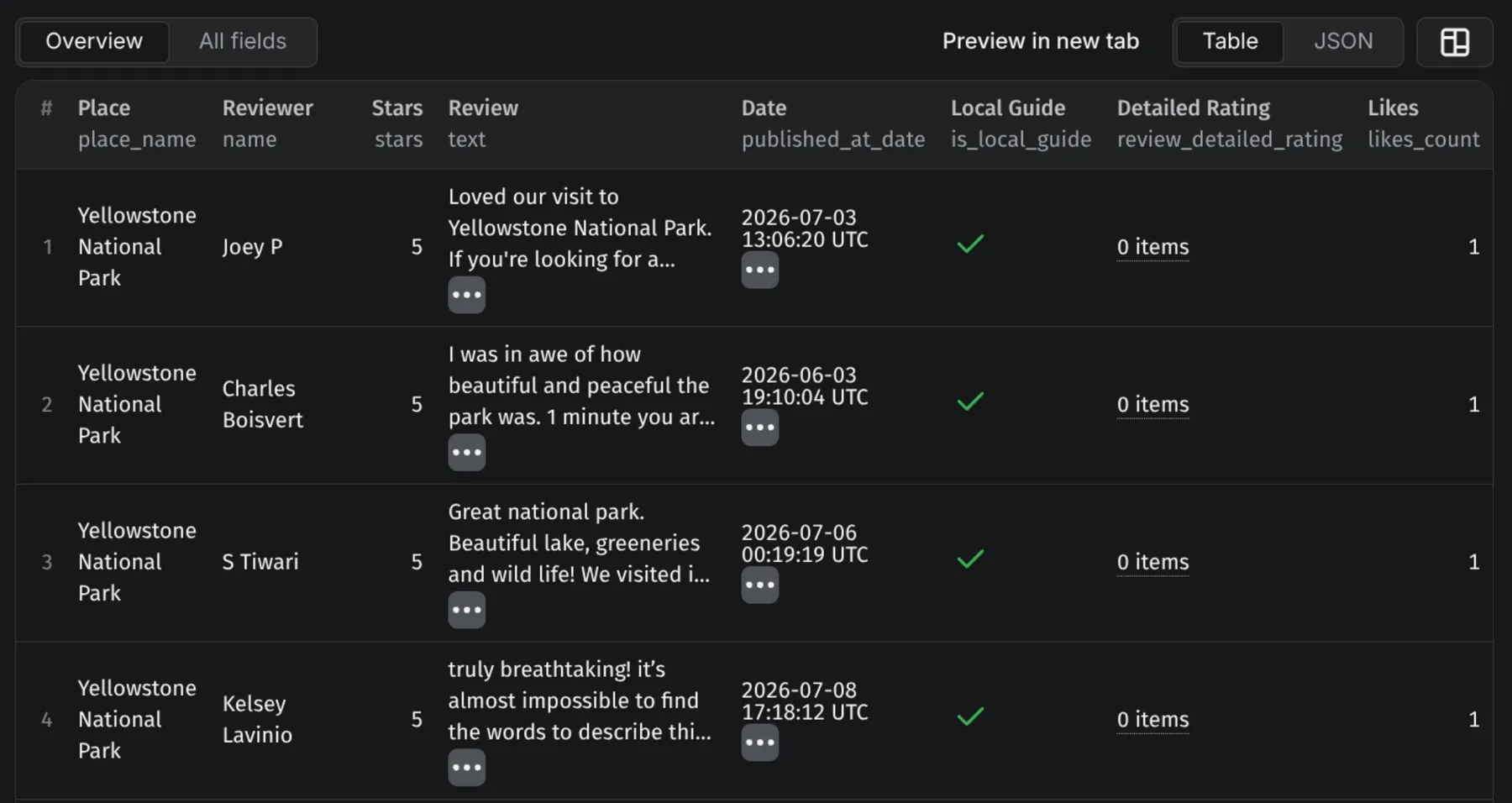
Extract every Google Maps review from any place URL. Get full text, star ratings, detailed sub-ratings, reviewer profiles, owner responses, images, and ISO dates. One row per review — easy to filter, sort, and export to JSON, CSV, or Excel.
Why scrape Google Maps reviews
Google's official Places API (New) returns at most 5 reviews per place with no pagination — fine for a website teaser, useless for any analysis at scale. This actor pages through every review Google's own Maps UI exposes, attaches place context to each row, and pushes the result as a flat dataset.
Five concrete plays:
- Weekly reputation alert. Schedule the actor on Apify, diff the dataset against last week's, and pipe new ≤2★ reviews into a Slack channel. Two locations or two hundred — same setup.
- Sentiment analysis on the full corpus. Pull every review per location, send
textinto Claude / GPT / your NLP stack, score satisfaction by category fromreview_detailed_ratingfor restaurants and hospitality. - Competitor benchmarking. Run the scraper against your locations plus your three nearest competitors monthly. Compare ratings, review counts, and detailed sub-ratings (Food / Service / Atmosphere) over time.
- Agency review reports. Pull all-time reviews per client location once, then weekly. White-label the CSV as a client report.
- Owner-response audits. Filter rows where
response_from_owner_textisnullandstars <= 3. That's the list of negative reviews your client hasn't replied to.
How to use it
No code, no setup. Five clicks from "I want reviews" to "I have a spreadsheet of reviews."
- Open the actor. Click Try for free at the top of this page — you'll land in the Apify Console with the input form ready. (First time on Apify? Sign up with email or Google; no credit card needed for the free tier.)
- Grab the URL of the place you want reviews from. Open google.com/maps, search for the business, click on it, then copy the URL from your browser's address bar. That's the URL the actor needs — long, messy, full of coordinates. That's the right one.
- Paste the URL(s) into the Place URLs field. One URL per line. Want reviews from ten of your locations? Paste ten URLs. Want to compare yourself against three competitors? Paste four.
- Set how many reviews you want per place. Default is 100. Bump it up to
500or5000if you want deeper history; leave it low if you only want recent feedback. - Click Start. The actor runs in the cloud. You can close the tab — you'll get an email when it's done. Most runs finish in a few minutes.
- Download your data. When the run finishes, go to the Dataset tab. Pick CSV (for Excel / Google Sheets), Excel (.xlsx), or JSON (for code / APIs).
What to do with the data once you have it
The fastest "I want value, not a tutorial" path:
-
Paste reviews into ChatGPT or Claude for instant strategic insight. Open the CSV, copy the
textcolumn, paste into a chat with a prompt like:"These are the last 200 customer reviews for our restaurant. Tell me the top 3 complaints, top 3 things people love, and the single most important thing we should focus on improving."
You'll get a strategic summary in 30 seconds. Works on any LLM (ChatGPT, Claude, Gemini, Perplexity, your own internal LLM). Repeat monthly and compare answers to see what's changing.
-
Sort in Excel / Google Sheets. Sort by
starsascending to surface your worst reviews. Filterresponse_from_owner_textfor blank cells to find reviews you haven't replied to. Sort bypublished_at_datedescending for "what happened this week." -
Push into your existing tools. CSV imports into any CRM, BI dashboard, sentiment-analysis tool, or marketing automation platform. See Integrations below for ready-made n8n / Make / Zapier flows if you want to skip the manual download step.
For automated monitoring, competitor benchmarking, or lead-generation workflows, see the How-to guides further down — each one is a step-by-step recipe with example code.
Input parameters
| Field | Required | What it does |
|---|---|---|
| Place URLs | yes | The Google Maps URLs you want reviews from. Paste one per line. URLs must come from your browser address bar (not goo.gl / maps.app.goo.gl short links — those don't carry the data we need). |
| Max reviews | no | How many reviews to grab per place. Default 100. Set higher (500, 5000) for deeper history. |
Running it from code (optional)
If you'd rather call the actor programmatically — to automate runs, feed URLs from a database, or integrate into a larger pipeline — here's the Python equivalent:
from apify_client import ApifyClientclient = ApifyClient("YOUR_API_TOKEN")run = client.actor("thodor/google-maps-reviews-scraper").call(run_input={"start_urls": [{"url": "https://www.google.com/maps/place/.../data=!4m5!3m4!1s0x...:0x..."},],"max_reviews": 500,})for review in client.dataset(run["defaultDatasetId"]).iterate_items():text = review["text"] or "(rating only, no text)"print(review["stars"], review["name"], text[:80])
Output
Each review comes out as one row in your dataset. Here's what every field means, grouped by what you'll actually filter on. Scroll to the bottom for raw JSON samples if you want to see the exact shape.
Place context — attached to every row so a multi-place run is one flat dataset.
| Field | Type | What it is |
|---|---|---|
place_name | text | Name of the place, parsed from the URL. Falls back to "Unknown" if the URL didn't carry one (rare). |
place_id | text | Google's internal place ID. Stable per place — same ID every run. |
place_url | text | The exact URL you passed in — useful for joining results back to your source list. |
Review content — the actual review, plus its metadata.
| Field | Type | What it is |
|---|---|---|
review_id | text | Unique ID per review. Use this to dedupe across runs. |
stars | number (1–5) | The star rating the reviewer gave. |
text | text or empty | The written review. Empty when the reviewer left a rating without typing anything. |
review_detailed_rating | list | Sub-ratings like Food / Service / Atmosphere / Rooms. Empty for places without sub-rating support (parks, shops, most non-hospitality categories). |
review_image_urls | list of links | Photos attached to the review. Empty if none. |
likes_count | number | How many other users marked this review as helpful. |
published_at_date | date | When the review was posted (ISO 8601 UTC). Use this for sorting and time-series. |
publish_at | text | Google's relative time string ("2 months ago"). Cosmetic only — don't sort on this. |
review_url | link | Direct link to the review on Google Maps. |
review_origin | text | Source label from Google. Typically "Google". |
review_context | text | Language code of the review (en, nl, es, …). |
Reviewer — who wrote it.
| Field | Type | What it is |
|---|---|---|
name | text | Reviewer's display name. |
reviewer_id | text | Google contributor ID. Stable per reviewer. |
reviewer_url | link | Link to the reviewer's contributor page on Google Maps. |
reviewer_photo_url | link | The reviewer's avatar. |
reviewer_number_of_reviews | number | Total reviews this person has written across all of Google Maps. Useful as a credibility weight. |
is_local_guide | yes / no | Whether the reviewer is in Google's Local Guide program. |
Owner response
| Field | Type | What it is |
|---|---|---|
response_from_owner_text | text or empty | The business's reply. Empty when no reply has been posted yet (most reviews). Filter for empty + low stars to find unanswered negatives. |
response_from_owner_date | date or empty | When the owner replied (ISO 8601 UTC). |
If you only want reviews with actual written feedback, filter for rows where text is not empty — a meaningful share of reviews on travel and high-volume listings are rating-only.
Raw JSON examples
For developers who want to see the exact shape of a row. Two real examples — a full review and a rating-only review:
A full review (text + photos + detailed sub-ratings)
{"place_name": "La Donna Re's","place_id": "0x89c25d8a10261a7d:0x148b4752f2b99ae2","place_url": "https://www.google.com/maps/place/La+Donna+Re's/...","review_id": "Ci9DQUlRQUNvZENodHljRjlvT2pkRmVVVlRhazVo...","name": "Isatta Bassie","reviewer_id": "109283811363605044639","reviewer_url": "https://www.google.com/maps/contrib/109283811363605044639/reviews?hl=en","reviewer_photo_url": "https://lh3.googleusercontent.com/a-/ALV-UjVPL1SQ...","reviewer_number_of_reviews": 5,"is_local_guide": false,"published_at_date": "2026-01-11T02:01:27Z","publish_at": "2 months ago","stars": 5,"text": "10/10! Super friendly staff and everything was delicious...","review_url": "https://www.google.com/maps/reviews/data=...","review_detailed_rating": [{"category": "Food", "rating": 5},{"category": "Service", "rating": 5},{"category": "Atmosphere", "rating": 5}],"likes_count": 1,"review_origin": "Google","response_from_owner_text": null,"response_from_owner_date": null,"review_image_urls": ["https://lh3.googleusercontent.com/geougc-cs/ABOP9..."],"review_context": "en"}
How-to guides
Step-by-step walkthroughs for the four workflows this scraper is most often used for. Each guide assumes you've run the actor once already — see Input above if you haven't.
How to monitor Google Maps reviews and alert on new negatives
The most operational use case: your client (or your own business) wants to know within hours when a 1- or 2-star review lands, especially one that's gone unanswered.
- Collect one place URL per location. Paste them into the Apify Console or store them in a Google Sheet you'll iterate over.
- Schedule the actor. Apify Console → Schedules → New schedule. Daily for high-volume listings, weekly for low-volume. Set
max_reviewsto a small number (e.g.30) — you only need the most recent batch each time. - Add a webhook on
ACTOR.RUN.SUCCEEDED. Apify Console → actor → Integrations → Webhooks → POST to a Slack incoming-webhook URL, a Make scenario URL, or an n8n trigger. - Dedupe and filter in the consumer. Track
review_ids you've already alerted on. For each new run, keep rows wherereview_id ∉ seenandstars <= 2. Optionally narrow further withresponse_from_owner_text == nullto surface only unanswered negatives. - Format and route the alert. Compose a message with
place_name,stars, the first ~200 chars oftext, andreview_url. Drop it into a Slack channel, open a help-desk ticket, or email the on-call manager.
Filter expression for Make / n8n / Zapier:
items.filter(r =>r.stars <= 2 &&!seen_review_ids.has(r.review_id) &&(r.text || '').length > 0)
This is the bare minimum for "alert me when a negative review is posted." Add trend detection on top by tracking the rolling 30-day average of stars per place_id — alert when it drops more than 0.2.
How to do sentiment analysis on Google Maps reviews
Star ratings tell you how people feel. Review text tells you why. Sentiment analysis bridges the two at scale.
- Scrape the corpus. Run the actor against your target place URL(s) with
max_reviewsset to your sample size —1000per place is plenty for stable per-theme percentages. - Filter to reviews that have text. Sentiment on a star rating alone is just the star rating. Keep
text != null— on most listings that's 40–70% of the dataset. - Pick an engine. Two paths:
- LLM (best for theme extraction). Send each
textto ChatGPT (GPT-4o-mini or GPT-4o) with a structured-output schema asking for{sentiment, themes[], complaints[], praise[]}. Cheap, accurate on real-world language, handles multiple languages without re-tooling. - Open-source classifier (cheapest, English-only). HuggingFace
cardiffnlp/twitter-roberta-base-sentiment-latestfor 3-class sentiment, ~50ms per review on CPU. Pair with topic modelling (BERTopic) if you want themes.
- LLM (best for theme extraction). Send each
- Group by what you care about. For restaurants and hospitality,
review_detailed_ratingalready gives you Food / Service / Atmosphere / Rooms scores per review — group those before layering LLM-extracted themes on top. For categories without sub-ratings (parks, shops, services), the LLM themes are your only signal. - Track over time. Bucket by month using
published_at_date. Chart sentiment scores against operational changes (menu launch, new staff, policy shift). A two-month sentiment drop before the star average moves is an early-warning signal.
ChatGPT example using the OpenAI SDK with structured outputs:
from openai import OpenAIfrom pydantic import BaseModelclient = OpenAI()class ReviewAnalysis(BaseModel):sentiment: str # "positive" | "neutral" | "negative"themes: list[str]complaints: list[str]praise: list[str]for review in (r for r in reviews if r["text"]):completion = client.beta.chat.completions.parse(model="gpt-4o-mini",messages=[{"role": "system", "content": "Analyse Google Maps reviews. Extract sentiment, themes, complaints, and praise. Be concise."},{"role": "user", "content": f"Review: {review['text']}\nStars: {review['stars']}"},],response_format=ReviewAnalysis,)analysis = completion.choices[0].message.parsed
OpenAI's prompt caching is automatic on the system message, so the schema instructions get a ~50% discount once warmed — meaningful when you're processing thousands of reviews.
How to benchmark your business against competitors on Google Maps
Same scraper, multiple place URLs, one flat dataset — compare yourself against the three to five closest competitors in your category.
- Get URLs for your business + competitors. Open each business on Google Maps, copy the URL from the address bar. Three to five competitors is the right comparison set for most local categories; more dilutes the signal.
- Run the actor on the combined list. One run, multiple URLs. The output is flat — every row carries
place_nameandplace_id, so a single dataset contains the whole comparison. - Aggregate per place. In Pandas:
In a spreadsheet: pivot onimport pandas as pddf = pd.DataFrame(reviews)summary = df.groupby("place_name").agg(reviews=("review_id", "count"),avg_stars=("stars", "mean"),low_star_pct=("stars", lambda s: (s <= 2).mean() * 100),owner_response_rate=("response_from_owner_text", lambda s: s.notna().mean() * 100),)place_namewith average stars, row count, count ofstars <= 2, and count of non-nullresponse_from_owner_text. - Compare sub-ratings where applicable. For restaurants / hotels, explode
review_detailed_ratinginto columns and average Food / Service / Atmosphere / Rooms per place. This reveals what drives a rating gap, not just the gap size — "they beat us on Service by 0.4 stars" is actionable; "they beat us overall by 0.1" is not. - Re-run monthly. Schedule the actor, store each snapshot. A 0.1-star drop at a competitor over two months is a real signal — somebody's experience is changing. Lock in your gains by feeding the deltas into your competitive-intel report.
How to use Google reviews for local-SEO lead generation
Reputation-management agencies, local-SEO consultants, and review-platform vendors all need the same list: high-visibility businesses with weak reputations. Reviews data is how you find them.
- Discover prospects with the Google Maps Scraper. Search by category + city, e.g.
dentistinBrooklyn, NY. The output includes place URLs ready for the next step. - Pass those URLs into this Reviews Scraper. Set
max_reviewslow (50is enough for a reputation signal — you don't need every review, just the recent ones). - Score each prospect. For each place, compute:
reviews_count— proxy for visibility / customer volumeavg_stars— current reputation levellow_star_pct— fraction of reviews ≤ 2 starsowner_response_rate— share of reviews with a non-nullresponse_from_owner_text
- Filter for outreach priority. Example signal:
reviews_count > 100 && avg_stars < 4.0 && owner_response_rate < 0.1. That's "high visibility, weak rating, neglected reputation" — the strongest lead profile for reputation-management services. - Export to your CRM with the underlying reviews attached. Each prospect record gets the actual review text so your outreach can reference specifics: "I noticed three of your reviews from the last month mention slow service — happy to share what we've seen work for other [category] businesses in [city]." Personalised outreach off real review data beats generic prospecting by an order of magnitude.
Need business data instead of reviews? If you want to discover businesses by search query and location (not just reviews from a known place URL), use the Google Maps Scraper instead. It returns names, phone numbers, websites, opening hours, and 60+ attributes per place, with reviews as an optional add-on.
Limits & honesty
This actor talks to Google's review feed directly. Things that costs you, stated up front:
- No sort selector. The actor uses Google's default review ordering — a Google-decided mix biased toward longer, photo-bearing, and recent reviews. There is no input to switch to "Newest first". If you need strictly chronological reviews, re-sort the dataset on
published_at_dateafter the run. Reviews older than yourmax_reviewscap aren't fetchable in a different order. - Per-place ceiling is Google's, not ours. On listings with very high review counts, Google's own feed stops returning new pages somewhere in the low tens of thousands. No scraper (ours or otherwise) can paginate past that.
- Short links don't work.
goo.gl/maps/…andmaps.app.goo.gl/…don't carry the place ID we need. Expand in a browser, copy the address bar. text_translatedis reserved. The field appears in the output for compatibility but is currently alwaysnull. Use thereview_contextlanguage code to detect non-English reviews and translate downstream.
Integrations
Apify Schedules + webhook (the killer review-monitoring workflow). Schedule the actor to run nightly or weekly against your list of place URLs. Set a webhook on the ACTOR.RUN.SUCCEEDED event to POST the dataset to your destination — Slack, a help-desk, an internal sentiment dashboard. Combined with a downstream filter on stars <= 2 && response_from_owner_text == null, this is a complete "alert me when a negative review goes unanswered" pipeline with no custom infrastructure.
n8n. HTTP Request node, POST:
https://api.apify.com/v2/acts/thodor~google-maps-reviews-scraper/run-sync-get-dataset-items?token=<APIFY_TOKEN>
Body: { "start_urls": [{ "url": "{{$json.place_url}}" }], "max_reviews": 200 }. Wire a CRM or Google Sheet trigger in, filter on {{$json.stars <= 2 && !$json.response_from_owner_text}}, route to Slack.
Make / Zapier / Google Sheets. Same pattern: one HTTP module pointed at run-sync-get-dataset-items, returning JSON in one round-trip. Apify also has a native Google Sheets integration if you'd rather push rows directly into a tab instead of pulling.
curl.
curl -X POST "https://api.apify.com/v2/acts/thodor~google-maps-reviews-scraper/run-sync-get-dataset-items?token=$APIFY_TOKEN" \-H "Content-Type: application/json" \-d '{ "start_urls": [{ "url": "https://www.google.com/maps/place/.../1s0x...:0x..." }], "max_reviews": 100 }'
FAQ
What URL formats work?
Any Google Maps URL that contains the hex place ID 0x...:0x.... The URL in your browser address bar after navigating to a place always carries it. goo.gl/maps/... and maps.app.goo.gl/... short links don't — expand them in a browser first.
Why is text null for some reviews?
The reviewer left a star rating without typing anything. Common on parks, hotels, and high-volume listings. Filter text != null downstream if you only want written reviews.
How many reviews can I fetch per place?
Set max_reviews to the cap you want. The actor paginates until either the cap is reached or Google stops returning pages. The hard ceiling is whatever Google's own feed exposes (low tens of thousands for very high-volume places); the rest aren't reachable from any tool.
Can I sort by newest?
Not via input — Google's feed returns its default "Most relevant" ordering. Re-sort on published_at_date after the run for chronological order; same data, in the order you want.
How is this different from the Google Places API? The official Places API returns at most 5 reviews per place with no pagination, so it can't drive any workflow that needs more than a teaser. This actor calls the same feed Google Maps' own UI uses and paginates fully — typically hundreds to thousands of reviews per place instead of 5.
How is this different from the Google Maps Scraper?
Google Maps Scraper takes a search query + location (e.g. restaurant in Brooklyn) and returns matching businesses. This Reviews Scraper takes a place URL as input and returns every review for that one place. Pair them: scrape a market for place URLs, then feed those URLs in here for deep review analysis.
What if a place has no reviews? The actor finishes that place with zero rows pushed and moves to the next URL.
Can I export to CSV / Excel / Google Sheets? Yes. Every Apify dataset exports to JSON, CSV, Excel, HTML, and XML from the Dataset tab. Each review is a separate row, so spreadsheet sort/filter works directly. Apify also has a native Google Sheets integration if you want pushes instead of pulls.
Do you scrape reviewer photos?
Yes — reviewer_photo_url is populated for every review where Google exposes it. Be mindful of GDPR / CCPA on reviewer personal data downstream.
Is scraping Google Maps reviews legal? Reviews are publicly displayed on Google Maps. Reading public metadata is generally permitted; you remain responsible for compliance with Google's Terms of Service and applicable law (GDPR, CCPA, etc.) in your downstream use, particularly around personal data carried in reviewer fields.
Support
Open an issue on this actor's Issues tab in the Apify Console. Include the place URL, what you expected, and what you got. The actor is maintained by a solo developer — every issue gets read and most fixes ship within a day. If the scraper helped you, a review on the Apify Store goes a long way; this actor is competing with much bigger players and every rating matters.