

Google Maps Scraper with Public Reviews
Pricing
from $2.00 / 1,000 place scrapeds
Google Maps Scraper with Public Reviews
Google Places API alternative. Get 60+ business attributes per place: names, phones, websites, hours, reviews, and coordinates. JSON, CSV, or Excel. Unlimited results per area, no per-request quota.
Pricing
from $2.00 / 1,000 place scrapeds
Rating
0.0
(0)
Developer

Thodor
Maintained by CommunityActor stats
4
Bookmarked
152
Total users
5
Monthly active users
16 hours ago
Last modified
Categories
Share
A Google Places API alternative that returns Google Maps places and their public reviews as clean JSON, CSV, or Excel. No Google Cloud project, no API key, no per-SKU billing: phone, website, hours, coordinates, and 60+ business attributes are all included in the base rate.
Google's Places API (New) bills per request per SKU and caps every query at 60 results. This actor bills one rate per place with everything included, and breaks Google Maps' 120-result cap by subdividing the target area automatically. Reviews come attached to each place: the five Google shows a visitor who is not signed in, which since late September 2026 is the whole of the public set. Going deeper means reading from inside a logged-in Google account, which is no longer public data, and this actor does not do it.
📋 How to export Google Maps places to a spreadsheet
- Type what you're looking for in Search Query:
dentist,restaurant,plumber. - Type the area in Location: a city, region, address, or country. It is geocoded automatically.
- Click Start.
- Open the Output tab and click Export for CSV, Excel, JSON, or HTML. Google Sheets works through the Console integrations.
🎁 So what do you get?
| 📞 Phone, local and international | 🌐 Website | ⭐ Rating and review count |
|---|---|---|
| 🕐 Full weekly opening hours | 📍 Coordinates and full address | 🏷️ Categories and price level |
| 📝 Public reviews, optional | 🎛️ 60+ business attributes | 🖼️ Primary photo |
| 🆔 Stable place ID and CID | 🕒 Open or closed right now | 🌍 IANA timezone |
⚖️ Compared to the Google Places API
| Google Places API (New) | This actor | |
|---|---|---|
| 💰 1,000 places | ❌ ~$32, contact and atmosphere data billed on top | ✅ $2.00-3.00, everything included |
| 📝 Reviews | ⚠️ 5 per place, no owner replies or sub-ratings | ✅ The same 5, plus owner replies, sub-ratings, photos, Local Guide status and helpful votes |
| 🖼️ Results per query | ❌ 60 max | ✅ Limited by area size, not a fixed cap |
| 🔑 Access | ❌ Google Cloud project, API key, billing account | ✅ Register on Apify, $5 free monthly credit |
| 📤 Output | ❌ JSON only | ✅ JSON, CSV, Excel, Google Sheets |
Google's $32 is Place Details Pro on the 2026 price list, before the Photos, Contact Data, and Atmosphere Data SKUs stack on top.
🎯 Three things people run this for
| How | |
|---|---|
| 📇 B2B lead lists | Turn reviews off and you get every business in an area with its phone, website, and address, fast and cheap. Need emails too? Maps doesn't show them, so run the websites through the Email Scraper |
| 📈 Local SEO monitoring | Recurring run on a Schedule, diff rating, review_count, and opening_hours between runs to catch competitor movement |
| 🗺️ Market research and store locators | Pull every business in a city, not just the 120 Google Maps normally stops at. Each place comes with coordinates, so the results drop straight onto a map or into your own app |
📥 Input
query: what to search for, like the Maps search barlocation: city, region, address, or country. Geocoded automaticallymax_results: default100. Caps billable placesscrape_reviews: defaulttrue. Attach each place's public reviews, billed separately per reviewhl,gl: language and country codes, defaultenandus
📇 Fast lead list, no reviews
📝 A market with its reviews
📤 Output
One flat JSON object per place. Fields the business has not filled in come back null rather than being dropped, so CSV columns stay aligned.
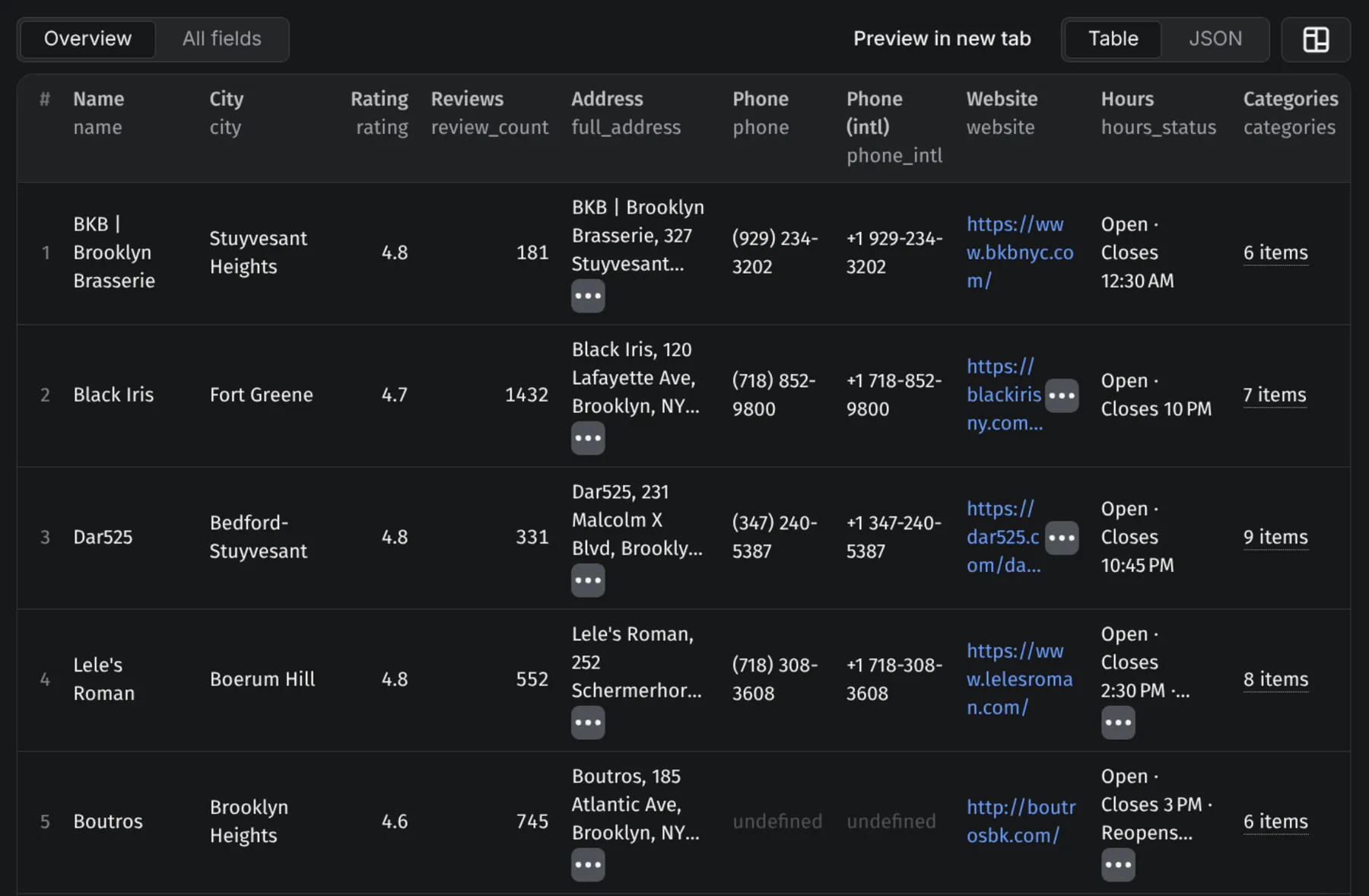
Reviews sit inside each place, in its reviews field, up to five of them. Places with fewer than five return everything they have. A single review looks like this:
⚠️ Google picks which five. They come from its default "most relevant" mix, biased toward longer, photo-bearing and recent reviews, and signed-out visitors get no sort switch. Sort on
published_at_dateafter the run for chronology, and read the five as a sample of a place, not as its newest five.
Fields
| Field | Type | Description |
|---|---|---|
name | string | Business name |
place_id, cid | string | Google Maps hex place ID and CID |
categories | string[] | Business categories |
full_address | string | Full formatted address |
street, city, neighborhood, country | string | Address components |
lat, lng | float | Latitude and longitude |
timezone | string | IANA timezone |
phone, phone_intl | string | Local and international phone |
website, website_domain | string | Business website and bare domain |
rating, review_count | float, int | Average rating and number of reviews |
price_level | string | $, $$, €€ |
opening_hours | {day, hours}[] | Full weekly schedule |
hours_status | string | Open or closed at scrape time |
photo_url | string | Primary photo |
additional_info | {category, name, value}[] | 60+ business attributes |
reviews | object[] | The place's public reviews, up to 5, when enabled |
⚙️ Use it as a Google Places API
One synchronous POST returns the dataset directly. No polling, no SDK required.
Python
Node.js
curl
Swap run-sync-get-dataset-items for runs to fire async and collect results by webhook; large areas with reviews on can outlive the 5-minute sync window. The apify-client SDK works too, in Python and JavaScript.
💡 Tip: no need to write the JSON by hand. Fill in the form on the Input tab, switch the editor from Form to JSON, and copy the result into your code.
💰 How much does it cost to scrape Google Maps?
Billing is per place returned, at the rate on the price card on this page. Reviews are billed separately per review and only when scrape_reviews is on. Page fetches, geocoding, and the grid subdivision are not billed.
⚠️ Reviews add a second billable line. A 500-place list with reviews off bills as 500 places. The same list with reviews on bills those 500 places plus up to 2,500 reviews, since Google serves at most five per place. Turn
scrape_reviewsoff when you only need the business data.
❓ FAQ
How do I bypass the 120-result limit on Google Maps? Automatically. The actor subdivides your target area into sub-regions, searches each, then merges and deduplicates. No configuration needed.
Do I need a Google Maps API key? No.
Can I use this Google Maps scraper for free? Yes. Registering on Apify comes with $5 of free platform credit every month, no credit card needed.
Can I get business email addresses?
Not from Google Maps. Listings do not carry them, so no Maps scraper can return them. Pipe the website column into an email finder instead.
Can I get every review of a specific restaurant?
No. Google shows five per place to visitors who are not signed in, and that is what comes back, here or anywhere else without a login. For one business, search it by name and city with max_results set to 1.
Does the official Places API return all reviews?
No, five, the same as here. Google caps the reviews field at five with no pagination, and no field mask, quota raise, or billing tier changes it. The Business Profile API does return a location's full review history with no cap, but only for profiles the signed-in account verifiably owns, so it covers your own locations and nobody else's.
Why do other tools advertise thousands of reviews per place? Past the public five, Google answers only signed-in accounts, so anything returning more was read from inside one. Those rows come from behind a login rather than from a public page, and that difference travels with the data once it is in your hands.
Is scraping Google Maps legal? Public listing data is generally readable, and this actor stays on the signed-out public view for exactly that reason. Reviewer fields (name, photo, profile URL) are personal data, so GDPR and CCPA apply to how you store and use them, and you remain responsible under Google's terms.
How is this different from Outscraper, Phantombuster, or Bright Data? They typically charge a base listing rate plus a second per-1,000 charge for hours, service options, and attributes. All 60+ attributes are in the base rate here.
🛟 Support
Something not working, or a field missing? Message me in the Issues tab and I'll look into it quickly. I'm a solo dev, so don't hesitate. Custom variants are available on request.
Enriching the businesses you found? The LinkedIn Company Scraper - Profile, Posts & Competitors turns each company's LinkedIn URL into firmographics, recent posts, and competitors.
- Thodor


