
Document to Markdown for AI — Word, PowerPoint, Excel, PDF
Pricing
from $2.40 / 1,000 document converteds
Document to Markdown for AI — Word, PowerPoint, Excel, PDF
Convert Word (DOCX), PowerPoint, Excel, EPUB, HTML, CSV, JSON and text-based PDF files to clean Markdown for LLMs and RAG: PDF to Markdown, DOCX to Markdown and more. Optional chunking with overlap. Tables kept. $3 per 1,000 documents; failed files are free.
Pricing
from $2.40 / 1,000 document converteds
Rating
0.0
(0)
Developer

tidydata
Maintained by CommunityActor stats
0
Bookmarked
2
Total users
1
Monthly active users
4 days ago
Last modified
Categories
Security
Limited permissionsShare
📄 Document to Markdown for AI — Word, PowerPoint, Excel, EPUB, PDF
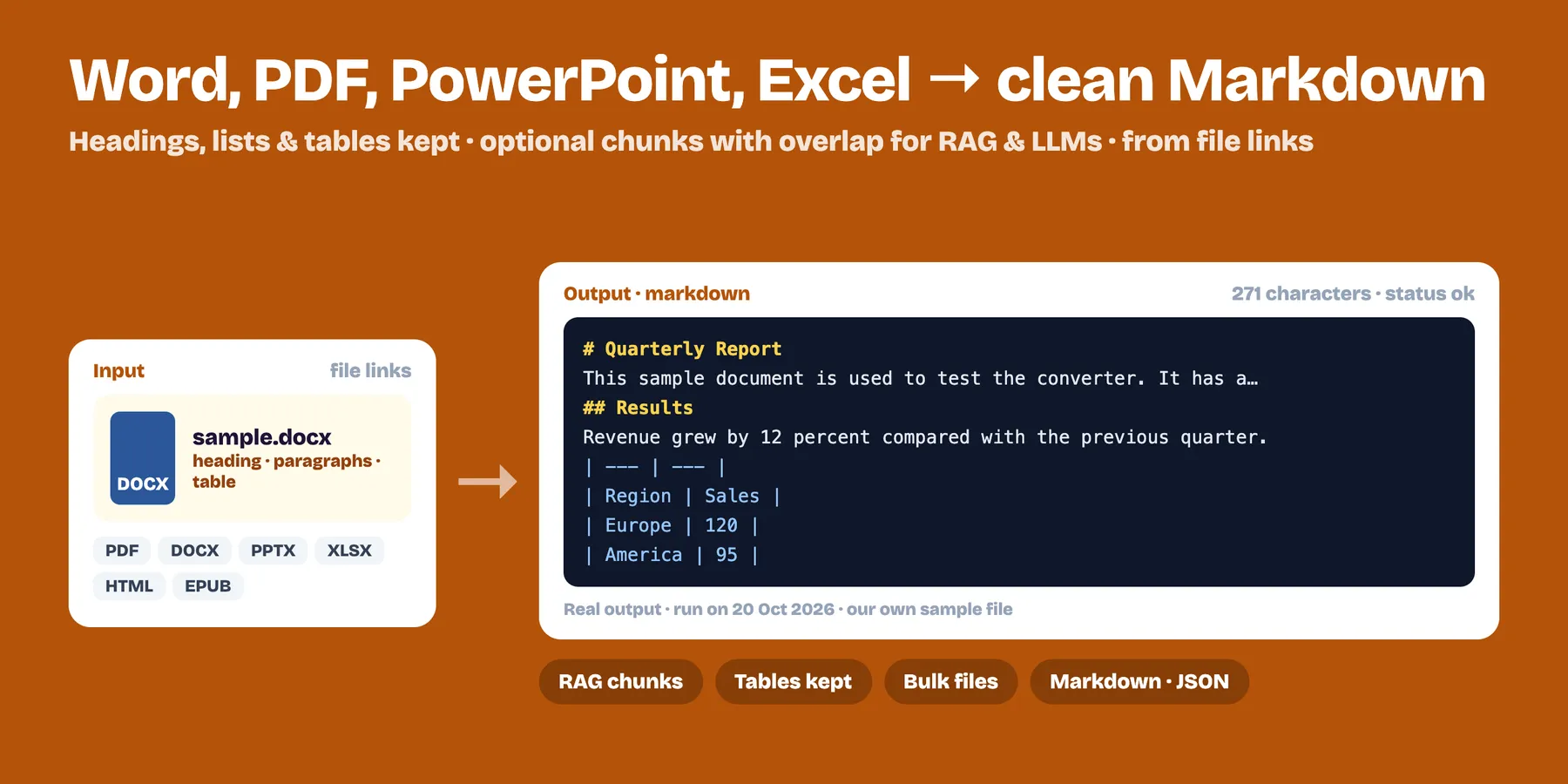
Turn Word, PowerPoint, Excel, EPUB, HTML, CSV, JSON, XML, text and text-based PDF files into clean Markdown that LLMs read well. Headings, lists and tables are kept. Optional chunking with overlap for RAG and embeddings. $3 per 1,000 documents; files that fail are free.
- ✅ .docx, .pptx, .xlsx/.xls, .epub, .html, .csv, .json, .xml, .txt and PDFs with text
- ✅ Tables → Markdown tables, slides separated, spreadsheet sheets as sections
- ✅ Chunks for RAG: set a size (e.g. 1,000 characters) and overlap; cuts happen at paragraph boundaries
- ✅ One row per document: title, format, character count, Markdown, chunks
- ✅ Direct file links (max 50 MB each); processed and deleted, nothing kept but your results
- ✅ Works great from AI agents and automations (n8n, Make, MCP) because the output is plain text
How to use it
- Paste links to your files (a public link, a file in cloud storage with a shareable link, a file in an Apify storage…).
- Optional: set chunk size and overlap, or turn off the full Markdown to get only chunks.
- Run. Read the results in the dataset or through the API.
Output example
Pricing
$0.003 per document converted ($3 per 1,000). Failed files and files without text are free.
Limits
- Scanned PDFs and images have no text to extract. Use an OCR tool for those (for example our PDF & Image to Text (OCR) Actor).
- Password-protected files can't be read.
- Layout (columns, floating boxes) is simplified: this is about clean text for AI, not pixel-perfect conversion.
FAQ
Which files can it convert? Word (.docx), PowerPoint (.pptx), Excel (.xlsx, .xls), EPUB, HTML, CSV, JSON, XML, plain text, Markdown and PDFs that contain text. Old .doc and .ppt files are not supported.
Can it read scanned PDFs or photos of documents? No. It extracts text that is already in the file and does no OCR. A file without text returns a failed row that says so, and it is free.
How big can a file be? Up to 50 MB per file. Links must be public http(s) links (private and local network addresses are refused) and up to 3 files are converted at the same time.
How much does it cost? $0.003 per document converted ($3 per 1,000). Failed files and files without text are free. No API key or account other than Apify is needed.
How does chunking work? Set a chunk size in characters and an overlap. Cuts happen at paragraph boundaries, only a paragraph longer than the chunk size is cut in the middle, and the overlap is capped at half the chunk size.
Can I use it from an automation or an AI agent? Yes. Call it through the Apify API, n8n, Make or MCP with a plain list of links, or run it on an Apify schedule. Files are deleted right after conversion: only your results are kept.


