
FFmpeg Video Converter & Compressor — MP4, MP3, GIF, WhatsApp
Pricing
from $16.00 / 1,000 hd video minutes
FFmpeg Video Converter & Compressor — MP4, MP3, GIF, WhatsApp
Convert and compress video and audio with FFmpeg: MP4, WebM, MOV, MP3, WAV, M4A, FLAC, GIF, thumbnails. Compress for WhatsApp, email, Discord or any size, 9:16 for Reels/TikTok, trim, mute, 16 kHz audio for Whisper. Links, uploads or datasets. For n8n, Make, Zapier.
Pricing
from $16.00 / 1,000 hd video minutes
Rating
0.0
(0)
Developer

tidydata
Maintained by CommunityActor stats
0
Bookmarked
2
Total users
1
Monthly active users
6 days ago
Last modified
Categories
Features
Share
🎬 FFmpeg Video Converter & Compressor — MP4, MP3, GIF, WhatsApp
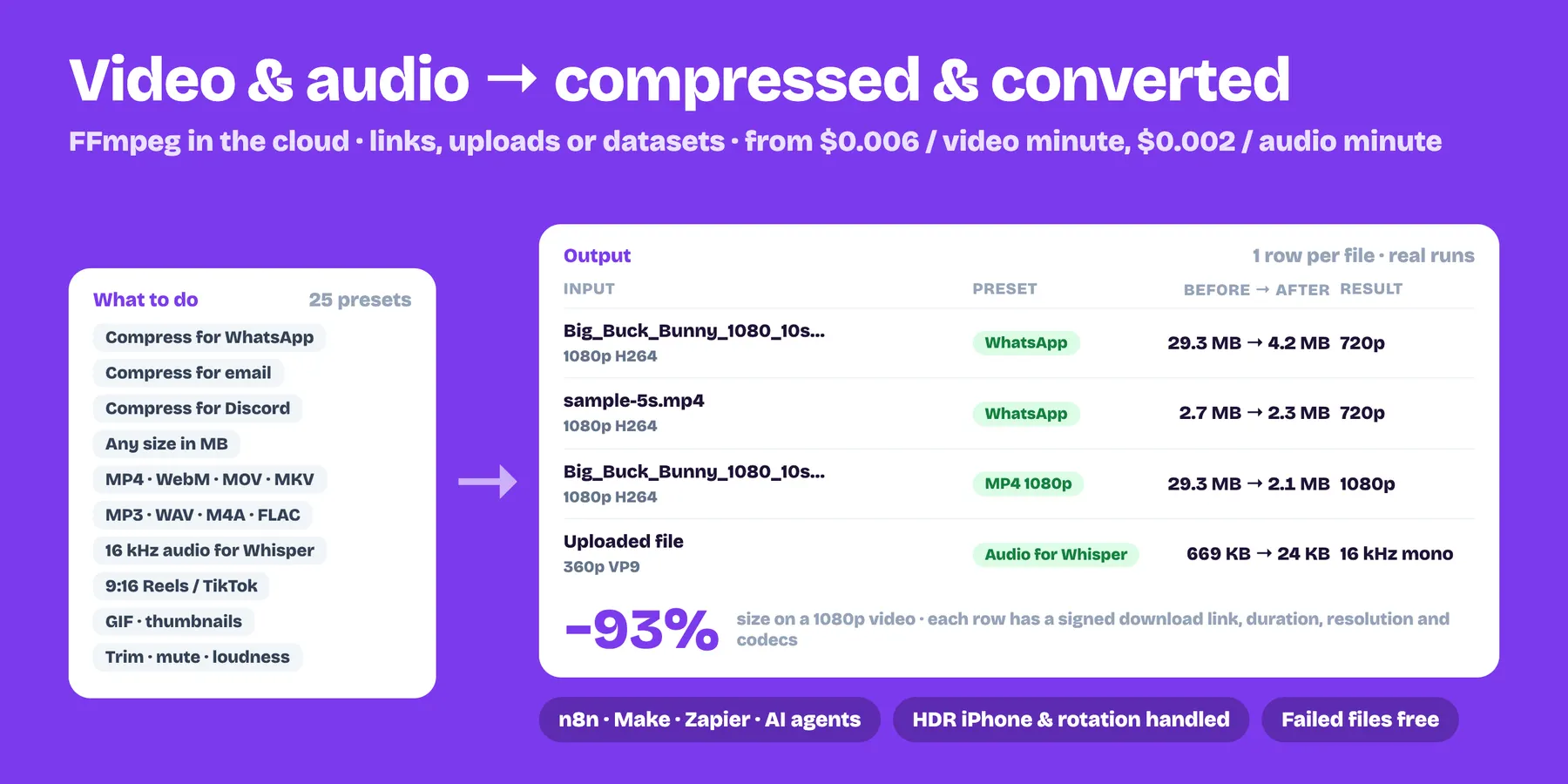
Convert and compress video and audio in the cloud with FFmpeg — no install, no server, no command line. Give it links, upload files or point it at another Actor's dataset, pick what you need, and get every result back as a direct download link with its size, duration, resolution and codecs.
- 📦 Compress for WhatsApp (16 MB), email (Gmail + Outlook), Discord (10 MB) or any size you choose — two-pass encoding, so the file really fits.
- 🔁 Convert to MP4, WebM, MOV, MKV — and MOV → MP4 without quality loss when the codecs already fit (lossless copy, seconds).
- 🎵 Extract audio: MP3, M4A, WAV, FLAC, OGG, Opus.
- 🤖 Audio for AI transcription: 16 kHz mono MP3 or WAV for Whisper, OpenAI, Deepgram, AssemblyAI (1.5 h of talk fits the 25 MB API limit).
- 📱 Vertical 9:16 for Reels / TikTok / Shorts, square 1:1, landscape 16:9 — with a blurred background, crop or black bars.
- ✂️ Trim (start / end), change resolution (4K → 1080p / 720p / 480p…), lower the frame rate, remove audio, normalize loudness (EBU R128).
- 🖼️ GIF with a high-quality palette, thumbnails / frames as JPG at any times.
- ℹ️ Media info of every input for free: duration, resolution, rotation, fps, codecs, bitrate, HDR, audio tracks.
From $0.006 per minute of video and $0.002 per minute of audio. Failed files are free, and nothing is ever charged above your spending limit.
✨ Why this one
| 💸 Price | $0.02 per 720p minute, $0.035 per 1080p minute, $0.002 per audio minute — below the other FFmpeg Actors and far below FFmpeg SaaS plans |
| 📦 Size presets | WhatsApp, email, Discord or any MB — one click, really fits |
| 📱 Social formats | 9:16, 1:1, 16:9 with blurred background, crop or bars |
| 🤖 Speech-to-text ready | 16 kHz mono MP3/WAV with even loudness |
| 📥 Inputs | links, uploads, Drive / Dropbox / OneDrive, public Drive folders, HLS .m3u8, datasets of other Actors |
| ⚡ Lossless when possible | MOV/MKV → MP4 by copying the streams (seconds, no quality loss) |
| 🌈 iPhone HDR | HEVC 10-bit HDR tone-mapped to normal colors |
| 🧾 No subscription | pay per minute, failed files free, spending limit respected |
Made for n8n Cloud, Make and Zapier, which can't run FFmpeg themselves, and for AI agents (Apify MCP server).
🚀 How to use it
- Paste one or more links (or upload files, or pick a dataset from a scraper).
- Choose What to do (e.g. Compress for WhatsApp, Extract audio → MP3, Vertical 9:16).
- Optional: start/end time to trim, resolution, quality, loudness.
- Run. Each file gets a row with a
fileUrlyou can download, send or pass to the next step.
Input examples (API, n8n, Make, Zapier, AI agents)
Compress phone videos to send on WhatsApp:
MP4 → MP3 for transcription with Whisper (the usual n8n Cloud problem):
Fit a video into 25 MB, only the first 2 minutes:
Vertical clip for Reels/TikTok from a landscape video, 30 s from 1:10:
GIF and thumbnails:
Every video file found by another Actor (chain it):
All presets: mp4, compress, compress-whatsapp, compress-email, compress-discord, compress-size, resize, vertical, square, landscape, mute, webm, mov, mkv, mp3, m4a, wav, flac, ogg, opus, speech, speech-wav, gif, thumbnail, info.
n8n (Cloud or self-hosted)
- Add the Apify node → Run an Actor and get dataset (or HTTP Request to the API below).
- Actor:
tidydata/ffmpeg-video-converter, input like the examples above (you can map{{ $json.videoUrl }}intofileUrls). - The output items have
fileUrl: add an HTTP Request node with Response format: File to get the binary for the next node (OpenAI transcribe, Google Drive upload, Telegram, email…).
Make / Zapier
Use the Apify app → Run an Actor (wait for finish) → Get dataset items. Map fileUrl to the next module (Google Drive Upload a file from URL, WhatsApp, Gmail attachment, OpenAI…).
API (one call, waits for the result)
📤 Output
One row per input file (and a summary in the key-value store record OUTPUT):
fileUrl is a signed link: it opens without an API token, so you can send it to anyone or to the next tool. A failed file has status: "failed", a readable error (e.g. "This file has no audio track, so there is no audio to extract.") and costs nothing.
💰 Pricing (pay per event)
You pay per started minute of the result (a 2 min 10 s video = 3 minutes), by the resolution of the result (its short side, so vertical videos count the same as landscape):
| Event | Price | When |
|---|---|---|
| SD video minute | $0.006 | result up to 480p |
| HD video minute | $0.02 | result 720p |
| Full HD video minute | $0.035 | result 1080p |
| 4K video minute | $0.14 | result above 1080p |
| Audio minute | $0.002 | MP3, M4A, WAV, FLAC, OGG, Opus, speech |
| GIF | $0.01 | each GIF |
| Image | $0.001 | each thumbnail |
| File info | $0.001 | each file with the Media info only preset |
Examples: compress a 3-min phone video for WhatsApp (720p) = 3 × $0.02 = $0.06. MP4 → MP3 of a 1-hour podcast = $0.12. 100 thumbnails = $0.10. Failed files, files over your limits and skipped files are free. Apify Store discounts apply on paid plans.
Tip: trimming with Start/End time and Resolution lowers the price, because you pay for the result, not the input.
❓ FAQ
Which links work? Any public http(s) link to a video or audio file, Google Drive files and public Drive folders, Dropbox, OneDrive/SharePoint, archive.org, HLS .m3u8 streams, and web pages that embed a video file. Files you upload in the input form work too.
YouTube, TikTok, Instagram, Facebook, X, Vimeo? Not supported, on purpose: their terms forbid downloading their content. Their CDNs are refused too.
Which formats can it read? Everything FFmpeg reads: MP4, MOV, MKV, WebM, AVI, WMV, FLV, MPEG-TS, 3GP, GIF; H.264, HEVC/H.265, AV1, VP8/VP9, ProRes, MPEG-2…; MP3, AAC, WAV, FLAC, OGG, Opus, WMA, AMR, AIFF.
Are rotated and HDR phone videos handled? Yes. Rotation is applied, and HDR (HEVC 10-bit) is tone-mapped to normal colors, so the result looks right on every screen.
How big and how long can files be? About 1.5 GB per file with the default 4 GB memory and 2 files at a time (3 GB with Files at the same time = 1; more memory = more disk), and up to 180 minutes per file by default (Max minutes per file, up to 600). More memory also gives more CPU, so big files convert faster.
Will the compressed file really fit? Yes: two-pass encoding aims just under the limit, and if the result is still over, it encodes once more with a lower bitrate. If a video is too long for the size (e.g. 2 hours into 10 MB), it fails for free and tells you the minimum size, so you can trim it.
What if the video is already small? The compressor never hands you a bigger file: if the input was already smaller than the result, you get the original back as MP4 (lossless).
What happens when my spending limit is reached? The Actor checks your limit before each file, so it never starts work it can't charge, and you are never charged above your Max cost per run. Files not converted get a skipped row.
How long are the files kept? In the run's key-value store, for your plan's data retention (7 days on the free plan). Copy them before that.
Is it legal? The Actor converts only the files you give it, without logging in or bypassing any paywall or DRM (protected streams are refused). Make sure you have the right to use those files.
🔗 Related Actors
- Audio & Video Transcription — turn the audio into text with timestamps and subtitles
- Video AI Analyzer — what happens in a video: scenes, summary, hooks, answers to your question
- Video Frame Extractor — frames at every scene change or every N seconds
- Bulk File Downloader — download any files in bulk, with clean names and a ZIP
⭐ If it saved you time, a review on the Store helps a lot. Questions or a missing format? Open an Issue — answered within a day.


