

Merge, Filter, Deduplicate & Transform Datasets — CSV, Excel
Pricing
from $0.20 / 1,000 row in the results
Merge, Filter, Deduplicate & Transform Datasets — CSV, Excel
Filter, merge and deduplicate Apify datasets, CSV, Excel, JSON and Google Sheets: keep only rows matching your conditions, remove or merge duplicates (smart URL/email/phone matching), sort, add computed columns, split lists into rows, keep only new rows and export CSV, Excel or JSON.
Pricing
from $0.20 / 1,000 row in the results
Rating
0.0
(0)
Developer

tidydata
Maintained by CommunityActor stats
0
Bookmarked
12
Total users
5
Monthly active users
5 days ago
Last modified
Categories
Share
🧹 Merge, Filter, Deduplicate & Transform Datasets — CSV, Excel, JSON
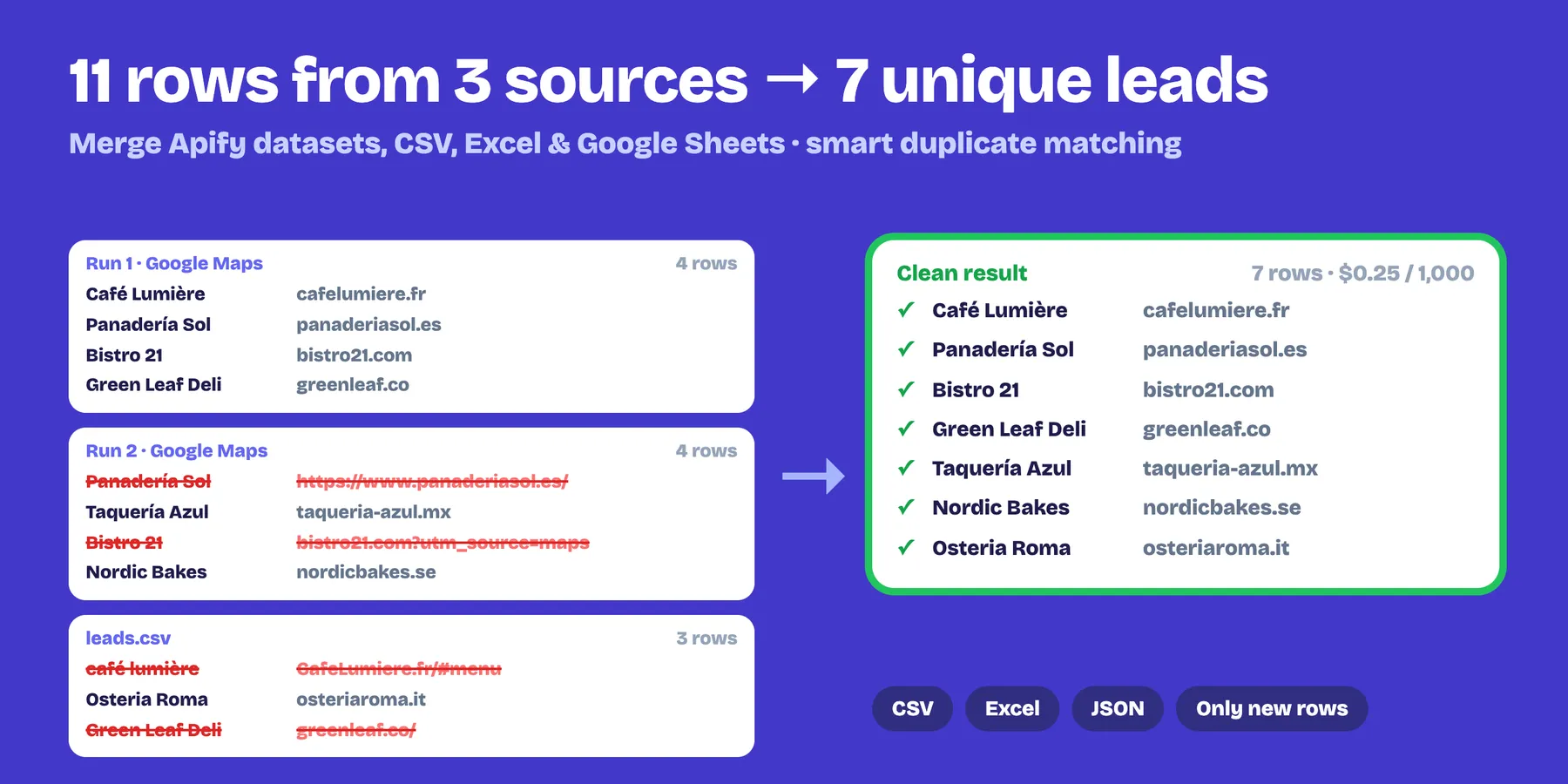
Combine several Apify datasets, CSV, Excel and JSON files or Google Sheets into one clean dataset: remove duplicates (exact, smart or by merging the copies), filter, sort, add computed columns, split lists into rows, rename / pick / drop columns, keep only the rows you haven't seen in earlier runs, and export CSV, Excel or JSON with a download link. Built to run after your scrapers — one step between the scraper and your sheet, CRM or database.
$0.25 per 1,000 rows in the result. Rows removed as duplicates or by filters are free.
- ✅ Pick datasets from a list: the Apify selector gives this Actor exactly the permission it needs (no API tokens to paste)
- ✅ Merge any number of datasets plus CSV, Excel (.xlsx), JSON / JSON Lines files and public Google Sheets in one run
- ✅ Deduplicate by any field(s) (
url,placeId,email, or a combination) and keep the first, the last (most recent) or merge them — one row per group with empty fields filled from the other copies - ✅ Smart matching: ignore case and spaces; URLs ignore
http/https,www., trailing/,#anchorsand tracking parameters (utm_*,fbclid,gclid…); phones compare digits only - ✅ "Only new rows": remembers what earlier runs saw, so each scheduled run outputs just the new items
- ✅ Filters in plain text with AND / OR:
price < 50,country in ES, FR, IT,title contains phone,url regex /product/,email exists - ✅ Computed columns:
domain = {website|domain},fullName = {firstName} {lastName},price = {price|number} - ✅ Split a list column into rows (emails, reviews, variants…), sort by several columns, keep only some columns in your order, rename / drop columns, add a
_sourcecolumn - ✅ Flatten nested JSON (
price.value) so it fits a spreadsheet - ✅ CSV (Excel-friendly UTF-8), XLSX and JSON files with download links; cells that start with
=,+,-or@are neutralised so scraped text can't run as a formula - ✅ Clear error messages that tell you what to fix — input mistakes are never charged
- ✅ Free demo if you run it with an empty input
Filter a dataset (keep only the rows you want)
Use it as a dataset filter on its own — no merging needed: pick one dataset, write one rule per line and get only the matching rows, already sorted and exported to Excel or CSV.
Choose all rules (AND) or any rule (OR). Operators: =, !=, >, >=, <, <=, contains, not_contains, starts_with, ends_with, in, not_in, regex, exists, not_exists. With >, >=, < and <=, prices written like 12,50 € or $1,299.00 are compared as numbers. You only pay for the rows you keep ($0.25 per 1,000) — filtered-out rows are free.
Typical uses
- Combine scheduled runs of Google Maps, Amazon, Instagram, TikTok, job or real-estate scrapers into one list without duplicates.
- Only new items: get just the listings, products, leads or posts that appeared since yesterday.
- Merge leads from several sources and fill the gaps (phone from one run, email from another).
- Clean before export: drop columns, rename them for your CRM, sort, filter and send a tidy CSV/Excel to Google Sheets, HubSpot, Airtable, Make, Zapier or n8n.
- Normalise URLs from different scrapers so the same page counts once.
How to use it
- Datasets to merge: pick them from your storages (or paste IDs). Optionally add CSV / Excel / JSON links or a Google Sheet.
- Remove duplicates by: type the field(s), e.g.
url. Choose first, last or merge them. Turn on Smart duplicate matching for messy URLs, emails or phones. - Optional: filters, Transform options (computed columns, split lists, sort, columns to keep / drop / rename,
_source), Only new rows, and the file formats you want. - Run. The result is in the dataset; files are in the Output tab.
Run it automatically after another Actor
Add it as an integration of your scraper and set Datasets to merge to {{resource.defaultDatasetId}}. Turn on Only new rows and every scheduled run outputs just the new items.
Full pipeline: scraper → clean → Google Sheets or your API
- In your scraper's Integrations tab add this Actor, with Datasets to merge =
{{resource.defaultDatasetId}}and Only new rows on. - In this Actor's Integrations tab add Google Sheets Export & Import (Dataset =
{{resource.defaultDatasetId}}, write mode Append without duplicates) or HTTP Request & Bulk API Calls to send every new row to your CRM, webhook or Clay table.
Every scheduled run then delivers only new, clean rows where you work.
Filters
One rule per line: field operator value. Choose whether a row must pass all rules (AND) or any of them (OR).
| Operator | Example |
|---|---|
=, != | country = ES |
>, >=, <, <= | price < 50 (numbers are compared as numbers) |
contains, not_contains | title contains phone |
starts_with, ends_with | url starts_with https://shop. |
in, not_in | country in ES, FR, IT |
regex, not_regex | url regex /product/\d+ (case-insensitive) |
exists, not_exists | email exists |
Filters, duplicate keys, sorting and Keep only these columns use the original column names (and computed columns); renaming and dropping happen at the end.
Computed columns
One per line: newColumn = template. Use {field} (nested fields with dots: {price.value}) and functions with |:
| Function | Example | Result |
|---|---|---|
domain | {website|domain} | https://www.shop.com/a → shop.com (also from emails) |
number | {price|number} | "1.234,50 €" → 1234.5 |
digits | {phone|digits} | +1 (202) 456-1111 → 12024561111 |
lower, upper, title, trim | {email|lower} | Ana@Gmail.com → ana@gmail.com |
first, length | {images|first}, {reviews|length} | first item / number of items |
nohtml, slug | {description|nohtml} | text without HTML tags |
Example: fullName = {firstName} {lastName} · site = {url|domain} · priceNum = {price|number}.
Merge duplicates instead of dropping them
With Which duplicate to keep → Merge them, each group of duplicates becomes one row: the first copy is the base and every empty field is filled from the other copies. A _duplicates column tells how many rows were merged. Perfect when one run found the phone and another the email.
Analyze the results with AI
After merging and cleaning, enrich the rows with Bulk ChatGPT & Claude for Datasets: classify, extract fields from messy text, summarize or translate every row into new columns.
Run it as an integration: in this Actor's Integrations tab add Bulk ChatGPT & Claude and set its datasets to {{resource.defaultDatasetId}}, so every run is analyzed automatically. No API key needed.
Pricing
- $0.25 per 1,000 rows in the result ($0.00025 each)
- $0.005 per file created (CSV, XLSX or JSON)
Rows removed as duplicates or by filters are free. A 100,000-row dataset reduced to 60,000 unique rows costs $15. Higher Apify plans get an automatic discount.
Notes
- Memory for "only new rows" is a named storage in your account (default name
merge-dedupe-memory); use a different name per project, or delete the storage to start over. Changing the duplicate fields or Smart duplicate matching changes what counts as "seen". - By default, rows where all duplicate fields are empty count as one group; turn on Keep rows with empty duplicate fields to keep them all.
- Google Sheets must be shared as "Anyone with the link can view". Only the first sheet of an Excel file is read.
- Big merges happen in memory: up to ~2,000,000 rows.
- Only your own data is processed and it is never sent anywhere else. If a run crashes, the Actor sends us only an anonymous error code (error type and line of our code, no input, no data) so we can fix it fast.
Related Actors
- Phone Number Validator & Formatter and Email Validator & List Cleaner — clean the contact columns of the merged list.
- Google Sheets Export & Import — send the result to a Google Sheet, appending without duplicates.
- HTTP Request & Bulk API Calls — call your API, CRM or a webhook once for every row of the result (
{{column}}templates, retries, $1 per 1,000 requests).


![CSV & Excel Dataset Merger / Splitter [Bulk Optimizer] avatar](https://images.apifyusercontent.com/AT5VsgcnAJ5JzMbf0ycrAjKUBNVQf2Tc7M5-U5gOGxA/rs:fill:76:76/cb:1/aHR0cHM6Ly9hcGlmeS1pbWFnZS11cGxvYWRzLXByb2QuczMudXMtZWFzdC0xLmFtYXpvbmF3cy5jb20vQ0UzdXRQY05XdzNMYjAyS3AtYWN0b3ItZGpsR2M0bEZYeFRJWVY0Q3YtSVJHcG93MnNCSC1hY3Rvcl9pY29uLmpwZw.webp)


