
HTTP Request & Bulk API Calls — Clay, n8n, Webhooks · $1/1k
Pricing
from $0.80 / 1,000 http requests
HTTP Request & Bulk API Calls — Clay, n8n, Webhooks · $1/1k
Send HTTP requests to any API: one call (Clay-ready, with callback) or thousands from a list, CSV, Google Sheet or Apify dataset with {{column}} templates. Retries, rate limits, JSON field extraction, pagination and webhooks. $1 per 1,000 requests.
Pricing
from $0.80 / 1,000 http requests
Rating
0.0
(0)
Developer

tidydata
Maintained by CommunityActor stats
0
Bookmarked
2
Total users
1
Monthly active users
12 hours ago
Last modified
Categories
Share
🔌 HTTP Request & Bulk API Calls — one call or thousands, Clay-ready
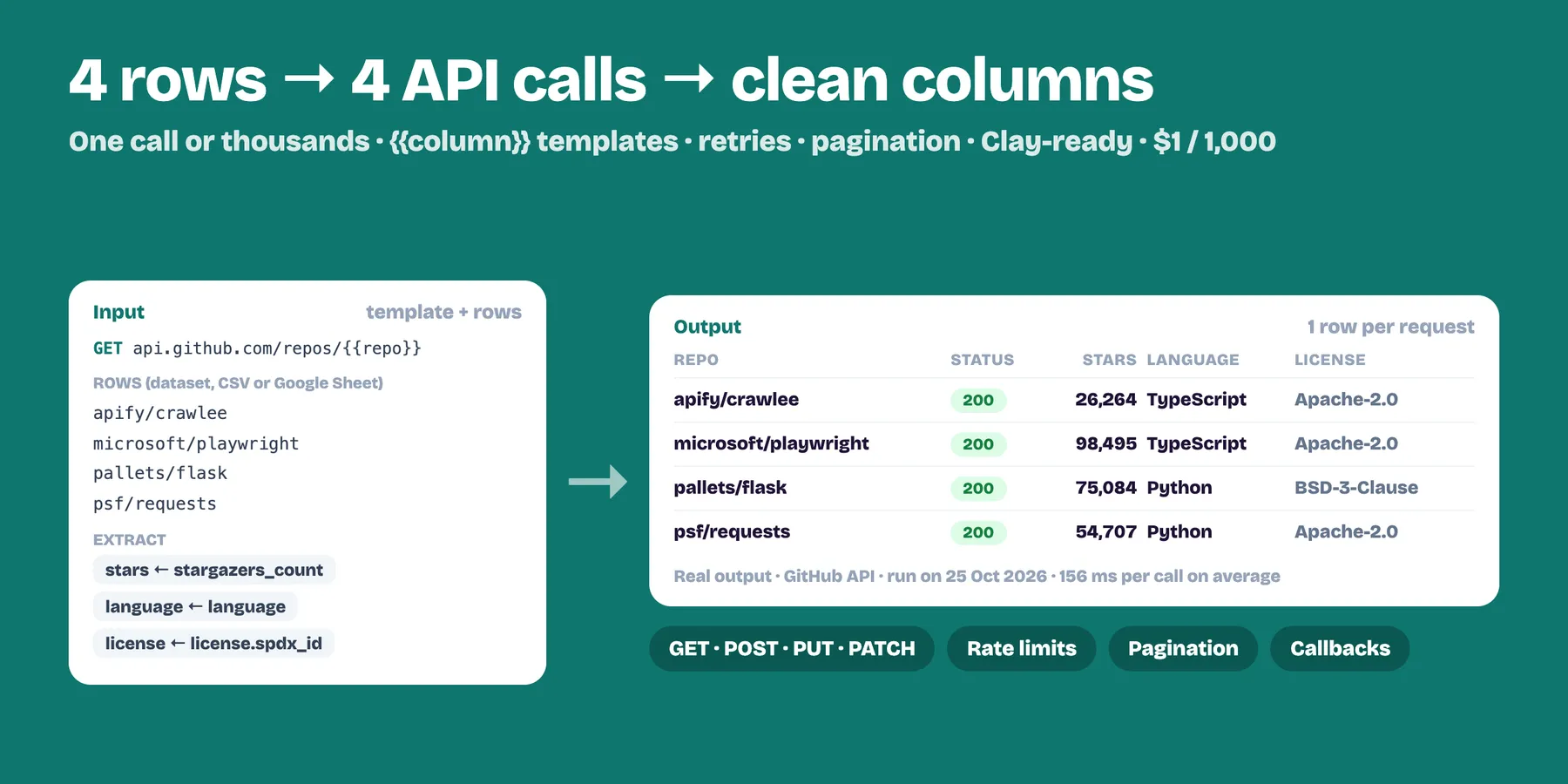
Send HTTP requests to any API from Apify: one call (perfect for Clay, n8n, Make and Zapier, with a callback URL and lookup key) or thousands in one run, from a list of URLs or by filling one request template with the {{columns}} of an Apify dataset, CSV, Excel or Google Sheet. Retries, rate limits, JSON field extraction and automatic pagination included. $1 per 1,000 requests — and requests that get no response are free.
- ✅ GET, POST, PUT, PATCH, DELETE, HEAD, OPTIONS with headers, query parameters and JSON, form or text bodies
- ✅ Bulk API calls: one request per row of a dataset, CSV, Excel, JSON file or Google Sheet, with
{{column}}placeholders in the URL, headers, params and body - ✅ Enrich datasets: each result keeps the row's own fields, plus the response or just the columns you extract (
data.items[0].price) - ✅ Automatic pagination: page numbers, offsets, next-page URLs (JSON or
Linkheader, GitHub style) and cursors - ✅ One row per item: turn an API list (
data.results) into a clean dataset, page after page - ✅ Reliable: parallel requests, per-host rate limit, retries with back-off on 429/5xx and
Retry-After, timeouts - ✅ Callbacks: every result can be POSTed to a Clay webhook table, n8n, Make, Zapier, Slack or Discord URL
- ✅ Optional Apify Proxy (datacenter or residential, by country) or your own proxies
- ✅ Safe by default: private, local and cloud-metadata addresses are always blocked
Who uses it
- Clay users — call any API from a Clay table without the HTTP API plan: one run per row, the answer comes back with your lookup key.
- Automation builders (n8n, Make, Zapier) — run hundreds of API calls in one go, with retries and rate limits you don't have to build.
- Data teams — enrich a scraped dataset with your own API, a CRM, a geocoder or an LLM endpoint, row by row.
- Developers — pull every page of a REST API into a dataset and export it as CSV, Excel or JSON.
- Ops & monitoring — hit a list of endpoints on a schedule and get status codes, timings and alerts (mark the run as failed on errors).
How to use it
1. One request (Clay, n8n, Make, Zapier)
Fill URL, Method and, if needed, Headers, Query parameters and Body (data). Add a Lookup key to recognise the answer, and a Callback URL if the result should be POSTed somewhere. Leave everything empty for a free demo call.
2. Many requests at once
- Or a list of URLs: one URL per line, all with the same method, headers and body.
- Several requests (list): a JSON list where each request has its own
url,method,headers,params,dataandlookupKey.
3. One request per row (dataset, CSV, Excel, Google Sheet)
Pick an Apify dataset (for example the output of a scraper — as an integration use {{resource.defaultDatasetId}}), or paste links to CSV / Excel / JSON files or a Google Sheet, or type the rows as JSON. Then write the request once with placeholders:
Placeholders: {{column}}, nested {{address.city}} or {{tags[0]}}. In the URL values are URL-encoded (spaces, &, =, ?, #… — slashes are kept, so {{repo}} = owner/name works); add |raw to insert a value exactly as it is (for example a whole URL). In JSON bodies a field that is exactly "{{column}}" keeps the column's type (number, list, object). Other filters: |json, |lower, |upper, |trim.
Pagination
| API style | Settings |
|---|---|
?page=1, 2, 3… | Pagination = Page number, Page parameter = page (or {{page}} in the URL) |
?offset=0, 100, 200… | Page number, Page parameter = offset, First page = 0, Page step = 100 |
"next": "https://…" in the JSON | Next-page URL, Next-page URL path = next |
Link: <…>; rel="next" header (GitHub) | Next-page URL, path empty |
"next_cursor": "abc" | Cursor, Next cursor path = meta.next_cursor, Cursor parameter = cursor |
Pages stop at Max pages, at the first error, or when the list in Stop when this list is empty (or the items path) comes back empty. Each page is one request.
Output
One row per request (or one row per item with One row per item). Example of a GET to https://jsonplaceholder.typicode.com/posts/1:
status is the HTTP status code (null when there was no response), ok is true for 2xx/3xx, error explains failures (HTTP 404, timeouts, blocked addresses). With Extract fields into columns you also get your columns; with Drop the full response only those.
Use it from code
Use it from Clay
- In your Clay table add an Apify enrichment → Run Actor →
tidydata/http-request. - Map the input:
url,method,headers,params,data(use Clay's/to insert column values) andlookupKey(a row ID). - Run the column: each row runs one request and gets back
status,responseand your extracted fields. To receive results in a webhook table instead, set Callback URL (and Callback headers such asx-clay-webhook-auth).
Pricing
$0.001 per HTTP request answered (= $1 per 1,000), any status code included; Apify Store discounts apply (−10 % Bronze, −15 % Silver, −20 % Gold and above). Each page of a paginated call counts as one request.
- Requests without a response are free: timeouts, DNS errors and blocked addresses after the retries.
- Through Apify Proxy (optional): +$0.001 per request on datacenter IPs, +$0.008 per request on residential IPs (responses capped at 2 MB there).
- Set a maximum cost per run: the Actor stops sending before going over it.
FAQ
Is it really one run per call for Clay? Yes, that's how Clay's Apify integration works. Runs start in a few seconds with 256 MB of memory, so they are cheap and fast. For big batches, send all rows in one run (dataset, CSV or list).
Can I send API keys safely? Put them in Headers (or the URL/params if the API wants that). Inputs are private to your Apify account. Don't share your run links publicly.
Does it run JavaScript or bypass anti-bot pages? No: it is a fast HTTP client for APIs, webhooks and simple pages. For full web pages use a browser scraper such as our AI Web Scraper.
How do I send each row of a dataset to a webhook (Slack, Discord, Make, Zapier, n8n)?
Method POST, URL = your webhook, Body = the fields you want, e.g. {"content": "New lead: {{name}} — {{email}}"} for Discord or {"text": "…"} for Slack, and pick the dataset.
What if the API is slow or rate limited?
Lower Parallel requests and Max requests per second per host. 429 and 5xx answers are retried with back-off (respecting Retry-After).
Notes
- Responses over Max response size are cut and marked
truncated(JSON is then returned as text). - POST and PATCH are not retried unless you allow it (they could create duplicates).
- Use it only with APIs and sites you are allowed to call, and respect their terms and rate limits.
- If a run crashes, the Actor sends us only an anonymous error code (error type and line of our code, no input, no data) so we can fix it fast.
Related Actors
- Merge, Filter, Deduplicate & Transform Datasets — clean and combine the results, export CSV or Excel.
- Bulk ChatGPT & Claude: Classify, Extract & Translate Datasets — enrich rows with AI instead of an API.
- Google Sheets Export & Import — send the results to a Google Sheet.
- URL Status Checker — check thousands of links for status codes and redirects.


