

Video Frame Extractor — Thumbnails, Screenshots & Keyframes
Pricing
from $0.80 / 1,000 frame extracteds
Video Frame Extractor — Thumbnails, Screenshots & Keyframes
Extract frames, thumbnails and screenshots from video links: direct files, Google Drive files and folders, Dropbox, OneDrive, archive.org or .m3u8 streams. Every N seconds or an exact number of evenly spaced frames, JPG/PNG/WebP with timestamps, ready for AI vision. Pay per frame.
Pricing
from $0.80 / 1,000 frame extracteds
Rating
0.0
(0)
Developer

tidydata
Maintained by CommunityActor stats
0
Bookmarked
18
Total users
11
Monthly active users
a day ago
Last modified
Categories
Share
🎞️ Video Frame Extractor — thumbnails and screenshots from video
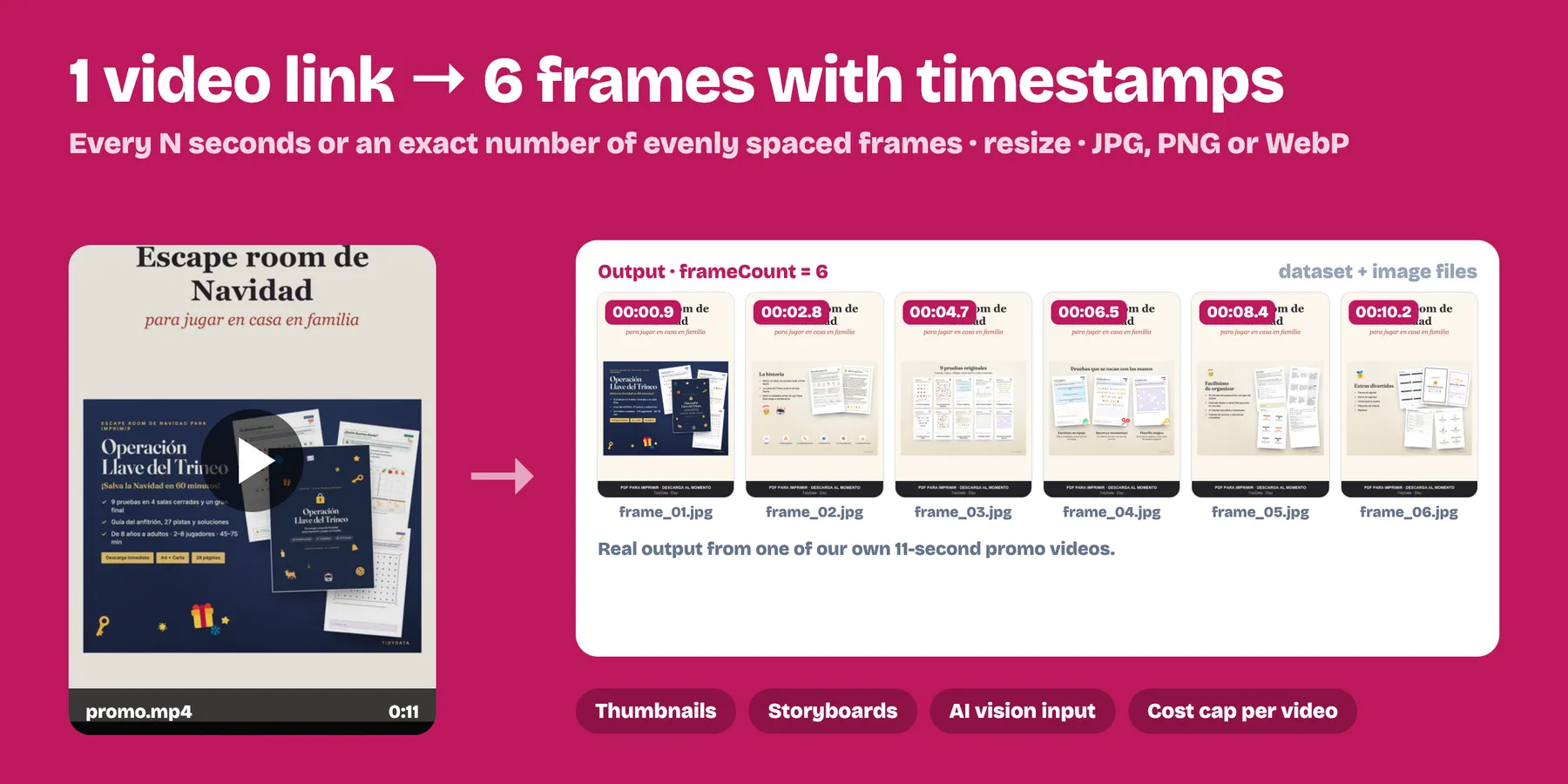
Turn a video link into images: one frame every N seconds or an exact number of evenly spaced frames. Saves JPG, PNG or WebP with timestamps and a public link for every frame. $1 per 1,000 frames.
- ✅ Paste the link you already have: direct .mp4/.mov/.webm/.mkv/.avi links, Google Drive files and whole public folders, Dropbox, OneDrive (files and folders) and SharePoint share links, archive.org items, Wikimedia Commons, GitHub, HLS streams (.m3u8) and web pages that embed a video player with a video file
- ✅ Up to 1 GB per video; busy servers are retried automatically
- ✅ Frame every N seconds, or a fixed count (great for contact sheets and AI vision)
- ✅ Resize (max width) and choose the format
- ✅ Cost cap per video, so long videos never surprise you
- ✅ Perfect to feed video into AI vision models, build thumbnails, review footage or create storyboards
Who uses it
- AI vision pipelines — send frames to GPT-4o, Claude, Gemini or your own model to describe, tag, moderate or search video content.
- Machine-learning datasets — turn hours of footage into labelled-ready images (object detection, classification, OCR).
- Thumbnails & previews — pick the best frame for a website, gallery, course or video card; WebP keeps them light.
- Storyboards & contact sheets — evenly spaced frames to review a video at a glance.
- E-commerce & real estate — stills from product or property videos for listings.
- Security & inspection — sample long recordings every few seconds instead of watching them.
How to use it
- Paste links to videos you have the right to use: a direct file link, a Google Drive / Dropbox / OneDrive share link (a Drive or OneDrive folder extracts every video in it), an archive.org or Wikimedia page, an .m3u8 stream or a web page with a video on it.
- Choose the mode, interval or count, size and format.
- Run, then open the image links or download the table.
Output example
Use it from code
The imageUrl of every frame is a direct public link, so you can pass it straight to an AI vision API, Google Sheets (=IMAGE()), Airtable or Make / Zapier / n8n.
Pricing
$0.002 per frame extracted ($2 per 1,000) from November 5, 2026; $0.001 until then. Videos that fail are free.
FAQ
How many frames do I get in "count" mode? Exactly the number you ask for (up to Max frames per video), evenly spread from the start to the end of the video.
Which video formats work? Anything ffmpeg reads: MP4, MOV, WebM, MKV, AVI, OGV, M4V, 3GP… up to 1 GB per file, plus HLS (.m3u8) and DASH (.mpd) streams.
Can I use a Google Drive, Dropbox or OneDrive link? Yes. Share the file (or a Drive/OneDrive folder) as Anyone with the link can view and paste the share link as it is: the Actor finds the real file. Private links get a clear message telling you what to change, and are free.
What about a web page with a video on it? Paste the page link: the Actor looks for the video file in the page (HTML5 video, Open Graph video, schema.org VideoObject or a link to a video file). If the page only embeds YouTube or Vimeo, it can't be used.
Can I limit the cost of long videos? Yes: Max frames per video caps each video, and the run's maximum cost caps the whole run.
And YouTube, Vimeo or TikTok videos? Not supported: those platforms forbid downloading in their terms. To get what is said in YouTube videos, use our YouTube Transcript Scraper; for your own audio/video files, our Audio & Video Transcription.
Need bigger or sharper frames? Upscale them with our Image Upscaler or convert/resize in bulk with Bulk Image Downloader & Converter.
Notes
- YouTube, Vimeo, TikTok, Instagram and other streaming or social platforms are not supported (their terms forbid downloading).
- Images stay in your run's storage according to your Apify retention.
- If a run crashes, the Actor sends us only an anonymous error code (error type and line of our code, no input, no data), and once per run an anonymous count of the kinds of links used (for example "Google Drive: 2 OK") — never the links or the files — so we know what to support next.


