Agentic AI For Good
Pricing
from $20.00 / 1,000 results
Agentic AI For Good
Fetches the latest agentic AI tools, models, frameworks, and research from top developer sources, then delivers structured insights and examples that keep you up to date every day
Pricing
from $20.00 / 1,000 results
Rating
0.0
(0)
Developer

Nimit Savant
Maintained by CommunityActor stats
0
Bookmarked
8
Total users
0
Monthly active users
10 months ago
Last modified
Categories
Share
Agentic AI Explorer — Developer Edition
An Apify Actor that scrapes developer-focused Agentic AI sources and converts them into structured insights for developers.
🎯 Overview
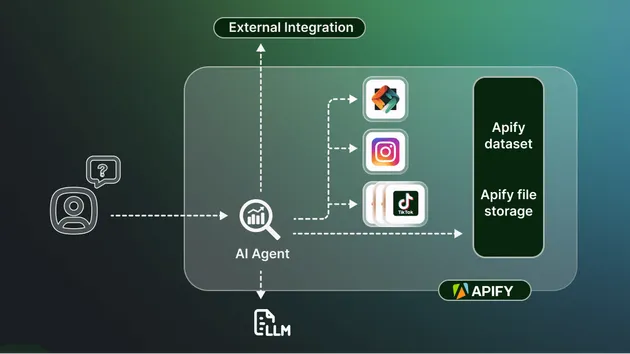
This Actor continuously monitors and aggregates the latest developments in agentic AI from multiple sources, transforming raw data into actionable developer insights with code examples and use cases.
📡 Data Sources
The Actor fetches data from:
- GitHub - Trending repositories related to AI, ML, LLM, and Agent frameworks
- HuggingFace - Newest models and agent frameworks
- PapersWithCode - New agentic AI research papers
- dev.to - Developer articles and tutorials on agentic AI
- Medium - Blog posts and articles about AI/ML developments
- LLM-Powered Internet Search - Uses AI search APIs (Tavily, Perplexity, Serper) to find relevant content across the web
🚀 Features
- Multi-source aggregation - Collects data from 6+ sources in parallel
- Developer-focused insights - Transforms raw data into actionable developer information
- Code examples - Generates relevant code examples for each tool/framework
- Multiple output formats - Supports JSON (default) and Markdown output
- Daily subscriptions - Automatically receive fresh insights every day at your preferred time
- Error resilience - Never crashes on partial failures
- Fully typed - Complete TypeScript type safety
📦 Output Structure
Each scraped item produces:
Markdown Format
When using Markdown output, generates readable sections:
// code here
🔑 API Keys & Authentication
Good news: No API keys required for core functionality!
All default data sources work without any API keys:
- ✅ GitHub - Uses public API (no authentication needed)
- ✅ HuggingFace - Uses public API (no authentication needed)
- ✅ PapersWithCode - Uses public API (no authentication needed)
- ✅ dev.to - Uses public API (no authentication needed)
- ✅ Medium - Uses web scraping (no authentication needed)
Optional API keys:
- 🔐 LLM Search - Only required if you enable
enableLLMSearch: true- Choose one:
TAVILY_API_KEY,PERPLEXITY_API_KEY, orSERPER_API_KEY - See LLM-Powered Internet Search section for setup
- Choose one:
Optional (for higher rate limits):
- 🔐 GitHub Token - Optional GitHub personal access token for higher API rate limits (60/hour → 5000/hour)
- Set as
GITHUB_TOKENenvironment variable (not required, Actor works fine without it)
- Set as
⚙️ Input Parameters
- topics (string[]): Topics to search for (default:
["agentic ai", "llm frameworks"]) - maxItems (number): Maximum number of items to collect per source (default:
20) - outputFormat ("json" | "markdown"): Output format (default:
"json") - includeCodeExamples (boolean): Whether to include code examples (default:
true) - subscribe (boolean): Enable daily automatic runs with the same query (default:
false) - subscriptionTimeUtc (string): Time of day (UTC) when you want to receive daily updates, e.g. "06:30" (default:
"06:30") - subscriptionName (string): Optional custom name for this subscription. If not provided, a stable name is derived from topics + format (default:
"") - enableLLMSearch (boolean): Enable LLM-powered internet search to find relevant content across the web (default:
false) - llmSearchProvider ("tavily" | "perplexity" | "serper"): Choose the search provider for LLM search (default:
"tavily") - tavilyApiKey (string, secret): Your Tavily API key. Only required if
enableLLMSearchis true andllmSearchProvideris "tavily" - perplexityApiKey (string, secret): Your Perplexity API key. Only required if
enableLLMSearchis true andllmSearchProvideris "perplexity" - serperApiKey (string, secret): Your Serper API key. Only required if
enableLLMSearchis true andllmSearchProvideris "serper" - githubToken (string, secret, optional): Optional GitHub personal access token for higher API rate limits (60/hour → 5000/hour)
🔔 Daily Subscriptions
The Actor supports automatic daily runs through Apify Schedules. When you enable subscriptions:
- Run once with subscription enabled - Set
subscribe: truein your input - Actor executes normally - Fetches sources, generates insights, delivers output
- Schedule is created/updated - After completion, creates or updates an Apify Schedule
- Daily automatic runs - The schedule runs the actor daily at your specified UTC time
- Same query, fresh data - Each scheduled run uses the same input parameters (except
subscribeis set tofalseto prevent recursion)
Subscription Features
- Stable schedule names - Re-running with the same subscription updates the existing schedule instead of creating duplicates
- Custom scheduling - Set your preferred UTC time for daily updates
- Automatic delivery - Output is delivered via your configured channels (email/Slack/Discord/webhook/etc.) on each scheduled run
- No recursion - Scheduled runs automatically have
subscribe: falseto prevent creating schedules of schedules
Example Subscription Input
This will:
- Run immediately with the provided query
- Create/update a schedule named "My Daily AI Updates"
- Run automatically every day at 06:30 UTC
- Deliver fresh insights via your configured output channels
🔍 LLM-Powered Internet Search
The Actor can use AI-powered search APIs to find relevant content across the internet. This feature is optional and requires API keys.
Supported Search Providers
- Tavily (Recommended) - Designed specifically for LLM agents, provides high-quality search results
- Perplexity - AI-powered search with real-time web access
- Serper - Google Search API with fast response times
Setup Instructions
Step 1: Get Your API Key
Choose one provider and get your API key:
-
Tavily (Recommended):
- Sign up at tavily.com
- Navigate to your dashboard to get your API key
- Free tier available
-
Perplexity:
- Visit perplexity.ai/settings/api
- Generate your API key
-
Serper (Google Search API):
- Sign up at serper.dev
- Get your API key from the dashboard
- Free tier: 2,500 searches/month
Step 2: Add API Key (Choose One Method)
Method 1: Direct Input (Easiest - Recommended)
You can enter API keys directly in the Actor input form when running the Actor:
-
When configuring the Actor run, you'll see secret input fields:
- Tavily API Key - If using Tavily
- Perplexity API Key - If using Perplexity
- Serper API Key - If using Serper
- GitHub Token - Optional, for higher rate limits
-
Simply paste your API key in the appropriate field
-
The field is automatically marked as Secret (encrypted and secure)
-
No additional setup needed!
Method 2: Apify Secrets (For Reusable Keys)
If you want to reuse the same API keys across multiple Actor runs:
-
Go to Apify Console → Settings → Secrets:
- Direct link:
https://console.apify.com/account/integrations/secrets - Or: Click your profile icon (top right) → Settings → Integrations → Secrets tab
- Direct link:
-
Click Add Secret button
-
Add secrets with these names:
TAVILY_API_KEY- For TavilyPERPLEXITY_API_KEY- For PerplexitySERPER_API_KEY- For SerperGITHUB_TOKEN- Optional, for GitHub
-
The Actor will automatically use these secrets if the input fields are empty
Priority Order:
- Input form secret fields (highest priority)
- Apify Secrets (fallback)
- Environment variables (for local development)
Step 3: Enable in Actor Input
When running the Actor, set these input parameters:
Or for Tavily:
Note:
- Make sure
llmSearchProvidermatches the API key field you fill:"serper"→ fillserperApiKey"tavily"→ filltavilyApiKey"perplexity"→ fillperplexityApiKey
- If you've set up Apify Secrets, you can leave the API key fields empty and the Actor will use the secrets automatically
Example with LLM Search
This will search across all sources including the internet using AI-powered search to find the most relevant recent content.
🏗️ Project Structure
🛠️ Development
Prerequisites
- Node.js >= 18.0.0
- npm or yarn
- Apify CLI (
npm install -g apify-cli)
Local Development
- Install dependencies:
- Build the project:
- Run locally:
Testing
The Actor can be tested locally with default input or by providing custom input in storage/key_value_stores/default/INPUT.json:
Testing with Subscription
To test the subscription feature:
This will create a schedule that runs daily at 06:30 UTC. You can view and manage schedules in the Apify Console.
📤 Output
JSON Format (Default)
- Data is pushed to the default dataset (one item per insight)
- A consolidated JSON file is saved to key-value store as
output.json
Markdown Format
- A formatted Markdown file is saved to key-value store as
output.md
🚢 Deployment
Deploy to Apify Platform
- Log in to Apify:
- Deploy the Actor:
The Actor will be available in your Apify Console.
🔧 Technical Details
- Language: TypeScript
- Runtime: Node.js 18+
- SDK: Apify SDK v3
- Client: Apify Client v2 (for schedule management)
- Module System: ES Modules
- Build: TypeScript compiler
📝 Code Style
- Fully typed with TypeScript
- Modular architecture with reusable components
- Error handling at every level
- Clean, readable code with comments
- Follows Apify best practices
🔄 Future Enhancements
- Additional data sources
- More sophisticated content extraction
- AI-powered summarization
- Custom filtering and ranking
- Webhook notifications
- Multiple subscription frequencies (weekly, monthly)
- Subscription management UI
📚 Resources
📄 License
ISC