
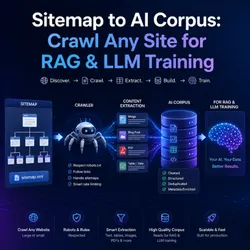
Sitemap to AI Corpus: Crawl Any Site for RAG & LLM Training
Pricing
$5.00 / 1,000 page successfully processeds
Sitemap to AI Corpus: Crawl Any Site for RAG & LLM Training
Feed in a sitemap.xml URL and get back every page as clean structured JSON. Built for RAG pipelines, LLM fine-tuning, and content intelligence. Pay only for pages with real content.
Pricing
$5.00 / 1,000 page successfully processeds
Rating
0.0
(0)
Developer

Moses Ndambuki
Maintained by CommunityActor stats
0
Bookmarked
2
Total users
1
Monthly active users
9 days ago
Last modified
Categories
Features
Share
Feed in a sitemap.xml URL. Get back every page as clean, structured JSON for AI training, RAG pipelines, and content intelligence. Built for ML engineers and AI teams who don't want to hand-compile URL lists.
Paste one sitemap. Get one dataset. Pay only for pages with real content.
Who this is for
- AI / ML engineers building training corpora from blogs, documentation sites, and editorial archives
- RAG developers populating vector stores with every page on a target domain
- Dataset curators harvesting an entire site's published content in a single run
- Content intelligence teams monitoring the full output of competitors or partner sites
- Researchers assembling source corpora across many domains
If you currently maintain a hand-rolled sitemap parser plus a content scraper, this replaces both.
What you get per page
The output JSON shape matches AI Training Dataset Builder — chain the two actors freely.
How it works
Sitemap indexes (sitemap-of-sitemaps) are followed recursively up to 5 levels. Filters apply before crawling so you don't pay for pages you'd discard.
Quick start
Run from the Apify Console
- Click Try for free.
- Paste your sitemap.xml URL.
- (Optional) Add an include or exclude regex.
- Click Start.
- Download the dataset as JSON, CSV, or Excel — or stream it into your pipeline.
Run from the API
Run from Python
Input fields
| Field | Type | Default | Description |
|---|---|---|---|
sitemapUrls | array | required | One or more sitemap.xml URLs (indexes auto-followed) |
urlPatternInclude | string | — | Regex; only matching URLs are crawled |
urlPatternExclude | string | — | Regex; matching URLs are skipped |
lastmodAfter | string | — | ISO date; skip entries with older lastmod |
maxPages | integer | 50 | Cap per run; raise it (and the run timeout) for full-site crawls |
minWordCount | integer | 50 | Skip thin pages |
includeImages | boolean | false | Attach image URLs from article body |
useApifyProxy | boolean | true | Route through Apify Proxy |
Pricing
Pay per page processed. No subscriptions.
| Volume | Price per page | Total |
|---|---|---|
| First 50 pages (free tier) | $0.000 | $0.00 |
| Per page after that | $0.005 | 1,000 pages = $5 |
| 10,000 pages | $0.005 | $50 |
You only pay for pages that return clean content above your word-count threshold. Sitemap fetching, filtered-out URLs, and thin pages cost nothing.
How it compares
| Tool | Pricing model | 1,000 pages |
|---|---|---|
| Sitemap to AI Corpus | $0.005 per page | $5 |
| Apify Web Content Crawler | Per result + compute | $7 to $15 |
| Diffbot Article API | $299 per month base | $300+ |
| Custom in-house crawler | Engineer time | $500+ build cost |
Common use cases
- LLM fine-tuning datasets from a target site's full archive
- RAG knowledge bases populated from
/docs/or/blog/sections - Competitive content audits comparing publishing cadence and depth
- Site migrations exporting every page's content as structured JSON
- Research corpora assembling sources across many domains
Tips for best results
- Start with
maxPages: 20to verify extraction quality on your target site - Use
urlPatternIncludelike/blog/or/docs/to scope to one section - Set
minWordCounthigher (200 to 500) for long-form-only datasets - Use
lastmodAfterto do incremental refreshes — pair with a weekly scheduler
Pairs well with
- AI Training Dataset Builder — same JSON shape; use this actor to discover URLs at scale, then pin specific URL lists in the Builder for surgical updates
- Reddit Brand Monitor & Lead Finder — combine site-wide content with social signals
- Website Lead Extractor — pair full-site crawl with B2B contact extraction
(Links updated as related actors ship.)
FAQ
What if a site doesn't have a sitemap?
Most modern sites do — check /sitemap.xml, /sitemap_index.xml, or robots.txt for the location. If there's no sitemap, use AI Training Dataset Builder with a manual URL list instead.
Does it handle JavaScript-rendered pages? Yes. The actor uses headless Chromium via Playwright, so SPAs and JS-heavy sites work the same as static HTML.
How deep does sitemap recursion go? Up to 5 levels of nested sitemap indexes. Most sites don't nest beyond 2.
Can I crawl multiple sitemaps in one run?
Yes — pass several URLs in sitemapUrls. URLs are deduplicated across sitemaps.
What about robots.txt? The actor reads sitemaps you specify directly. If a site disallows crawling, respect that — the actor doesn't bypass robots.txt directives, but it also doesn't read them. You're responsible for compliance with each site's terms.
Can I run this on a schedule?
Yes. Apify's built-in scheduler runs the actor on any cron expression. Combine with lastmodAfter for incremental refreshes.
What if a page fails? Failed pages are logged and skipped. You are not charged for failures.
Support
Open an issue on the actor's Apify page or message the maintainer. Bug reports with the failing sitemap or URL get fastest turnaround.
- Source examples and docs: https://github.com/andersonjames38phd-cpu/sitemap-to-ai-corpus
- Community Discord (updates, support, feature requests): https://discord.gg/8SrXSCpvgj
Built and maintained by Turboextract on the Apify platform.


