

CatalogFix AI — Clean Product Catalogs, PDF & Excel
Pricing
from $4.90 / catalog processed — up to 50 pages
CatalogFix AI — Clean Product Catalogs, PDF & Excel
Clean product catalogs from supplier PDF, Excel and CSV files. Normalize titles and SKUs, flag duplicate SKU and missing prices, and separate Ready from Needs Review. Get RESULT.xlsx, Issues Found and a Shopify-ready CSV for reviewed import workflows.
Pricing
from $4.90 / catalog processed — up to 50 pages
Rating
0.0
(0)
Developer

LeadGap AI
Maintained by CommunityActor stats
0
Bookmarked
2
Total users
1
Monthly active users
12 days ago
Last modified
Categories
Security
Limited permissionsShare
CatalogFix AI — Product Catalog Cleaning & Data Quality Audit
Clean messy product catalogs before they reach your store, marketplace, or feed. CatalogFix normalizes product fields, flags missing data, invalid prices and duplicates, and separates Ready rows from records needing manual review.
Designed to reduce manual catalog QA before import or publication. Upload a supplier PDF, Excel, or CSV file; download structured products and an issue report.
See the result before you run
Supplier CSV → normalized products → Ready / Needs Review → Issues Found
Preview from two successful synthetic demo runs on 14 October 2026. These are fictional products, not customer results.
| Supplier data | Product output | Status | Issue / next action |
|---|---|---|---|
cfx-201, uneven title spacing | CFX-201 · Linen Cushion Cover · 24.90 | READY | Review the normalized record |
CFX-302, price -5.00 | Travel Lunch Box · source price retained | NEEDS REVIEW | Negative price; confirm the supplier price |
Two rows with SKU CFX-304 | Both conflicting products retained for review | NEEDS REVIEW | Duplicate SKU; resolve the conflicting records |
Download: RESULT.xlsx with Issues Found, separate Ready / Needs Review views, and SHOPIFY_READY.csv for rows passing the current gates. Ready is a quality-gate result; review relevant issues before import.
Run the 3-product demo · Try a catalog audit
From $4.90 per completed catalog up to 50 PDF pages: get normalized product data, a Ready / Needs Review split and an issue workbook. Larger PDF tiers and non-catalog screening prices are listed below. A completed tiny demo is subject to the same catalog event pricing; Apify credits or plan eligibility determine what you actually pay.
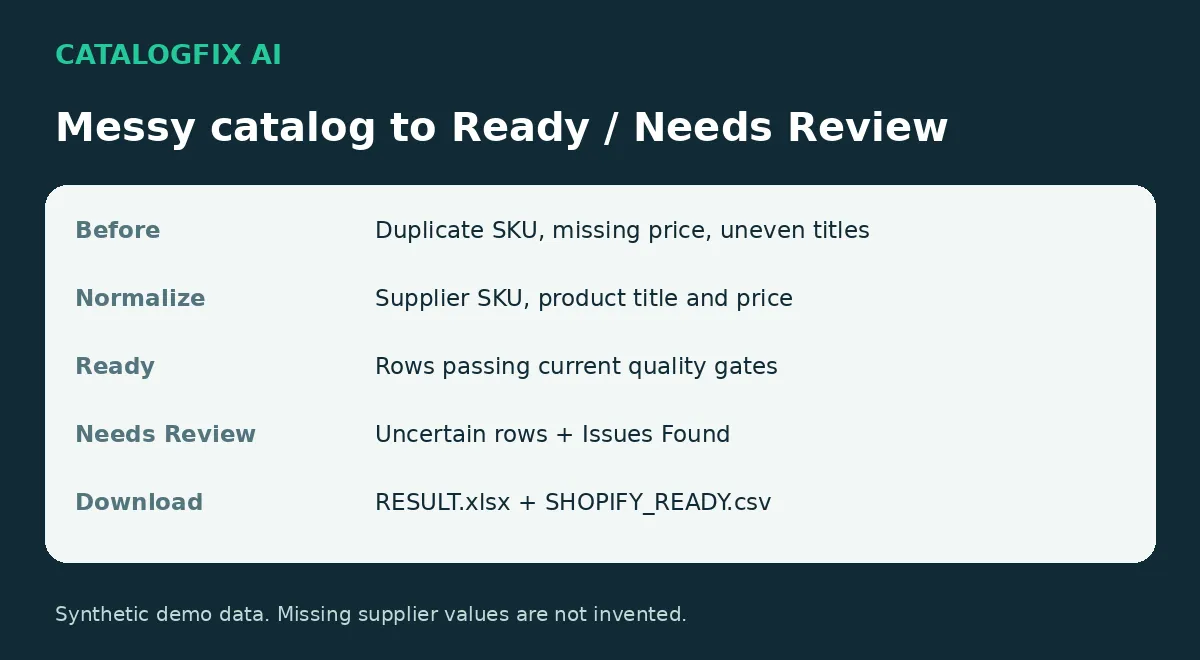
40-second illustrated walkthrough
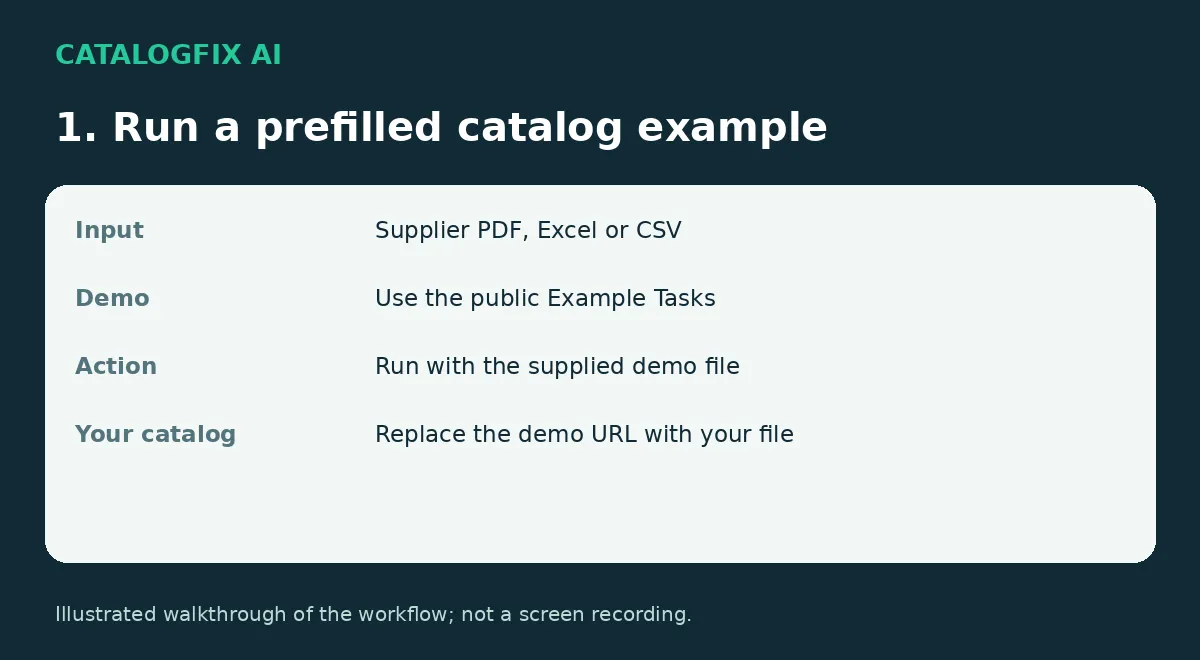
This is an illustrated workflow guide, not a screen recording. All demo products are fictional.
Quick start
- Run the linked three-product example (one row has a missing price), or use the Actor's prefilled two-product smoke test. Replace Supplier catalog with your PDF, CSV, XLSX or XLS file.
- Open Catalog quality at a glance to review product status and normalized values.
- Download RESULT.xlsx and check Issues Found for issue type, severity, affected field and current value.
- Review flagged rows before import. SHOPIFY_READY.csv contains rows passing the current quality gates; it is not a guarantee of acceptance by every marketplace.
Before / After
| Before: supplier data | After: CatalogFix output |
|---|---|
cfx-101, uneven title spacing | Normalized SKU CFX-101 and title Ceramic Mug |
| Missing or invalid price | Needs Review; missing price is not invented |
| Duplicate or conflicting SKU | Issue recorded for manual resolution |
| Uncertain extracted row | Explicit Ready / Needs Review status and source context |
| Manual inspection across a file | RESULT.xlsx with Issues Found and separate export views |
These are synthetic demonstration examples. Ready means the row passed current quality gates; inspect relevant issues before import.
Example results
These results come from the bundled synthetic demonstration catalogs, processed by CatalogFix:
| Record | Issue in Issues Found | Severity | Result / next action |
|---|---|---|---|
| CFX-101 | Extra spaces and lowercase SKU in source | — | Normalized SKU CFX-101, title Ceramic Mug, price 19.90; READY |
| CFX-102 | Missing or invalid price | Critical | NEEDS REVIEW; obtain the correct supplier price |
| CFX-302 | Negative price | Critical | NEEDS REVIEW; confirm the price in the source |
| CFX-304 | Duplicate SKU | Critical | NEEDS REVIEW; resolve the conflicting records |
The next actions above are guidance for interpreting the report. CatalogFix does not fabricate missing values or generate a suggested repair for every issue. Possible duplicate products can be flagged for review even when their rows pass the basic Ready gates.
Popular use cases
Clean supplier Excel catalog
Normalize supplier spreadsheet product data, flag missing commercial fields, and separate Ready records from rows that need review.
Convert supplier PDF catalog to product data
Extract structured product data from text-based or image-only supplier catalogs while keeping uncertain records review-only.
Find duplicate products in a catalog
Surface duplicate or conflicting records before they reach Shopify, a marketplace, PIM, or product feed.
Check missing SKU and prices
Flag records where supplier SKU, price, or other required commercial data is missing or uncertain.
Clean ecommerce CSV before import
Use CatalogFix as a QA gate before uploading product data to your storefront or downstream feed.
Audit product feed before Shopify import
Review catalog quality and separate import-ready products from records requiring manual attention.
Prepare supplier catalog for marketplace upload
Clean and audit supplier product data before marketplace publication.
Best for
- supplier catalogs that need to become e-commerce product data;
- image-only PDF catalogs that require OCR;
- mixed catalogs with printed and unprinted supplier codes;
- price lists and order forms;
- teams that need an audit trail instead of a black-box extraction.
What you get
Every successful catalog run can produce:
- RESULT.xlsx — full workbook with Clean Master, Issues Found, Shopify Ready, Needs Review, and Import Report;
- SHOPIFY_READY.csv — only rows that passed the current release gates;
- SUMMARY.json — counts, document type, and quality statistics;
- IMPORT_REPORT.json — page/sheet routing and parsing audit;
- Dataset — normalized product rows with source and quality context.
Ready vs Review
CatalogFix does not treat every extracted row as equally trustworthy.
Ready
A row is placed in Ready only when it passes the current release gates, including required product fields and quality checks.
Needs Review
A row is placed in Needs Review when something important is uncertain, for example:
- supplier SKU is missing or not confidently verified;
- OCR confidence is low;
- title or product-card boundaries are uncertain;
- required commercial data such as price is missing.
This means a run can legitimately return zero Ready rows while still extracting useful product candidates. That is intentional behavior, not a failure.
Safety behavior
CatalogFix prefers an explicit review state over false certainty.
- Missing supplier SKUs are not invented.
- Internal candidate IDs stay review-only.
- Technical datasheets can be rejected with zero product rows.
- Visual OCR keeps source location and confidence metadata.
- Structured price sources preserve price provenance where available.
- Quality gates keep uncertain records out of Shopify Ready.
Knowing when not to extract is part of the product.
Input
Upload one supplier catalog per run.
Supported formats:
- CSV
- XLSX
- XLS
You can also provide a direct HTTP(S) URL.
For URLs that do not preserve a recognizable file extension, use Filename override.
Verified release behavior
CatalogFix AI v1.9.0 was regression-tested across:
- image-only visual catalogs;
- structured dual-price order forms;
- technical datasheet refusal.
In the image-only Appliances test, the Actor successfully ran RapidOCR on Apify, extracted structured product rows, preserved verified supplier codes such as DW-01, MWO-1, FSCR01, BIO-01, CW-165, and CW-46, and kept uncertain rows in Review.
In the TL972 technical-datasheet test, CatalogFix intentionally returned zero products with a technical-datasheet skip status.
How it works
- Upload a catalog.
- CatalogFix classifies the document and routes pages by content type.
- Structured parsers handle commercial tables and order forms where possible.
- Visual pages use adaptive OCR.
- Quality gates separate Ready rows from review-only rows.
- Download the structured dataset and audit files.
Pricing
CatalogFix uses pay per event with one charge per completed run:
- Up to 50 pages: $4.90
- 51–200 pages: $12.90
- 201–500 pages: $24.90
- Technical/statistical non-catalog screening: $1.00
The catalog event includes OCR/parsing, QA and the listed output files; there is no separate OCR event. CSV and Excel files use the $4.90 small-catalog event. A completed demo uses the same event pricing. A completed run with no detected products can still incur the catalog event; only files classified as technical/statistical non-catalog documents use the $1 screening event. Inspect the source and select an appropriate maximum cost before starting. Apify credits and applicable discounts determine the amount charged to your account.
The current self-service Store version accepts PDFs up to 500 pages. Larger catalogs should be split or handled as a managed/custom run.
API, automations, and AI agents
CatalogFix can be run from the Apify Console, API, scheduled Tasks, integrations, and Apify MCP workflows. Public Example Tasks are named around concrete catalog-cleaning jobs so users and AI agents can start from a specific workflow instead of building an input from scratch.
Common automation pattern: supplier file → catalog QA → Ready / Needs Review → structured export or downstream ecommerce workflow.
60-second demo flow
Upload supplier CSV/PDF → normalize product fields → flag missing, invalid, or duplicate data → split Ready from Needs Review → download structured output and audit files.
Use the public Example Tasks in the Store to launch common catalog-cleaning scenarios with prefilled demonstration data.
Notes and limitations
- OCR-heavy PDFs take longer than text-based catalogs.
- A second OCR pass may be triggered when the first pass is not reliable enough.
- A real supplier SKU can still remain in Needs Review if other required fields are missing.
- CatalogFix does not promise perfect extraction. It makes uncertainty explicit and auditable.
Current release
Sellable v1
Try your own small catalog / support
Send us one small supplier catalog and we'll show you the Ready / Needs Review output. Start with the Actor's Issues tab to arrange a sample; do not attach a confidential supplier file to a public issue. Only share a catalog you are authorized to share, through an agreed private channel.
For support, include the run ID, input format and expected outcome in the Issues tab. If CatalogFix helped with a real import or catalog QA job, an honest Store review describing that workflow is welcome. No review is required for support or a sample. We do not promise an unverified response-time SLA.
Documentation and public example pages checked: 14 October 2026. Apify reported reliable prefilled-input execution at this check.


