

Job Change Monitor — Greenhouse, Lever, Ashby +2 ATS
Pricing
$10.00 / 1,000 completed board checks
Job Change Monitor — Greenhouse, Lever, Ashby +2 ATS
Track new, changed and removed jobs across your company watchlist on five ATS platforms, with posted salary where the board publishes it. Export results and send change alerts without AI. Add optional Gemini relevance scores with source evidence.
Pricing
$10.00 / 1,000 completed board checks
Rating
0.0
(0)
Developer

Vanja V
Maintained by CommunityActor stats
0
Bookmarked
2
Total users
1
Monthly active users
23 days ago
Last modified
Categories
Share
Job Change Monitor — Greenhouse, Lever, Ashby, Workable & SmartRecruiters
Collect jobs from public career boards, track new and changed postings, and get alerts when jobs disappear. No AI account or API key is needed for scraping, filters, change detection, exports or ordinary webhook alerts. Optional Gemini scores help assess relevance to your business.
See exactly what changed on the company job boards you watch
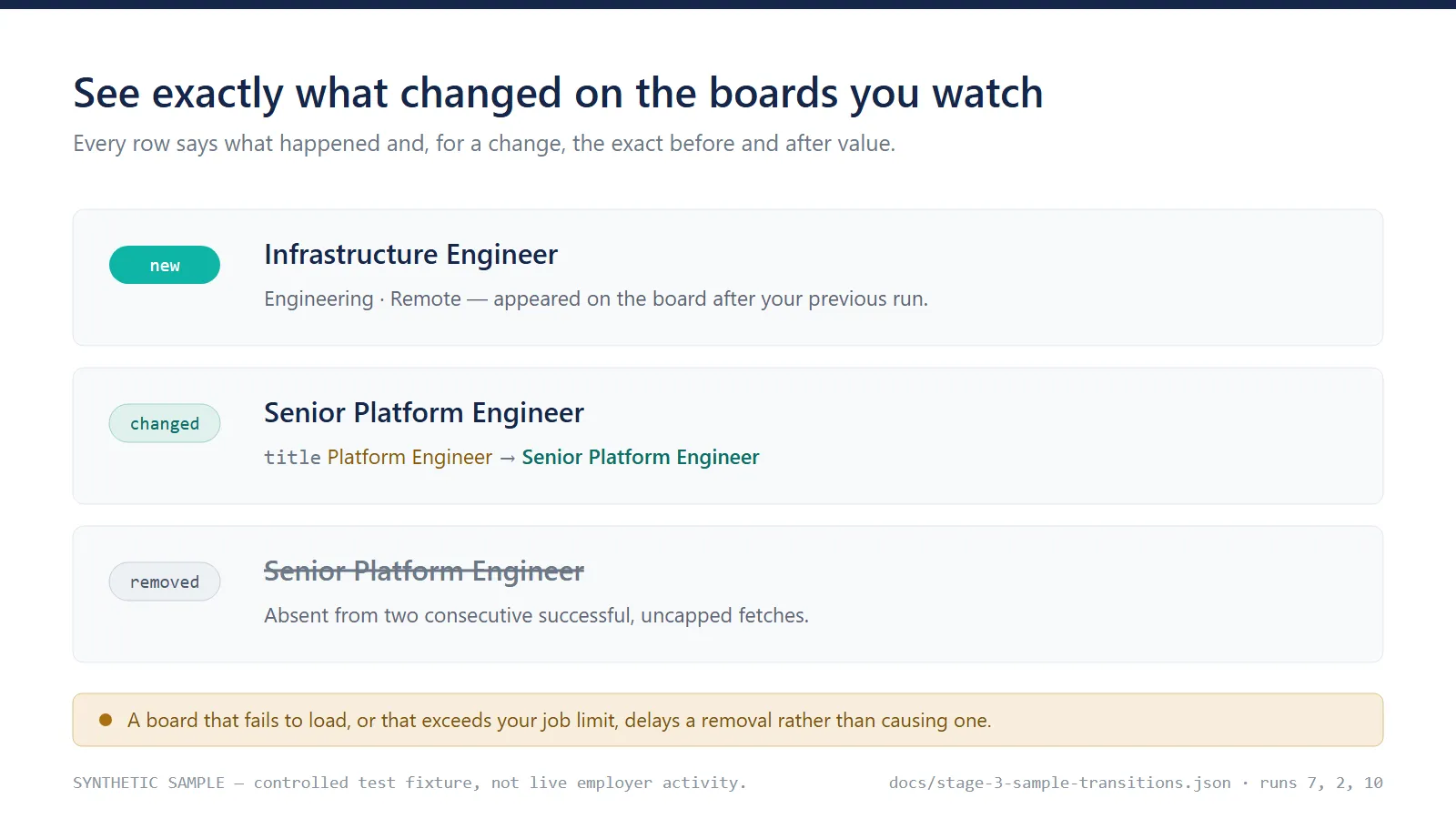
The same three rows as text:
| Change | Job | What the row tells you |
|---|---|---|
new | Infrastructure Engineer — Engineering, Remote | Appeared on the board after your previous run. |
changed | Senior Platform Engineer — Engineering, Remote | title went from Platform Engineer to Senior Platform Engineer. Description edits carry the current text, but their previous text is not retained. Other changed fields include both values. |
removed | Senior Platform Engineer — Engineering, Remote | Absent from two consecutive successful, uncapped fetches. A board that failed or hit your job limit never counts toward this. |
These three rows are a synthetic fixture, not live employer activity. They come from controlled transitions (runs 7, 2 and 10). Removal confirmation follows Successful absences required for removal, which defaults to 2 — so a board that fails to load delays a removal rather than causing one. The counters behind that claim are in failure protection.
Optional Gemini scoring adds a match score, an explanation and the exact source sentence it quoted, in a separate view. It is off by default and not needed for anything above.
Start with a board URL
Everything needed for a first run is in the Start here section. The other four sections are optional and start collapsed.
- Paste hosted Greenhouse, Lever, Ashby, SmartRecruiters or Workable URLs into Career board URLs, one per line. The provider is detected automatically, including Lever EU. A company homepage or a custom careers domain such as
careers.company.comis not accepted. - Leave What would you like to see? on All jobs and changes — start here.
- Check the Job limit per company starter value of 25; see the limit note below.
- Run, then open Jobs and changes in the dataset. Run again with the same settings, or save a task and schedule it, to detect changes.
The prefilled board is Lever's public demo board, which is small enough for the starter job limit to cover it — so repeat runs can reach a confirmed removal. Replace it with the boards you actually watch.
For API users:
Your first run saves the jobs currently on each board and labels them unchanged — there is no previous run to compare against yet, so nothing has changed by definition. Run again with the same settings to detect changes. Select Changes since the previous run on later runs to return only changes and source errors. An empty result in that mode is normal on a quiet day; check the run summary for fetched jobs and errors. To count first-run jobs as new instead, switch on Treat first-run jobs as new in Advanced settings before the first run.
Job limit per company. The starter limit keeps up to 25 jobs per company, applied after your filters. A board only hits the limit when more jobs match your filters than the limit allows — a 500-job board with 10 jobs matching your filters never reaches a limit of 25. When a board does hit it, the jobs beyond the limit are not monitored and removal confirmation is paused for that whole board until the limit covers them. Changing the limit starts a separate monitoring history. The limit does not reduce downloads: the whole public board is still read, and a run uses Apify resources even with AI off. A small trial uses one board, a limit of 25, 256 MB memory and a 120-second timeout.
The JSON above is a complete first-scrape example. For repeat runs, use the scheduled monitoring example. AI is an optional next step.
Monitor and send change alerts
new: first seen after the first run, or a first-run job when you asked for that.changed: a tracked posting changed;changeslists material fields with before/after values.unchanged: a first-run job, or a tracked job with no material change.removed: absent from two successful uncapped fetches by default. Failed or capped boards never advance absence counters.
Monitor snapshots retain a hash of the description. Current job rows still include source
description text; newly confirmed removal rows have descriptionText: null. For description
edits, changes.before is null because the previous text was not retained, not necessarily
because it was absent at the source. Old journal replays retain their original payloads.
Switch on Send job changes to a webhook, enter your secret Webhook URL, and leave Which changes should trigger alerts? on All job changes — no AI needed. An optional bearer token is supported. The receiver must accept public HTTPS on port 443. Environment alternatives are HIRING_WEBHOOK_URL and HIRING_WEBHOOK_TOKEN.
New, changed and confirmed-removed jobs create alerts regardless of AI outcome. Alerts follow the selected results mode; choose All jobs and changes or Changes since the previous run for ordinary monitoring. unchanged jobs never create alerts. First-run jobs do not either by default, but they do if you switch on Treat first-run jobs as new — that makes them new, and new jobs alert. Source errors remain in the dataset and summary.
The payload includes alertType: "job_change", eventId, monitorId, occurredAt and the normalized job. The Idempotency-Key header equals eventId. Receivers should persistently deduplicate it. Delivery is at least once: uncertain acknowledgements can cause retries. Retryable failures are attempted on later runs, at most five times, subject to the per-run cap. Disabling delivery pauses queued alerts; changing the URL pauses alerts for the previous destination.
Changing boards, filters, the job limit or removal settings starts a separate monitoring history. Output choice, AI settings and webhook configuration preserve it. Use stable settings in a saved task. The Actor protects each monitor with a lock; an exclusive schedule provides another guard. It does not automatically create a schedule.
Follow Schedule repeat runs below for setup. For interrupted runs and delivery backlogs, see Troubleshooting and recovery.
Optional AI relevance scores
Switch on Add AI relevance scores only if you want jobs scored against your own offering. Enter a Gemini key in the secret field, fill in Your product or service and Ideal customer profile, and list the words or role families worth scoring. No JSON is needed. Jobs matching neither the words nor the families are never sent to Gemini, so they cost nothing.
AI processes only eligible new or changed jobs. It adds a score, explanation and exact source quote in AI relevance (optional). Normal change alerts still work if assessment is irrelevant, skipped or fails. To restrict alerts to assessed matches, explicitly choose AI matches only; these require an actionable score and high confidence. Dataset matches can include medium confidence.
Enabling AI later does not backfill unchanged jobs. A deliberate one-run reset with initial emission allows fresh assessment; turn reset off afterward. Pending transaction recovery precedes a reset. Reset does not clear old alerts or locks.
Google bills your Gemini key separately. Each run is capped at two assessments and a $0.03 estimated model reservation until you raise those limits in Advanced settings. Gemini 3.8 Flash is provisional; Flash-Lite is selectable, with no automatic fallback. Both passed a small direct API synthetic sample, and one cloud assessment succeeded. This is limited validation, not a production accuracy claim. Scores suggest possible relevance, not purchasing intent or budget. Review the source posting.
A nonblank secret input overrides its environment fallback (GEMINI_API_KEY or GOOGLE_API_KEY). Apify secret fields are decrypted at runtime; local JSON lacks this protection. Keep local keys in an ignored .env. Inactive features do not read or validate their credentials.
Results, limits and status
Jobs and changes shows source facts, change type, changed fields and posting links. AI relevance (optional) shows assessments separately. Run summary opens RUN_SUMMARY, including source counts, errors, changes, AI usage and delivery outcomes. Missing source facts remain null. See Output and webhook reference.
Price: $0.01 per completed company-board check, including first-run, unchanged and empty boards. Failed fetches and boards capped by the job limit have no board-check fee. Job rows, change rows and ordinary alerts are included; there is no start fee. Run platform costs are included in the event price. Optional Gemini requests are billed separately by Google. See Pricing.
Supported: public hosted Greenhouse, Lever global/EU, Ashby, SmartRecruiters and Workable boards. Custom career domains, other ATS providers, contact enrichment, LinkedIn, browser scraping and automatic email/CRM setup are outside this version. Reappearing postings are treated as new; there is no separate reopened label.
Two source limits are worth knowing before you choose a board. SmartRecruiters' public listing publishes no job description, so for those boards keyword matching sees only the title, department, team, location and employment type, description changes are not detected, and AI relevance has little to work with. Salary is reported only where the provider publishes a pay field: Greenhouse, Lever and Ashby do, SmartRecruiters and Workable do not.
State and alerts persist across runs. Journal replay can duplicate physical dataset rows; deduplicate change rows by eventId. The journal is bounded to 9 MB and 1,000 pending/exhausted alerts. A hard stop can leave a lock requiring inspection after confirming its owner stopped. Model/platform estimates are not invoice ceilings. Cloud concurrency, hard-stop recovery and larger or burst-heavy watchlists still need additional validation.
There is no guaranteed total-job capacity: descriptions, change volume and queued webhook
payloads determine journal size. changes reduces output on quiet runs but can still exceed
the journal limit during a burst. Oversized work fails before fresh dataset/state commit;
previously queued deliveries may already have been attempted. See the
tested workload and limits.
Read Troubleshooting and recovery and Data handling.
Schedule repeat runs
- Run once with your chosen boards, filters and job limit. Check that every intended board succeeded and was not truncated.
- Choose Changes since the previous run, keep Treat first-run jobs as new and Reset monitor state off, and use Save as a new task to save the configuration.
- In Apify Console, open Schedules, create a schedule for that task, and select a cadence and timezone. Daily is a useful starting point. Enable exclusive execution to avoid overlapping scheduled runs.
- Start with 256 MB and a 120-second timeout for a small watchlist. Every scheduled run consumes resources. Choose when you will review the results and disable the schedule when no longer needed.
- Inspect the next run's Run summary. The monitor ID should match,
stateResetshould be false, andbaselineSourcesshould be zero for previously successful boards. Check source successes too: a previously failed board records its first baseline when it recovers.recoveredTransaction: truemeans saved work was replayed; the following run fetches fresh jobs.
Example repeat-run input (same board and limit as the first-scrape example):
An unchanged run returns no job rows in this mode. A schedule was tested with three platform-started runs on 7 September 2026: all reused the existing history and returned zero changes, AI requests and webhook requests. The temporary schedule was removed afterward; this Actor does not create schedules for you.
Output and webhook reference
Download dataset results as JSON, CSV or Excel from the run's Output view. Job and source-error rows share the dataset and are distinguished by recordType.
| Fields | Meaning |
|---|---|
source, sourceRegion, sourceSite, sourceJobId | Provider, Lever region if applicable, board identifier and original job ID |
company, title, department, team, location | Normalized source facts; unavailable optional values are null |
workplaceType, employmentType, descriptionText, publishedAt | Source-provided facts; descriptions on removal rows and previous description text have the exceptions explained above |
sourceUrl, applyUrl, fetchedAt | Source posting, optional application link and observation time |
changeType, changes, eventId | Classification, material field changes and a logical occurrence ID preserved on retries/replays |
analysis | Optional assessment status, score, confidence, reason, evidence and model |
source_error rows include the provider, board input, diagnostic message, error type, optional HTTP status and observation time. They are not removals. RUN_SUMMARY reports source outcomes, change counts, AI usage and delivery counts; its cost estimates exclude some platform operations and are not invoices.
Webhook requests contain JSON and an Idempotency-Key header equal to eventId. If configured, the bearer token is sent in the Authorization header. The receiver must accept public HTTPS POST on port 443, durably accept the alert before returning 2xx, and deduplicate IDs before any downstream action. Redirects are rejected and requests time out after 10 seconds.
Illustrative payload shape (placeholders, not a complete exported job):
For AI-only alerts, alertType is ai_match. A real external receiver was tested with an initial new-job alert and 500-to-200 retries from local Actor runs. Retries retained the same ID and body, and a subsequent quiet run sent nothing. This verifies sender behavior; it does not establish exactly-once effects in your receiver or cloud webhook delivery.
Failure protection
In the controlled twelve-run synthetic sequence, run 8 failed to fetch its board and produced a source-error row. It counted no missing jobs toward removal. Run 9 was the first successful absence of two jobs; run 10 was their second successful absence and confirmed both removals. Failed fetches therefore delayed confirmation instead of being treated as empty boards.
Separate regression tests check that capped fetches cannot advance removal counters and that a present job which falls outside a filter is not treated as absent. This protects change tracking; it is not a claim that every provider outage or employer-side content change can be detected.
Tested workload and limits
A cloud run on 7 September 2026 collected 448 jobs across four boards covering all three providers, at 512 MB, in about 2 seconds, with zero source errors and no truncation. Persisted monitor state was about 0.46 MB after description hashing. This is one observed workload, not a guaranteed job capacity or latency.
The journal still has a 9,000,000-byte limit. In controlled serialization checks, 500 new jobs with roughly 10 KB descriptions and webhooks enabled required about 11.55 MB; 500 description edits without webhooks required about 11.10 MB. Both exceed the limit. Start small and test representative change bursts, not only quiet runs. Split large watchlists into smaller saved tasks if necessary; new board/filter/limit configurations start independent histories.
Valid older v2 snapshots are upgraded to v3 without resetting history. Real cloud migration preserved the prior history and produced no false changed-job burst. Old v2-only builds cannot read written v3 state; rollback requires preserved compatible snapshots and journals.
Pricing
- Completed board check: $0.01, once per distinct successfully fetched, uncapped board per run. First-run, unchanged and confirmed-empty checks count. Failed and capped boards do not. All job/change rows and ordinary alerts are included; no per-row or start fee.
- Example: one board is $0.01/run; 20 boards are $0.20/run, approximately $6 for 30 daily runs. Filters and changes-only output do not reduce the number of completed checks. The run's platform costs are included in the event price; storage retention and exports outside the run remain subject to your Apify plan.
- Spending limit: set the run's Max total charge to at least $0.01 times the number of board entries, or reduce the watchlist. The Actor checks that the whole requested watchlist fits before fetching; actual charges can be lower for failed, capped or duplicate boards. This limit is per run, not per month.
- Recovery: saved transaction replay never creates a new board charge. Unattempted fees are waived; an uncertain charge acknowledgement is not retried.
RUN_SUMMARY.billingreports the original run ID and charge status. Check Apify's run charge details if the status isuncertain. - Optional Gemini: billed separately by Google to the key owner. The starter permits two assessments and a $0.03 estimated model reservation per run. That reservation is not a platform cost cap or an invoice guarantee.
Review Apify pricing and your Google account before raising budgets or enabling recurring runs. The small historical runs described above predate event billing; their reported platform usage is not the current customer price.
Troubleshooting and recovery
| Symptom | Action |
|---|---|
| Empty first dataset | Use outputMode: "all" to inspect initial jobs; the API default is changes only. Check fetched counts and source errors. |
| Board rejected | Use a hosted Greenhouse, Lever, Ashby, SmartRecruiters or Workable URL. Custom careers domains are not resolved. A single-job link such as apply.workable.com/j/CODE is not a board. |
| Too few jobs or no removals | Review filters and the job limit. A capped board pauses removal confirmation. Changing these settings creates a separate history. |
| AI skipped | Check analysis.reasonCode. Only eligible new/changed jobs are scored. Enabling AI later does not backfill unchanged jobs. |
| No webhook | Enable delivery, provide a public HTTPS receiver, and choose all/changes results with ordinary change alerts. Initial jobs alert only if initial emission is enabled. |
| Pending or exhausted webhook | Check receiver responses and summary counts. Retryable failures get one attempt/event/run, up to five total. Changing the URL pauses old alerts. |
| Duplicate rows | Deduplicate change rows by eventId; interrupted output may be replayed into a later run's dataset. |
recoveredTransaction: true | Saved work was recovered without a fresh scrape or AI call. The next run collects fresh data. |
skipped_locked | Another run owns the monitor, or a hard stop left a lock. Follow the procedure below. |
| Journal or backlog limit | Pause schedules and inspect/export saved work. Do not delete pending work to bypass the limit. |
After a hard stop: disable the affected schedules and verify the owning run is fully stopped. Preserve MONITOR_STATE_<monitorId> and WORKFLOW_<monitorId> from the named store hiring-signal-monitor-state-v1. In request queue hiring-monitor-locks-v1, locate the request whose unique key is the monitor ID; userData.owner identifies the owning run. Remove only that stale request after confirming its owner is terminal. Run once to recover pending work, inspect the result, then resume scheduling. Never clear all locks or edit state while an owner is active.
Pending transactions recover before new scraping and before an explicit reset. Exhausted alerts remain stored until deliberate operator cleanup. There is no automatic dead-letter cleanup interface. Cloud hard-stop and concurrency recovery have not yet been validated on the platform.
For support, open an issue on this Actor's Issues tab with the run ID, provider, shareable board URL, error type and relevant summary counts. Do not include API keys, bearer tokens, secret webhook URLs or raw input containing credentials.
Data handling
The Actor reads public job postings, not applicant records, resumes or private ATS content. Postings can contain personal information; handle exported text appropriately.
Job results and summaries are stored in the user's Apify account. Named monitor snapshots, workflow journals and AI caches persist across runs. Snapshots retain description hashes; datasets and pending alert payloads may retain full descriptions. Cache entries become ineligible after 30 days, but are not automatically deleted. Exhausted alerts also remain stored. There is no automatic overall retention schedule; the account owner manages storage access and deletion.
With AI enabled, eligible job fields and the supplied targeting profile go to Google Gemini. With webhooks enabled, selected alerts containing the normalized job go to the configured receiver. With either feature disabled, it receives no data from the Actor. Review the relevant providers' policies for retention and processing terms.
Gemini keys, webhook URLs and bearer tokens use Apify secret input fields and are decrypted in process memory. They are excluded from normalized input and are not intentionally written to output, summaries or logs. Nonblank secret inputs override environment fallbacks. Keep local credentials in an ignored .env; local JSON has no automatic encryption. Do not publish run-storage links containing information you intend to keep private.
Existing integrations and local development
Existing companies, workflow and ai API objects remain supported in the legacy section. Leave Career board URLs empty when supplying nonempty companies; using both is rejected. Explicit simple form fields override nested workflow/AI values. Older nonempty nested workflow inputs without an alert mode retain AI-only alerts for compatibility; set alertMode: "changes" explicitly to switch. Queued alerts retain their original type and destination through recovery.
Use Node 24 or newer. Run npm ci, npm test, npm run build and npm run check:product. Put a sample in storage/key_value_stores/default/INPUT.json, then run npm start. Local .env is loaded by npm start and excluded from deployment. For overlapping local tests, set APIFY_PURGE_ON_START=false to preserve shared state.


