

Threads Scraper: Keyword Search & Profiles (No Login)
Pricing
$2.00 / 1,000 posts
Threads Scraper: Keyword Search & Profiles (No Login)
Scrape Threads posts by keyword or profile without a login. Keeps only posts that contain your keyword, in your language, above a like count. No duplicate rows, limits honored, text attachments and numeric user ids included. Pay per post; duplicates and failed pages are free.
Pricing
$2.00 / 1,000 posts
Rating
0.0
(0)
Developer

Vanja V
Maintained by CommunityActor stats
0
Bookmarked
3
Total users
2
Monthly active users
7 days ago
Last modified
Categories
Share
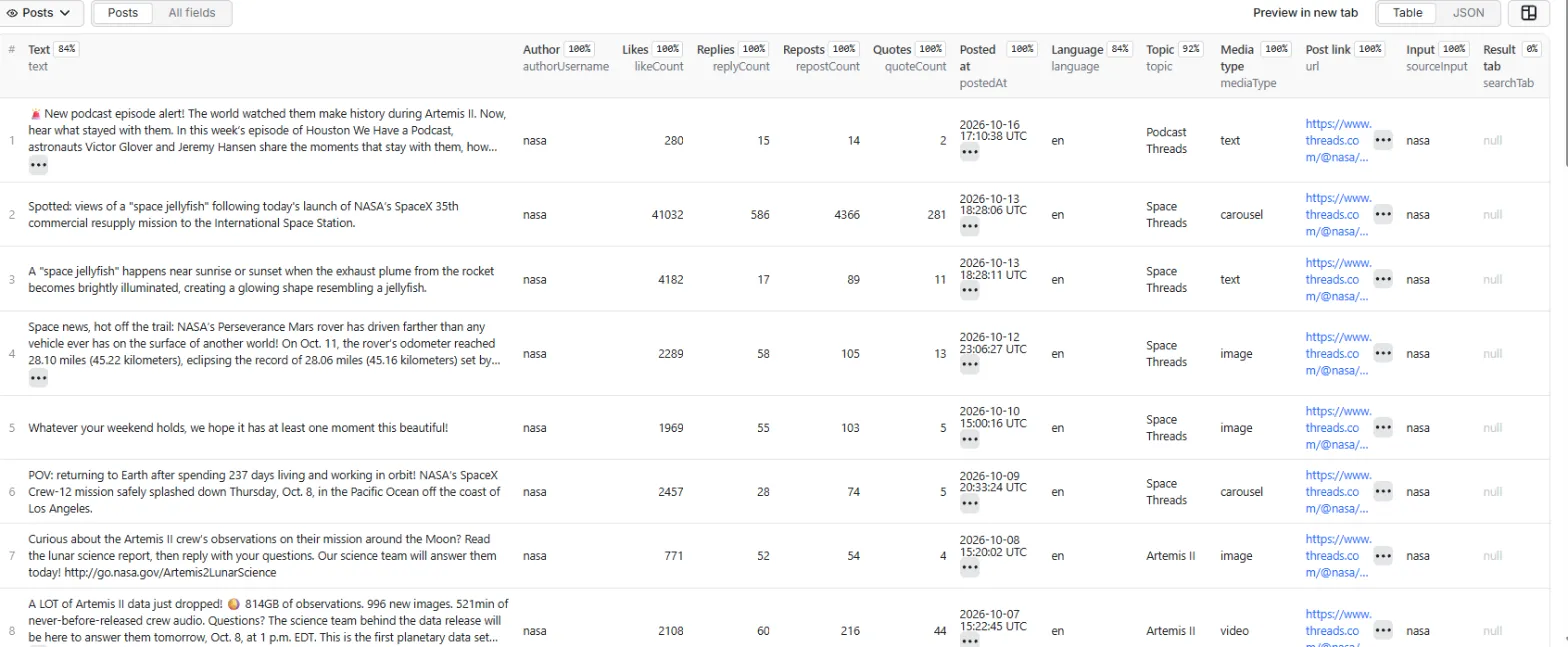
Get Threads posts by keyword or from profiles, without a Threads account or cookies. You get posts that contain your keyword, in the language you choose, above a minimum like count, and each post appears once. Every row has the text, any text attachment, likes, replies, reposts, quotes, media links, the topic tag and the author's numeric user id.
$2.00 per 1,000 posts ($0.002 each). No start fee. Duplicates, posts the filters drop and failed pages cost nothing.
What it's for
- Social listening. Track what people post about your brand, product or topic, in one language, without the off-topic posts Threads search mixes in.
- Find voices in a niche. Sort by likes and replies to see who gets traction on a keyword.
- Watch accounts. Pull a profile's posts, newest first, with engagement counts.
- Look up single posts. Paste post links to get each post's text and current counts, optionally with the first replies.
- Scheduled monitoring. Turn on Only posts not returned by an earlier run and schedule the Actor: each run returns only the posts it hasn't returned before, and the rest cost nothing.
- Give an AI agent Threads data, through Apify's MCP server or the API (examples below).
Example
Input:
One output row (shortened):
What you get
| Field | What it is |
|---|---|
id, code, url | Post id, short code and link |
text, textAttachment | Post text and the long-form text attached to it, if any |
hashtags, mentions, links, topic | Hashtags, mentioned usernames, links and the topic tag |
language | Language detected from the text (ISO 639-1, e.g. en) |
likeCount, replyCount, repostCount, quoteCount, reshareCount | Engagement when scraped |
postedAt | When it was posted (UTC) |
isReply, replyToUsername, isPinned | Reply and pin details |
quotedPost, repostedPost | The quoted or reposted post: id, code, url, username, text |
mediaType, imageUrls, videoUrls, linkPreview | text, image, video or carousel; media links; link card |
authorId, authorUsername, authorFullName, authorIsVerified, authorProfilePicUrl | The author; authorId stays the same when a username changes |
sourceType, sourceInput, searchTab, scrapedAt | Which keyword or profile found the post, and when |
A SUMMARY record in the run's key-value store lists every keyword tab, profile and post link with its status (ok, incomplete, no results, no posts that passed the filters, no new posts, blocked, login-required, not found, not scraped), the posts found, duplicates and filtered, and the reason when something went wrong.
Input
- Search keywords: one search per keyword and result tab. A keyword can be a word, a phrase, a hashtag or a brand name, in any language.
- Result tabs: Threads gives each keyword two result lists, and they rarely share posts. Both are searched by default.
- Keep only posts that contain the keyword (on by default): every word of the keyword must appear in the post text, text attachment, topic, quoted post or link title. Case and accents are ignored, and "espresso" also matches "espressos".
- Profiles: usernames or profile links (
zuck,@zuck,https://www.threads.com/@zuck). Posts come newest first. - Post links: links to single posts (
https://www.threads.com/@zuck/post/DeZtp-TkQHh; threads.net and share links work too). Each returns that post, whatever the filters. - Include replies (off by default): with post links, also returns the replies shown on each post's page and the author's own follow-ups, one row each. Their
sourceInputis the post link, so you can group them by post. - Language, Minimum likes, Posted after (a date or a time ago such as
7 days): filters for both searches and profiles. - Only posts not returned by an earlier run: for scheduled runs (see below).
- Max posts per keyword tab or profile (default 100) and Max posts in total.
Only new posts on a schedule
With Only posts not returned by an earlier run on, the Actor remembers which posts it returned for each keyword tab and profile, in a key-value store named threads-scraper-seen in your Apify account. The next run skips any post an earlier run returned for one of its keywords or profiles, at no charge, and stops paging a profile when it reaches posts it returned before. The record keeps posts for 30 days. Delete the store to start over.
Pricing
| Posts | Price |
|---|---|
| 100 | $0.20 |
| 1,000 | $2.00 |
| 10,000 | $20.00 |
- Apify's platform usage is included, and there's no start fee.
- You pay for rows you get. A post found by two keywords or both tabs is one row, charged once. Posts the filters drop, posts returned by an earlier run (with that option on), blocked pages, login-only profiles and posts not found cost nothing. Replies (with Include replies) are charged as posts.
- To cap what a run can cost, set a maximum cost when you start it (
maxTotalChargeUsdin the API). The Actor stops once the cap is reached and lists what it didn't get to inSUMMARYasnot-scraped, free of charge.
Use it through the API
Run it and get the rows back in one call:
That call waits at most 5 minutes. For bigger runs, the Apify clients start the run and wait for it to finish.
JavaScript (npm install apify-client):
Python (pip install apify-client):
Use it from an AI agent (MCP)
Add Apify's MCP server with this Actor as its tool, for example in Claude Desktop, Cursor or VS Code:
Clients that support OAuth sign you in to Apify on first use. Other clients can send your token in a header: "headers": { "Authorization": "Bearer <APIFY_TOKEN>" }.
Speed and limits
- The Actor works on eight keyword tabs or profiles at a time, and rows appear in the dataset as each page arrives.
- Typical run times on Apify in our tests: one keyword (both tabs) about 40 seconds; 20 keywords and 50 profiles (about 2,400 posts) about 4.5 minutes.
- Logged out, Threads shows a limited number of posts per keyword: about 15–35 per result tab, with no further pages. To get more posts on a topic, add related keywords and phrasings, use both tabs, or schedule runs with Only posts not returned by an earlier run. A keyword can end below your maximum.
- Profiles page back through older posts until your maximum or the date you set.
- Logged out, a post's page shows only its first replies, usually 3–12, so Include replies doesn't return every reply on busy posts.
- Some large accounts (news outlets, celebrities) are only shown to logged-in visitors, and a username that doesn't exist looks the same. Both show as
login-requiredinSUMMARYand cost nothing. A post link to a deleted post or a wrong code shows asnot-found, also free. - Threads blocks some logged-out requests. The Actor retries each page on new IP addresses; a page that stays blocked shows as
blockedand costs nothing. - Language detection works from the post text. Posts too short to tell (a single word or emoji) are dropped when you set a language. Indonesian is reported as Malay (
ms). - Image, video and profile picture links come from Meta's CDN and expire after a while; download them soon if you need them.
Notes
- This Actor reads public Threads pages and isn't affiliated with Meta or Threads.
- Posts contain personal data (usernames, names, profile pictures, what people wrote). You're responsible for using the data lawfully, including data-protection laws such as the GDPR where they apply.
- Found a problem or need a field? Open an issue in the Issues tab.


