
TikTok Shop Scraper with Sold Counts
Pricing
from $1.00 / 1,000 product rows
TikTok Shop Scraper with Sold Counts
Scrape TikTok Shop products with real sold counts: keyword search, bestseller lists, full product details with SKUs and stock, and store catalogues. Flat rows with price, discount, rating, reviews, seller and units sold. Pay per row, no start fee; failed inputs are free.
Pricing
from $1.00 / 1,000 product rows
Rating
0.0
(0)
Developer

Vanja V
Maintained by CommunityActor stats
0
Bookmarked
12
Total users
8
Monthly active users
11 days ago
Last modified
Categories
Security
Limited permissionsShare
Get TikTok Shop products with the units sold that TikTok Shop reports, as flat rows: keyword search, bestseller lists, full product pages with SKUs and stock, and whole store catalogues. Each row has the price, discount, rating, review count, seller and soldCount.
$1.00 per 1,000 product rows from search, bestsellers and stores, and $3.00 per 1,000 product details. No start fee, and inputs that fail cost nothing.
What it's for
- Find products that sell. Rank a keyword's results or a bestseller list by
soldCountbefore you source or list a product. - Watch competitors. Pull a store's whole catalogue with sold counts, followers and rating, or check its listings every day.
- Track sales over time. Turn on Track units sold since last run and schedule the actor: each row gets the units sold since the previous run (see below).
- Check variants and stock. Product details list every SKU with its price, discount, stock count and image, plus the category path and shop stats.
- Give an AI agent TikTok Shop data, through Apify's MCP server or the API (examples below).
What people use it for
- TikTok Shop best sellers. Pull the US or UK best-seller list, ranked by units sold, as a CSV or Excel file.
- TikTok Shop product research. Search a keyword and compare price, discount, rating and
soldCountacross the results. - TikTok Shop competitor analysis. Export a store's whole catalogue with sold counts, followers and rating.
- TikTok Shop sales tracker. Schedule the actor and read
soldSinceLastRunto see which products are speeding up. - TikTok Shop data for your own tools. Send the rows to a spreadsheet, a BI dashboard or an AI agent through the API or MCP.
Example: TikTok Shop best sellers export
Input:
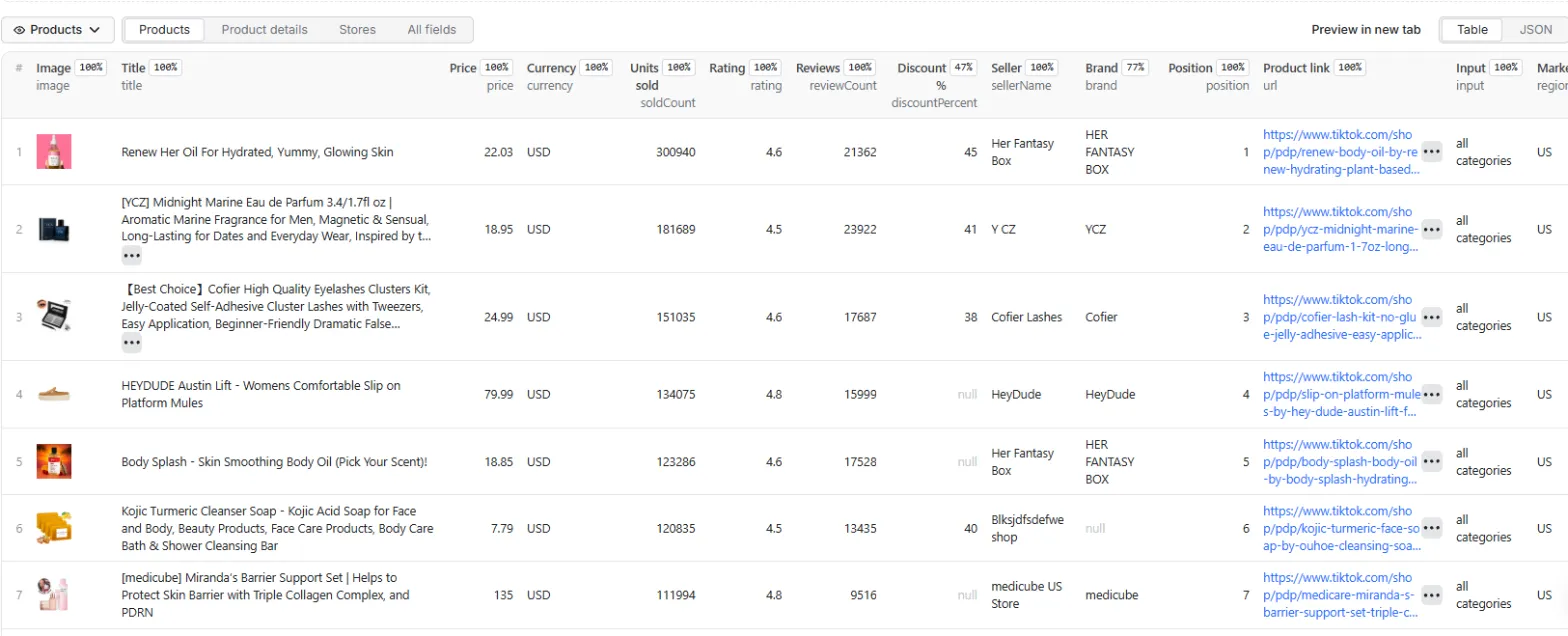
The first row of the US bestseller list on 5 October 2026 (image link shortened). The run returned 30 rows in 37 seconds:
Modes and markets: TikTok Shop search, best sellers, product details and stores
| Mode | Markets | You give it | You get |
|---|---|---|---|
Search by keyword (search) | US | Keywords | One row per product found, in search order |
Bestsellers (bestsellers) | US, UK | Nothing for the whole market, or category links or ids | One row per product, ranked by units sold, up to 100 per list |
Product details (product) | US, UK | Product links or ids | One detailed row per product |
Store catalogue (store) | US | Store links or seller ids | One summary row per store, then one row per product |
Any row's sellerId works as a store input, and any product detail's categoryIds work as bestseller categories.
What you get: TikTok Shop product data as CSV, JSON or Excel
Every product row has:
| Field | What it holds |
|---|---|
productId, title, url | The product's id, title and link |
image | Main product image |
price, originalPrice, discountPercent, currency | Current price as a number, the price before discount and the discount in percent where the listing shows them, and USD or GBP |
rating, reviewCount | Average stars out of 5 and number of reviews |
soldCount | Units sold, as TikTok Shop reports it |
soldSinceLastRun, hoursSinceLastRun | Units sold since an earlier run saw the same product, and the hours in between. Present only when Track units sold since last run is on |
sellerId, sellerName, sellerUrl | The store selling it |
brand, labels | Brand where named, and badges such as Free shipping or Flash sale |
videoUrl, videoAuthor, videoPlays, videoLikes | The TikTok video a search result is bound to, where search returns one. None of our test searches returned one |
position | Rank in the search results or bestseller list |
region, sourceMode, input, scrapedAt | Market, mode, the keyword, link or id the row came from, and when it was fetched |
Product details add description, images, available, categories and categoryIds, attributes, skus (each with skuId, properties, price, originalPrice, discountPercent, availableQuantity, inStock and image) and the shop's shopSoldCount, shopFollowers, shopRating, shopProductCount and shopReviewCount.
Store runs add one row per store with rowType: "store": the store's name, link, logo, rating, review count, total units sold, product count, followers and video count.
The SUMMARY record in the run's key-value store lists every input with its status (ok, no-results, partial, failed, unavailable, not-found, unsupported, invalid or not-scraped), its row count and the reason when something went wrong. unavailable means the data service behind the actor didn't deliver, usually during one of its outages; nothing is charged and trying again a few minutes later usually works. The run's status message gives the same totals. A run that returns no rows because inputs were invalid or not found ends as failed. When the data service didn't deliver or every input came back empty, the run ends as succeeded and its status message says to try again: the service sometimes returns empty results during its outages.
Download the rows as CSV, Excel or JSON from the Output tab, or read them through the API. The Output tab has three views: Products, Product details and Stores.
Input
| Field | Default | What it does |
|---|---|---|
What to scrape (mode) | search | search, bestsellers, product or store. Fill in the section for that mode; the others are ignored. |
Max products per keyword, list or store (maxResults) | 30 | Stop each keyword, bestseller list or store after this many products, up to 1,000. Bestseller lists hold at most 100. |
Track units sold since last run (trackSoldSinceLastRun) | off | Adds soldSinceLastRun and hoursSinceLastRun. Free. |
Search keywords (keywords) | One US search per keyword. | |
Bestsellers market (bestsellersRegion) | US | US or GB. |
Categories (bestsellersCategories) | whole market | Category links or ids, e.g. https://www.tiktok.com/shop/c/beauty-personal-care/601450 or 601450, one list each. |
Products (products) | Product links or ids, e.g. https://www.tiktok.com/shop/pdp/…/1732714053565124892 or 1732714053565124892. | |
Product market (productRegion) | US | US or GB. |
Stores (stores) | US store links or seller ids, e.g. https://www.tiktok.com/shop/store/glowwinner-us/7496322034243111196. |
Duplicate inputs are scraped once. Short vm.tiktok.com links don't work: open them in a browser and copy the full link.
Track units sold over time: a TikTok Shop sales tracker
With Track units sold since last run on, the actor saves each product's soldCount and the time it read it. The next run that sees the same product fills in:
soldSinceLastRun: today'ssoldCountminus the saved one.hoursSinceLastRun: hours between the two reads, to one decimal.
Schedule the actor daily or hourly on the same keywords, lists or stores to get a sales rate for each product. Both fields are empty the first time a product is seen.
- The counts live in a key-value store named
tiktok-shop-sold-historyin your own Apify account, shared by all your runs of this actor. Delete it to start over. - Search and bestseller lists can lag the product page: in one test a listing showed 61 sold in search and 247 on its product page. So each kind of source (lists, product pages, store summaries) is compared only with itself.
- In tests, 20 of 36 products had a higher count 2 hours later (2026-10-04), and 22 of 31 a day later (2026-10-05). Every product with more than 1,000 sold moved within a day; about half of those under 1,000 did. Daily sales among products that moved ranged from 1 to about 3,200, median about 40.
Pricing
| Event | Price | Charged for |
|---|---|---|
| Product row | $1.00 per 1,000 ($0.001 each) | Each product from search, bestsellers or a store |
| Product detail | $3.00 per 1,000 ($0.003 each) | Each product page in product details mode |
| Rows | Search, bestsellers, stores | Product details |
|---|---|---|
| 100 | $0.10 | $0.30 |
| 1,000 | $1.00 | $3.00 |
| 10,000 | $10.00 | $30.00 |
- Apify's platform usage is included, and there's no start fee.
- You pay for rows you get. Inputs that fail, find nothing or are invalid cost nothing; an input that stops partway is charged only for the rows it returned.
- The store summary row and sold-since-last-run tracking are free.
- To cap what a run can cost, set a maximum cost when you start it (
maxTotalChargeUsdin the API). The actor stops once the cap is reached and lists the inputs it didn't get to inSUMMARYasnot-scraped, free of charge. - On Apify's free plan, a run stops after 100 products (10 in product details mode). The run ends normally with the rows it got, and the status message says it hit the free-plan limit, which the actor's developer set. Paid Apify plans have no limit beyond the maximum cost you set.
Use it through the API: a TikTok Shop data API
Run it and get the rows back in one call:
That call waits at most 5 minutes. For bigger runs, the Apify clients start the run and wait for it to finish.
JavaScript (npm install apify-client):
Python (pip install apify-client):
Use it from an AI agent (MCP)
Add Apify's MCP server with this actor as its tool, for example in Claude Desktop, Cursor or VS Code:
Clients that support OAuth sign you in to Apify on first use. Other clients can send your token in a header: "headers": { "Authorization": "Bearer <APIFY_TOKEN>" }. The agent gets a tool that takes a mode and its inputs and returns the rows.
Speed and limits
- The actor works on three inputs at a time, and rows appear in the dataset as each page arrives.
- Typical run times on Apify in our tests: a keyword with 30 rows 5–9 seconds, a store about 5, a product page about 5, a bestseller list 35 seconds to 2 minutes.
- Search pages hold up to 30 products and store pages up to 50. Some keywords return fewer pages than others, so a keyword can end below your maximum.
- Bestseller lists sometimes come back empty with "no best-seller data". The actor tries each list three times; a list that still fails is marked
unavailableinSUMMARYand costs nothing. - A product id that doesn't exist, or a product that was removed, comes back as
unavailable, the same as during a data service outage. If one product keeps failing while others work, its listing is likely gone. - Markets: search and stores cover the US; bestsellers and product details cover the US and UK. Other markets and product reviews aren't included. UK product pages and bestseller lists fail more often than US ones; failed items show as
unavailableand cost nothing.
FAQ
Does TikTok Shop have an API? Why not use it? TikTok Shop has an official Open API, reached through an app registered in TikTok's Partner Center, with access granted by the sellers whose shops it manages. It is built for running your own shop. This actor reads public listings, so it needs no developer account, seller account or API key from TikTok, and it works on stores you don't own.
How do I find best-selling products on TikTok Shop? Use the bestsellers mode. Leave the categories empty for the whole market or give category links. You get up to 100 products per list, ranked by units sold, for the US or the UK.
How do I track TikTok Shop sales?
Turn on Track units sold since last run and schedule the actor on the same keywords, lists or stores. Each row then carries soldSinceLastRun and hoursSinceLastRun. The counts are what TikTok Shop reports. In our tests about half of the products under 1,000 sold didn't change within a day.
Can I export TikTok Shop products to CSV or Excel? Yes. Run the actor, open the Output tab and download the rows as CSV, Excel or JSON.
Can I analyze a competitor's TikTok Shop store? Yes, in the store catalogue mode (US stores). Paste the store link or its seller id. You get one summary row for the store and one row per product.
Do I need a TikTok account or an API key? No. The inputs are keywords, links and ids.
Which countries does it cover? Search and stores cover the US. Bestsellers and product details cover the US and the UK.
How much does it cost? $1.00 per 1,000 product rows and $3.00 per 1,000 product details. A 100-product best-seller list costs $0.10. Set a maximum cost on the run to cap spend.
Can I run it from Python or JavaScript? Yes, see the API section above for curl, JavaScript and Python examples.
Related Actors
- Threads Scraper: Threads posts by keyword or profile, no login. Search it for what people say about a product or brand.
- Instagram Reels Transcript Scraper: turns reel speech into text, for product and ad research on short video.
Notes
- This actor reads public TikTok Shop listings and isn't affiliated with TikTok or ByteDance.
- Found a problem or need a field or market? Open an issue in the Issues tab.


