
eBay Sold Items Scraper: Sold Prices, Comps & Sell-Through
DeprecatedPricing
Pay per usage
eBay Sold Items Scraper: Sold Prices, Comps & Sell-Through
Deprecated⚡🔥 BLAZING-FAST eBay sold-price scraper — every real sold price for any keyword in seconds. See what items really sell for, not asking prices, and price every flip right. Median & avg · sneakers, cards, electronics, any category · 8 marketplaces · newest-first.
Pricing
Pay per usage
Rating
0.0
(0)
Developer

Yakugusa Yumitori
Maintained by CommunityActor stats
0
Bookmarked
13
Total users
2
Monthly active users
19 days ago
Last modified
Categories
Share
Legal Disclaimer: This Actor is an independent development utility and is not affiliated with, endorsed by, or sponsored by eBay Inc. "eBay" is a registered trademark of eBay Inc. All trademarks and registered brand names belong to their respective owners.




Industrial-throughput eBay completed listings scraper.
Extract confirmed sold prices, shipping fees, historical comps, accepted Best Offers, and deep technical hardware specifications across 8 international marketplaces with zero browser overhead.
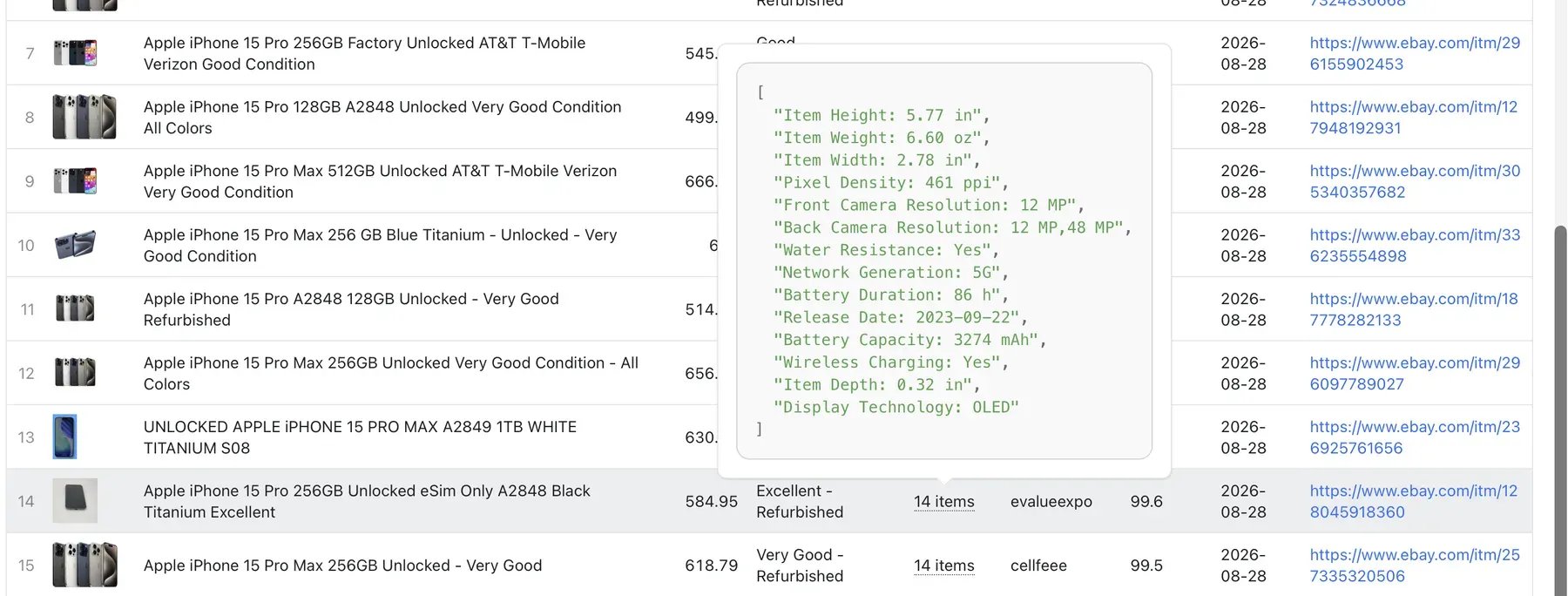
⚡ 247,798 Sold Listings in 1 Minute 3 Seconds
A real run — that is the whole market for one term, pulled faster and deeper than any other eBay scraper. Most scrapers hit eBay's ~12,000 web cap and stop. This engine does not slow down, harvesting tens of thousands of comps up to 250,000+ per keyword across categories.
🚨 Free Plan: Runs are capped at 500 sold listings per keyword and 3 keywords per run — plenty to try it out. Any paid Apify plan unlocks the full market (up to 250,000 per keyword) and lower per-result pricing.
🏆 Why It Is the Fastest — and Why That Matters
Traditional web scrapers rely on resource-heavy headless Chromium browsers that parse client-side scripts, triggering anti-bot hurdles and running up massive compute bills.
This Actor interfaces directly with eBay's completed transaction feeds via high-efficiency HTTP protocols, processing hundreds of thousands of historical sales without browser overhead.
💬 Just Ask — No Fields to Fill
Not sure which keyword, marketplace, or date range to set? Don't configure them manually. Type your query the way you would say it into the "Ask in plain English" (ask) box and the Actor handles parameter resolution automatically:
| You Ask… | It Runs… |
|---|---|
"how much do used AirPods Pro 2 sell for in the UK last 30 days" | airpods pro 2 · used · UK · 30 days |
"sealed pokemon booster box prices this year" | pokemon booster box · new · 90-day+ window |
"compare iphone 15 pro on US vs UK" | iphone 15 pro on both US and UK — side-by-side, each row tagged by marketplace |
"iphone 15 vs samsung s24 sold prices" | Both items analyzed within one run |
"charizard ex 201/165 psa 10" | The card plus its per-grade Price Guide table |
Prefer manual control? Leave the ask field empty and use structured keywords, category selectors, and dropdowns as normal.
🃏 Graded Cards — Per-Grade Price Guide, Automatically
Search a graded trading card and you receive more than raw comps: the run returns eBay's per-grade Price Guide — the realized value at each grade (PSA 10, PSA 9, PSA 8, BGS, CGC) alongside total units sold. A PSA 10 is never blended into the same median as a raw, ungraded copy.
- Auto-Detected Activation: Search a standard product (a phone, sneakers, or jeans) and the Price Guide remains inactive. It triggers exclusively for cards and collectibles with an indexed grade guide.
- Trigger Examples:
charizard ex 201/165,2020 pokemon pikachu vmax psa 10,michael jordan psa 9.
📦 What You Get: Structured Comps + Technical Specs
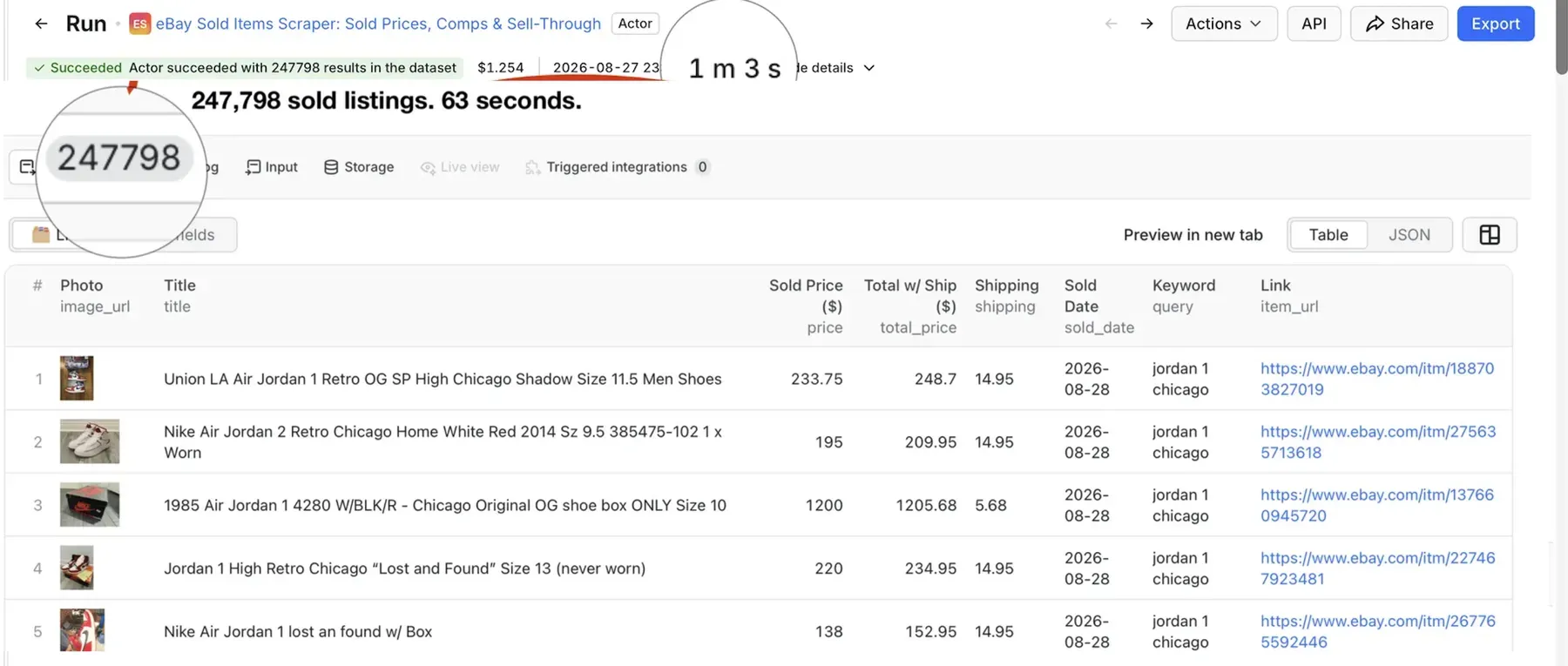
Every execution outputs clean, tabular data ready for instant export to JSON, CSV, or Excel:
Complete Output Schema & Data Dictionary
| Field | Type | Description | Sample Value |
|---|---|---|---|
title | String | Full title of the completed listing | "Nike Air Jordan 1 Retro High OG Chicago Lost & Found Size 10" |
price | Number | Final realized sold price (what it actually closed at) | 194.99 |
shipping | String | Shipping price as displayed ("Free" or numeric fee) | "$14.95" |
sold_date | String | Date sold (newest first) | "2026-08-27" |
image_url | String | Direct gallery item photograph URL | "https://i.ebayimg.com/images/..." |
item_id | String | Unique eBay item / listing ID | "206518842971" |
item_url | String | Direct canonical eBay link | "https://www.ebay.com/itm/206518842971" |
query | String | The exact keyword that returned this listing | "jordan 1 chicago" |
Deep Enrichment Mode (enrichDetails: true)
Turn on Enrich with item details ("enrichDetails": true) to attach deep parameters to the newest listings:
- Condition: Pre-owned, Brand New, Refurbished, Graded.
- Item Specifics: Size, storage capacity, brand, model number, dimensions, hardware specs.
- Seller Details: Seller handle and positive feedback score percentage.
⏱️ Speed Note on Enrichment: Enrichment performs additional metadata lookups per listing. While still running on fast HTTP endpoints (no browser overhead), it will not match the 4,000/sec velocity of the core sold-only pull. Keep it off for maximum speed; turn it on when forensic technical specs and seller data are required. Output lands in a separate "🔎 With details" tab.
🎯 Quick Start: Step-by-Step Guide
- Define Your Query: Enter 1–50 search terms into
queriesor use natural phrasing inask. - Select Regional Marketplace: Choose your target region (
US,GB,DE,FR,IT,ES,CA,AU). - Set Recency Window: Restrict sales to the last
7,14,30,60,90days, or up to 12 months. - Run & Export: Click Start. Download clean datasets via CSV, JSON, or connect via API endpoints.
⚙️ Input Parameters
Configure the Actor via the Apify Console visual form or submit raw JSON directly:
| Parameter | Type | Required | Default | Description |
|---|---|---|---|---|
ask | String | No | "" | Plain-English prompt (e.g., "used AirPods Pro 2 in UK last 30 days") |
queries | Array | Yes* | [] | 1–50 search keywords (one per line). *Required if ask is omitted |
marketplace | String | No | "US" | Target site: US, GB, DE, FR, IT, ES, CA, AU |
categories | Array | No | [] | Category selection. Leave empty to auto-scope per keyword |
categoryIdsCustom | Array | No | [] | Custom eBay category IDs pasted from lookup tools |
maxComps | Integer | No | 5000 | Max sold listings per keyword (up to 250,000 on paid plans) |
days | Integer | No | 90 | Restrict to items sold in the last 7, 14, 30, 60, or 90 days (up to 12 months) |
enrichDetails | Boolean | No | false | Attach condition, technical specs, and seller feedback |
Example Input Configuration
📁 Category Scoping & Custom Category IDs
By default, the Actor auto-scopes each keyword to its most-relevant eBay category so comps stay strictly on-topic and statistical medians remain accurate.
To take manual control or broaden queries across adjacent subcategories:
- Consoles & Systems:
139971 - Video Games:
139973 - Video Game Accessories:
54968 - Sneakers & Athletic Footwear:
15709 - Men's Jeans:
11483
Example: Leaving categories empty on "playstation 5" returns real PS5 consoles (~$145 median). Adding Consoles + Video Games + Accessories queries the entire 250k-listing PS5 market.
🚀 Use Cases & Industry Applications
💻 API & Code Integration
Trigger runs programmatically and pull dataset comps directly into your applications.
Node.js (apify-client)
Python (apify-client)
🔌 Integrations & Automated Webhooks
- Make / Zapier: Set the run trigger to "Actor Run Succeeded" to append sold items to Google Sheets or Airtable rows automatically.
- Scheduled Monitoring: Run hourly or daily via the Schedules tab to maintain an uninterrupted rolling price history.
- Discord Webhook Alert Format:
💰 Pricing & Compute Estimates
- Pay-Per-Result: Pay only for the completed sold records you extract. Full-market pulls finish in about a minute.
- No Subscriptions: Eliminates recurring per-seat marketplace research tool fees.
- Free Tier Allowance: Extract up to 500 listings per keyword across 3 keywords per run on Apify's free tier. Paid plans unlock 250,000+ items per keyword.
⚠️ Limitations & Best Practices
- Rolling Timeframe: eBay indexes completed transactions for a rolling window of up to 90 days (up to 12 months for select product categories). Run scheduled captures to build multi-year archives.
- Enrichment Overhead: Running with
enrichDetails: trueexecutes secondary lookups for seller feedback and item specifics. Disable this toggle if raw speed (~4,000 items/sec) is your priority. - Best-Offer Sales: When Best Offer sales occur, statistical summaries automatically exclude ambiguous accepted figures to prevent skewing median comps.
❓ Frequently Asked Questions (FAQ)
Does this return sold prices or asking prices?
Real sold prices — completed transactions with verified closing prices and sold dates.
Is this the same as eBay's completed / sold listings filter?
It is the full version of it. eBay's web view is capped at ~12,000 results and is login-gated. This engine pulls the entire sold history for a keyword — tens of thousands of completed records without requiring an account.
How do I see what something sold for on eBay?
Enter the item as a keyword and click Start. You receive every recent sold listing with the exact price it closed at, plus the calculated median across all comps.
Can I get eBay price history for an item?
Yes. Set the recency window (7, 14, 30, 60, 90 days, or up to 12 months) and you get the full price history over that period, arranged newest-sold first.
How many sold listings can I get per keyword?
Up to 250,000 per keyword on paid plans, bypassing eBay's ~12,000 UI pagination limit.
How fast is a run?
A typical keyword query completes in 2–8 seconds. A full-market pull of ~250,000 listings finishes in approximately one minute (~4,000 listings per second).
Which eBay marketplaces are supported?
US (United States), UK / GB (United Kingdom), DE (Germany), FR (France), IT (Italy), ES (Spain), CA (Canada), and AU (Australia).
Do I need an eBay API key or account?
No. No API keys, accounts, browser instances, or CAPTCHAs are needed.
How do I stop a broad keyword from returning unrelated items?
The Actor auto-scopes to the most relevant category by default. To lock in an exact category, paste eBay Category IDs into categoryIdsCustom.
Does it work for trading cards, sneakers, and electronics?
Yes, all product categories are supported. Cards automatically trigger the per-grade Price Guide table.
⚖️ Legal & Fair Use
This Actor collects publicly available eBay listing data for price research and market analysis. Use it responsibly and in accordance with eBay's terms of service and applicable regulations. This tool is not affiliated with or endorsed by eBay Inc.
🛠️ Maintenance & Platform SLA
This Actor is continuously monitored with automated test suites. In full adherence to Apify platform standards, any selector shifts, upstream changes, or bug reports submitted via the Issues tab are resolved within 14 days.
| Actor | Status | Architecture | Billing Pass-Through |
|---|---|---|---|
caffein.dev/ebay-sold-listings | Headless Chromium | ||
xtracto/ebay-sold-comps-scraper | Headless Chromium | ⚠️ | |
| This Engine 🏆 | Direct HTTP Feed |


