

Instagram DM Monitor API | ManyChat Alternative
Pricing
from $3.99 / 1,000 dm forwarded via webhooks
Instagram DM Monitor API | ManyChat Alternative
ManyChat alternative for developers. Real-time Instagram DM and comment webhooks. Build comment-to-DM funnels, auto-reply bots, lead capture. Pay-per-event, ~$3/mo vs $45/mo.
Pricing
from $3.99 / 1,000 dm forwarded via webhooks
Rating
0.0
(0)
Developer

Zen Studio
Maintained by CommunityActor stats
0
Bookmarked
17
Total users
1
Monthly active users
9 days ago
Last modified
Categories
Share
From Zen Studio, creators of the Instagram Automation API, RedNote Search and Douyin Search. Pair incoming Instagram events with the actions your workflow needs.
Why choose this actor?
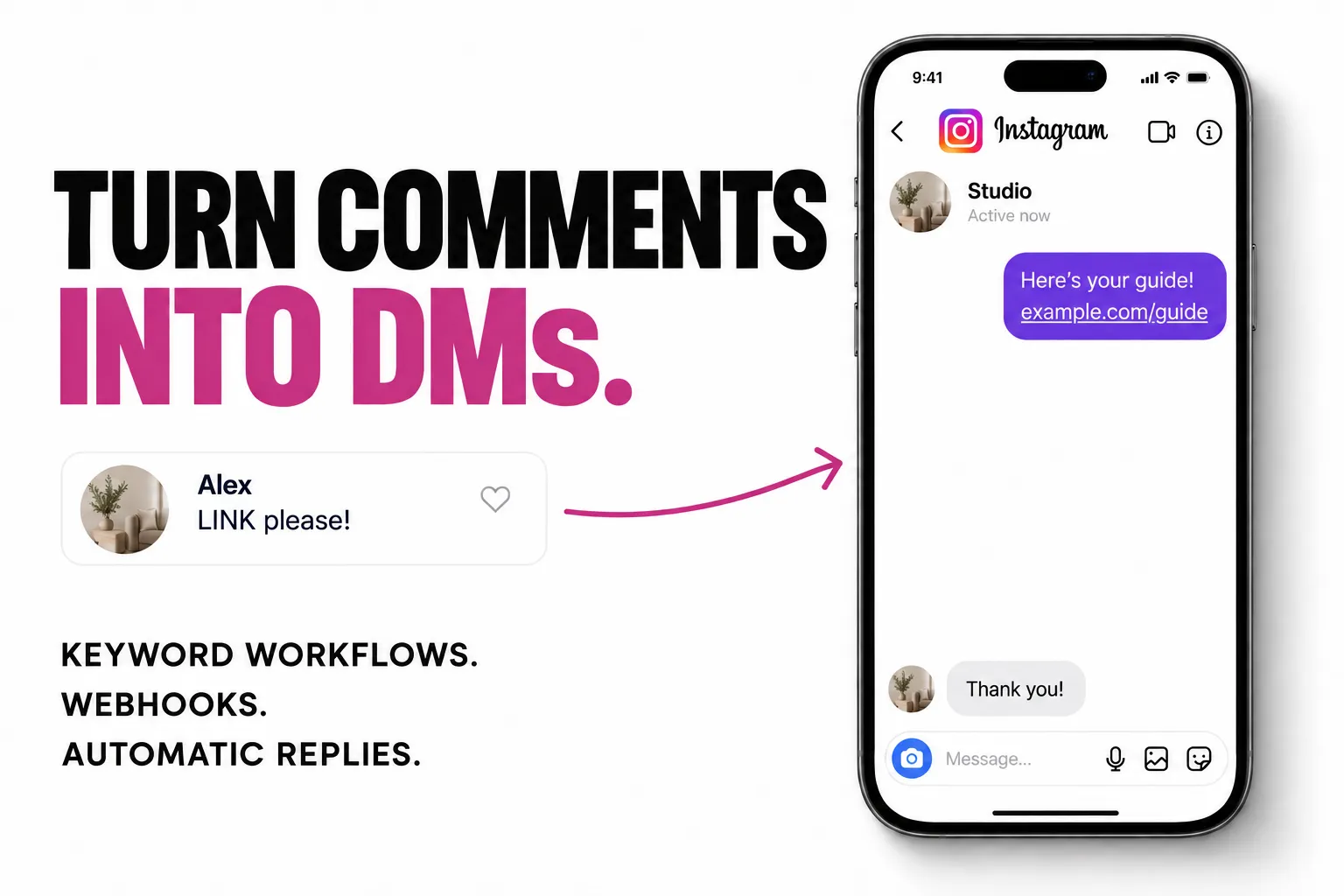
Turn “LINK please” into a private reply. Receive the comment text, username and commenter ID at your webhook. Your n8n, Make or custom workflow checks the keyword and DM eligibility, then calls /reply with your message or link. You control which comments trigger a response.
Bring new DMs into your workflow. Incoming messages arrive through a live listener, with text, conversation ID and message ID. Route them to your helpdesk, apply your reply logic and respond to the same conversation through the API. Comment and other activity checks run every 45–75 seconds.
Choose the events that matter. Subscribe to DMs, comments, follows, likes or mentions from your connected account. Send them to your HTTPS webhook and manage subscriptions through the API. Login and two-factor verification are supported; account permissions and Instagram limits still apply.
Start with comments and DMs
Follow the login and 2FA setup first. Then send this JSON body to POST /subscribe at https://zen-studio--instagram-dm-comment-monitor.apify.actor with your Apify token in the Authorization: Bearer header:
Replace YOUR_LOGIN_EMAIL with your connected account email and the example URL with your own HTTPS webhook. This is an API request body, not the actor’s input form. Your workflow receives events, checks the comment keyword and can_dm_commenter, then calls /reply with user_id and text. See the comment-to-DM example for the complete flow.
Forwarded DMs, activity events and sent replies are charged separately. See current pricing.
| Zen Studio · Social & Messaging | ||||
 DM Monitor DM MonitorYou are here |  Instagram API Instagram API43 actions |  IG Login IG LoginSessions & 2FA |  RedNote RedNotePost search |  Douyin DouyinVideo search |
Copy to your AI assistant
Copy this block into ChatGPT, Claude, Cursor, or any LLM to start using this actor.
How It Works
Standby actor. Persistent REST API server. You interact via HTTP endpoints.
- Login an Instagram account via
/login(supports 2FA) - Subscribe to events via
/subscribewith your webhook URL - Receive real-time webhook POSTs when activity happens
- Reply to DMs via
/reply
Two monitoring channels run simultaneously:
- DMs: Real-time (instant, sub-second)
- Comments, likes, follows, mentions: Polled every 45-75 seconds
Comment-to-DM Funnels
The most popular Instagram automation pattern. Post says "Comment LINK to get the free guide." Someone comments. They get a DM with the link automatically.
How to Build It
- Subscribe to
commentevents with your webhook URL - Your webhook receives every comment with the commenter's ID, username, and text
- Check if
comment_textcontains your keyword ("LINK", "INFO", "YES") - Check
can_dm_commenter(true = they accept DMs) - Call
/replywithuser_idset to the commenter'scommenter_idand your message
Webhook Payload You Receive
n8n / Make Workflow
No code required. Any webhook-capable automation tool works.
Auto-Reply Bot
Respond to DMs automatically. Your webhook receives every incoming DM:
Match keywords, route through an LLM, or apply any logic you want. Send the reply back via /reply with the thread_id. The webhook gives you the message, you decide how to respond.
New Follower Welcome
Greet every new follower with a DM.
n8n / Make Workflow
API Endpoints
Monitoring (3 endpoints)
| Endpoint | Method | Description |
|---|---|---|
/subscribe | POST | Register webhook for account monitoring |
/unsubscribe | POST | Stop monitoring an account |
/subscriptions | GET | List all active subscriptions |
Calling /subscribe on an already-subscribed account replaces the existing subscription (tears down the old one, creates new). To change events or webhook URL, just call /subscribe again with the updated parameters.
Actions (1 endpoint)
| Endpoint | Method | Description |
|---|---|---|
/reply | POST | Send text DM reply |
Requires email, text, and either user_id (creates thread if needed) or thread_id (sends to existing thread). One of the two must be provided. Text messages only — image, voice, and link preview support is planned.
Auth & Session (2 endpoints)
| Endpoint | Method | Description |
|---|---|---|
/login | POST | Login with email/password (2FA supported) |
/verify-2fa | POST | Submit verification code |
Response Format
Every endpoint returns a consistent envelope:
Errors return the same structure with "success": false, an error code, and a message. When session.status is "active" on an error, the session is fine and the error is temporary. When "expired" or "suspended", re-login via /login.
| Error | Code | Meaning |
|---|---|---|
session_not_found | 404 | No active session, login first |
login_required | 401 | Session expired, login again |
account_suspended | 403 | Account suspended by Instagram |
rate_limited | 429 | Too many requests, slow down |
dm_delivery_failed | 422 | Couldn't send DM to this user |
Quick Start
1. Login
2FA enabled? You'll get "status": "pending_2fa". Submit the code:
2. Subscribe
3. Reply
Event Types
Subscribe to any combination. The event field in the webhook payload matches the subscribe event name.
| Event | Delivery | Description |
|---|---|---|
dm | Real-time | Incoming direct messages |
comment | Polled (45-75s) | Comments on your posts |
follow | Polled (45-75s) | New followers |
like | Polled (45-75s) | Likes on your posts |
mention | Polled (45-75s) | Tags in other users' posts |
Pricing
Pay-per-event. You only pay when events are forwarded or messages are sent.
| Event | Price | Description |
|---|---|---|
dm-forwarded | $0.005 | Incoming DM delivered to your webhook |
activity-forwarded | $0.003 | Comment, like, follow, or mention delivered |
dm-sent | $0.01 | Reply sent via /reply |
Login, subscribe, unsubscribe, health check: free.
Cost Comparison with ManyChat
| Scenario | This Actor | ManyChat |
|---|---|---|
| Small creator (10 DMs + 20 comments/day) | $3.30/mo | $15/mo |
| Growing account (50 DMs + 100 comments/day) | $16.50/mo | $45/mo |
| Agency (5 accounts, 200 DMs + 500 comments/day each) | $97.50/mo | $225+/mo |
Safe Usage
Instagram restricts accounts that automate too aggressively. This actor keeps your sessions connected, but your automation logic controls the pace.
- Space out DMs. Don't send 50 replies in a minute. Add short delays between sends in your webhook handler.
- Don't DM everyone. Only reply to users who engaged first (commented, DM'd you, followed). Cold outreach at scale gets flagged fast.
- Respect
can_dm_commenter. The comment webhook tells you if the user accepts DMs. Don't try to DM users where this isfalse. - Start slow on new accounts. Fresh or low-activity accounts have lower thresholds. Ramp up gradually over days.
- Watch for
rate_limited(429). When you get this error, back off for 30-60 minutes. The session is fine, Instagram is just throttling.
If your account gets temporarily restricted, it usually lifts within a few hours. If it persists, re-login via /login to get a fresh session.
FAQ
How is this different from ManyChat? ManyChat is a no-code platform with visual flow builders. This actor is an API that sends webhooks. You bring your own logic, whether that's n8n, Make, Zapier, or custom code. Lower cost, more flexibility, no lock-in.
Do I need to write code? No. Use n8n, Make, or Zapier to receive webhooks and call the reply endpoint. No coding required. But if you want custom logic, the API is there.
Do I need an Instagram account?
Yes. You authenticate via /login. The monitor acts on behalf of your account.
Can I monitor multiple accounts? Yes. Each email gets its own session and subscription. One API, unlimited accounts.
What about 2FA?
Fully supported. /login returns "pending_2fa", then submit the code via /verify-2fa.
How fast are DM notifications? Sub-second. DMs are delivered in real time.
How fast are comment/follow/like notifications? 45-75 seconds. Activity is polled at randomized intervals.
What if my webhook is down? Failed deliveries retry up to 3 times. Events that fail all retries are dropped.
Legal Compliance
This actor interacts with Instagram on behalf of authenticated account owners. Users must comply with Instagram's Terms of Service and applicable data protection regulations (GDPR, CCPA).
Instagram DM automation API. ManyChat alternative for developers. Comment-to-DM funnels, auto-replies, lead capture via webhooks.


