
Rxnorm Drug Lookup
Pricing
from $2.99 / 1,000 results
Rxnorm Drug Lookup
RxNorm Drug Lookup is a Python script designed to query the NIH RxNorm API to retrieve standardized drug information, unique concept identifiers (RxCUI), ingredients, brand names, and dosage forms for medical and healthcare applications.
Pricing
from $2.99 / 1,000 results
Rating
0.0
(0)
Developer

ZeroBreak
Maintained by CommunityActor stats
0
Bookmarked
2
Total users
1
Monthly active users
2 days ago
Last modified
Categories
Share
RxNorm Drug Lookup: Drug Names and RxCUI via NLM RxNav
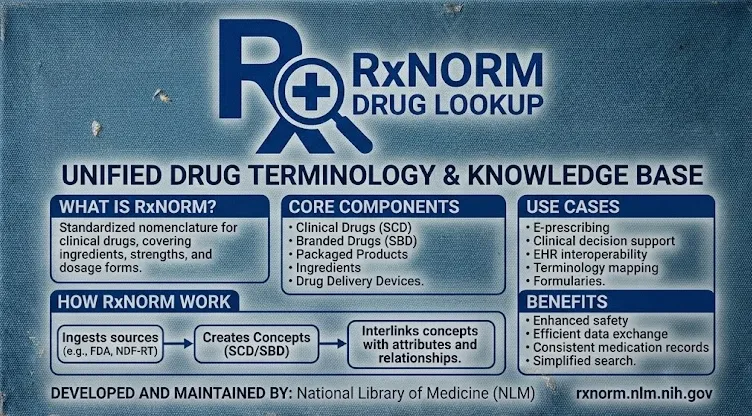
RxNorm Drug Lookup retrieves drug concepts from the public National Library of Medicine (NLM) RxNav service. It collects RxCUI identifiers, drug names, synonyms, term types (TTY), language codes, suppression flags, and UMLS Concept Unique Identifiers (CUIs).
Provide a list of drug names, configure fuzzy matching and record limits, and export the results as JSON, CSV, or Excel. The public service does not require an API key, and the actor is free to run.
Use Cases
- Formulary mapping: Match brand-name or generic drugs to RxCUI identifiers for integration with other medication datasets.
- Typo handling: Use approximate matching to find candidate drug concepts when names contain spelling errors.
- Concept review: Collect ingredient, clinical drug, branded drug, and package-related term types for a given drug name.
- Scheduled quality assurance: Rerun a list of drug names periodically to refresh reference data and identify changes.
- Research datasets: Store drug names, synonyms, identifiers, and term types in a structured dataset without requiring a UTS login.
Input Parameters
| Parameter | Type | Default | Description |
|---|---|---|---|
names | array | aspirin | Drug names to look up, with one name per item. |
fuzzy | boolean | true | Enables approximate matching to identify possible matches for misspelled or similar drug names. |
maxItems | integer | 100 | Maximum number of drug records to save. Limited to 1,000. |
timeoutSecs | integer | 300 | Maximum total runtime in seconds. |
requestTimeoutSecs | integer | 30 | Maximum wait time for an individual RxNav response. |
Example Input
What Data Does This Actor Extract?
Each successful output row represents an RxNorm concept. RxNav returns matching concept groups in a response rather than using conventional page-based pagination. When multiple names are supplied, the actor processes them until the configured record limit or runtime limit is reached.
Example Output
The example uses a placeholder for the request URL. Actual output depends on the concepts and information returned by RxNav.
Output Fields
| Field | Type | Description |
|---|---|---|
rxcui | string | Unique identifier for the RxNorm concept. |
name | string | Drug name returned by RxNav. |
synonym | string | Alternative name or synonym, when available. |
tty | string | Term type, such as IN, SBD, SCD, BPCK, or GPCK. |
language | string | Language code, usually ENG for English. |
suppress | string | Suppression status. N indicates that the concept is not suppressed. |
umlscui | string | UMLS Concept Unique Identifier, when available. |
sourceUrl | string | Request URL associated with the returned record. |
scrapedAt | string | UTC timestamp indicating when the record was saved. |
error | string | Error description, when a lookup fails. |
input | string | Original drug name associated with an error row. |
A failed lookup produces an error row containing the error description and original input. Previously collected records remain in the dataset, and the run continues processing other names where possible.
How It Works
- Read the input names and validate the configured limits.
- Send requests to the public RxNav REST service.
- Retrieve drug concepts and associated information from the available responses.
- When fuzzy matching is enabled, perform an additional approximate-term lookup for each input name.
- Remove duplicate records using the RxCUI identifier.
- Retry HTTP 429 responses and HTTP 5xx errors using backoff.
- Save successful records and error rows in the output dataset.
Limits and Data Usage
- Public API rate limit: The public RxNav service documents a limit of 20 requests per second per IP address.
- Authenticated rate limit: A higher limit of 100 requests per second is documented for requests using a UTS key.
- Request pacing: This actor targets approximately 10 requests per second and retries rate-limit and server errors.
- Duplicate handling: Duplicate records are removed using RxCUI identifiers.
- Maximum records: Up to 1,000 output records per run.
- Authentication: No API key is required for the public endpoints used by this actor.
- Licensing: Most RxNorm content does not require a separate license. Certain components, including SNOMED CT content incorporated into RxNorm, have additional licensing requirements. Review the applicable NLM terms before redistributing affected data.
Frequently Asked Questions
Does RxNorm Drug Lookup require an API key?
No. It uses public RxNav JSON endpoints and does not require an API key for the described lookups.
What does fuzzy matching do?
Fuzzy matching adds an approximate-term lookup for each drug name. Enable it when you want to identify possible matches for spelling errors or similar terms. Disable it when you only need standard drug-name and RxCUI lookups.
How many rows can one run save?
The default maximum is 100 records, and the configured limit cannot exceed 1,000.
Why is there no page cursor?
RxNav returns concept groups for an individual name in a response. The actor moves to the next input name instead of following a conventional pagination cursor.
What happens when a drug name is unknown?
The actor records an error row for the unrecognized name. The entire run does not need to stop because of one failed lookup.
Can the results be exported to CSV, JSON, and Excel?
Yes. The resulting dataset can be downloaded in JSON, CSV, or Excel format for research, reporting, and integration with other data-processing systems.
Pricing
The actor is free to run. Apify platform usage is separate and depends on the applicable plan.
Trademark Notice
RxNorm, RxNav, and related names, logos, and trademarks belong to their respective owners. Their use in this documentation is solely for identifying the data source and does not imply affiliation, sponsorship, endorsement, or partnership.
Disclaimer
This actor is an independent tool and is not affiliated with, endorsed by, sponsored by, or officially associated with RxNorm, RxNav, or the National Library of Medicine.
Data is collected from publicly accessible sources. Users are responsible for complying with applicable source terms, request limits, licensing conditions, and attribution requirements.
Is Web Scraping Legal?
Accessing publicly available information through a public API is generally permitted, but the legality and conditions of use depend on the data, applicable laws, licensing terms, and intended purpose.
- Personal data: If collected results contain personal information, applicable privacy laws may impose additional obligations. Collect and retain such information only when there is a legitimate and lawful basis.
- Copyright and licensing: Drug reference data and associated content may have specific licensing requirements. Follow applicable license terms and attribution obligations when redistributing data.
- Terms of use: Respect the source's usage policies, request limits, and applicable data-use requirements.
- Legal advice: This information is provided for general educational purposes and does not constitute legal advice. Consult a qualified professional if you need guidance on a specific use case.


