

Google Maps Email Extractor — Business & Branch Contacts
Pricing
from $5.04 / 1,000 completed unique places
Google Maps Email Extractor — Business & Branch Contacts
Extract Google Maps business emails with branch or organization scope, source URLs and reasons. Search category and city, exclude previous places, export unique business rows to CSV.
Pricing
from $5.04 / 1,000 completed unique places
Rating
0.0
(0)
Developer

Tim Zinin
Maintained by CommunityActor stats
0
Bookmarked
2
Total users
1
Monthly active users
9 days ago
Last modified
Categories
Features
Share
Google Maps Email Extractor finds businesses by category and city, checks their public websites, and returns business emails with the page that published them. Each unique place keeps its own row: branch contacts are distinguished from organization, general and uncertain contacts using address, phone and page context. Export Google Maps leads to CSV or JSON with evidence you can inspect before adding them to a CRM.
What you get
- Place ID, business name, address, phone, website, coordinates and Google Maps link.
- A preferred email plus all observed candidates, contact types, source URLs and reasons.
- Separate branches on shared domains; exclusions for completed places before new website work or charges.
- Clear no-website, no-email, blocked and partial outcomes. Mailbox delivery is not tested.
- One global place limit and a charge cap; no full-city coverage promise.
- Runs on Apify: schedule it, monitor it, call it from the API and export JSON, CSV or Excel into your workflow.
How to run it
- Open Input and keep the example: category
dentist, locationCambridge, England, United Kingdom, country codeGB. - Keep Maximum unique places at
10for a small first run. Review the charge cap and pricing below. - Click Start. Open the CRM contacts dataset view, inspect contact types and sources, then select Export → CSV. Use JSON for all candidates and evidence.
Pricing
$0.0072 per completed unique place on the FREE plan — $7.20 per 1,000. No start fee.
The single paid event is result-found. A completed check is charged even when the business has no website or no email appears within the selected page limit. This is a price per completed place check, not per found or deliverable email. 100 completed places cost $0.72; the default 10-place run costs at most $0.072 at the FREE rate.
Duplicate and excluded places are free. Transport errors, robots denials or failures, challenges, truncated pages and unfinished checks produce free partial rows, even if an email was observed. Compute, proxy and storage for the Actor run are included in the event price.
| Apify plan | Per completed place | Per 1,000 completed places |
|---|---|---|
| FREE | $0.0072 | $7.20 |
| BRONZE | $0.00648 | $6.48 |
| SILVER | $0.00576 | $5.76 |
| GOLD | $0.00504 | $5.04 |
| PLATINUM | $0.00504 | $5.04 |
| DIAMOND | $0.00504 | $5.04 |
Active prices checked November 15, 2026. Apify account credits, plan eligibility and separate downstream services follow their own terms.
Input: category and city, or known Google Maps places
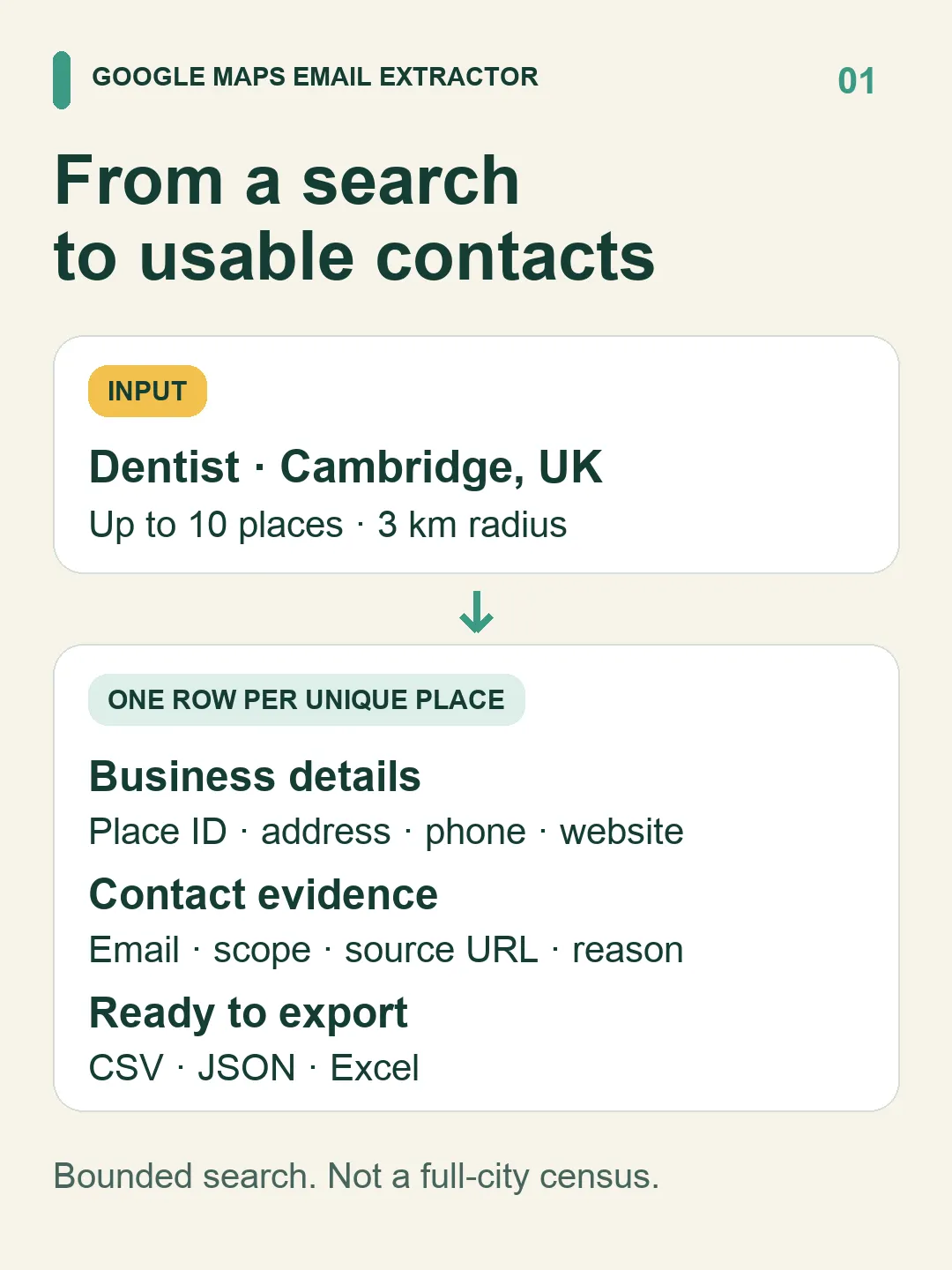
Use search mode or known-place mode. Search needs a category and location, or a category and coordinates. Include the country in a location name; the resolved geography is checked against countryCode and shown in the summary. A city name resolves to a center, not an administrative boundary.
| Field | Default | Meaning |
|---|---|---|
category | dentist | Business category; clear for known places. |
location | Cambridge, England, United Kingdom | City/region and country separated by commas. Clear for coordinates or known places. |
countryCode | GB | Two-letter country code for geographic validation and Maps requests. |
language | en | Maps result language, such as de, fr or es. |
searchArea | {} | Optional {"latitude":52.2,"longitude":0.12} center. Clear location when using it. |
radiusKm | 3 | Circular search radius, 0.2–20 km; results are distance-filtered. |
placeIds | [] | Known Google place IDs. Clear category, location and searchArea. |
startUrls | [] | Google Maps place URLs; links containing query_place_id are preferred. |
excludePlaceIds | [] | Up to 10,000 place IDs excluded before website work and billing. |
previousDatasetId | None | Select this Actor's previous dataset to grant read-only access. Completed rows are excluded; partial rows remain retryable. At most 10,000 rows are read; larger datasets cause an explicit stop. |
maxPlaces | 10 | Global unique-place cap, 1–500, including free partial rows. |
maxPagesPerPlace | 4 | 1–6 public HTML pages per place, beginning at the Maps website path. Robots requests are separate. |
maxRunSeconds | 300 | Work deadline, 30–900 seconds. Set Apify's run timeout above it. |
maxSearchRequests | 12 | 1–30 Maps requests, including location resolution, details, retries and redirects. |
maxConcurrency | 4 | 1–8 simultaneous website checks; Maps requests stay serial. |
maxChargeUsd | 1 | Actor event budget, $0–$15; also respects the Apify run cap. Zero does no paid work. |
The default input used for the platform test is:
Refresh known places and avoid repeat charges
This example uses a real Cambridge branch. Clear the search fields as shown; leaving the form's default city or category creates a mode conflict.
Select Previous dataset ID or supply excludePlaceIds to skip earlier work. Only checkComplete=true dataset rows are excluded. Exclusions use place IDs, so branches sharing a domain remain separate.
Search uses a bounded center-and-neighbor grid. Increasing maxPlaces does not remove request, time or byte limits; the requested count may not be reached. Known places usually need at least one Maps request each. The summary provides a resume input for remaining discovered places, without promising discovery of every business in an area.
Output: Google Maps business emails with evidence
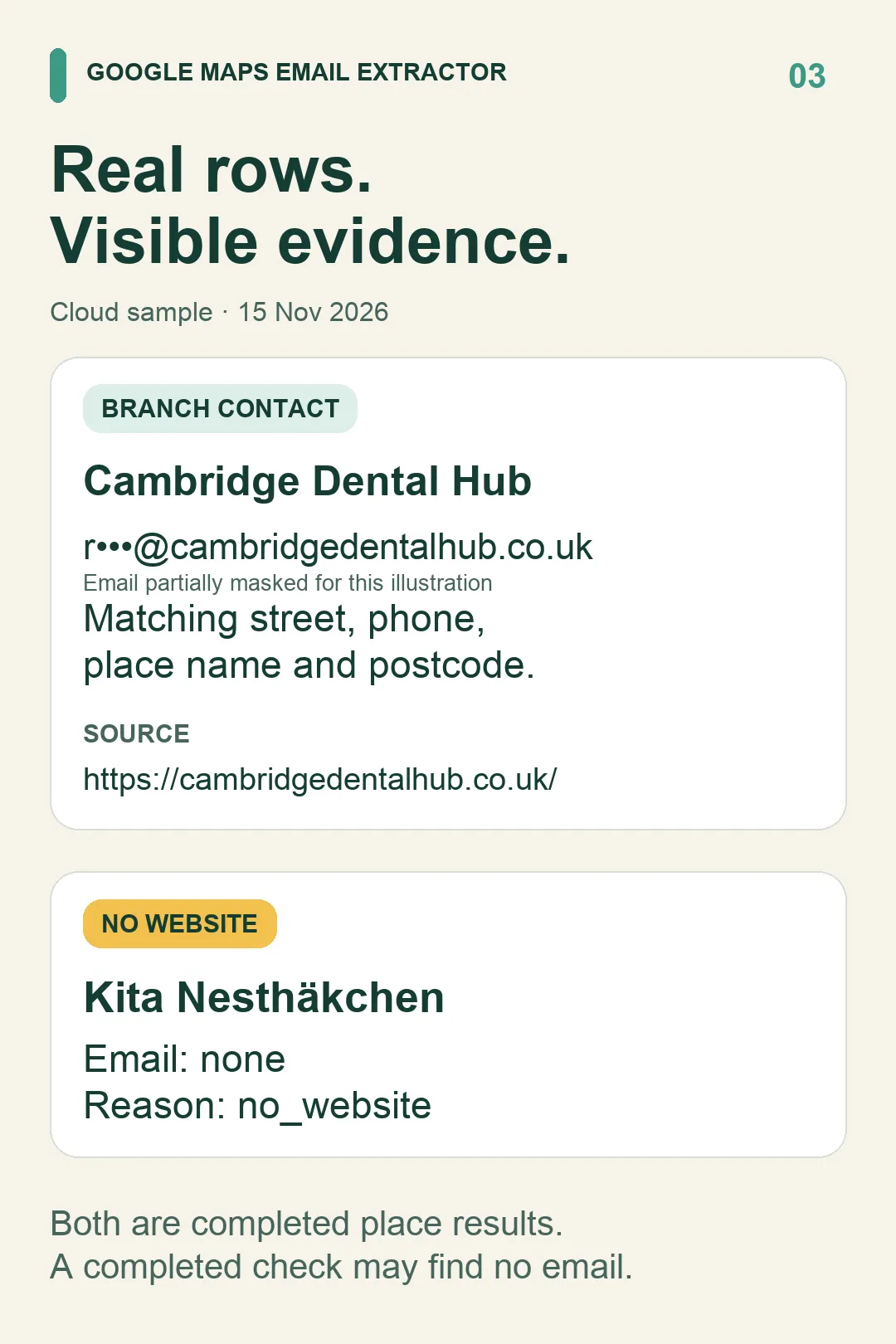
These fields are copied unchanged from a successful cloud run on November 15, 2026. This abbreviated real row describes mydentist on Chesterton Road; full JSON also contains organization contacts and per-page evidence.
| Fields | Meaning |
|---|---|
placeId, dataId, name, address, phone, website, mapsUrl | Place identity and observed business details. Missing source fields stay empty. |
latitude, longitude, category, categories | Location and source categories. |
email, emailType, emailSourceUrl, emailReason | Preferred candidate and attribution; preference order: branch, organization, general, uncertain. |
emails[] | All candidates with type, confidence, original spelling, extraction method, context, signals and source observations. |
websiteStatus, noContactReason | Completed/no-website/partial status and why no branch contact was established. |
checkComplete, partial, chargeEligible | Completion and eligibility for the paid event. Eligibility is not a charge receipt. |
pagesChecked, pagesAttempted, pageLimitReached, pages[] | Scope of the bounded check, including failed attempts. |
observedAt, mailboxChecked | Observation time; mailboxChecked is false because delivery is not tested. |
Dataset views: CRM contacts, Contact evidence, Diagnostics. CSV suits preferred flat fields; JSON preserves nested evidence. Key-value store OUTPUT contains counts, resolved geography, limits and resumeInput. UNPROCESSED contains retryable work; BILLING records receipts and charge reconciliation.
Other tools we built
Need the next step, or already have website URLs?
| Actor | What it does |
|---|---|
| Website Contact Extractor | Extract public contacts from websites you already have. |
| Google Maps Chain Location Grouper | Organize locations into chain groups. |
| Google Maps Service Opportunity Scorer | Prioritize service opportunities from business data. |
| Google Reviews Response Backlog | Turn review data into a response backlog. |
FAQ / Limitations
Does every business return an email? No. Sites may publish none, provide only a central contact, block requests or require JavaScript. no_contact_observed means no email appeared in the pages checked, not proof the entire site has none. no_website, organization_only and branch_unconfirmed explain other outcomes.
Why is a result with no email charged? You buy a completed, bounded place check. No-website and successfully checked no-email outcomes are paid at the stated rate. Failed or incomplete checks are free. Review checkComplete and final billing together.
Is a branch email verified? The label describes evidence connecting an address to the location. It does not establish deliverability, permission to contact or current ownership. SMTP, mailbox verification, email guessing and personal-contact enrichment are not performed.
Can I collect every business in a city? No completeness guarantee is made. Google ranking, radius, bounded search grid and request/time limits restrict coverage. A run can succeed with partial rows; inspect OUTPUT and diagnostics.
What happens when a source blocks the run? The affected route stops with a reported limitation. The Actor respects robots rules and follows public website links; it does not solve CAPTCHAs, sign in or render JavaScript. Ordinary robots.txt HTTP 4xx responses mean no available rules, as permitted by RFC 9309; server errors, network failures and detected challenges stop the check. Temporary website failures receive at most one paused retry; detected challenges are not retried. Limits: 750 KB per HTML response, 40 seconds per place, 25 MB of website responses and 12 MB of Maps responses per run.
How do I resume? Use OUTPUT.resumeInput for remaining discovered places. It retains prior exclusions and adds completed places. A new run has a new budget. Ambiguous delivery or billing outcomes are quarantined instead of automatically retried; inspect them before manual reuse. More than 10,000 exclusions requires manual batching, explicitly reported in the summary. Reconciliation can be unknown if platform counters have not confirmed receipts; eventual Apify run billing is authoritative.
How may I use the data? Review source terms and privacy/outreach requirements for your use. Public availability does not grant unrestricted reuse rights. Google Maps terms apply to the source. This Actor is independent of Google and does not send messages.
Open an Issue on this Actor for a reproducible bug, including the run URL, input geography and expected result. Keep tokens and private contact lists out of public issues.
How branch contact matching works
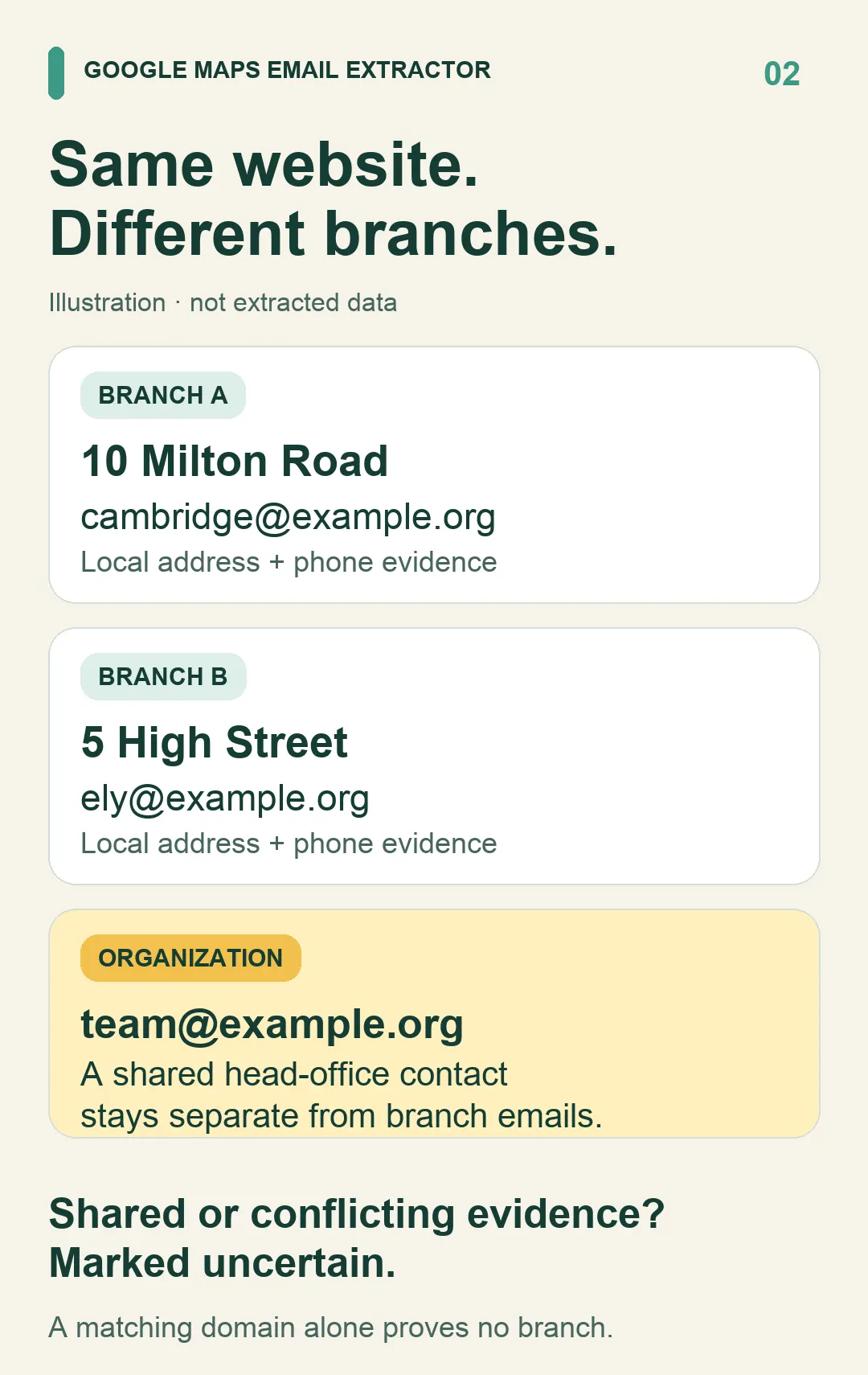
A branch label needs local evidence: a matching street and number, or matching published phone with relevant place context, without a conflicting address. A shared domain or footer occurrence alone is insufficient. Explicit head-office contacts are organization; unlocalized site contacts are general; ambiguous relationships remain uncertain.
Published emails on another domain are retained when the source supports them. The extractor reads mailto links, visible text and explicit (at)/(dot) forms, preserving original spelling and source.
This diagram uses labeled example addresses to explain the rule; it is not an additional live result.
Measured email coverage and comparison
Validation on November 15, 2026 used 48 manually labeled real places and saved public pages: independent businesses, shared-domain branches, external-domain emails, obfuscation, central contacts and negative cases. Labels were frozen before tuning; 12 places were held out.
| Saved-page metric | Observed result |
|---|---|
| Correct branch associations / all branch predictions | 19 / 19 (100% on this sample) |
| Branch-positive places with a correct branch prediction | 19 / 24 (79.2%) |
| Places with any observed email | 29 / 48 (60.4%) |
| Places with an uncertain candidate | 8 / 48 (16.7%) |
| Held-out branch associations | 4 / 4 correct |
These are saved-page classification results, not 48 end-to-end cloud runs or a guarantee of future precision. Conservative labels reduce branch coverage.
One live run per Actor on the same ten Cambridge dentist place IDs produced:
| Actor | Places | Places with email | Run time | BRONZE customer event cost / competitor bill |
|---|---|---|---|---|
| This Actor | 10 | 7 | 56.7 s | $0.04536 |
| Lukas Google Maps with Contact Details | 10 | 9 | 74.0 s | $0.08005 |
| Vortex Google Maps | 10 | 6 | 18.9 s | $0.01745 |
Our run returned seven completed event-eligible checks and three free partial rows. Our $0.04536 is the calculated customer event cost (7 × $0.00648); because this was an owner test, the actual owner infrastructure cost was $0.0032335, not customer revenue. The two competitor amounts are actual test-account bills. Lukas's direct-URL mode also charged place-details events; Vortex charged base rows, contact results and a start event. Settings requested contacts and disabled optional reviews, photos and people enrichment. Billing models differ, so these are bounded test costs under the stated models, not universal price rankings. Competitors do not expose the same branch label; their emails were not scored as incorrect branches. Separate ten-place tests in Wiesbaden childcare and Boston bookstores returned four and five places with email respectively.
A later independent default-input run on the same day returned ten business rows but only three completed checks with branch emails: four website requests and three robots checks were unavailable, leaving seven free partial results. After correcting robots 4xx handling, adding a bounded retry for ordinary HTTP 202 responses and preserving transport diagnostics, one final run of the unchanged Cambridge default returned seven branch-email rows and three free partial rows. Those remaining failures were one TLS hostname mismatch and two website HTTP 403 responses. The two emails found only by Lukas belonged to sites we could not access; they were not rejected by the branch classifier. Availability varied between runs, so this observation does not isolate the effect of the code change or guarantee future email coverage.
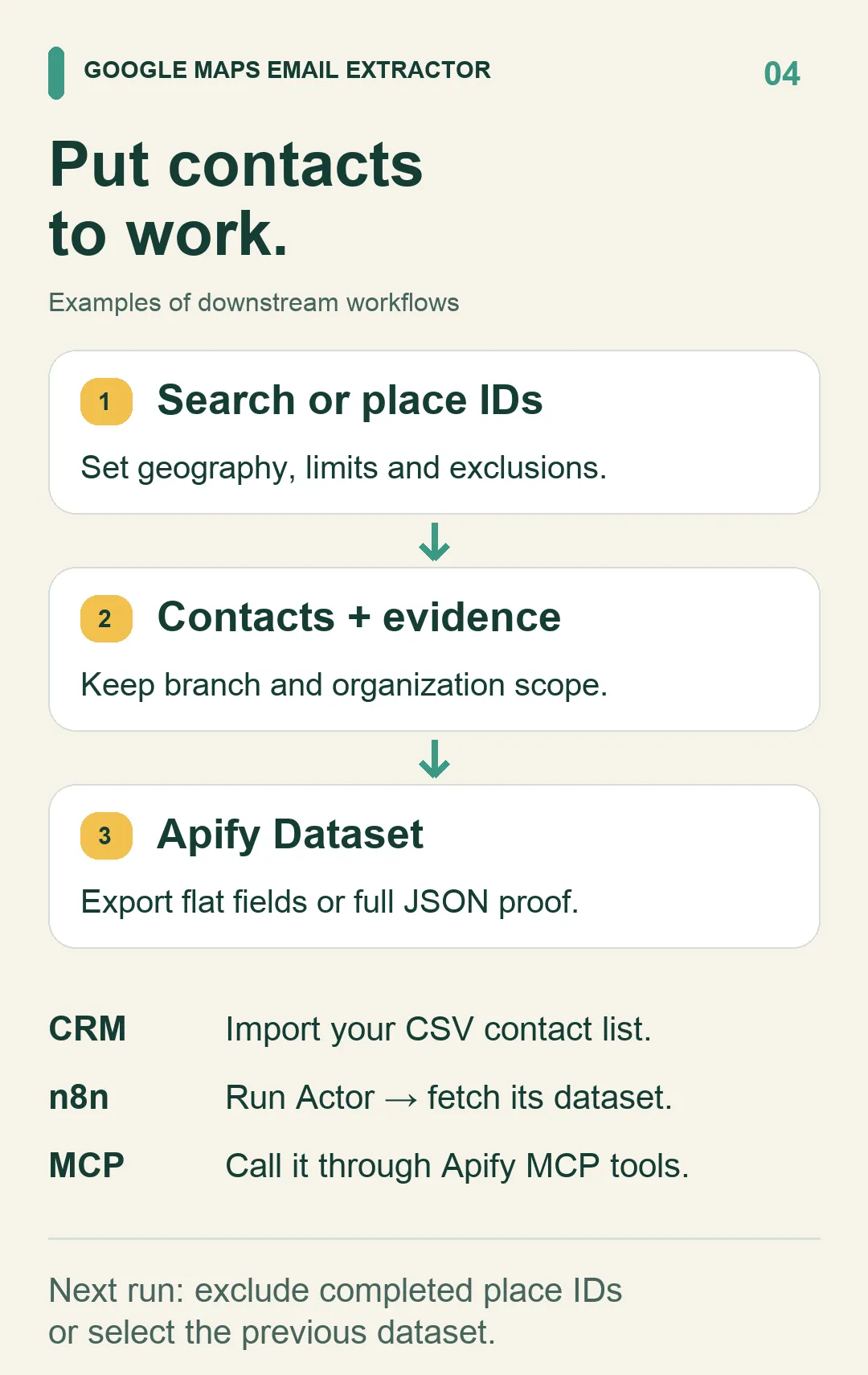
API, n8n, MCP and CRM workflows
API: send the default JSON to POST https://api.apify.com/v2/acts/zinin~google-maps-email-extractor/runs?maxTotalChargeUsd=1 with your Apify token in the Authorization header. Save the run ID, wait for terminal status, then read defaultDatasetId. Export with GET /v2/datasets/{datasetId}/items?format=csv&clean=true. Use asynchronous runs for larger inputs; a client timeout is not a reason to start another run.
n8n: use Apify's Run Actor action, pass the input, wait for completion and retrieve dataset items. Map placeId to your CRM's external identifier and review emailType and emailSourceUrl before use. This is a setup guide; no CRM connection is created automatically.
MCP: connect the official Apify MCP server, load this Actor's current input schema and request a bounded run of zinin/google-maps-email-extractor. No Google or third-party provider key is required; execution uses your Apify account.
Ready-made examples
Copy one preset into the JSON input. Each uses a different real scenario with a ten-place limit and $1 charge cap; the other fields keep their documented defaults.
Cambridge dentist business contacts
A small UK local-business list:
Wiesbaden childcare contact sources
German institutions, with branch and organization contacts kept separate:
Boston bookstore business emails
US independent shops and chain locations:
Change category, geography and limits when adapting an example.
Changelog
0.1 — November 15, 2026: initial release with bounded Maps search and known-place input, evidence-based contact types, early exclusions, CSV views, partial diagnostics and one completed-place billing event.


