

TikTok Scraper - Hashtags, Profiles & Videos (No Login)
Pricing
from $1.75 / 1,000 result scrapeds
TikTok Scraper - Hashtags, Profiles & Videos (No Login)
Scrape public TikTok posts, hashtags and profiles without login or API key: views, likes, comment, share and save counts, caption, sound and author followers. One flat price per result: date and view filters and MP4, cover and subtitle downloads cost nothing extra. Failed inputs never billed.
Pricing
from $1.75 / 1,000 result scrapeds
Rating
0.0
(0)
Developer

Badr Bouargan
Maintained by CommunityActor stats
0
Bookmarked
4
Total users
1
Monthly active users
2 days ago
Last modified
Categories
Features
Share
TikTok Scraper – Hashtags, Profiles & Video Stats (No Login)
Get the views, likes, comments, shares and saves of any public TikTok post, hashtag or profile — without a TikTok account.
- 🔗 Post URLs, hashtags and profiles, several of each in one run.
- 📈 Views, likes, comments, shares, saves, caption, sound, date and the author's followers.
- 🎞️ Keep the files (MP4, covers, subtitles) before TikTok's links expire: 1,000 results = $3.50 on the Free plan.
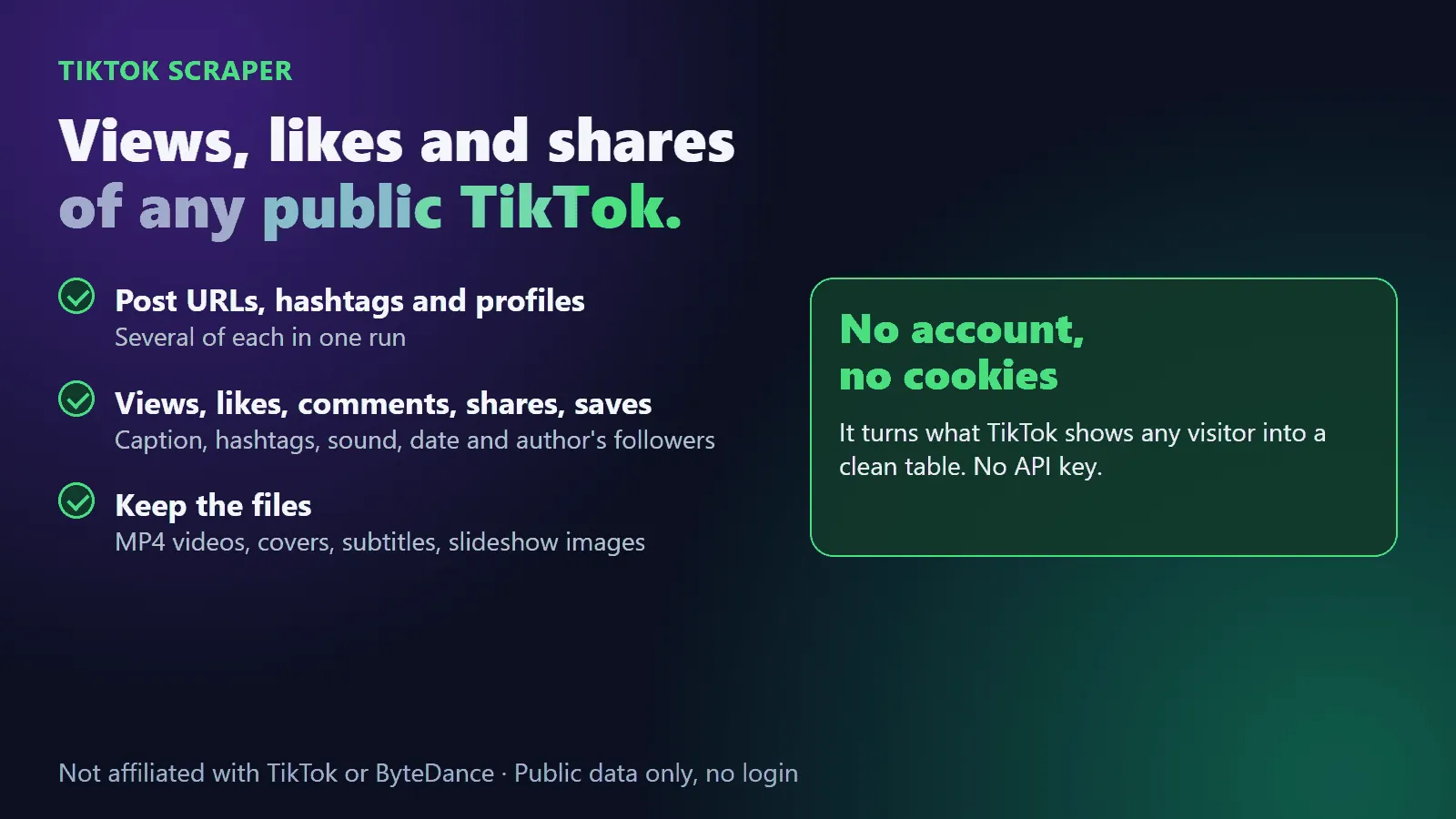
This Actor is not affiliated with, endorsed by or sponsored by TikTok or ByteDance. It reads only public data and never logs in.
What it does. TikTok Scraper collects public TikTok data from post URLs, hashtags and profiles: views, likes, comments, shares, saves, caption, hashtags, sound, publication date and the author's followers. It can also save the MP4 videos, covers, avatars, subtitles and slideshow images.
The problem it solves. TikTok offers no open API for this data, and its media links expire within days. This Actor turns what TikTok shows any visitor into a clean table, and keeps a copy of the files — without a TikTok account, cookies or an API key.
Who it is for. Marketers and agencies tracking creators and hashtags, brands benchmarking competitors, e-commerce teams watching viral products, and researchers who need a dated sample of posts.
What you get. One row per post, profile or hashtag (column resultType):
| Row | Main fields |
|---|---|
| Post | webVideoUrl, text, createTimeISO, playCount, diggCount, commentCount, shareCount, collectCount, hashtags, musicMeta, authorMeta (handle, followers, likes, videos) |
| Profile | name, nickName, fans, following, heart, video, signature, bioLink, verified |
| Hashtag | name, viewCount, videoCount, hashtagUrl |
How to start.
- Open the Actor's Store page and click Try for free — or open the ready-made task listed on that page (videos under a hashtag) to start from a working example.
- Paste TikTok video links in Post URLs, hashtags in Hashtags, or accounts in Profiles (any combination), and set Videos per hashtag or profile.
- Click Start, then open the Posts overview table or export JSON, CSV, Excel or Google Sheets.
Why choose it.
- One flat price per result. The date, views and likes filters and every file download (MP4, cover, avatar, music cover, subtitles, slideshow images) are included: there are no add-on events.
- No login, no cookies, no API key. It reads what TikTok shows to any visitor and follows TikTok's
robots.txt. - Failed inputs are never billed. A deleted post, a misspelled account or a TikTok refusal is listed in
FAILED_INPUTSwith the reason; posts removed by your filters are not billed either. - Exact budget control. The run stops cleanly at Maximum posts in total and at your Maximum cost per run, keeping everything collected so far.
- Easy to switch to. Field names used by other TikTok Actors (
postUrls,usernames,resultsPerHashtag,maxResults…) are accepted.
How much it costs. From November 16, 2026: $3.50 per 1,000 results on the Free plan ($2.80 Starter, $2.28 Scale, $1.75 Business), plus a start fee of $0.02 per GB of memory (default 2 GB = $0.04 per run). Until then: $2.00 per 1,000 results on the Free plan. Example: 1,000 videos from one hashtag ≈ $3.54 on the Free plan (1,000 posts + 1 hashtag row + start fee; about $2.04 before November 16). Full table in Pricing.
Paste inputs the way you have them: full links with ?is_from_webapp=… tracking, vm.tiktok.com or tiktok.com/t/ short links, mobile and embed links, bare video IDs, @handles, #tags, or a comma-separated list on one line. A profile or hashtag link put in the wrong list is moved to the right one, and the same video, profile or hashtag given twice is read (and billed) once. A line that is none of these is listed in FAILED_INPUTS with the reason, never billed, and the run carries on.
Use cases
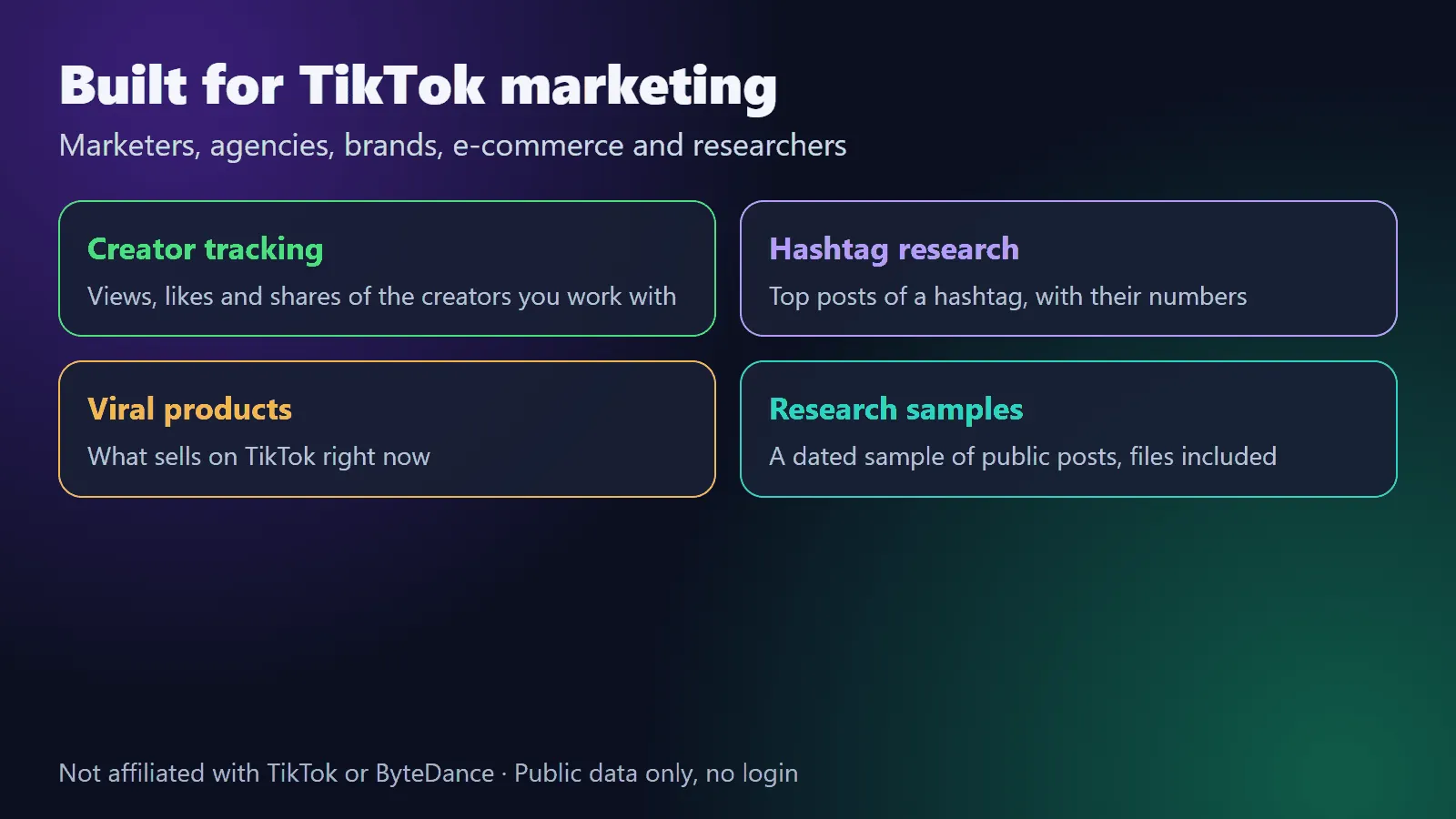
- Creator and influencer tracking (agencies, brands): followers, total likes, number of videos, bio and bio link for a list of accounts, plus their latest posts with views and engagement. Run it on a schedule to build a growth history.
- Influencer discovery and outreach (marketing, sales): collect the accounts posting under a niche hashtag (
#skincare,#smallbusiness,#realestate), with their follower counts, bio and bio link. - E-commerce and product research (sellers, dropshippers): see which products and sounds go viral under shopping hashtags (
#tiktokmademebuyit), and whether the author is a business account. - Competitor and content benchmarking (social media teams): compare a brand's TikTok with competitors — views, likes, comments, shares and saves per post — and the captions, hashtags and sounds behind the best posts.
- Archiving and research (researchers, legal, media teams): download the MP4, cover, avatar and subtitles with a dated record of each post — TikTok's own media links expire within days.
How it works
- Post URLs are read one by one from their own page, which carries every field. A few are read in parallel.
- Hashtags get their counters from TikTok's hashtag endpoint.
- Profiles get their counters from the profile page, and their latest posts from the creator feed, newest first, 15 per request. Paging stops at your limit or at your Published after date. If that feed is refused, the Actor falls back to a real browser before giving up.
- If you asked for hashtag videos or related videos, Chromium opens the page (images, fonts and media blocked to save time), scrolls it, and the Actor keeps the posts TikTok loads. No signatures are forged: the lists come from the answers TikTok's own page receives. Chromium starts in the background while steps 1–3 run, and each scroll moves on as soon as TikTok's answer has arrived instead of waiting a fixed time.
- Posts are de-duplicated on their ID, filtered on date, views and likes, and saved. Blocked requests, HTTP 429 and 5xx errors are retried with back-off from a new session (and a new proxy address when Apify Proxy is on).
- At the end, the Actor writes a
RUN_SUMMARYrecord (counts, failures, billed results, duration) and aFAILED_INPUTSrecord.
Step-by-step tutorial
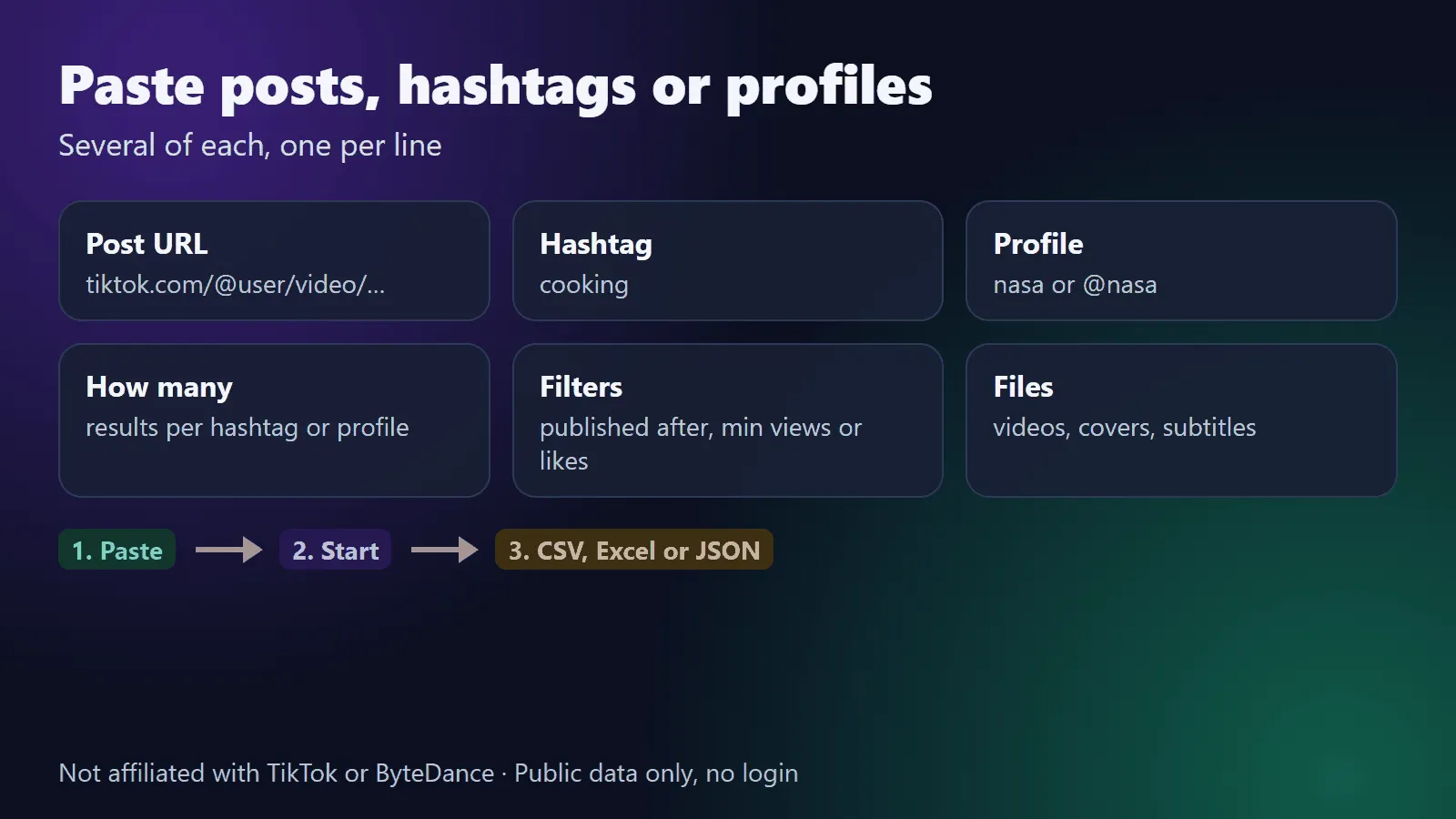
- Paste links in Post URLs, type hashtags in Hashtags, or accounts in Profiles (
nasa,@nasaorhttps://www.tiktok.com/@nasa). Any combination works. - Set Videos per hashtag or profile — 10 to 20 is a good first run.
- Switch on Collect the videos of each profile if you want the posts, not just the account figures.
- Optional: Published after (
2026-01-01, or7 days), Minimum views, Minimum likes, and Maximum posts in total to cap the run. - Optional: switch on the files you want under Files to download.
- Press Start. The prefilled example (one post, one hashtag, one profile, 10 videos each) finishes in about a minute and returns about 23 results plus the start fee. Export as JSON, CSV, Excel or HTML, or send it to Google Sheets.
Input example
excludePinnedPosts (Skip pinned posts, off by default) drops the posts a creator pinned to the top of their profile, so a profile's list holds only its latest videos; skipped posts are not billed and are counted in RUN_SUMMARY.filteredPinned.
Field names used by other TikTok Actors are also accepted: postUrls, videoUrls, startUrls, usernames, resultsPerHashtag, maxPostsPerProfile, maxResults.
Output example
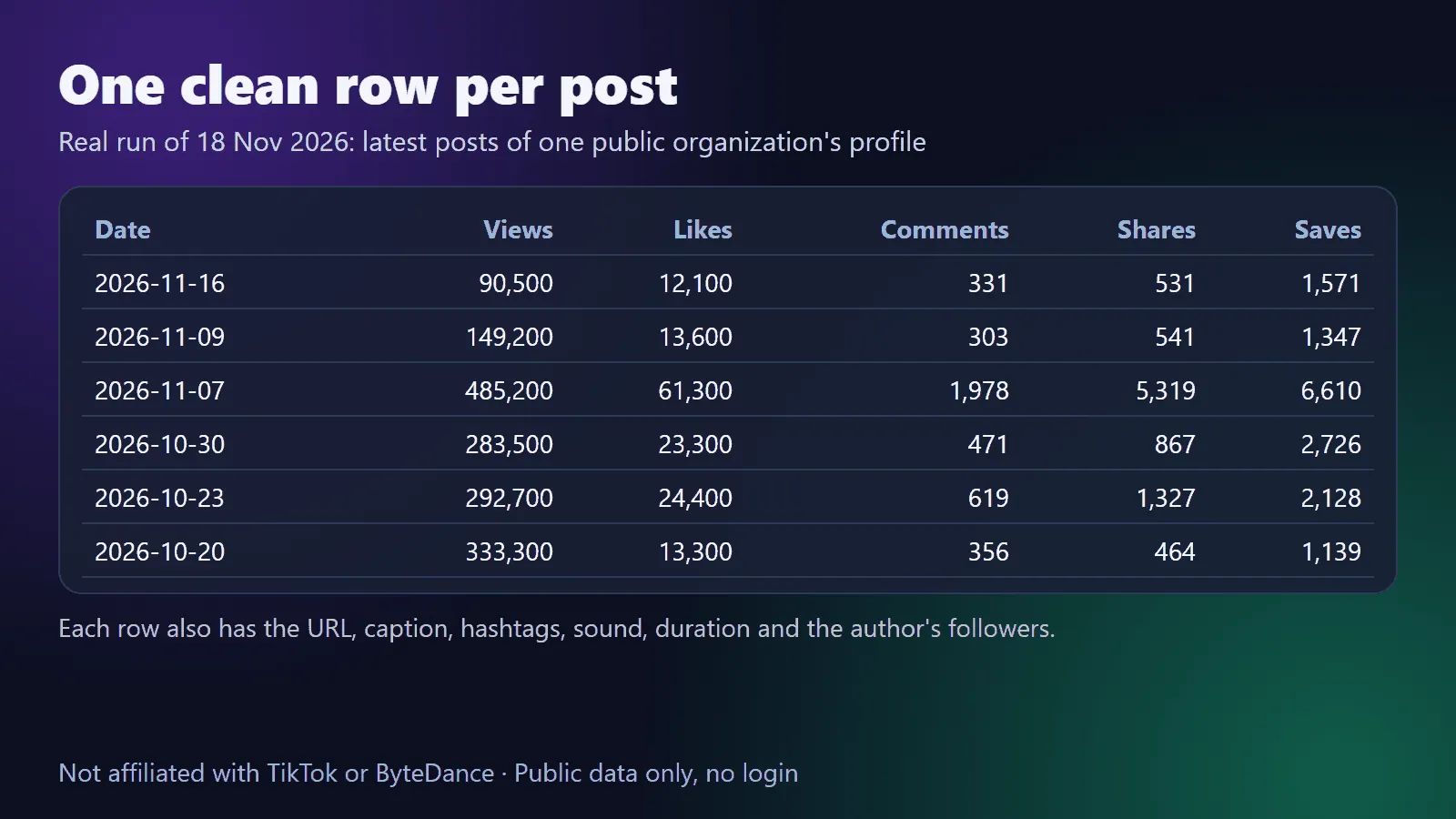
Real run of 18 Nov 2026: latest posts of one public organization's profile.
A post row, shortened:
A profile row, shortened:
A hashtag row: resultType, id, name, text (the hashtag description, often empty), viewCount, videoCount (exact figures from TikTok; videoCount stays empty when TikTok does not publish it), coverUrl (the hashtag image), hashtagUrl, input, searchHashtag.
The dataset mixes three kinds of rows, so each row only fills the columns of its kind: filter on resultType, or open the Posts overview, Profiles or Hashtags view. Every column, its type and when it can be empty is listed in the Actor's dataset schema (the Output tab).
Output fields of a post
| Field | What it holds |
|---|---|
id, webVideoUrl | The post's ID and its address |
text, textLanguage | The caption and the language TikTok detected |
createTime, createTimeISO | Publication date, as a Unix timestamp and as an ISO 8601 date |
playCount, diggCount, commentCount, shareCount, collectCount, repostCount | Views, likes, comments, shares, saves, reposts |
engagementRate | (likes + comments + shares) / views, in percent with 2 decimals, computed from the row's own counters; empty when TikTok reports no views |
hashtags, mentions | Hashtags with their IDs, and the accounts mentioned |
authorMeta | Handle, display name, verification, bio, bio link, followers, total likes, number of videos, avatar, profile URL |
musicMeta | Sound title, author, original or not, duration, cover, play URL |
videoMeta | Dimensions, duration, quality, codec, cover images, download address, subtitle tracks |
isAd, isSponsored, isSlideshow, isPinned, isAigc | What kind of post it is |
duetEnabled, stitchEnabled, commentsTurnedOff | What the author allows |
labels, effectStickers, locationCreated | Topic labels, effects used, and the country TikTok attaches to the post (only on posts read from their own URL) |
slideshowImages | The images of a photo post |
videoUrl, coverUrl, avatarUrl, musicCoverUrl, subtitleUrls, slideshowImageUrls | Where the files were saved, when downloading is on |
input, searchHashtag, searchProfile, relatedTo | Which of your inputs produced this row |
Run records (key-value store)
RUN_SUMMARY:status,resultsSaved,posts,profiles,hashtags,chargedResults,failedInputs,failuresByCode,filteredByDate,filteredByCount,filteredPinned,duplicates,maxItemsReached,maxChargeReached,durationSecs,startedAt,finishedAt, plushttpRequests(plain requests sent),stepSecs(seconds spent on each step: post URLs, hashtag figures, profiles, browser video lists) andoutputTypeMismatches(rows whose field types differ from the dataset schema; 0 expected).FAILED_INPUTS: one entry per input that could not be read:input,errorCode,error,failedAt.
| Error code | What happened |
|---|---|
INVALID_INPUT | The line is not a TikTok post URL, video ID, handle or hashtag (the reason says why: a sound page, another website, a handle with spaces…) |
POST_NOT_FOUND_OR_PRIVATE | The post is gone, private, or blocked in the region the request came from |
POST_SENSITIVE | TikTok marks the post as age-restricted |
NOT_FOUND | No account or hashtag by that name |
PRIVATE_ACCOUNT | The account is private: its figures are saved, its videos are not visible |
PROFILE_FEED_UNAVAILABLE | Neither the creator feed nor the profile page returned videos, from several sessions |
FEED_UNAVAILABLE | A hashtag's video list came back empty from every session tried |
RELATED_UNAVAILABLE | TikTok recommended nothing next to the post |
BLOCKED, RATE_LIMITED | TikTok refused the page from every session tried — switch Apify Proxy on |
BROWSER_UNAVAILABLE | Chromium could not start in the container |
Visual report
Every run also saves a visual report: one HTML page that shows your results as cards instead of rows.
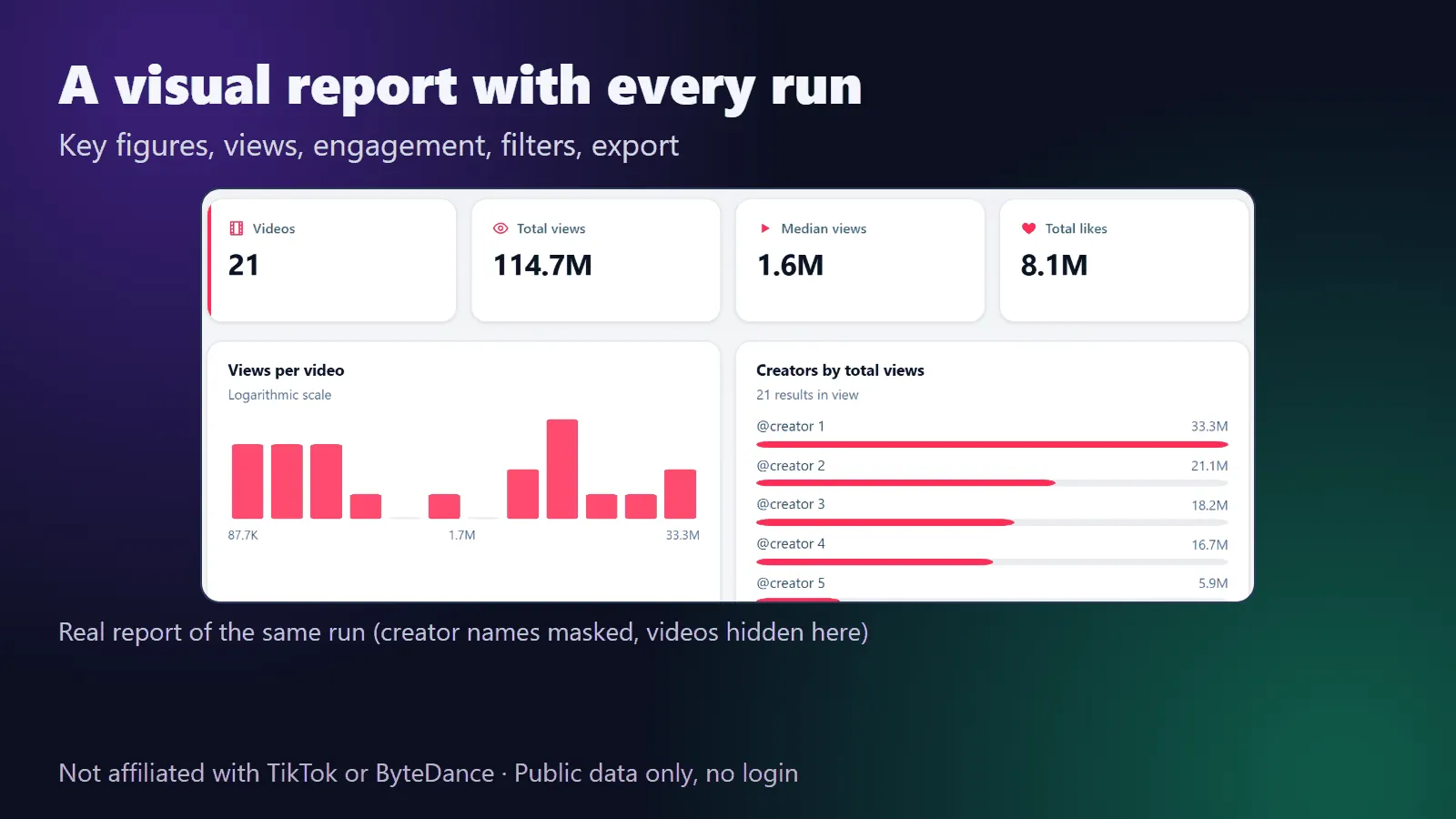
- Videos as 9:16 cards: cover, duration, views, likes, comments, shares, engagement rate, author avatar and name, verified badge, caption, hashtags and sound. Photo posts show their real number of photos and open a gallery of the first 3 (the report shows at most 3 images per result; the dataset keeps every slide).
- Profiles as header cards: avatar, name, bio, followers, following, likes and videos. Hashtags with their views.
- Key figures and charts: total and median views, likes, average engagement, creators; views distribution, creators by total views, top hashtags. They follow your filters.
- Search, filters and sorting: caption/author/hashtag search, filters by type, author, hashtag, input, photo posts and verified accounts; sort by views, likes, comments, shares, engagement, date or length. Card or table view.
- Viewer: click a cover to see it full size, with arrows, keyboard (← → Esc) and swipe on mobile.
- Export: download the filtered rows as JSON or CSV, or the full dataset as JSON, CSV or Excel.
- Warnings and errors at the top: failed inputs grouped by error code (they are not billed) and run warnings (maximum charge reached, pinned posts skipped).
- Data quality: a one-line summary (completeness of the main fields, share of rows with an image, duplicates) that opens to a fill rate per field: author, link, caption, views, likes, comments, shares, date, hashtags. It measures completeness, not accuracy.
- Live progress: while the run is going, the page shows the inputs done out of the inputs given and the results so far, and refreshes itself every 30 seconds (updated at most once a minute).
How to open it: in the run, go to the Output tab and choose Visual report (or open the REPORT record of the key-value store). The page works in any browser, offline included, except for the images.
Images are shown straight from TikTok in your browser; nothing is re-hosted. TikTok signs these links and they expire after a few days, so an older report shows neutral placeholders where covers used to be — the data stays. The report holds the first 2,000 results of a run; the full dataset is always one click away. Saving the report is never billed and can never make a run fail.
Pricing
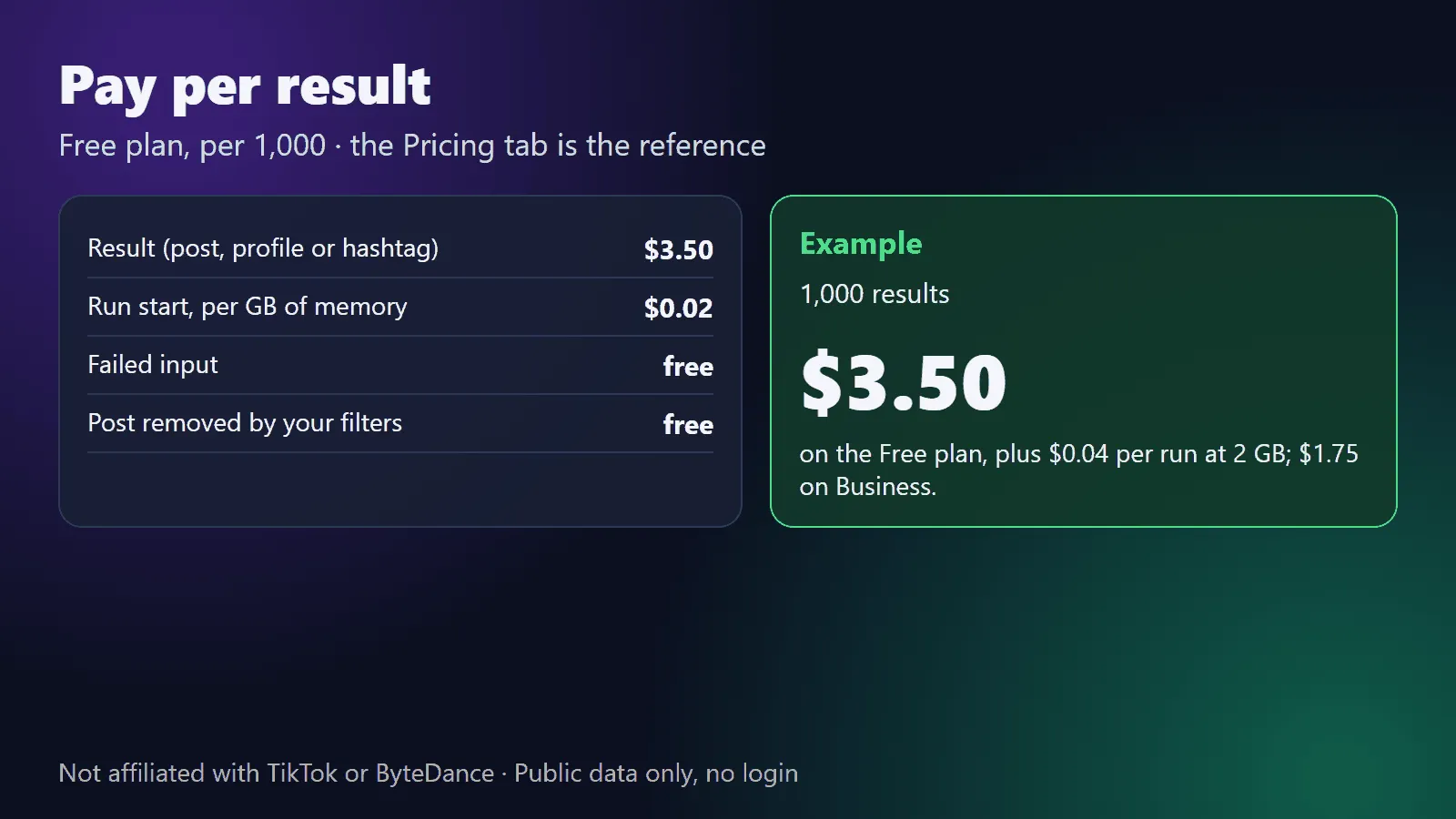
This Actor uses pay-per-event pricing: you pay for results, not for compute time. Platform usage is included.
| Event | Free plan | Starter | Scale | Business |
|---|---|---|---|---|
| Result scraped (one post, profile or hashtag) | $0.0035 | $0.0028 | $0.002275 | $0.00175 |
| Per 1,000 results | $3.50 | $2.80 | $2.28 | $1.75 |
| Actor start (per GB of memory, once per run) | $0.02 | $0.02 | $0.02 | $0.02 |
These prices apply from November 16, 2026. Until then, the previous prices apply: $2.00 / $1.60 / $1.30 / $1.00 per 1,000 results.
At the default 2 GB of memory, a run starts at $0.04. Paid Apify plans get 20% (Starter), 35% (Scale) and 50% (Business) off each result. Failed inputs are never billed, posts removed by your filters are never billed, and file downloads are not billed as extra results. Set Maximum cost per run when you start the Actor: it stops cleanly once that amount is reached.
Integrations
- API: start runs and read the dataset from any language (examples below), or call
run-sync-get-dataset-itemsto get the rows in one request. - Google Sheets: send each run's dataset to a sheet from the Integrations tab, and filter on
resultType. - Make, Zapier and n8n: use the Apify app/node with
badr_xba/tiktok-scraperto start the Actor and read its dataset — for example, add every new post from a list of creators to your CRM or Slack. - AI agents (MCP): add
https://mcp.apify.com/?actors=badr_xba/tiktok-scraperto Claude, Cursor or any MCP client and ask in plain words ("latest 20 videos of @nasa with their views"). - Webhooks: get notified when a run succeeds or fails. A run ends as Failed only when TikTok refused every request and nothing was saved; wrong inputs end normally, with their reasons in
FAILED_INPUTS. - Schedules: run it daily or weekly to monitor creators and hashtags.
Use it via API
Python (pip install apify-client):
JavaScript (npm install apify-client):
cURL (runs the Actor and returns the rows in one call):
RUN_SUMMARY and FAILED_INPUTS are plain JSON records in the run's key-value store: https://api.apify.com/v2/key-value-stores/<defaultKeyValueStoreId>/records/RUN_SUMMARY.
Limits
- No keyword search. TikTok's
robots.txtasks crawlers not to visit/search, and this Actor respects that. Use hashtags, profiles or post URLs. - No comments text and no follower lists. TikTok serves those to signed-in sessions only, and this Actor never signs in.
- Private accounts return their figures but no videos.
- Up to 1,000 videos per hashtag or profile per run (Videos per hashtag or profile). Hashtag video lists open a browser and take about half a minute per hashtag.
- Related videos are served by TikTok mostly to residential addresses.
- Figures are those TikTok shows at the time of the run and keep changing afterwards.
FAQ
Do I need a TikTok account, cookies or an API key? No. Nothing to create and nothing to paste.
How many videos can I get from a profile? As many as you set in Videos per hashtag or profile (up to 1,000), newest first. The creator feed is read 15 posts at a time. Use Published after to only get recent posts: reading stops as soon as posts get older than that date.
Why did a profile return its figures but no videos?
Either the account is private (PRIVATE_ACCOUNT), has no videos, or TikTok refused the feed from every session tried (PROFILE_FEED_UNAVAILABLE). The profile row itself is real data and counts as one result; the missing videos are listed in FAILED_INPUTS and cost nothing. Switching Apify Proxy on gives every retry a new address.
Do the filters or downloads cost extra? No. Only the result rows are billed (plus the start fee). Posts dropped by the date, views or likes filters are not billed, and downloaded files are not billed as extra results — they only make the run longer.
Do I need a proxy?
Not by default. If FAILED_INPUTS shows BLOCKED, RATE_LIMITED or FEED_UNAVAILABLE, switch Apify Proxy on (datacenter group). The RESIDENTIAL group only helps related videos.
Why are downloaded files stored instead of just linked? TikTok signs its media links for one session and expires them within days. A link saved in a spreadsheet stops working; a downloaded file does not.
Can I run it on a schedule? Yes. Followers, views and likes change every day: a daily run on the same accounts or hashtags builds a history you can chart.
Is it legal to scrape TikTok?
This Actor scrapes only publicly available data, never signs in and follows TikTok's robots.txt. You are responsible for complying with TikTok's terms and with data-protection law (GDPR, CCPA…): handles, captions and follower counts can be personal data, so have a lawful basis before you store or process them.
Troubleshooting
| What you see | What to do |
|---|---|
BLOCKED or RATE_LIMITED in FAILED_INPUTS | TikTok throttled the address. Switch Apify Proxy on (datacenter group is enough) and run again: every retry then leaves from a new address. |
| A profile row but no videos | The account is private (PRIVATE_ACCOUNT), has no videos, or its feed was refused (PROFILE_FEED_UNAVAILABLE): switch Apify Proxy on and retry. Check that Collect the videos of each profile is on. |
A hashtag row but no videos (FEED_UNAVAILABLE) | Try again with Apify Proxy on; check that Collect the videos under each hashtag is on. |
| Fewer posts than asked | Your date or popularity filters dropped the rest (see filteredByDate and filteredByCount in RUN_SUMMARY), or the account has fewer videos. |
INVALID_INPUT | Read the reason next to it: usually a typo, a handle with spaces, or a link to another site. |
| The run ended early | Maximum posts in total or your maximum cost per run was reached (maxItemsReached / maxChargeReached in RUN_SUMMARY). |
Related Actors
Other Actors by the same developer that work well with this one:
- TikTok Scraper Pro – keyword search, profile search and follower / following lists.
- Instagram Reel Scraper – compare with Instagram reels: plays, sponsors and music.
Support
Found a bug, or need a field? Open an issue on the Actor's Issues tab with the run link and your input.
Did this Actor do the job? A short review on its Store page helps other people find it — and tells me what to build next.
Feedback and reviews
If this Actor saved you time, a short review on its Store page helps other users find it. If something did not work as expected, please open an issue on the Issues tab with your run ID: we read every issue.
Legal
This Actor reads only what TikTok publishes to anyone, follows TikTok's robots.txt, never signs in and collects no private data. Handles, captions and follower counts can still be personal data in some jurisdictions (GDPR, CCPA): have a lawful basis before you store or process them, and check TikTok's terms for your own use case.
En français
TikTok Scraper récupère les données publiques de TikTok sans clé API ni compte : les dernières vidéos d'un profil, les publications sous un hashtag et tous les chiffres d'une vidéo (vues, likes, commentaires, partages, enregistrements, légende, musique, date, abonnés de l'auteur). Idéal pour le suivi d'influenceurs, la recherche de prospects, la veille concurrentielle et l'e-commerce. Export en JSON, CSV, Excel ou Google Sheets, téléchargement des MP4, couvertures et sous-titres. Vous ne payez que les résultats obtenus : les entrées en échec sont listées dans l'enregistrement FAILED_INPUTS et ne sont jamais facturées, et le run s'arrête proprement à votre budget maximum.


