

TikTok Scraper
Pricing
from $1.00 / 1,000 result scrapeds
TikTok Scraper
TikTok posts without an API key: views, likes, comments, shares, saves, caption, hashtags, sound and author. Optional MP4, cover, avatar and subtitle downloads, since TikTok's own links expire. Works from post URLs, hashtags and related videos. Example: hashtag 'cooking', 20 videos.
Pricing
from $1.00 / 1,000 result scrapeds
Rating
0.0
(0)
Developer

Badr Bouargan
Maintained by CommunityActor stats
0
Bookmarked
4
Total users
4
Monthly active users
6 days ago
Last modified
Categories
Security
Limited permissionsShare
TikTok Scraper – Posts, Profiles, Hashtags & Video Stats (No Login)
TikTok Scraper extracts TikTok data without an API key, a login or cookies: the latest videos of any TikTok profile, the posts under a hashtag, and every figure of a TikTok video URL — views, likes, comments, shares, saves, caption, hashtags, music, publication date, author followers and more. Export TikTok data to JSON, CSV, Excel or Google Sheets, download the MP4 videos, covers and subtitles, and pay only for results that were actually scraped.
How to use it in 3 steps
- Paste TikTok video links in Post URLs, hashtags in Hashtags, or accounts in Profiles — any combination.
- Set how many videos you want per hashtag or profile.
- Click Start, then open the Posts overview table or export JSON, CSV or Excel.
The prefilled run (one post, one hashtag, one profile, 10 videos each) finishes in about a minute and costs about ten cents on the Free plan (about 23 results plus the start fee).
Paste inputs the way you have them: full links with ?is_from_webapp=… tracking, vm.tiktok.com or tiktok.com/t/ short links, mobile and embed links, bare video IDs, @handles, #tags, or a comma-separated list on one line. A profile or hashtag link put in the wrong list is moved to the right one, and the same video, profile or hashtag given twice is read (and billed) once. A line that is none of these is listed in FAILED_INPUTS with the reason, never billed, and the run carries on.
What you can do with TikTok Scraper
- Track creators and influencers: followers, total likes, number of videos, bio, bio link and business-account flag for a list of accounts, plus their latest posts with views and engagement. Run it on a schedule to build a growth history.
- Find influencers and leads for outreach: collect the accounts posting under a niche hashtag (
#skincare,#smallbusiness,#realestate), with their follower counts, bio and bio link. - E-commerce and product research: see which products and sounds go viral under shopping hashtags (
#tiktokmademebuyit), and whether the author is a business account. - Social media and competitor monitoring: benchmark a brand's TikTok against competitors — views, likes, comments, shares and saves per post.
- Content and SEO research: captions, hashtags, mentions, language and the sound behind each video, to find the topics and trends that work in your niche.
- Archive content: download the MP4, the cover, the author's avatar and the subtitles — TikTok's own media links expire within days.
Why this TikTok Scraper
- Pay only for success. Every row in the dataset is a real post, profile or hashtag. An input that cannot be read (deleted post, misspelled account, TikTok refusal) is listed in the
FAILED_INPUTSrecord and never billed. - Profile videos without a browser. A profile's posts are read from TikTok's creator feed with plain requests: fast and light. If that feed is refused, the Actor falls back to a real browser before giving up.
- Respects your budget exactly. The run stops cleanly at your Maximum cost per run and at your Maximum posts in total, keeping everything collected so far.
- No API key, no account, no cookies to paste. It reads what TikTok shows to any visitor.
- No forged signatures. Hashtag video lists are read by a real browser from the answers TikTok's own page receives, which is why it keeps working when TikTok changes its signing.
- Clean, stable data. Flat rows with a
resultTypecolumn (post,profile,hashtag), numbers as numbers and ISO 8601 dates.
How it works
- Post URLs are read one by one from their own page, which carries every field. A few are read in parallel.
- Hashtags get their counters from TikTok's hashtag endpoint.
- Profiles get their counters from the profile page, and their latest posts from the creator feed, newest first, 15 per request. Paging stops at your limit or at your Published after date.
- If you asked for hashtag videos or related videos, Chromium opens the page (images, fonts and media blocked to save time), scrolls it, and the Actor keeps the posts TikTok loads.
- Posts are de-duplicated on their ID, filtered on date, views and likes, and saved. Blocked requests, HTTP 429 and 5xx errors are retried with back-off from a new session (and a new proxy address when Apify Proxy is on).
- At the end, the Actor writes a
RUN_SUMMARYrecord (counts, failures, billed results, duration) and aFAILED_INPUTSrecord.
Step-by-step tutorial
- Paste links in Post URLs, type hashtags in Hashtags, or accounts in Profiles (
nasa,@nasaorhttps://www.tiktok.com/@nasa). Any combination works. - Set Videos per hashtag or profile — 10 to 20 is a good first run.
- Switch on Collect the videos of each profile if you want the posts, not just the account figures.
- Optional: Published after (
2026-01-01, or7 days), Minimum views, Minimum likes, and Maximum posts in total to cap the run. - Optional: switch on the files you want under Files to download.
- Press Start. The prefilled example (one post, one hashtag, one profile, 10 videos each) finishes in about a minute. Export as JSON, CSV, Excel or HTML, or send it to Google Sheets.
Input example
Field names used by other TikTok Actors are also accepted: postUrls, videoUrls, startUrls, usernames, resultsPerHashtag, maxPostsPerProfile, maxResults.
Output example
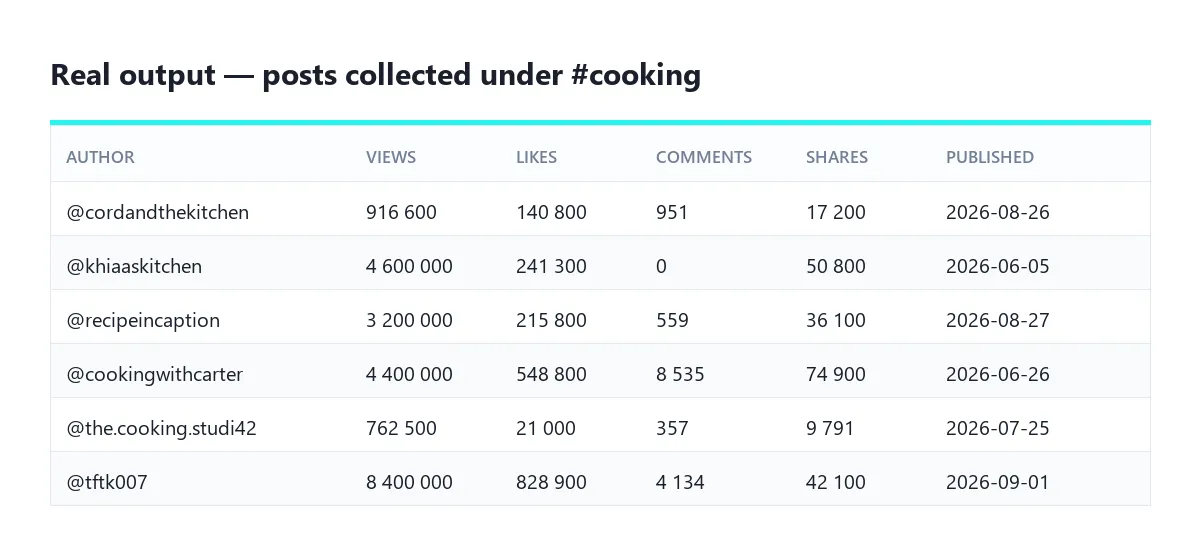
A post row, shortened:
A profile row, shortened:
A hashtag row: resultType, id, name, text, viewCount, videoCount (left empty: TikTok no longer publishes it), coverUrl, hashtagUrl, input, searchHashtag.
Output fields of a post
| Field | What it holds |
|---|---|
id, webVideoUrl | The post's ID and its address |
text, textLanguage | The caption and the language TikTok detected |
createTime, createTimeISO | Publication date, as a Unix timestamp and as an ISO 8601 date |
playCount, diggCount, commentCount, shareCount, collectCount, repostCount | Views, likes, comments, shares, saves, reposts |
hashtags, mentions | Hashtags with their IDs, and the accounts mentioned |
authorMeta | Handle, display name, verification, bio, bio link, followers, total likes, number of videos, avatar, profile URL |
musicMeta | Sound title, author, original or not, duration, cover, play URL |
videoMeta | Dimensions, duration, quality, codec, cover images, download address, subtitle tracks |
isAd, isSponsored, isSlideshow, isPinned, isAigc | What kind of post it is |
duetEnabled, stitchEnabled, commentsTurnedOff | What the author allows |
labels, effectStickers, locationCreated | Topic labels, effects used, and the country TikTok attaches to the post (only on posts read from their own URL) |
slideshowImages | The images of a photo post |
videoUrl, coverUrl, avatarUrl, musicCoverUrl, subtitleUrls, slideshowImageUrls | Where the files were saved, when downloading is on |
input, searchHashtag, searchProfile, relatedTo | Which of your inputs produced this row |
Run records (key-value store)
RUN_SUMMARY:status,resultsSaved,posts,profiles,hashtags,chargedResults,failedInputs,failuresByCode,filteredByDate,filteredByCount,duplicates,maxItemsReached,maxChargeReached,durationSecs,startedAt,finishedAt.FAILED_INPUTS: one entry per input that could not be read:input,errorCode,error,failedAt.
| Error code | What happened |
|---|---|
INVALID_INPUT | The line is not a TikTok post URL, video ID, handle or hashtag (the reason says why: a sound page, another website, a handle with spaces…) |
POST_NOT_FOUND_OR_PRIVATE | The post is gone, private, or blocked in the region the request came from |
POST_SENSITIVE | TikTok marks the post as age-restricted |
NOT_FOUND | No account or hashtag by that name |
PRIVATE_ACCOUNT | The account is private: its figures are saved, its videos are not visible |
PROFILE_FEED_UNAVAILABLE | Neither the creator feed nor the profile page returned videos, from several sessions |
FEED_UNAVAILABLE | A hashtag's video list came back empty from every session tried |
RELATED_UNAVAILABLE | TikTok recommended nothing next to the post |
BLOCKED, RATE_LIMITED | TikTok refused the page from every session tried — switch Apify Proxy on |
BROWSER_UNAVAILABLE | Chromium could not start in the container |
Pricing
This Actor uses pay-per-event pricing: you pay for results, not for compute time. Platform usage is included.
| Event | Free plan | Starter | Scale | Business |
|---|---|---|---|---|
| Result scraped (one post, profile or hashtag) | $0.002 | $0.0016 | $0.0013 | $0.001 |
| Per 1,000 results | $2.00 | $1.60 | $1.30 | $1.00 |
| Actor start (per GB of memory, once per run) | $0.02 | $0.02 | $0.02 | $0.02 |
At the default 2 GB of memory, a run starts at $0.04. Paid Apify plans get 20% (Starter), 35% (Scale) and 50% (Business) off each result. Failed inputs are never billed, posts removed by your filters are never billed, and file downloads are not billed as extra results. Set Maximum cost per run when you start the Actor: it stops cleanly once that amount is reached.
FAQ
Do I need a TikTok account, cookies or an API key? No. Nothing to create and nothing to paste.
How many videos can I get from a profile? As many as you set in Videos per hashtag or profile (up to 1,000), newest first. The creator feed is read 15 posts at a time. Use Published after to only get recent posts: reading stops as soon as posts get older than that date.
Why did a profile return its figures but no videos?
Either the account is private (PRIVATE_ACCOUNT), has no videos, or TikTok refused the feed from every session tried (PROFILE_FEED_UNAVAILABLE). The profile row itself is real data and counts as one result; the missing videos are listed in FAILED_INPUTS and cost nothing. Switching Apify Proxy on gives every retry a new address.
Why is there no keyword search?
TikTok's robots.txt asks crawlers not to visit /search. This Actor respects that. Hashtags are allowed and reach the same content.
Can I get the comments or the followers list? No. TikTok serves those to signed-in sessions only, and this Actor never asks for an account.
Do I need a proxy?
Not by default. If FAILED_INPUTS shows BLOCKED, RATE_LIMITED or FEED_UNAVAILABLE, switch Apify Proxy on (datacenter group). The RESIDENTIAL group only helps related videos.
Why are downloaded files stored instead of just linked? TikTok signs its media links for one session and expires them within days. A link saved in a spreadsheet stops working; a downloaded file does not.
Can I run it on a schedule? Yes. Followers, views and likes change every day: a daily run on the same accounts or hashtags builds a history you can chart.
Troubleshooting
| What you see | What to do |
|---|---|
BLOCKED or RATE_LIMITED in FAILED_INPUTS | TikTok throttled the address. Switch Apify Proxy on (datacenter group is enough) and run again: every retry then leaves from a new address. |
| A profile row but no videos | The account is private (PRIVATE_ACCOUNT), has no videos, or its feed was refused (PROFILE_FEED_UNAVAILABLE): switch Apify Proxy on and retry. Check that Collect the videos of each profile is on. |
A hashtag row but no videos (FEED_UNAVAILABLE) | Try again with Apify Proxy on; check that Collect the videos under each hashtag is on. |
| Fewer posts than asked | Your date or popularity filters dropped the rest (see filteredByDate and filteredByCount in RUN_SUMMARY), or the account has fewer videos. |
INVALID_INPUT | Read the reason next to it: usually a typo, a handle with spaces, or a link to another site. |
| The run ended early | Maximum posts in total or your maximum cost per run was reached (maxItemsReached / maxChargeReached in RUN_SUMMARY). |
Use it via API
Python (pip install apify-client):
JavaScript (npm install apify-client):
cURL (runs the Actor and returns the rows in one call):
RUN_SUMMARY and FAILED_INPUTS are plain JSON records in the run's key-value store: https://api.apify.com/v2/key-value-stores/<defaultKeyValueStoreId>/records/RUN_SUMMARY.
Integrations
- Google Sheets: send each run's dataset to a sheet from the Integrations tab, and filter on
resultType. - Make, Zapier and n8n: use the Apify app/node with
badr_xba/tiktok-scraperto start the Actor and read its dataset — for example, add every new post from a list of creators to your CRM or Slack. - AI agents (MCP): add
https://mcp.apify.com/?actors=badr_xba/tiktok-scraperto Claude, Cursor or any MCP client and ask in plain words ("latest 20 videos of @nasa with their views"). - Webhooks: get notified when a run succeeds or fails. A run ends as Failed only when TikTok refused every request and nothing was saved; wrong inputs end normally, with their reasons in
FAILED_INPUTS. - Schedules: run it daily or weekly to monitor creators and hashtags.
Support
Found a bug, or a field you need? Open an issue on the Actor's Issues tab with the run link, and it will be looked at quickly.
Did this Actor do the job? A short review on its Store page helps other people find it — and tells me what to build next.
Legal
This Actor reads only what TikTok publishes to anyone, follows TikTok's robots.txt, never signs in and collects no private data. Handles, captions and follower counts can still be personal data in some jurisdictions (GDPR, CCPA): have a lawful basis before you store or process them, and check TikTok's terms for your own use case.
En français
TikTok Scraper récupère les données publiques de TikTok sans clé API ni compte : les dernières vidéos d'un profil, les publications sous un hashtag et tous les chiffres d'une vidéo (vues, likes, commentaires, partages, enregistrements, légende, musique, date, abonnés de l'auteur). Idéal pour le suivi d'influenceurs, la recherche de prospects, la veille concurrentielle et l'e-commerce. Export en JSON, CSV, Excel ou Google Sheets, téléchargement des MP4, couvertures et sous-titres. Vous ne payez que les résultats obtenus : les entrées en échec sont listées dans l'enregistrement FAILED_INPUTS et ne sont jamais facturées, et le run s'arrête proprement à votre budget maximum.


