
Amazon Ad Library Scraper
Pricing
from $1.40 / 1,000 results
Amazon Ad Library Scraper
[💰$2 / 1K] ⚡ Fast Amazon Ad Library scraper. No login, no API key. Search EU ads by keyword or paste library, removed-ads or ad URLs from 9 Amazon EU stores, filter by country and date. Get advertiser, payer, product ASIN, creatives, impressions per country and targeting.
Pricing
from $1.40 / 1,000 results
Rating
0.0
(0)
Developer

Aboo Script
Maintained by CommunityActor stats
0
Bookmarked
2
Total users
1
Monthly active users
a day ago
Last modified
Categories
Share
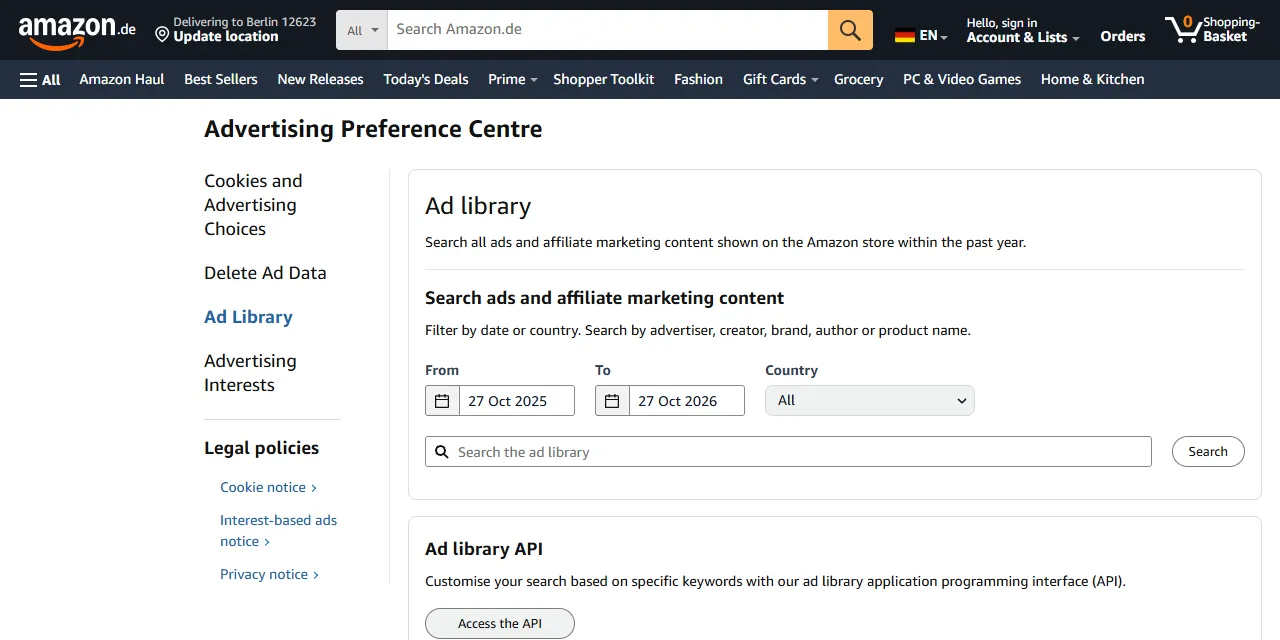
Amazon Ad Library Scraper extracts ads and affiliate marketing content from the Amazon Ad Library of Amazon's EU stores into clean, structured data you can download as JSON, CSV, Excel, or HTML. Type a brand, advertiser, or product name, or paste an Ad Library URL, and get the advertiser, who paid, the advertised product and ASIN, the ad creative, the dates it ran, impressions per country, and audience targeting for every ad. No account or login required.
Introduction
The Amazon Ad Library is Amazon's public ad repository for its European stores (Germany, France, Italy, Spain, the Netherlands, Poland, Sweden, Belgium, and Ireland). It lists the ads and affiliate marketing content shown on the Amazon store within the past year, with who advertised, who paid, how many people saw each ad in each country, and how the audience was targeted. It also lists ads that were removed for compliance issues.
This Amazon ad library scraper collects the same public information you see in your browser and turns it into a ready-to-use dataset. Search many brands at once, filter by country and date, run it once or on a schedule, and connect the results to your own tools.
What data can you extract from the Amazon Ad Library?
- 🏢 Advertiser name and the company that paid for the ad
- 🏷️ Ad type (ad or affiliate marketing content) and what the ad is about
- 📦 Advertised product: ASIN, product link, and brand store page
- 🖼️ Ad creatives: image or video link and the page the ad links to
- 🎬 Affiliate content page for creator videos
- 📅 First and last day the ad was shown
- 👀 Impressions range in total and per country
- 🎯 Targeting methods (location, past activity, search terms, ads preferences)
- 🚫 Compliance details for removed ads: restriction categories, automated detection, illegal content report
- 🔗 Direct link to each ad in the Ad Library
Use Cases
- 📈 Market research: see which brands advertise most on Amazon in each EU country and which products they push.
- 🕵️ Competitor monitoring: follow your competitors' Amazon ads, products, creatives, and reach over time.
- 🤝 Lead generation: find active Amazon advertisers and the companies paying for their ads.
- 🗂️ Database building: build your own searchable archive of Amazon ads and creatives.
- ⚖️ Compliance and research: study removed ads and their restriction categories under the EU Digital Services Act.
- 🤖 AI and automation: feed clean, structured data into spreadsheets, dashboards, or AI workflows.
How to scrape the Amazon Ad Library step by step
- Paste one or more Amazon Ad Library URLs into Start URLs, or type brand, advertiser, or product names into Search queries.
- Optionally pick a Country and a date range with Shown from and Shown until for your search queries.
- Set Maximum number of results to how many ads you want per URL or per query.
- Click Start and wait for the run to finish.
- Download your data in JSON, CSV, Excel, or HTML from the Output tab.
Input
- Start URLs: Amazon Ad Library URLs from any EU store (amazon.de, amazon.fr, amazon.it, amazon.es, amazon.nl, amazon.pl, amazon.se, amazon.com.be, amazon.ie). Supported pages: search result pages (the keyword, dates, and country in the URL are kept), the compliance search page for removed ads, and single ad detail pages.
- Search queries: keywords to search in the Ad Library, such as a brand, advertiser, or product name, one per line. Each query is scraped separately.
- Country: only ads shown in this country. Applies to search queries.
- Shown from: only ads shown on or after this date. Applies to search queries.
- Shown until: only ads shown on or before this date. Applies to search queries.
- Maximum number of results: how many ads to collect for each start URL or search query. Set 0 for no limit.
You can use start URLs, search queries, or both in the same run.
Input Examples
Scrape an Ad Library search page:
Search by keywords:
Search by keyword in one country and date range:
Output
Each ad is saved as one item in the dataset. Here is an example of a single item:
Video and image ads have mediaType set to Video or Image and a mediaUrl with the creative file. You can download the dataset in JSON, CSV, Excel, XML, or HTML, or access it through the Apify API.
Notes
- The Ad Library covers Amazon's EU stores only. Amazon.com, Amazon.co.uk, and other non-EU stores have no ad library, so their URLs are skipped.
- Every EU store shows the same library, so a search on amazon.fr returns the same ads as on amazon.de.
- The search matches words in product titles and advertiser names, with the best matches first. Ads from other advertisers that mention your keyword are included too.
- The compliance search (removed ads) cannot be combined with a keyword, just like on the website. A compliance URL with a keyword is skipped; remove the keyword to get removed ads.
- Removed ads have no advertiser, payer, or product, so those fields are empty.
- Image and video links are temporary and stop working about 30 minutes after the run. Download the files right away if you need to keep them.
- Affiliate marketing content (creator videos) usually has no payer, end date, product link, impressions, or targeting; it links to its video page in
contentUrl. - Impressions are ranges as published by Amazon (for example 2,000 to 3,000), not exact numbers.
- Dates filter by when the ad was shown: an ad that ran at any time inside your range is included.
Why use the Amazon Ad Library Scraper?
- ✅ No login needed: works with public data only, so there is no Amazon account to manage.
- 🎯 Keeps your filters: paste any Ad Library search URL from your browser and get exactly what you see there.
- 🌍 All EU stores: accepts URLs from all nine Amazon EU stores and filters by country.
- 🧹 Clean data: numbers are real numbers, dates use one standard format, and product ASINs are pulled out of the ad links.
- 💸 Pay for what you need: set a result limit per URL or query and keep every run small and cheap.
- 🔄 Ready for automation: schedule runs, export to Google Sheets, or connect to Make, Zapier, and n8n.
FAQ
How many results can I scrape?
You can set any number in Maximum number of results, or 0 for no limit. The actor keeps going until it reaches your limit or runs out of ads for your search.
Do I need an Amazon account?
No. The actor only collects publicly available data from the Ad Library. You do not need to log in or provide any account details.
Can I scrape data on a schedule?
Yes. Use Apify Schedules to run the actor every hour, day, or week, and get fresh ads automatically.
Why are some fields empty?
Not every ad shows every piece of information. Some ads promote a brand store instead of a product, and some have no image or video. When a field is not available in the Ad Library, it is returned as null or an empty list.
Can I request a new feature or filter?
Yes. Right now the actor supports start URLs, search queries, country, and date filters. If you need other filters or inputs, get in touch and they can be added.
Can I get a custom or private version?
Yes. The actor can be customized for your workflow, delivered as a private version, or a new scraper can be built for a different website. Use the contact details below.
Need help or want a custom solution?
- 📧 Email: aboo.script@gmail.com
- 🧩 More scrapers: Apify profile
Image Credit
Image credit: Amazon Ad Library


