
YouTube Charts Scraper
Pricing
from $1.40 / 1,000 results
YouTube Charts Scraper
[💰$2 / 1K] ⚡ Fast YouTube Charts scraper. No login, no API key. Top songs, artists, music videos, trending, Shorts songs and podcasts for any country, weekly, daily or past dates: rank, previous rank, weeks on chart, views, artists, songwriters, producers, label and links.
Pricing
from $1.40 / 1,000 results
Rating
0.0
(0)
Developer

Aboo Script
Maintained by CommunityActor stats
0
Bookmarked
2
Total users
1
Monthly active users
a day ago
Last modified
Categories
Features
Share
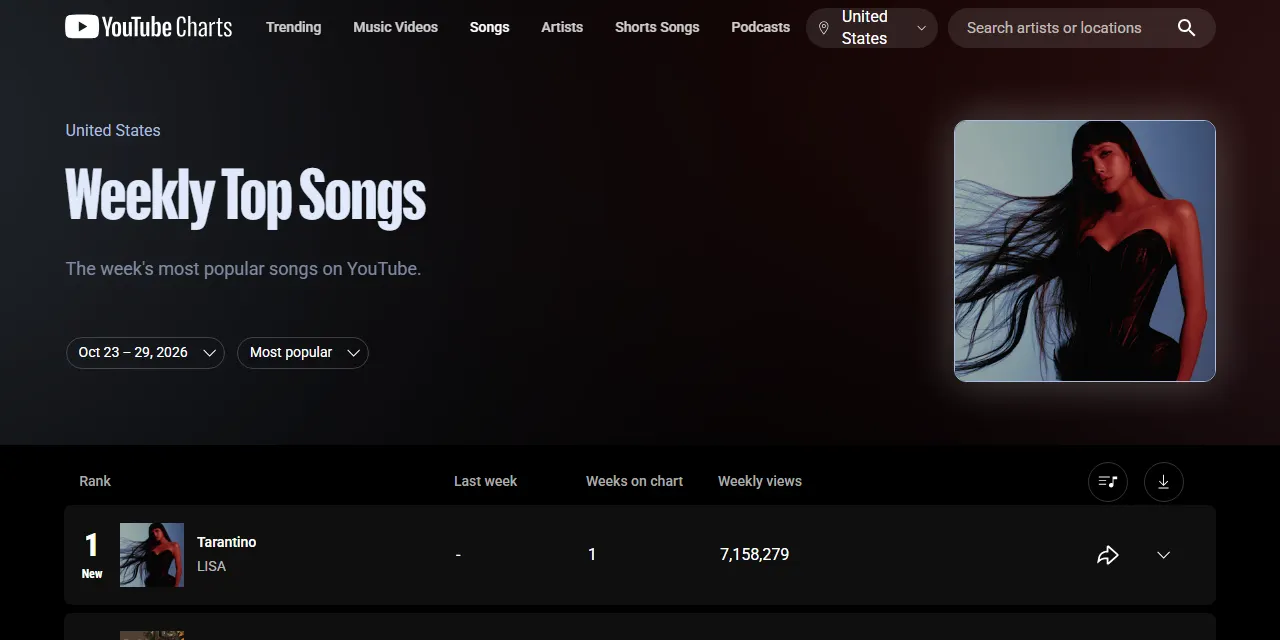
YouTube Charts Scraper extracts the official YouTube Charts into clean, structured data you can download as JSON, CSV, Excel, or HTML. Paste a chart URL or list the countries you want, and get the rank, last week's rank, weeks on chart, views, artists, songwriters, label, and YouTube links for every entry. No account or login required.
Introduction
YouTube Charts is YouTube's official music and podcast chart site. It ranks the most played songs, artists, and music videos on YouTube every week and every day, for the whole world and for each country, plus trending music videos, the top songs used in Shorts, and the most watched podcast shows.
This actor collects the same public chart data you see in your browser and turns it into a ready-to-use dataset. Run it once, schedule it every week to build your own chart history, or connect it to your own tools.
What data can you extract from YouTube Charts?
- 🏆 Rank, previous rank, rank change, new entry flag, and weeks (or days) on chart
- 👀 Views for the chart period and the change in views since the previous period
- 🎵 Song or video title, artists with their IDs, release date, and duration
- ✍️ Songwriters, producers, and record label
- 📺 Channel name, channel ID, and channel URL
- 🔗 YouTube video link, YouTube Music link, and thumbnail
- 🎙️ Podcast show playlist, description, genre, number of episodes, and last update date
- 🗓️ Chart name, country, period, chart date, and chart URL
Use Cases
- 📈 Music market research: compare what is charting in the US, UK, Brazil, India, Japan, and dozens of other countries in one run.
- 🎧 A&R and talent scouting: spot new entries and fast climbers before they peak.
- 🏷️ Label and artist reporting: track weekly rank, views, and weeks on chart for your catalog.
- 🗂️ Chart history datasets: collect past weekly or daily charts to build your own archive.
- 🎙️ Podcast research: follow the top podcast shows by watch time and their genres.
- 🤖 AI and automation: feed clean, structured chart data into spreadsheets, dashboards, or AI workflows.
How to scrape YouTube Charts step by step
- Paste one or more YouTube Charts URLs into Chart URLs, or type country codes into Countries and pick a Chart type, Period, and optional Chart date.
- Set Maximum results per chart to how many entries you want per chart (0 for the full chart).
- Click Start and wait for the run to finish.
- Download your data in JSON, CSV, Excel, or HTML from the Output tab.
Input
- Chart URLs: YouTube Charts pages to scrape. Supported charts: top songs, top artists, top music videos (weekly or daily), trending music videos, top songs on Shorts (weekly or daily), top podcast shows, and the India charts by language and trending movie trailers. Dated chart URLs (for example a past week) are supported, and each URL keeps its own country, period, and date.
- Countries: two-letter country codes such as
us,gb, orbr, orglobalfor the worldwide chart. One chart is scraped per country. - Chart type: the chart to scrape for each country: top songs, top artists, top music videos, trending music videos, top songs on Shorts, or top podcast shows.
- Period: weekly or daily. Top songs, top artists, and podcasts are weekly only, and trending music videos is a live chart.
- Chart date: scrape a past chart instead of the latest one. Weekly charts use the chart week that contains this date.
- Maximum results per chart: how many entries to collect for each chart URL or country. Set 0 to get the full chart.
Chart type, period, and chart date apply to the countries list only. You can use chart URLs, countries, or both in the same run.
Input Examples
Scrape the weekly top songs in the United States:
Scrape the weekly top songs for several countries:
Scrape a past daily music video chart:
Output
Each chart entry is saved as one item in the dataset. Here is an example from the weekly top songs chart:
Every item has the same fields. Fields that do not apply to a chart are null or empty lists. For example, artistId is filled for the top artists chart, and playlistId, description, genre, episodeCount, and lastUpdatedDate are filled for podcast shows.
You can download the dataset in JSON, CSV, Excel, XML, or HTML, or access it through the Apify API.
Notes
- Charts have up to 100 entries (50 for Shorts songs, 30 for trending charts), so Maximum results per chart never returns more than that.
- Top songs and top artists are weekly only, and trending charts have no past dates. A chart URL with an unsupported combination is skipped with a warning.
- Not every chart exists in every country (for example, podcast charts are currently available for the United States only). Charts that do not exist for a country or date are skipped with a warning, and unknown country codes are skipped instead of returning the global chart.
- A chart date between two weekly charts gives you the chart week that contains that date. A date after the latest chart gives you the latest chart.
viewsis the view count for the chart period (week or day), not the all-time count. Trending and podcast charts do not show views or previous ranks, so those fields arenull.- Some Shorts songs and older chart entries have no linked video, so their
urlandvideoIdarenull. rankChangeis positive when an entry moved up and negative when it moved down.
Why use the YouTube Charts Scraper?
- ✅ No login needed: works with public chart data only, so there is no account to manage.
- 🌍 Any country, any chart: paste any chart URL from your browser or list countries in one run.
- 🕰️ Past charts: get weekly or daily charts from earlier dates, not just the latest one.
- 🧹 Clean data: numbers are real numbers, dates use one standard format, and every item has the same fields.
- 💸 Pay for what you need: set a result limit per chart and keep every run small and cheap.
- 🔄 Ready for automation: schedule weekly runs, export to Google Sheets, or connect to Make, Zapier, and n8n.
FAQ
How many results can I scrape?
Set any number in Maximum results per chart, or 0 for the full chart. The limit applies to each chart URL or country separately, so three countries with a limit of 10 give you up to 30 entries.
Do I need a YouTube account?
No. The actor only collects publicly available chart data. You do not need to log in or provide any account details.
Can I build a weekly chart history?
Yes. Use Apify Schedules to run the actor every week, or use Chart date to collect past weeks.
Can I request a new feature or filter?
Yes. Right now the actor supports chart URLs and countries with chart type, period, and date. If you need other inputs, such as artist or location insights, get in touch and they can be added.
Can I get a custom or private version?
Yes. The actor can be customized for your workflow, delivered as a private version, or a new scraper can be built for a different website. Use the contact details below.
Need to scrape other social media platforms?
- YouTube Live Chat Scraper: live chat and chat replays from YouTube videos and streams, including Super Chat amounts.
- TikTok Trending Videos Scraper: top TikTok videos by country with views, engagement rate, hashtags, and creators.
- TikTok Trending Hashtags Scraper: TikTok hashtag rankings by country with posts, views, and top creators.
Need help or want a custom solution?
- 📧 Email: aboo.script@gmail.com
- 🧩 More scrapers: Apify profile
Image Credit
Image credit: YouTube Charts


