

Pinterest Trends Scraper
Pricing
from $1.40 / 1,000 results
Pinterest Trends Scraper
[💰$2 / 1K] ⚡ Fast Pinterest Trends scraper. No login, no API key. Get growing, top monthly, top yearly and seasonal search trends in 26 regions by keyword, interest, age, gender and date: rank, search volume, weekly, monthly and yearly change, image and 12-month history.
Pricing
from $1.40 / 1,000 results
Rating
0.0
(0)
Developer

Aboo Script
Maintained by CommunityActor stats
0
Bookmarked
2
Total users
1
Monthly active users
4 days ago
Last modified
Categories
Security
Limited permissionsShare
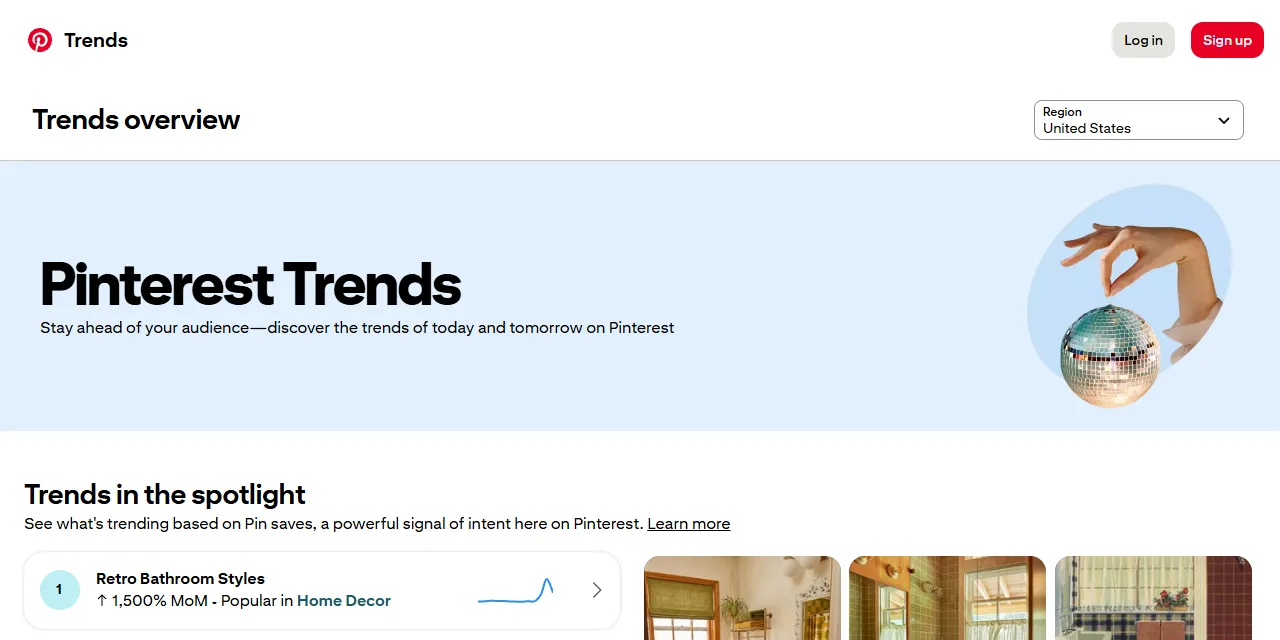
Pinterest Trends Scraper extracts trending search terms from Pinterest Trends into clean, structured data you can download as JSON, CSV, Excel, or HTML. Pick a region and trend type, or type a keyword, and get the term, rank, search volume index, weekly, monthly and yearly change, interests, a preview image, and 12 months of weekly search history for every trend. No account or login required.
Introduction
Pinterest Trends shows what people search for on Pinterest, one of the biggest sources of shopping and lifestyle inspiration. Marketers, creators, and online sellers use it to spot rising topics weeks before they peak and to plan seasonal content and products.
The full search trends list on the website asks you to log in. This actor collects the same trend data without an account and turns it into a ready-to-use dataset. You can run it once, schedule it to run every week, or connect it to your own tools.
What data can you extract from Pinterest Trends?
- 🔎 Trending search term and its rank in the list
- 📊 Search volume index (0 to 100, relative to the top term of the list)
- 📈 Weekly, monthly, and yearly change in percent
- 🗓️ Seasonality score and the date of the data
- 🏷️ Interests the term belongs to (Food and Drinks, Home Decor, Beauty, and more)
- 🖼️ Preview image of each trend
- 📉 Weekly search volume history of the last 12 months
- 🌍 Region and trend type (top monthly, top yearly, growing, seasonal)
- 🔗 Link to the term on Pinterest Trends
Use Cases
- 📈 Market research: find the topics and products people are starting to search for, by region, age group, and gender.
- 🗓️ Content planning: plan Pins, blog posts, and ads around seasonal peaks before they happen.
- 🛍️ Product research: see which product ideas grow month over month and year over year.
- 🔑 Keyword research: collect every trending term that contains your keyword, with real growth numbers.
- 🤖 AI and automation: feed clean, structured trend data into spreadsheets, dashboards, or AI workflows.
How to scrape Pinterest Trends step by step
- Paste one or more Pinterest Trends URLs into Start URLs, or type keywords into Keywords.
- Choose the Region, Trend type, and any other filters you need.
- Set Max results per URL or keyword to how many trends you want per list.
- Click Start and wait for the run to finish.
- Download your data in JSON, CSV, Excel, or HTML from the Output tab.
Input
- Start URLs: Pinterest Trends URLs, such as
https://trends.pinterest.com/orhttps://trends.pinterest.com/search/?country=US&trendsPreset=3. Filters written in the URL (region, trend type, interests, age, gender, keywords, end date) are kept and take precedence over the filters below. - Keywords: keywords to find trends for, one per line. Each keyword returns the trending terms that contain it, for example "cake" returns "birthday cake" and "wedding cake".
- Max results per URL or keyword: how many trends to collect for each start URL or keyword (up to 100). Use 0 for all.
- Region: one of the 26 regions available on Pinterest Trends, such as United States, Great Britain and Ireland, Canada, Germany, France, Brazil, or Australasia.
- Trend type: top monthly, top yearly, growing, or seasonal.
- Interests: only trends in these interests, such as Food and Drinks, Home Decor, Beauty, or Women's Fashion.
- Age groups: only trends searched by these age groups (18-24 up to 65+).
- Genders: only trends searched by these genders.
- Exclude keywords: skip trends that contain any of these words.
- End date: get the trends as they were on a past date. Leave empty for the latest data.
- Include weekly history: add the weekly search volume of the last 12 months to every trend.
You can use start URLs, keywords, or both in the same run.
Input Examples
Get the growing trends in the United States:
Find trending terms that contain a keyword:
Output
Each trend is saved as one item in the dataset. Here is an example of a single item (history shortened):
You can download the dataset in JSON, CSV, Excel, XML, or HTML, or access it through the Apify API.
Notes
- Pinterest returns at most 100 trends per list. To get more, split your search by region, interest, age group, or keyword.
- Search volume is an index from 0 to 100, relative to the top term of the same list, not an absolute number of searches.
- A change of 10001% is the highest value Pinterest reports and means the term was barely searched before.
- Interests are only filled when you filter by interest.
- Keywords filter the trend lists: a keyword that is not part of any trending term returns no results.
- Very old dates combined with interest filters may return no trends, because Pinterest keeps less history for filtered lists.
- Only Pinterest Trends URLs are supported; other URLs are skipped.
Why use the Pinterest Trends Scraper?
- ✅ No login needed: get the full search trends list without a Pinterest business account.
- 🎯 Every filter: region, trend type, interests, age, gender, keywords, and past dates.
- 📉 History included: 12 months of weekly search volume in the same item, at no extra cost.
- 🧹 Clean data: changes are real numbers in percent, dates use one standard format.
- 🔄 Ready for automation: schedule weekly runs, export to Google Sheets, or connect to Make, Zapier, and n8n.
FAQ
How many trends can I scrape?
Up to 100 trends per list. Add more start URLs, keywords, or filter combinations to collect more lists in one run.
Do I need a Pinterest account?
No. You do not need to log in or provide any account details.
Can I track trends over time?
Yes. Use Apify Schedules to run the actor every week, or set an End date to get the trends of a past date.
Why are some fields empty?
Some trends do not have every value, for example a yearly change for a brand-new term. Missing values are returned as null.
Can I request a new feature or filter?
Yes. If you need other data from Pinterest Trends, such as shopping trends or moments, get in touch and it can be added.
Can I get a custom or private version?
Yes. The actor can be customized for your workflow, delivered as a private version, or a new scraper can be built for a different website. Use the contact details below.
Need to scrape other social media trends?
- TikTok Trending Hashtags Scraper: trending TikTok hashtags with views and posts.
- TikTok Trending Videos Scraper: trending TikTok videos with creators and stats.
- Pinterest Ads Repository Scraper: Pinterest ads with targeting, reach, and creatives.
- Google AI Mode Scraper - Answers & Sources: Google AI Mode answers and their sources.
Need help or want a custom solution?
- 📧 Email: aboo.script@gmail.com
- 🧩 More scrapers: Apify profile
Image Credit
Image credit: Pinterest Trends


