
Google Trends Extracts - FAST
Pricing
from $0.14 / 1,000 results
Google Trends Extracts - FAST
Compare keywords, discover related searches, track regional interest, and monitor Trending Now data from Google Trends.
Pricing
from $0.14 / 1,000 results
Rating
0.0
(0)
Developer

Abrahan Gil
Maintained by CommunityActor stats
0
Bookmarked
2
Total users
1
Monthly active users
a month ago
Last modified
Categories
Share
Google Trends Scraper for SEO & Keyword Research
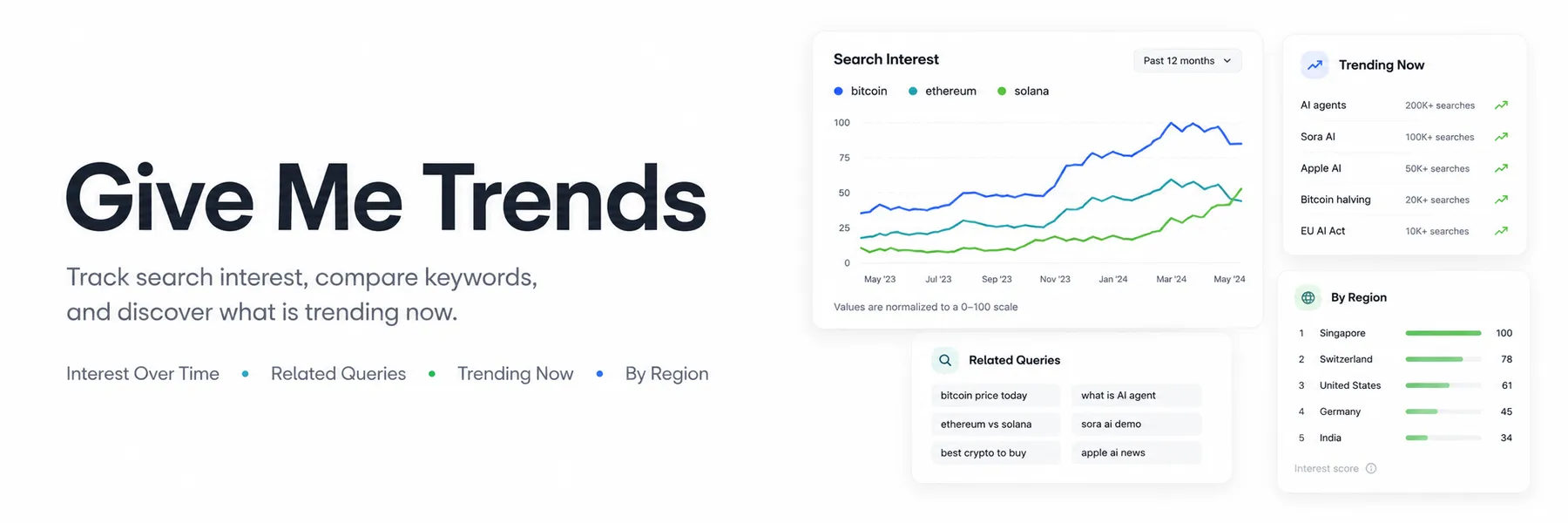
Discover what people are searching for, compare keyword demand, find rising searches, and monitor trending topics with Give Me Trends.
This Google Trends scraper turns search-interest data into clean, exportable results for SEO specialists, marketers, content creators, ecommerce teams, and market researchers.
Enter your keywords and target countries, click Start, and use the results to make better content, product, and marketing decisions.
Find SEO opportunities before your competitors
Use Give Me Trends to:
- discover rising keywords and breakout searches
- compare the popularity of keywords, brands, products, or competitors
- identify seasonal SEO opportunities
- find related searches for new content ideas
- discover where demand is strongest by country, region, or city
- validate product and niche ideas before investing
- monitor current Google Trending Now searches
- build automated trend-monitoring workflows
Google Trends data you can extract
| Data | What it helps you discover |
|---|---|
| Interest over time | Keyword growth, decline, seasonality, and demand changes |
| Interest by region | Countries, regions, and cities with the strongest interest |
| Related queries | Top and rising searches connected to your keywords |
| Related topics | Popular entities and topics associated with a search |
| Trending Now | Current trending searches and estimated search volume |
| Keyword suggestions | Google Trends terms and recognized topics |
| Keyword comparisons | Relative popularity of up to 5 keywords |
Analyze trends from Google Search, Images, News, YouTube, and Google Shopping.
Popular use cases
SEO keyword research
Find rising search queries, compare keyword opportunities, and identify topics gaining momentum before creating content.
Content strategy
Build editorial calendars around seasonal demand, trending topics, and searches your audience already makes.
Competitor and brand analysis
Compare brand awareness and search interest across markets, time periods, and Google properties.
Ecommerce product research
Validate product demand, discover emerging categories, and identify the locations where interest is strongest.
Market research
Measure how consumer interest changes across countries and monitor new market opportunities.
How to use Give Me Trends
- Select Analyze keywords, Trending Now, or Find topics.
- Add your keywords and target countries.
- Choose the time range and data you want to collect.
- Click Start.
- Open the Dataset to review or export your results.
Download results as JSON, CSV, Excel, XML, or HTML. You can also send them to Google Sheets, Make, Zapier, Slack, Airbyte, or your own application.
Compare keywords for SEO
Analyze up to 5 keywords together to see which term has stronger demand and how their popularity changes over time.
This analysis can reveal:
- which keyword receives more relative interest
- whether demand is increasing or declining
- seasonal peaks worth targeting
- top and rising related searches
- regions with the strongest audience interest
Monitor Trending Now
Track current trending searches across one or multiple countries.
Trending Now returns Google's current country feed. It is not filtered by the keywords field, so Trending Now rows do not include an input query.
Clean, analysis-ready results
Every timeline point, region, related search, topic, suggestion, and trending search is returned as a separate Dataset row.
This makes the data easy to:
- filter and sort inside Apify
- export to spreadsheets
- visualize in dashboards
- use in SEO reports
- process through APIs and automations
The Dataset includes dedicated views for Interest over time, Interest by location, Related queries and topics, Trending Now, Topic suggestions, and Explore widgets.
Each row keeps the original input keyword in query. Regional rows use locationName and locationCode, while related topics use topicId, title, and topicType, making exports consistent across searches and countries.
The OUTPUT record summarizes result counts by type, empty sections, retries, proxy usage, and any job-level issues. Optional raw payloads are stored separately in RAW-* key-value records so they do not clutter or increase the paid Dataset result count.
Pricing
Give Me Trends uses pay-per-result pricing.
Starter, Scale, and Business users receive discounted result pricing. One result represents one timeline point, keyword average, location, related query, related topic, trending search, keyword suggestion, or Explore widget. Errors and optional raw diagnostic payloads are not written as paid Dataset results.
Run spending limits are honored. When the configured item or maximum-charge limit is reached, the Actor stops writing results, cancels remaining work, and reports chargeLimitReached in OUTPUT.
Requests start directly using the same private-API flow as Google Trends. When enabled, the selected Apify Proxy is used only after Google blocks a direct request, reducing platform usage costs.
Automate Google Trends monitoring
Use Apify schedules and integrations to:
- monitor important keywords every day or week
- detect changes in brand or competitor interest
- send new trending searches to Slack
- update SEO dashboards automatically
- export recurring reports to Google Sheets
- trigger workflows when a run finishes
Frequently asked questions
What is Google Trends keyword research?
Google Trends keyword research compares relative search interest over time. It helps identify rising topics, seasonal searches, regional demand, and changes in audience interest.
Can I compare multiple keywords?
Yes. You can compare up to 5 keywords in a single analysis.
Can I research multiple countries?
Yes. Add multiple country codes to collect results for every selected market.
Does Google Trends provide exact search volume?
Interest-over-time values are normalized from 0 to 100 and do not represent exact monthly search volume. Trending Now results may include estimated search volume when Google provides it.
Can I find rising and breakout searches?
Yes. Enable Related queries to collect top and rising searches associated with your keyword.
Can I use this scraper for YouTube keyword research?
Yes. Select YouTube as the Google property to analyze YouTube search interest.
Can I schedule recurring trend reports?
Yes. Apify schedules can run the Actor automatically, while integrations and webhooks can send the results to your preferred tools.
Do I need a Google account or API key?
No Google account or API key is required.
Is Give Me Trends affiliated with Google?
No. Give Me Trends is an independent tool and is not affiliated with or endorsed by Google.
Support
Need help with a keyword research workflow, country, or result? Open an issue from the Actor's Issues tab and include a non-sensitive input example.


