

Salesforce AppExchange Scraper – Apps, Ratings & Pricing
Pricing
from $0.25 / 1,000 results
Salesforce AppExchange Scraper – Apps, Ratings & Pricing
Extract Salesforce AppExchange app listings, ratings, review counts, and pricing details. Discover apps by business need, industry, or product. Export CSV/XLSX datasets and generate JSON, TXT, and optional PDF reports for vendor comparison and market research.
Pricing
from $0.25 / 1,000 results
Rating
0.0
(0)
Developer

Artashes Arakelyan
Maintained by CommunityActor stats
0
Bookmarked
3
Total users
0
Monthly active users
17 days ago
Last modified
Categories
Features
Share
Collect Salesforce AppExchange app listings for vendor comparison, competitor research, and marketplace analysis. Export app details, ratings, review counts, and available pricing text to CSV and Excel, with structured research summaries in JSON and text.
Before you run: the listed rate checked on November 3, 2026 is $0.25 per 1,000 app records ($0.00025 per app), plus a separate startup event. CSV, Excel and enabled research reports are included. One result is an app listing, not an individual review or a guarantee that every field is populated. The live Pricing tab controls your applicable rate.
Match the output to your question
| Your question | What you receive | What is outside this build |
|---|---|---|
| Which apps should we shortlist? | Names, listing URLs, descriptions and available ratings/review counts | A complete AppExchange census or guaranteed discovery count |
| How do pricing models compare? | Available price text, inferred model, extraction visibility and confidence | Vendor quotations, negotiated pricing or guaranteed price coverage |
| What does our sample show? | Sample statistics, category composition and rating/review heuristics | Verified market share, adoption, revenue or growth forecasts |
| Can we analyze customer opinions? | Displayed review counts as listing metadata | Review texts, sentiment analysis or reviewer profiles |
| Can we reuse and share the research? | Dataset, CSV/XLSX, enabled JSON/TXT and optional PDF | An external LLM service or additional paid data source |
Choose this Actor for app-listing research. If individual review texts or a guaranteed price for every app are essential, this build does not meet that requirement.
What this build does
- Discovers app listings through Business Needs, Industries, or Products navigation.
- Extracts app names, URLs, descriptions, ratings, and review counts when available.
- Reads pricing from the listing header, with a matching-listing JSON-LD fallback.
- Keeps free-trial and nonprofit-discount mentions separate from the pricing model.
- Creates spreadsheet exports and descriptive summaries of the collected sample.
Supported mode: apps. The reviews column is the displayed review count. This build does not collect individual review texts; reviews and apps+reviews modes are not supported by its entry point.
Output preview
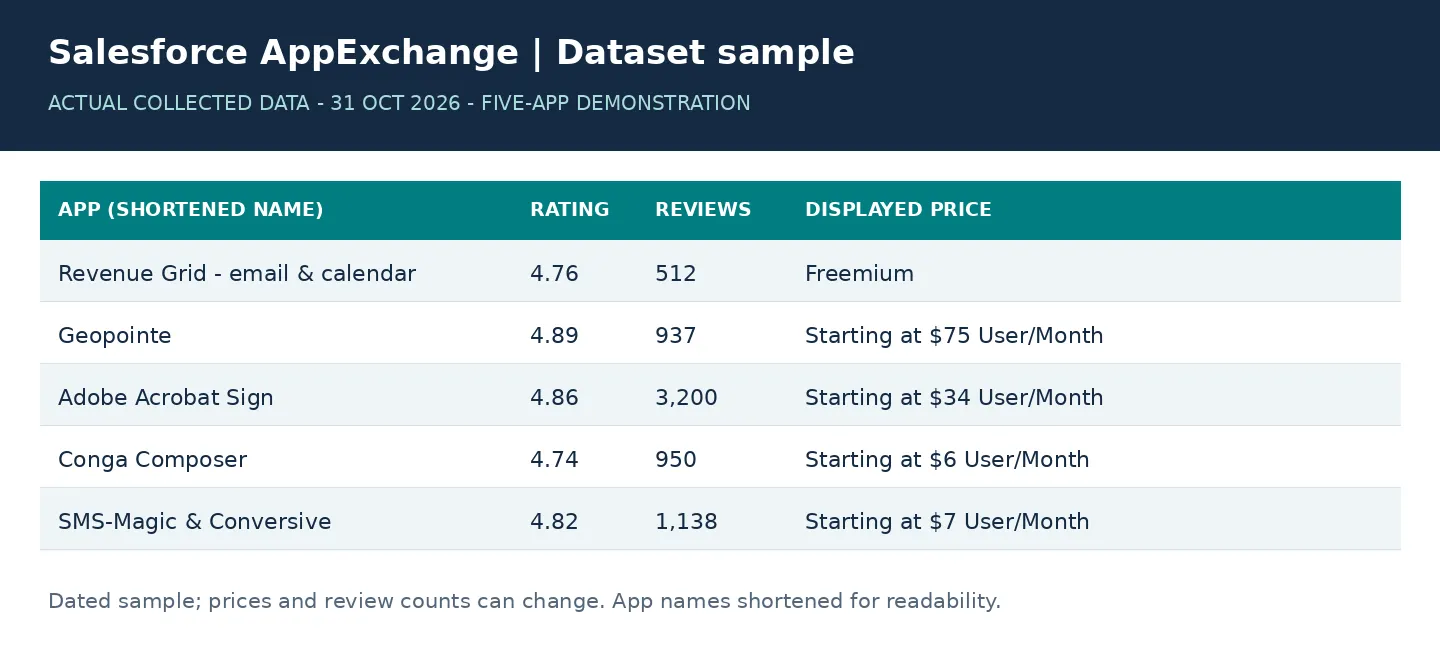
The previews below use a five-app sample collected on 31 October 2026. Prices and review counts are historical observations, not current vendor quotations. Input and dataset images are rendered examples; the report image is an actual generated PDF page.
Quick start
Start with one category and five apps:
The input preview below enables the optional PDF; the lightweight quick-start JSON above leaves PDF disabled. Set analysisOptions.outputPdfReport to true to include the PDF without a separate report event.
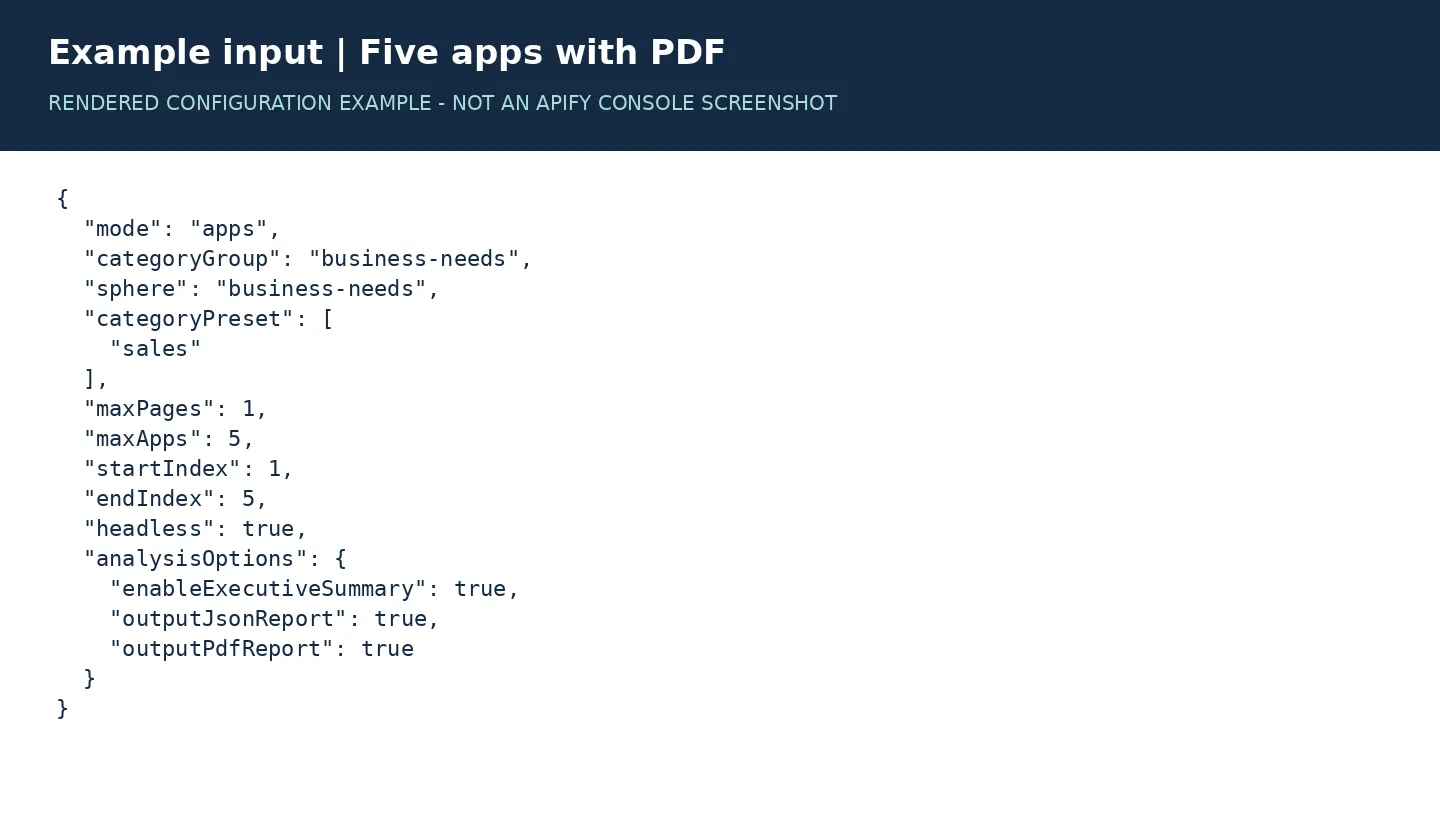
Inspect the dataset, downloadable files, logs, and charges before expanding the scope. maxPages controls discovery passes; it is not a promised result count. maxApps caps total app-detail attempts across the run, including attempts that fail.
Discovery options
categoryGroup | Example categoryPreset | Optional appGroup override |
|---|---|---|
business-needs | ["sales"] or ["marketing"] | Exact business-needs filter values |
industries | ["automotive"] | Exact industry filter values |
products | ["b2b-commerce"] | For example, ["B2B Commerce"] |
Preset resolution uses the bundled taxonomy. appGroup overrides preset crawl targets. Source navigation and filter labels may change; validate a small run for each target group.
Input parameters
| Parameter | Meaning |
|---|---|
mode | apps only. |
deliveryMode | collect (default), or recover_exports for this run's default dataset only. |
categoryGroup | business-needs, industries, or products. |
sphere | Output grouping label; defaults to the category group. |
categoryPreset | Array of preset labels. |
appGroup | Optional explicit crawl-filter values. |
maxPages | Discovery passes per group, from 1 to 5. |
maxApps | Global cap on app-detail attempts; default 5. |
startIndex | One-based first discovered app per group. |
endIndex | Inclusive final index per group; 0 means no index ceiling, subject to maxApps. |
minRating | Minimum available rating; 0 disables filtering. Unrated apps are retained. |
pricingFilter | Optional pricing-model filter. paid also includes subscription, usage-based, and contact/quote options. |
headless | Browser visibility; use true on Apify. |
proxySettings | Proxy configuration field; proxy creation is not wired into this build's browser context. |
analysisOptions | Controls JSON, text, optional PDF, and an optional file-key prefix. |
Output files
| File | Contents |
|---|---|
APPS.csv | Unique, readable app records from the current run's default dataset. |
APPS.xlsx | Excel export with readable column formatting. |
MARKET_INTELLIGENCE.json | Sample statistics, pricing coverage, category counts, heuristic rankings, and limitations. |
EXECUTIVE_SUMMARY.txt | Readable summary when enabled. |
LLM_MARKET_SUMMARY.json | Structured summary for downstream AI workflows; its creation does not itself call an LLM. |
MARKET_REPORT.pdf | Optional PDF when enabled; included in the app-result price. |
RUN_REPORT.json | Delivery status, dataset/export counts, recovery flag, and completed output keys. |
DELIVERY_STATE.json | Internal recovery marker; not an app result and not proof of a separate charge. |
JSON outputs follow outputJsonReport; the text summary follows enableExecutiveSummary. PDF generation is off by default. Use reportKvKeyPrefix to prefix report-file keys.
Open Storage → Key-value store in the run to download files. Check RUN_REPORT.json first: output links can exist even when an optional file was not generated. An empty run produces header-only CSV/XLSX, without a substantive research report.
App fields
| Field | Description |
|---|---|
app_name, app_url | Application name and source listing. |
categoryGroup, sphere, categoryPreset, appGroup | Discovery context. |
short_description | Available description, with HTML entities decoded. |
rating, reviews | Available rating and displayed review count. |
price | Price text, retaining qualifiers and units when present in the source. |
pricing_model | Inferred model: subscription, usage-based, paid, contact-sales, quote-based, free, freemium, or unknown. |
pricing_visibility | visible, contact-required, or not-extracted. |
pricing_confidence | Rule-based extraction confidence, not a calibrated probability. |
has_free_trial, has_nonprofit_discount | Whether the corresponding text was detected. False means not detected, not necessarily unavailable. |
rating_bucket, reviews_bucket, market_segment | Derived grouping fields. |
last_seen | Collection timestamp in UTC. |
The dataset additionally includes listing_id and compatibility aliases such as name, last_seen_at, and category_preset.
Illustrative record
This is a synthetic illustration, not a current vendor quote. JSON-LD fallback prices may appear as USD 75/User/Month; a source qualifier is retained only when available. A free trial does not mean a free plan or freemium pricing. A discount does not replace the underlying subscription model.
Interpreting the research summaries
Reports describe the selected sample. Unknown prices are extraction/classification gaps until checked against source pages. Category shares, HHI, and CR4 describe sample composition, not vendor market shares or competition. Position labels and scores are screening heuristics based on ratings/review counts, not evidence of adoption, revenue, or an investment opportunity. The JSON documents the classification thresholds.
One run cannot establish historical trends or unmet demand. Review-count statistics do not replace analysis of review texts. Reports retain legacy field names for compatibility while stating these limits explicitly.
Pricing and delivery
Listed rates and cost scenarios
Checked against the public Actor metadata on November 3, 2026. No event or price change is introduced by this update.
| Event | Listed price | Meaning |
|---|---|---|
apify-default-dataset-item | $0.00025 per app / $0.25 per 1,000 | Automatically handled when an eligible app is admitted to the default Dataset |
apify-actor-start | $0.00005 per startup unit | One unit per GB allocated memory, minimum one unit |
review-result | Legacy event; not emitted here | The apps workflow does not collect individual reviews |
At 4 GB, one start costs $0.00020 at the listed rate. These arithmetic examples exclude discounts, account-specific billing treatment and taxes:
| Outcome | App-result fee | Startup at 4 GB | Listed event total |
|---|---|---|---|
| 5 app records admitted | $0.00125 | $0.00020 | $0.00145 |
| 100 app records admitted | $0.02500 | $0.00020 | $0.02520 |
| No app records admitted | $0 | $0.00020 | $0.00020 |
| 3 rows admitted before an interruption | $0.00075 | $0.00020 | $0.00095 |
| Same-storage export-only recovery | No new result fee | A further startup can apply | Depends on memory and starts |
Optional fields are not a separate billing gate. A record with a valid listing identity and app name can be delivered and charged even if price, description, rating or review count is missing. Unknown price means extraction/classification is unavailable; it does not make the app result free. Filters affect which rows are admitted, while discovery and failed detail attempts can still consume time.
There is no complete-report package event, partial-report discount or automatic refund mechanism. Downloads do not trigger a new Actor result/report event. If a later report export fails, already admitted app rows can remain charged and available. Rebuild the files from the same Dataset rather than collecting those apps again.
Spending limits and runtime
maxApps limits detail attempts, including failures; it does not guarantee that many billable results. maxPages limits discovery passes. Filters, duplicates, blocking and changed source pages can reduce results. Browser startup and page waits mean even a five-app run has no guaranteed completion time.
Set the maximum charge in Apify to your spending cap. This is a cap, not a fixed-price quotation. A capped run may deliver fewer apps; inspect the Dataset and RUN_REPORT.json.
Delivery rules
Check the live Pricing tab before running. No price change is introduced by this update.
- One result means one app record admitted to the default dataset. Apify automatically handles the
apify-default-dataset-itemevent. This Actor does not manually charge a second result event. - Startup is separate. The platform charges
apify-actor-startautomatically; the count depends on allocated memory. An empty run can still incur startup charges. - Review counts are included metadata. The app workflow does not collect review texts or trigger the legacy
review-resultevent. - Exports and reports are included. CSV/XLSX and enabled JSON/TXT/PDF reports do not trigger a separate report charge.
- Spending limits are platform enforced. The collection loop checks the SDK result-event budget before discovery/detail work and stops after the last admitted result.
maxAppsandmaxPagesare workload limits, not fixed dollar quotes. - Resources and event revenue are different. With the observed monetization setting, platform usage is not separately passed to users for standard runs. Owner testing costs do not demonstrate customer revenue. Read the live pricing terms for the applicable run.
The SDK/platform controls billing, including free-plan and owner-run treatment. Dataset readback confirms availability; it is not an independent invoice audit. Cloud event-count reconciliation remains part of release validation.
Partial delivery and recovery
Local recovery: before importing or initializing the SDK, set APIFY_PURGE_ON_START=false and CRAWLEE_PURGE_ON_START=false, and point both storage-directory variables to the original storage. Otherwise, SDK startup can clear the local default storage.
Each eligible app is published before the next app detail is processed. CSV/XLSX and reports are built only from records read back from the default dataset, not from the in-memory scrape buffer.
After a successful publication response, the Actor makes bounded read-only checks for delayed Dataset visibility or temporary read errors: up to five reads, with 6.5 seconds of scheduled waiting. It never repeats the write to fix visibility. An unexpected row at the publication offset stops the run.
If publication throws an error, the Actor does not retry that row automatically. It attempts to read the dataset and export the records already present, then fails visibly. A failed readback prevents export generation. A write accepted before a lost response can still appear in the readback; that result is not republished.
If CSV/XLSX or a requested report fails, RUN_REPORT.json records export_failed and the run fails. Some files may already exist; use the manifest/status rather than assuming that every advertised file was produced.
When this run's default dataset or delivery marker already exists, collection is skipped and exports are rebuilt. You can also select:
Recovery scope matters: recovery uses the same default dataset and storage, such as a resurrected run or the same local storage directory. Starting a new cloud run normally creates a new dataset; it does not recover another run's outputs. Recovery performs no scraping, result writes, or explicit charging. Platform startup/usage charges can still apply. Recovery restores exports only; it does not resume unfinished collection or refund earlier charges.
A hard abort may interrupt export creation immediately. Already admitted dataset rows remain the recovery source. Existing legacy duplicate/invalid rows are not deleted or refunded; exports contain unique valid app rows, and the manifest reports excluded row counts. There is no transaction spanning the dataset and all files, and concurrent writers to the same dataset are not supported.
Delivery status example
Illustrative manifest, not an actual billing receipt:
Possible final statuses include complete, recovered, no_results, budget_reached, publication_failed, and export_failed. A running marker alone does not prove completed delivery.
Report preview
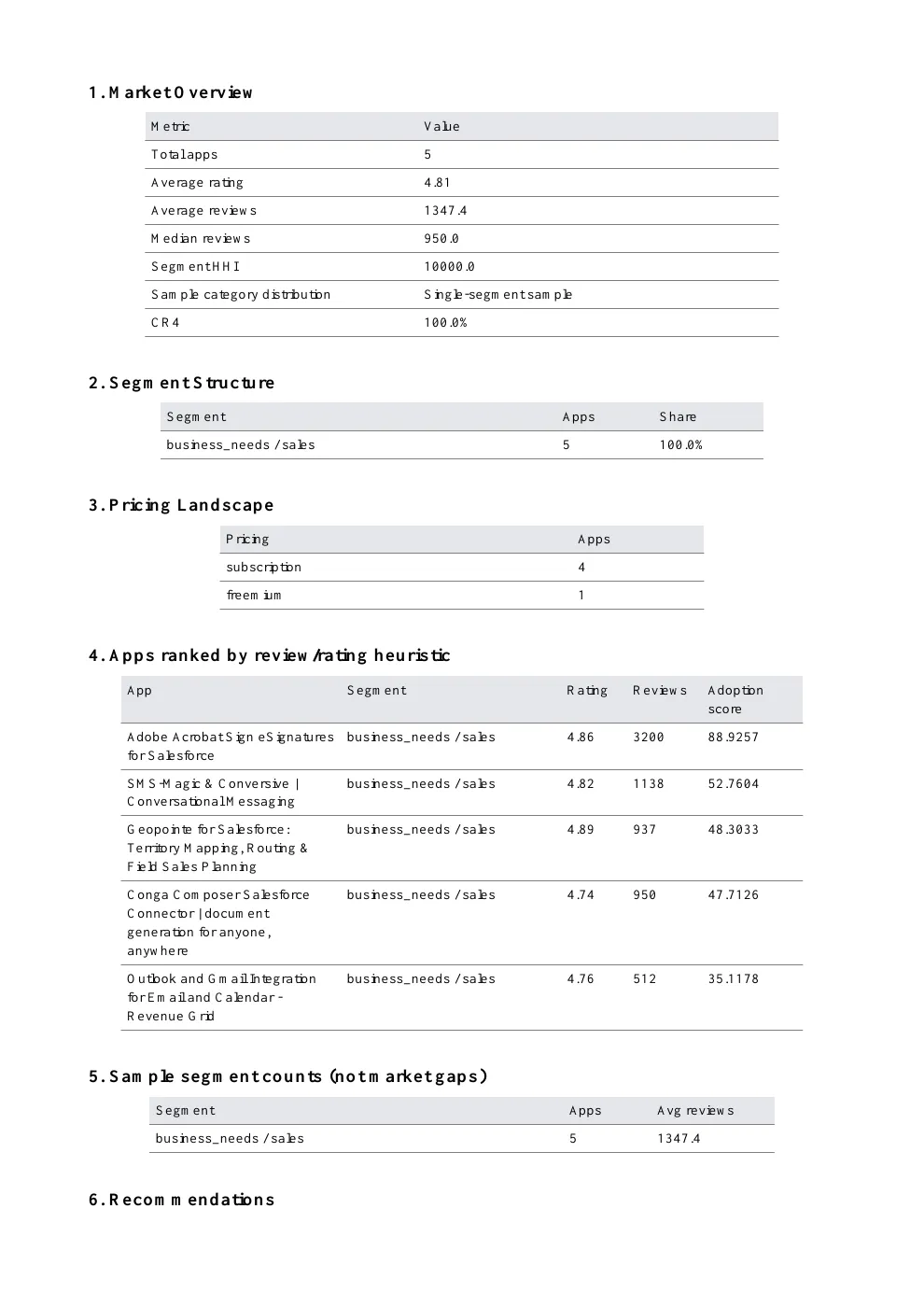
Reports summarize the selected sample. They do not establish whole-market coverage, vendor market share, historic growth or validated investment opportunities.
Troubleshooting
- Empty results: inspect RUN_REPORT.json and selected filters. CSV/XLSX contain headers only; diagnostics are not pushed to the dataset.
- Missing price: check
pricing_visibilityand the source page. Do not infer that pricing is private or unavailable. - Fewer apps than requested: discovery limits, duplicates, filters, unavailable listings, and extraction failures can reduce the result count.
- No PDF: set
analysisOptions.outputPdfReportto true. Check RUN_REPORT.json and logs for export/report errors. A new run is not required to rebuild exports from the same stored dataset.
For support, use the Actor's Issues tab and include the run ID, sanitized input, relevant logs, and expected versus actual output.
This independent tool is not affiliated with or endorsed by Salesforce.


