

Booking.com Reviews Scraper
Pricing
$3.75 / 1,000 review scrapeds
Booking.com Reviews Scraper
Scrape guest reviews from any Booking.com hotel — liked/disliked text, score, date, room type, length of stay, and the hotel's management responses, which most alternatives skip. Working date filter and full review-feed capture (not just the first ~30). Runs on Apify residential proxies.
Pricing
$3.75 / 1,000 review scrapeds
Rating
0.0
(0)
Developer

Agilevendor
Maintained by CommunityActor stats
0
Bookmarked
7
Total users
0
Monthly active users
25 days ago
Last modified
Categories
Share
Scrape all guest reviews from any Booking.com hotel page — liked/disliked text, score, date, room type, length of stay — plus the hotel's management responses, which most alternatives don't return.
Why this scraper
- ✅ Every review, not just the first ~30 — pagination runs to the end of the feed.
- ✅ A date filter that actually works — collect only reviews after (or before) a date, accurately.
- ✅ Management responses included — the hotel's official replies, which most scrapers drop.
- ✅ Rich context on every record — hotel rating with category breakdown (Staff, Cleanliness, Location…), guest avatar, review photos, room ID, and source URL.
- ✅ No blocking to deal with — residential proxies and anti-bot handling are built in and on by default.
- ✅ One flat price per review — the same rate on every plan, no tier ladders and no extra platform or proxy charges. See the current price on the Actor's page.
What it does
- Full set of reviews. Pagination runs to the end of Booking's review feed, not just the first ~30 reviews. The Actor reads the hotel's total review count up front and collects every available review.
- Working date filter (
cutoffDate). Collect only reviews newer (or older) than a given date — accurately, without over-fetching. Works with date sorting. - Management responses (
ownerResponse). The hotel's official reply to a review, whenever one exists. - Hotel context on every review. Overall hotel rating and label (e.g. 9.4 "Superb"), total review count, and a per-category score breakdown (Staff, Cleanliness, Comfort, Location, Value, Wi-Fi) — alongside the guest avatar, any review photos, and the room ID.
- Flexible sorting and score filter. Sort by newest, oldest, score, or relevance; keep only the score bands you care about (e.g. superb only, poor only).
- Reliable by design. Booking's anti-bot protection is handled automatically — residential proxies and session rotation are built in and on by default, so you just get the reviews.
How to use
- Open a hotel on Booking.com and copy its page URL from the browser address bar.
- Paste one or more such URLs into Booking.com hotel URLs.
- Optionally set how many reviews to collect, the sort order, a cutoff date, or a score filter.
- Click Start and wait for the run to finish.
- Download the results from the Output tab in JSON, CSV, Excel, XML, or HTML.
Ready-made examples
Each example is a saved configuration you can open and run as is:
- Scrape negative Booking.com hotel reviews — only the poor and very poor scores, to see what guests complain about.
- Scrape positive Booking.com reviews (9+) — superb reviews to reuse as testimonials.
- Monitor new reviews since a date — everything posted after a chosen day; schedule it daily.
- Scrape hotel replies to reviews — reviews together with the hotel's management response.
- Compare reviews of competitor hotels — several properties in one run.
- Hotel reviews dataset for sentiment analysis — bulk export for NLP and AI training.
Input
| Field | Type | Description |
|---|---|---|
startUrls | array | Booking.com hotel page URLs (required). |
maxReviewsPerHotel | integer | Max reviews per hotel. 0 — all available (default). Set a number to cap how many you collect (and how much you pay). |
sortReviewsBy | enum | newest / oldest / highest_score / lowest_score / relevance. Default newest. |
cutoffDate | string | Date boundary. With newest keeps reviews newer than the date; with oldest, older than it. Ignored for other sort orders. |
reviewScores | array | Score bands to keep: ALL, REVIEW_ADJ_SUPERB (9+), REVIEW_ADJ_GOOD (7–8.9), REVIEW_ADJ_AVERAGE_PASSABLE (5–6.9), REVIEW_ADJ_POOR (3–4.9), REVIEW_ADJ_VERY_POOR (below 3). Empty or ALL — all scores. |
proxyConfiguration | object | Proxy. Defaults to Apify Residential. |
customData | object | Arbitrary JSON attached to every output record. |
Example input:
Output (per review)
Each collected review is one record in the dataset, including the management response (ownerResponse) when the hotel has replied.
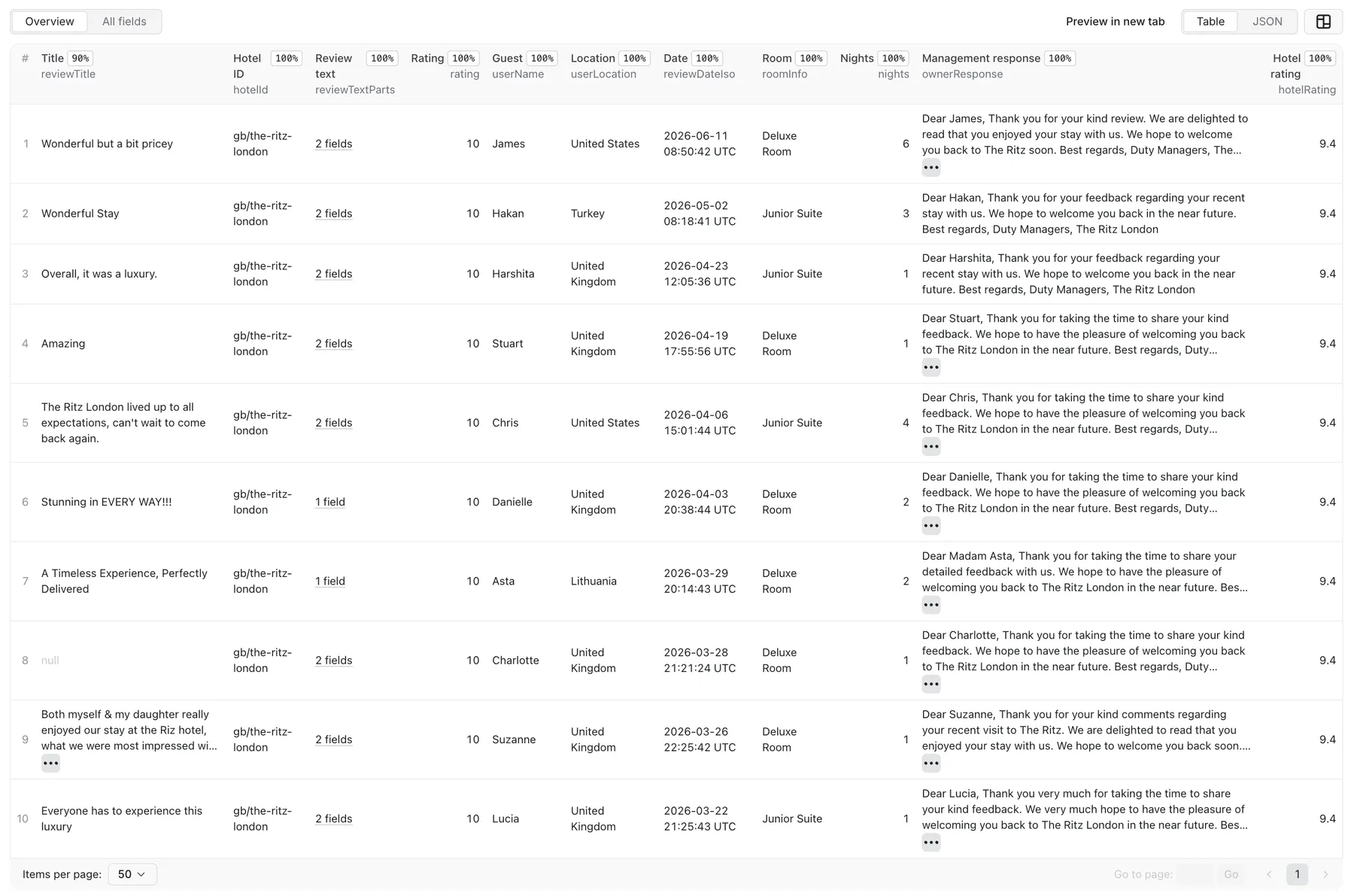
Each record also carries hotel-level context — overall rating, rating label, total review count, and a per-category breakdown (Staff, Cleanliness, Location, …) — plus the guest avatar, any photos attached to the review, the room ID, and the source URL.
Example records (real output from The Ritz London):
Proxy and cost
The Actor is billed pay-per-event: a flat rate per review collected, and nothing else — no charge for run time or platform usage. The current rate is shown on the Actor's page; it is the same on every Apify plan.
Booking.com blocks datacenter IPs, so the Actor uses residential proxies (Apify Residential by default). Proxy traffic is billed to the account that runs the Actor.
Is it legal to scrape Booking.com reviews?
The Actor only reads information that guests have already chosen to publish on Booking.com — review text, score, room type, stay dates, the reviewer's display name, and the management reply. It does not log in, bypass any access restriction, or collect hidden or private data such as email addresses or profile photos. In the United States, courts have held that scraping publicly accessible pages without logging in generally does not break computer-access law (the CFAA), but that is not the whole picture: a site's Terms of Service may still restrict scraping as a matter of contract, copyright can apply to the text of individual reviews, and the rules differ by jurisdiction and by what you do with the results.
A review and its display name can also count as personal data under laws such as the GDPR, even when published publicly. You are responsible for having a lawful basis to collect and use it. The Actor keeps the output to publicly shown, non-identifying fields and does not collect contact details, exact addresses, or profile photos.
This is general information, not legal advice. If you are unsure whether your use case is allowed, check with a lawyer.
Your feedback
This Actor is actively maintained. If you hit a bug, notice a change on Booking.com that breaks the output, or want a new field or option, open an issue on the Issues tab of this Actor — it goes straight to the developer.


