
![Bandsintown Scraper [Only $1/1K💰] | Concerts | Tour Dates avatar](https://images.apifyusercontent.com/GBmprGDzue9VjXqe-ktP5Hq_w-5zGeUL407wLJw1Y8A/rs:fill:250:250/cb:1/aHR0cHM6Ly9hcGlmeS1pbWFnZS11cGxvYWRzLXByb2QuczMudXMtZWFzdC0xLmFtYXpvbmF3cy5jb20vZHRSN3FuVGJRck5pU0NtajctYWN0b3ItYzF2dFUzeUhRNnE2YnN1ZnMtaFZoOHN4cjdqWC1pbWFnZXNfJTI4MzklMjkucG5n.webp)
Bandsintown Scraper [Only $1/1K💰] | Concerts | Tour Dates
Pricing
from $0.90 / 1,000 results
Bandsintown Scraper [Only $1/1K💰] | Concerts | Tour Dates
Get upcoming and past concert, tour and festival data from Bandsintown as structured JSON — artist, date, venue, city, coordinates, ticket links, lineup and RSVP counts. Search artists, festivals or venues. No API key, no login.
Pricing
from $0.90 / 1,000 results
Rating
0.0
(0)
Developer

Ahmed Jasarevic
Maintained by CommunityActor stats
0
Bookmarked
2
Total users
1
Monthly active users
3 days ago
Last modified
Categories
Share
Bandsintown Scraper
Bandsintown Scraper extracts upcoming and past concerts, tour dates, festivals and venue shows from Bandsintown and returns them as one clean row per event — artist, event title, date and time, venue, city/region/country, coordinates, ticket links and, optionally, the full lineup, RSVP count, venue address and ticket vendors.
Search by artist name, tour or festival name, venue name, a Bandsintown URL or a numeric artist ID — every term resolves through Bandsintown's own search, so a single input field covers artists, festivals, venues and single events. No official API key and no browser required.
Built for tour managers, booking agents, promoters, music marketing and fan-analytics teams, ticketing and resale tools, event apps and live-music data pipelines.
Track Concert Tour Dates, Festival Lineups & Live Music Events
- Artist tour tracking and tour-date monitoring — schedule daily runs to catch newly announced dates for a roster or a watchlist of artists.
- Building a live music event database — collect concerts, festivals and venue shows into one structured dataset.
- Festival lineup extraction — pull a festival's dates, venue and full lineup in a single run.
- Venue calendars and local concert listings — scrape every upcoming show at a venue and build a city-level concert calendar.
- Ticketing and resale intelligence — capture ticket availability, the primary ticket URL and the ticket vendors for each event.
- Music marketing and fan analytics — track artist follower counts and per-event RSVP / fans-interested numbers.
How It Works
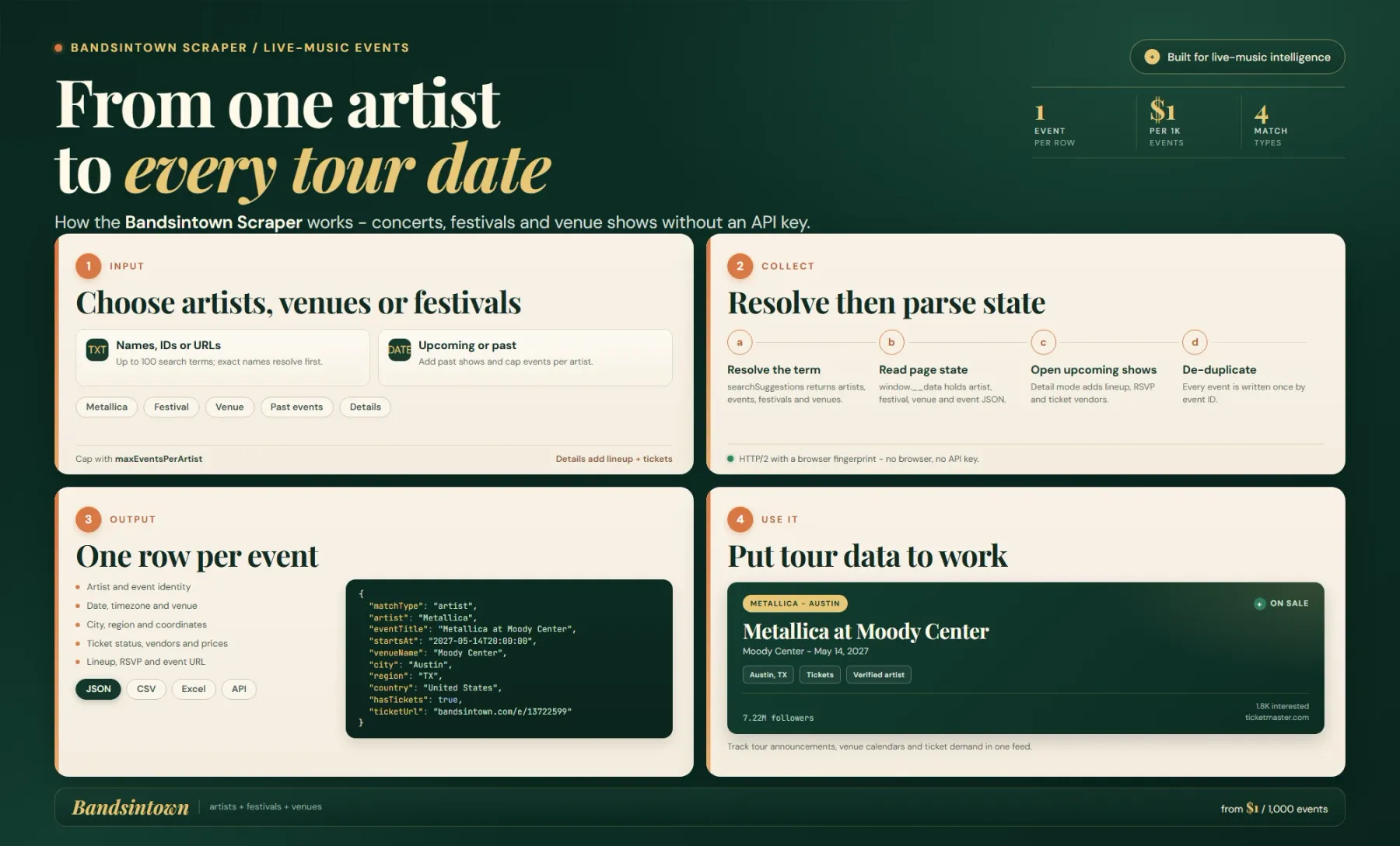
The Actor resolves artist, festival, venue and event terms through Bandsintown's public suggestion endpoint, then parses the page-state JSON embedded in each page. Upcoming event pages can be opened for lineup, RSVP and ticket details, and rows are deduplicated by event ID.
Each row covers one event with its artist, date, timezone, venue, location, ticket status and source URL. Use the feed for tour calendars, venue research and ticket-demand tracking.
Bandsintown's consumer site is a server-rendered React app that embeds its whole page state in a window.__data = { ... } JSON blob inside the served HTML. The actor parses that blob directly — no browser, no DOM scraping and no official API key:
- Resolution →
GET /searchSuggestions?searchTerm=<term>returns clean JSON withartists,events,festivalsandvenuesin one call; the best match wins (exact name > prefix > word > substring). A name that matches both a band and a festival scrapes both. - Artist page (
/a/) →window.__data.artistView.bodyholds the artist info and all upcoming events; past events come fromevents.pastEventsand paginate through/a/<id>/past-events?startDate=.... - Festival page (
/f/) →festivalView.bodyholds the festival dates, venue, description and the lineup slots. - Venue page (
/v/) →initialState.events.eventListholds every upcoming show at that venue. - Event page (
/e/) →window.__data.eventView.bodycontains the lineup, RSVP count, venue details, ticket vendors and description. Only upcoming events are opened this way; past events are pushed straight from the artist's past-events list. - Rows are de-duplicated by event id, so a show reached through an artist page, a festival lineup and a venue page is written once.
Because Bandsintown sits behind Cloudflare and rejects plain HTTP/1.1 clients, the actor uses Crawlee's ImpitHttpClient with the okhttp5 browser profile, which negotiates HTTP/2 with a fingerprint Cloudflare accepts — so it stays a plain CheerioCrawler (no browser) while still getting through.
Input Parameters
| Field | Type | Required | Default | Notes |
|---|---|---|---|---|
artists | string[] | Yes | ["Metallica", "Yo-Yo Ma"] | Search terms: artist names (Metallica), tour names, festival names, venue names, Bandsintown URLs (/a/, /f/, /v/, /e/) or numeric artist IDs / id-slugs (99-coldplay). Each term resolves to the best matching artist, festival, venue or event. |
includeEventDetails | boolean | No | false | Open each upcoming event page to add lineup, RSVP count, venue address, country and ticket vendors/prices. Slower, uses more requests, and costs one event-detail pay-per-event charge per enriched event. Past events are always saved without this fetch. |
includePastEvents | boolean | No | false | Also scrape past concerts of matched artists (paginated as far back as Bandsintown allows). Past shows fill the remaining maxEventsPerArtist budget after upcoming shows. |
maxEventsPerArtist | integer | No | 50 | Maximum events per search term (upcoming first, past after). Range 1–500. |
maxArtists | integer | No | 10 | Maximum search terms per run. Range 1–100. |
proxy | object (proxy) | No | Apify Proxy off | Standard Apify proxy configuration. Not required — the actor reads Bandsintown's own JSON. |
Output Fields
Each dataset item is one event.
| Field | Type | Description |
|---|---|---|
matchType | string | How the term matched: artist, festival, venue or event. |
searchTerm | string | The input term that produced the row. |
eventStatus | string | upcoming or past. |
artist | string | Artist name. |
artistId | number or null | Bandsintown artist id. |
artistUrl | string or null | Bandsintown artist page URL. |
artistFollowers | number or null | Number of Bandsintown followers. |
artistFollowersText | string or null | Follower count as displayed, e.g. "7.22M Followers". |
artistVerified | boolean | Whether the artist is verified on Bandsintown. |
artistImageUrl | string or null | Artist image URL. |
artistUpcomingShows | number or null | Number of upcoming shows listed for the artist. |
eventId | string | Bandsintown event id. |
eventTitle | string | Event title (falls back to "<artist> at <venue>" when Bandsintown has none). |
eventUrl | string | Bandsintown event page URL. |
startsAt | string | Event start date/time, local to the event timezone (ISO 8601). |
endsAt | string or null | Event end date/time, when available. |
timezone | string or null | IANA timezone of the event. |
venueName | string or null | Venue name. |
location | string or null | Raw location string as shown by Bandsintown, e.g. "Las Vegas, NV". |
city | string or null | City. |
region | string or null | Region / state code. |
country | string or null | Country. |
venueAddress | string or null | Full venue street address (event-details mode). |
venueId | number or null | Bandsintown venue id (event-details mode). |
latitude | number or null | Venue latitude. |
longitude | number or null | Venue longitude. |
hasTickets | boolean | Whether tickets are available. |
isFree | boolean | Whether the event is free. |
streamingEvent | boolean | Whether the event is a livestream. |
ticketUrl | string or null | Primary ticket / call-to-action URL. |
ticketVendors | string[] | Ticket vendor domains (event-details mode). |
ticketPriceTiers | object[] | Ticket price tiers with vendor, price, formattedPrice and currency (event-details mode; prices are often hidden by Bandsintown). |
lineup | string[] | Lineup artist names (event-details mode; always populated for festival rows). |
lineupDetails | object[] | Lineup artists with name, id, followersText and url (event-details mode). |
rsvpCount | number or null | Number of fans interested / RSVPs (event-details mode). |
fansInterestedText | string or null | Fans-interested text as displayed (event-details mode). |
description | string or null | Event description (event-details mode). |
scrapedAt | string | ISO timestamp of when the row was scraped. |
Example Input
The smallest input that produces results:
Example Output
Integrations & Automation
- Apify API — start a run programmatically and read results from the default dataset; every run also exposes the dataset as JSON, CSV or Excel.
- Webhooks — get notified when a run finishes, then push new events into your own systems.
- Zapier / Make / n8n — connect the actor through Apify's no-code integrations to write results to Google Sheets, Airtable, a database or a Slack channel.
- Scheduling — for tour-date monitoring, run the actor daily against your artists/festivals and diff by
eventIdto surface newly announced dates; run it weekly for slower venue-calendar refreshes.
Related Actors
- Songkick Concert Calendar Scraper — the same audience on a second live-music platform; pair Songkick and Bandsintown data to cover more tour dates than either source alone.
- Eventbrite Scraper — Event & Organizer Data — the largest event-data actor in the Store; use it for ticketed events and organizer leads alongside concert/tour data.
- Ticketmaster Scraper — event and ticket-status data from Ticketmaster, the primary ticketing source many Bandsintown events link out to.
- SeatGeek Scraper — concert and sports ticket price data from SeatGeek for secondary-market pricing.
- StubHub Scraper — ticket resale listings to complete a live-events pricing and availability pipeline.
Frequently Asked Questions
Why use this actor instead of the official Bandsintown API?
Bandsintown's official REST API (rest.bandsintown.com) is read-only and covers artist info plus artist events (/artists/{artist}/events?app_id=..., with an optional date of upcoming, past, all or a range). It requires an app_id assigned by Bandsintown — artists can generate a key for their own profile in Bandsintown for Artists, and organizations must agree terms through Bandsintown's partnership program before they get one. It is artist-scoped, so venues and festivals are not first-class lookups.
This actor needs no app_id and no approval. It resolves any term — artist, festival, venue or single event — through Bandsintown's own search, returns one normalized row per event with venue coordinates, and can enrich upcoming events with lineup, RSVP count, venue address and ticket vendors. Use the official API if you are an artist with your own key or have a partnership agreement and only need artist-scoped reads.
What are alternatives to this actor or to Bandsintown data?
- Other Bandsintown scrapers in the Apify Store — several cover the same public pages; compare on price per result, whether they call Bandsintown's REST API (and therefore need an
app_id) and how they paginate past events. - Songkick — a second large live-music source (see Songkick Concert Calendar Scraper); its public API is licensed separately.
- Eventbrite — for ticketed events and organizer profiles (Eventbrite Scraper).
- Licensed datasets — JamBase Data (B2B licensed) and Pollstar (licenses its historical archive) sell normalized live-music data commercially.
- The official Bandsintown API — best when you hold your own
app_idand only need artist-scoped reads.
How do I scrape Bandsintown concert and tour dates?
Pass one or more artist, festival or venue names in the artists input and run the actor. Each run returns one row per event with the artist, date/time, venue, location and ticket link already parsed — no API key, no login, no browser.
Does Bandsintown have a public API?
Bandsintown has a REST API for artist info and artist events, but access requires an app_id that Bandsintown assigns (organizations must agree partnership terms first). This actor instead reads Bandsintown's own public pages, so it works without a key or an approval step.
How can I get concert tour dates as JSON?
Run the actor and download the dataset as JSON, CSV or Excel from Apify Console, or read it over the Apify API. Each item carries artist, startsAt, venueName, city, region, country, latitude, longitude, ticketUrl and eventUrl.
How do I monitor newly announced tour dates?
Schedule the actor to run daily against the artists you track, then compare consecutive runs by eventId to detect dates that appeared since the previous run. This is the cheapest way to catch new tour announcements.
What's the best way to build a live music event database?
Run the actor across a list of artists, festivals and venues, then map the output fields — eventId, artist, eventTitle, startsAt, venueName, city, country, latitude, longitude — into your schema. Rows are already de-duplicated by eventId, so overlapping searches do not create duplicate entries.
Can I get festival lineups from Bandsintown?
Yes. Festival rows always include the lineup, and setting includeEventDetails to true adds the lineup, RSVP count, venue address and ticket vendors for upcoming events as well.
For AI Agents & LLM Apps
Purpose: return one row per Bandsintown event (upcoming or past) for a list of search terms — artist, festival, venue or event — with date/time, venue, location, coordinates and ticket links, plus optional lineup/RSVP enrichment.
Minimal working input:
Enriched variant (lineup, RSVP count, venue address, ticket vendors):
Past events variant:
Output fields: matchType, searchTerm, eventStatus, artist, artistId, artistUrl, artistFollowers, artistFollowersText, artistVerified, artistImageUrl, artistUpcomingShows, eventId, eventTitle, eventUrl, startsAt, endsAt, timezone, venueName, location, city, region, country, venueAddress, venueId, latitude, longitude, hasTickets, isFree, streamingEvent, ticketUrl, ticketVendors, ticketPriceTiers, lineup, lineupDetails, rsvpCount, fansInterestedText, description, scrapedAt.
Behaviors an agent should know:
artistsis required — an empty list produces no output.maxArtistscaps how many search terms are processed (default10, max100);maxEventsPerArtistcaps events per term (default50, max500).- Free (non-paying) runs are hard-capped at 10 events. Only paying runs return the full
maxEventsPerArtistper term. includeEventDetails: trueadds one extra request per upcoming event and, with pay-per-event pricing, oneevent-detailcharge per enriched event. Past events are never enriched.- Rows are de-duplicated by
eventId, so overlapping search terms do not create duplicate rows. ticketPriceTiers[].priceis frequentlynull— Bandsintown usually hides public prices;ticketVendorsandticketUrlare still returned.
Billing: pay-per-result — $1 per 1,000 dataset items ($0.001 each), plus $2.50 per 1,000 event-detail enrichments ($0.0025 each) when includeEventDetails is on, plus a small per-run start fee. Budget from expected events + enriched events.
Legal & Compliance Disclaimer
This actor is an independent tool and is not affiliated with, endorsed by or sponsored by Bandsintown.
It accesses only the publicly available Bandsintown pages that are served to any anonymous visitor; it does not log in, bypass authentication, solve CAPTCHAs or access non-public data.
You are responsible for ensuring your use complies with Bandsintown's terms of service and with applicable law. The output contains public event, artist and venue information — no personal contact data — and ticketUrl / ticketVendors point to third-party ticketing sites whose own terms apply.
SEO Keywords
bandsintown scraper, bandsintown api, bandsintown api alternative, scrape bandsintown, concert data api, tour dates api, live music data, concert scraper, tour date tracking, festival lineup scraper, artist tour monitoring, venue concert calendar, upcoming concerts data, concert ticket links, live music events dataset, bandsintown events to json, concert data export csv, music industry data, artist follower data, event rsvp data, songkick alternative, pollstar alternative, tour announcement monitoring, live music analytics, concert listings scraper


![FindLaw Lawyer Scraper [Only $0.9/1K💰] | Leads | Legal Data avatar](https://images.apifyusercontent.com/TAwv4dbulYCqRJ1E7rO7t1JGW27TdYWwLgDNRCl0Fek/rs:fill:76:76/cb:1/aHR0cHM6Ly9hcGlmeS1pbWFnZS11cGxvYWRzLXByb2QuczMudXMtZWFzdC0xLmFtYXpvbmF3cy5jb20vZHRSN3FuVGJRck5pU0NtajctYWN0b3Itc3lmeXJHdWg4NnFiaFllS0ktZDFVTDg5eDN6Qi04M2ZmYmYxZC1hNjM0LTRhNDktODg5Yi02YzA5YWQzMzc1NmZfdGh1bWIuanBn.webp)


![Zimmo Scraper [Only $1.5💰] | Belgian Property | Prices avatar](https://images.apifyusercontent.com/IEt6LPBafYAEWs9sp-WGv7m7O0Nv95DifmshNNsmgqc/rs:fill:76:76/cb:1/aHR0cHM6Ly9hcGlmeS1pbWFnZS11cGxvYWRzLXByb2QuczMudXMtZWFzdC0xLmFtYXpvbmF3cy5jb20vZHRSN3FuVGJRck5pU0NtajctYWN0b3Itb3N2Y3pLeWh0em9xcXdPemktbmhHZGExTlFobS11bm5hbWVkLnBuZw.webp)