

ImmobilienScout24 [$0.70/1K💰] | Rent & Buy | Germany
Pricing
from $0.67 / 1,000 results
ImmobilienScout24 [$0.70/1K💰] | Rent & Buy | Germany
[$0.70/1K💰] Extract German real estate listings from ImmobilienScout24.de for rent and buy property market research
Pricing
from $0.67 / 1,000 results
Rating
0.0
(0)
Developer

Ahmed Jasarevic
Maintained by CommunityActor stats
0
Bookmarked
2
Total users
1
Monthly active users
5 days ago
Last modified
Categories
Share
ImmobilienScout24 Scraper — German Real Estate Data Pro 🏠🇩🇪
💰 From $0.7 per 1,000 results — the most affordable hybrid-engine ImmobilienScout24 scraper on the market, built for speed, stealth, and high-fidelity data.
Extract professional real estate data from immobilienscout24.de — Germany's #1 property portal. This actor uses a hybrid engine: a headless browser solves ImmobilienScout24's anti-bot challenge once, then every search page and expose detail is fetched over fast HTTP (JSON API + Cheerio parsing) — no per-page browser rendering, and reliable pagination through all result pages.
Why use this actor?
In the competitive German real estate market, speed and data accuracy matter. Whether you're an investor, a data scientist, or a real estate agency, this actor is built for you.
- 💸 Cheap & fast — from $0.7 per 1,000 results, one of the most affordable full-detail ImmobilienScout24 scrapers available.
- 🚀 Hybrid engine — the browser only bootstraps the anti-bot token; everything else runs over high-concurrency HTTP.
- 🛡️ Anti-bot handling built in — AWS WAF challenge solved automatically, token refreshed on expiry, session-sticky residential proxies.
- 📄 True pagination — uses IS24's own search API (
numberOfPages,nextlinks) to crawl every result page reliably. - 🔁 Monitoring mode — emit only listings that are new since the last run, with optional price-change and sold/removed feeds.
- 📞 Agent direct phone — deliver the agent's or private seller's phone number when ImmoScout24 exposes it.
- 🏢 Commercial-grade data — price, rooms, surface, energy class, year built, full description, features, images, and contacts.
- 📍 Precise location control — search by city, zip code, or region using standard IS24 search filters.
Use cases
Real estate investment & price tracking
Investors tracking price trends in specific German cities. Input: location + category (rent/buy) · Output: price, price type, surface, energy class · Use: spot undervalued listings and track price movement over time.
Market analysis
Analysts comparing price-per-square-meter across regions. Input: multiple city/zip searches · Output: price, surface, rooms, energy class · Use: build regional price comparables and market reports.
Lead generation
Agencies and services identifying new listings from private sellers or agencies. Input: location + property type · Output: agency/private-seller name, contact details · Use: build outreach lists for financing, insurance, or relocation services.
Competitive intelligence
Agencies monitoring competitor listings and availability in real time. Input: scheduled runs per region · Output: full structured listing set · Use: track competitor inventory and pricing shifts.
PropTech & data products
Builders feeding a German property data product or valuation model. Input: scheduled runs per region · Output: structured JSON · Use: power a search or valuation app without an ImmoScout24 API key.
How It Works
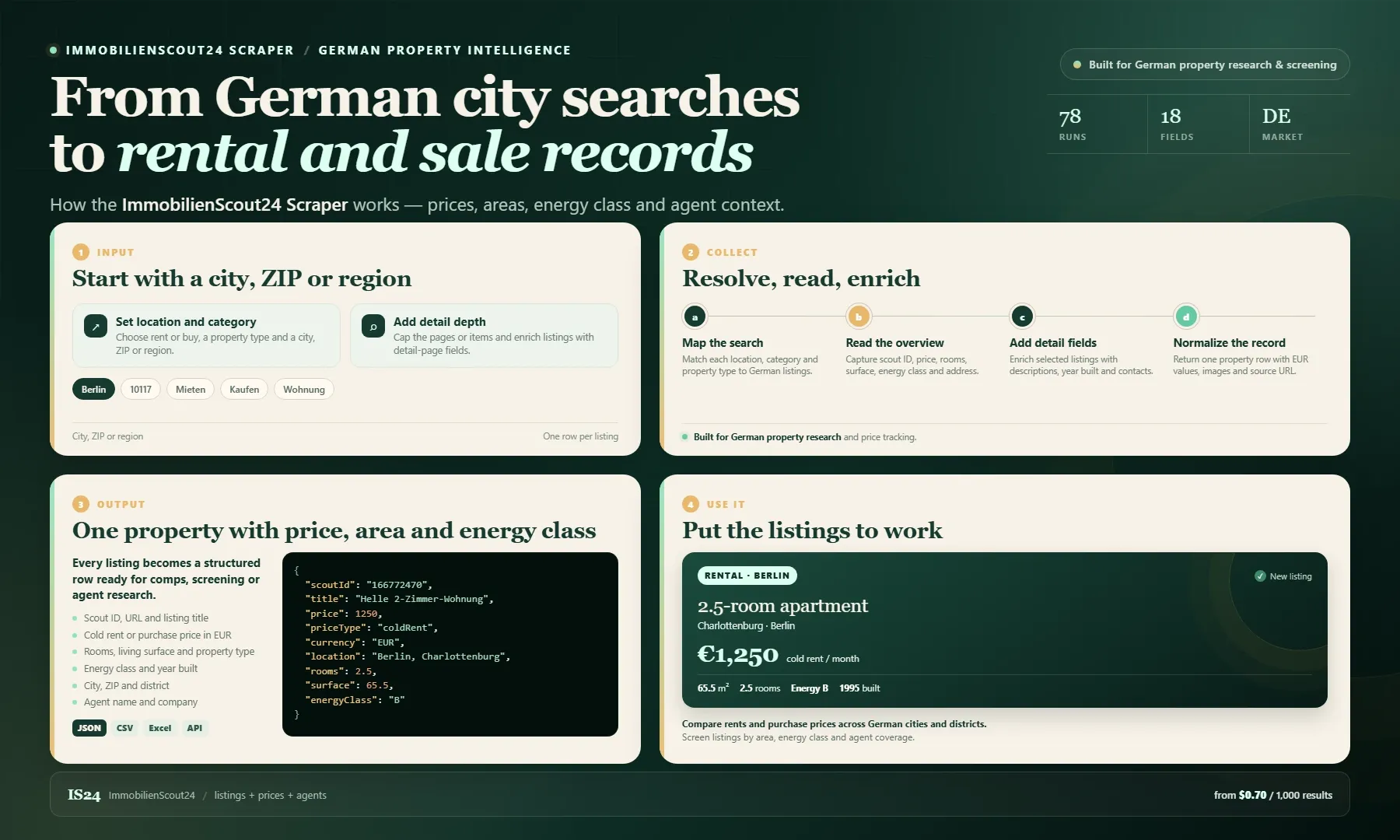
Looking for an ImmobilienScout24 scraper or a practical German property data alternative? Enter a city, ZIP or region, choose rent or buy and a property type, then set page and item limits. Each row includes scout ID, URL, title, price and price type, currency, rooms, living surface, energy class, year built, address, images and agent contacts, plus the agent's direct phone when ImmoScout24 exposes it.
Use the dataset for German rental research, purchase comps, investment screening, energy-class analysis and agent lead lists. Turn on monitoring mode and the same search becomes a daily change feed: new listings in the default dataset, price movements in changes-<runId>, and sold/delisted listings in removed-<runId>. Export as JSON, CSV or Excel, or pull results through the Apify API. Pay from $0.70 per 1,000 results; detail pages add description and year-built fields.
Input parameters
| Field | Type | Description | Default |
|---|---|---|---|
location | String | City name, zip code, or region (e.g. "Berlin", "Munich", "10117") | Berlin |
category | Select | Rent (mieten) or Buy (kaufen) | mieten |
propertyType | Select | Apartment (wohnung) or House (haus) | wohnung |
maxPages | Integer | Limit the number of search pages to crawl (0 = unlimited). Set 0 for full-market monitoring | 1 |
maxItems | Integer | Stop after checking this many listings (0 = no limit). In monitoring mode this caps checks, not dataset rows | 0 |
fetchDetails | Boolean | Visit each expose page for full description + year built. Slower, more proxy bandwidth — search-API fields are returned either way | false |
monitoringMode | Boolean | Emit only listings new since the previous run of the same search. State lives in the is24-monitoring key-value store | false |
detectPriceChanges | Boolean | Monitoring add-on: write price_changed rows to changes-<runId> | false |
detectRemovedListings | Boolean | Monitoring add-on: write removed rows to removed-<runId> with days-on-market | false |
deliverAgentPhone | Boolean | Include contact.phone when ImmoScout24 exposes a direct number. Billed only for rows that receive a phone | true |
proxyConfiguration | Object | Residential proxies are required for German real estate portals | Residential |
Example input:
Monitoring mode example
The first run is a baseline: every listing is new, so everything is written to the default dataset. Every following run against the same search compares against the saved state:
| Signal | Where it lands | Billed |
|---|---|---|
| New listings | default dataset, plus firstSeenAt / lastSeenAt | result event |
| Price change (cut or hike) | changes-<runId> dataset | additional-data check |
| Sold / delisted | removed-<runId> dataset, with daysOnMarket | additional-data check |
| Every listing checked | state store is24-monitoring | additional-data check |
Removed-listing detection only runs when the search was enumerated completely. Setting maxItems or a too-low maxPages makes the run partial, so removal detection is skipped with a warning instead of producing false positives.
Keep the same location, category and propertyType between runs so the diff lines up. The state is keyed by the search URL.
Agent direct phone
When deliverAgentPhone is on (the default), each listing includes the agent's or private seller's phone number in contact.phone whenever ImmoScout24's search response exposes it:
The contact-phone event (Agent direct phone delivered) is charged only for rows that actually receive a phone. Records without a phone are never charged this event.
Output
Data is delivered as structured JSON, CSV, or Excel.
Monitoring add-on rows are written to separate named datasets (changes-<runId> and removed-<runId>), so the default dataset always keeps its clean listing shape.
Integration examples
JavaScript / Node.js
Python
cURL
Automation workflows (n8n / Zapier / Make)
- Trigger: schedule or webhook
- HTTP Request: call the actor API
- Process: parse the JSON results
- Action: save to a sheet/DB, alert on new listings, or feed into a valuation model
Pro tips for best results
Use residential proxies. ImmobilienScout24 blocks data-center IPs almost instantly (AWS WAF challenge). For a reliable success rate, always use Apify Residential Proxies.
- Sorting — the actor automatically sorts by "Most Recent" (
-firstactivation) so you get the newest listings first. - Page limits — start with
maxPages: 5to test your search, then scale up. SetmaxPages: 0to crawl every available page. - Detail mode — only enable
fetchDetailswhen you need the full description and year built; it adds proxy bandwidth and run time. - Monitoring — for a daily change feed, set
monitoringMode: true, setmaxPagesto 0, and schedule the Actor. The first run is a baseline; later runs only pay for new rows plus the change checks. - Don't overlap runs — monitoring state is keyed by search URL. Running the same search twice in parallel can make the two runs overwrite each other's state.
- Slicing large markets — a single search can exceed the portal's practical page cap. Split the market by district, price band or property type, and run each slice with monitoring on.
How much does it cost to scrape ImmobilienScout24?
At $0.7 per 1,000 results, this is one of the most affordable full-detail ImmoScout24 scrapers available. Because search-API fields are returned without visiting expose pages (unless fetchDetails is enabled), overview-only runs stay especially cheap.
Monitoring and phone delivery use two custom pay-per-event charges:
| Event | Charged when | Rate |
|---|---|---|
| Result row | A row is written to the default dataset | $0.70 / 1,000 |
additional-data | Each item checked by monitoring mode (new-listing dedup, price change, removed) | $0.50 / 1,000 |
contact-phone (Agent direct phone delivered) | A row is delivered with a direct phone number | $0.005 / row |
Actor start is Apify's synthetic apify-actor-start event, priced in Console (the memo23-style listing uses $0.005 per GB, minimum one event).
The custom event definitions are in .actor/pay_per_event.json. To enable them, open the Actor's Monetization settings in Apify Console, choose Pay per event, and paste that JSON. Then set the base result event price to your current per-result price.
Example: daily monitoring of 2,000 Berlin listings costs roughly 2,000 checks × $0.50/1,000 = $1.00/day, plus $0.70/1,000 only for genuinely new listings and $0.005 for each row that receives a direct phone.
FAQ
How much does it cost?
$0.7 per 1,000 results — search-API fields included by default; enable fetchDetails for the full expose-page field set. Monitoring checks cost $0.50/1,000 and a delivered agent phone costs $0.005 per row.
How does monitoring mode work?
The first run saves every listing ID, price and firstSeenAt in the is24-monitoring key-value store, keyed by the search URL. Later runs compare against that state and write only new listings to the default dataset. With the add-ons enabled, price movements go to changes-<runId> and sold/delisted listings go to removed-<runId>.
Why was removed-listing detection skipped?
Removal detection needs a complete enumeration. If you set maxItems, cap maxPages, or the run hits a request error, the enumeration is partial and the actor skips removal detection to avoid false "sold" rows.
How do I get the agent's phone number?
Leave deliverAgentPhone on. Each listing gains contact.phone when ImmoScout24's search response contains a direct number. Rows without a phone are delivered with null and are never charged the contact-phone event.
Do I need a proxy? Yes. ImmobilienScout24 uses an AWS WAF challenge that blocks data-center IPs almost immediately — residential proxies are required for reliable results.
What's the difference with fetchDetails on vs off?
Off: fast, cheap search-API fields (price, rooms, surface, energy class, images). On: additionally visits each expose page for full description and year built — slower and uses more proxy bandwidth.
Can I scrape both rent and buy listings?
Yes — set category to mieten (rent) or kaufen (buy); run separately for each if you need both in one dataset.
Does it cover apartments and houses?
Yes — set propertyType to wohnung (apartment) or haus (house).
What output formats are supported? JSON, CSV, and Excel — all exportable directly from the Apify dataset.
Is scraping ImmobilienScout24 legal? Scraping publicly available listing data for research, analysis, or lead generation is generally acceptable, but always respect ImmobilienScout24's Terms of Service and applicable data protection laws (GDPR). Read more in Apify's blog post on the legality of web scraping.
Will it break when ImmobilienScout24 updates their site? The actor is actively maintained and updated when ImmobilienScout24 changes its anti-bot challenge or page structure.
Support
Developed for professionals who need reliable ImmobilienScout24 data at scale. Open an issue in the actor's Issues tab, or reach out for custom German real-estate scraping solutions.
Related Actors
Verified related actors on Apify that pair well with this one. All links point to real, publicly available actors.
SEO Keywords
immobilienscout24 scraper, immobilienscout data, german real estate data, is24 scraper, immobilien scout 24, deutsche immobilien daten, immobilienscout24 api alternative, german property listings, immobilienscout24 rent data, immobilienscout24 price monitoring, german rental market data, is24 lead generation, immobilien scout24 csv, german property scraper, immobilienscout24 export, immobilien daten deutschland, is24 miete kaufen, deutsche immobilien portal data, immobilienscout24 market analysis, immobilienscout24 proptech


