
![Crexi Scraper [💰$3.5/1K] | Commercial CRE | Broker Leads avatar](https://images.apifyusercontent.com/fkMRKqHSAUl2qs7KSJayoS9TdknBqy6nBx8Wq3KjSqI/rs:fill:250:250/cb:1/aHR0cHM6Ly9hcGlmeS1pbWFnZS11cGxvYWRzLXByb2QuczMudXMtZWFzdC0xLmFtYXpvbmF3cy5jb20vZHRSN3FuVGJRck5pU0NtajctYWN0b3ItNXZhVmNGTUZuRHl4Y2R0QVUtTXhCMHA0cnZtaC1jcmV4aS5wbmc.webp)
Crexi Scraper [💰$3.5/1K] | Commercial CRE | Broker Leads
Pricing
from $3.47 / 1,000 results
Crexi Scraper [💰$3.5/1K] | Commercial CRE | Broker Leads
Extract commercial real estate listings and broker data from Crexi for investment research and lead generation. Build CRE deal pipelines and broker contact datasets.
Pricing
from $3.47 / 1,000 results
Rating
5.0
(6)
Developer

Ahmed Jasarevic
Maintained by CommunityActor stats
2
Bookmarked
71
Total users
4
Monthly active users
8 days ago
Last modified
Categories
Share
Crexi Scraper - Commercial Real Estate Listings and Broker Leads
The Crexi Scraper extracts commercial real estate listings and public broker records from Crexi. Paste a Crexi search URL and receive structured property rows with deal type, property type, asking price, price per square foot, cap rate, NOI, square footage, full address, coordinates, photo counts, listing dates, days on market and broker contacts when Crexi publishes them.
It is built for CRE deal sourcing, broker lead generation, market comps and portfolio monitoring. The Actor applies supported filters from the search URL, pages through the public Crexi API in batches of 60, and returns one row per property with a stable listing URL and scrape timestamp.
Main Use Cases for Commercial Real Estate Data
- Deal sourcing - collect office, retail, industrial, multifamily and land listings that match a target market and price range.
- Broker lead generation - build outreach lists from public broker names, brokerages, phone numbers, emails and profile URLs.
- Market comps - compare asking prices, price per square foot, cap rates and NOI across similar properties.
- Portfolio monitoring - schedule runs to detect new listings, price changes and days-on-market movement.
- Opportunity zone research - filter and analyze listings flagged as opportunity zone properties.
- CRM enrichment - append property, location, brokerage and broker details to an existing deal pipeline.
- AI investment screening - feed an LLM compact property rows with numeric pricing and location fields.
How It Works
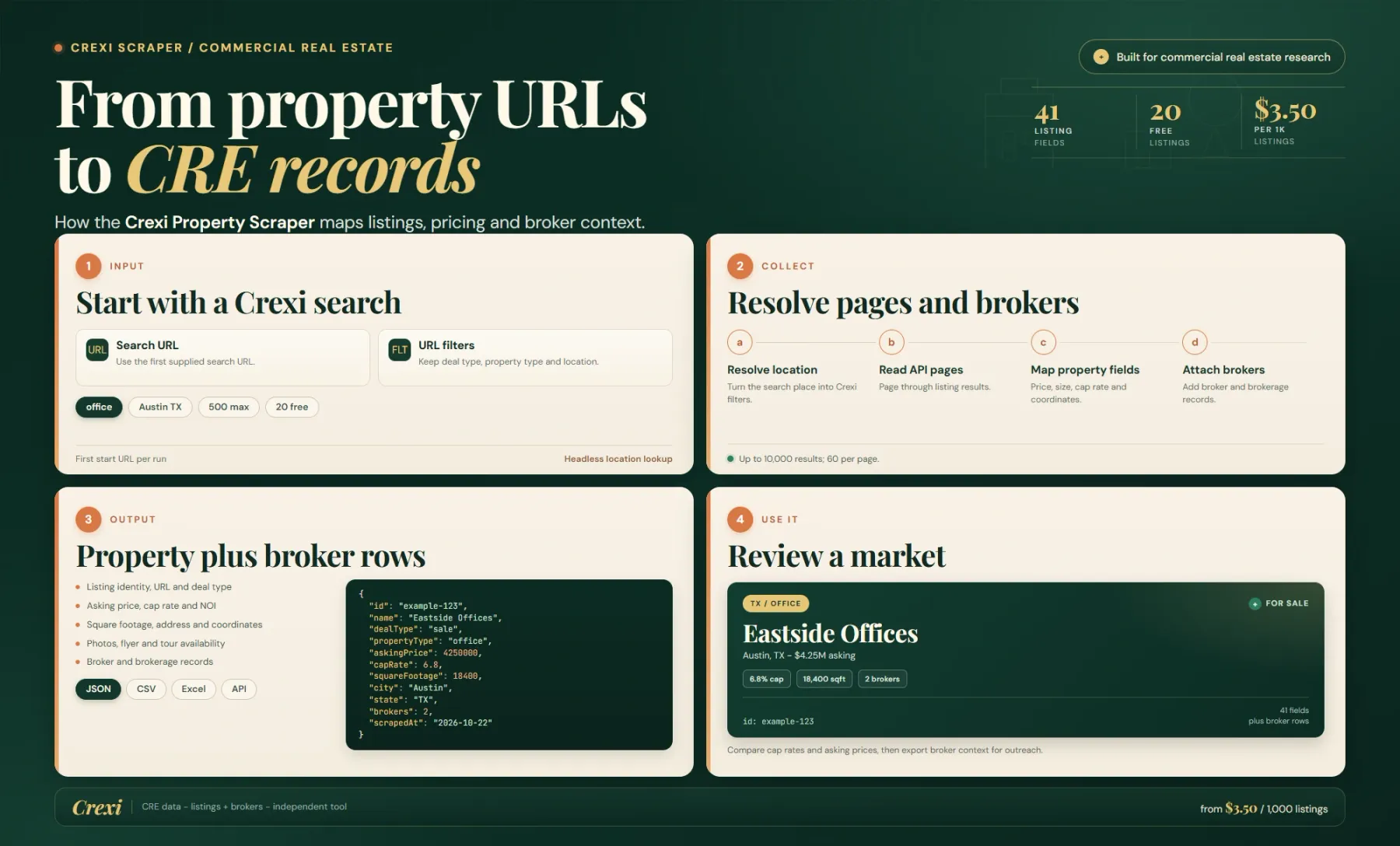
Provide a Crexi search or property URL in startUrls and set maxResults. The current build reads the first start URL, extracts supported filters from its query string, and posts them to the Crexi search API. Supported filters include asking price range, cap rate range, price per square foot, square footage, listing types, property types and a keyword query.
Location filters use Crexi place IDs. When the URL contains placeIds[], the Actor opens the search page in a headless browser to capture the location polygons, then includes them in the API request. If the polygons cannot be captured, it continues without the location filter rather than stopping the run.
The API returns page sizes of up to 60 properties. Each row is written with Crexi fields plus a normalized listing url and scrapedAt. Paging continues until maxResults is reached, the API runs out, or an API error stops the loop. The free tier is capped at 20 properties; paid runs can request up to 10,000 per run.
Broker data is public but not guaranteed. A listing can have one or several broker records, and phone, email, title, license numbers or avatar may be missing. The top-level brokerName and brokerageName are convenient summary fields; the brokers array is the authoritative list when you need every contact on the deal.
Input
The input is a Crexi URL, a result budget and an optional proxy configuration. Filters belong in the URL rather than in separate fields.
| Field | Type | Required | Default | What it does |
|---|---|---|---|---|
startUrls | string[] | Yes | Crexi properties URL | Crexi search or property URLs. The current build uses the first URL and reads its supported query filters. |
maxResults | integer | No | 500 | Maximum properties saved. Range 1-10,000. The free tier is capped at 20. |
proxyConfiguration | object | No | Apify Proxy | Proxy settings. Residential proxy is recommended for location capture and stable API access. |
Build the search on Crexi first, then copy the resulting URL. Supported query parameters are read from the URL; unsupported UI filters may not be translated. Because the current build uses only the first start URL for the API query, run separate jobs when you need several distinct searches, or combine them at the analysis layer.
Output
Rows closely follow the Crexi API object. Numeric fields are numbers when Crexi supplies them, and optional fields are null rather than invented.
| Field group | Fields | What you get |
|---|---|---|
| Identity | id, url, name, description, dealType, status, propertyType, propertyTypes | Listing ID, canonical URL, name, marketing description and deal or property classification. |
| Pricing | askingPrice, pricePerSqFt, pricePerAcre, capRate, netOperatingIncome | Asking price and the underwriting metrics Crexi exposes for the listing. |
| Size and location | squareFootage, fullAddress, addressLine1, city, county, state, zipCode, country, latitude, longitude | Building size, mailing address, administrative location and coordinates. |
| Broker summary | brokerName, brokerageName, brokerageAddress, brokers | Primary broker summary plus an array of broker records with contact and profile data when published. |
| Media and flags | thumbnailUrl, photoCount, hasFlyer, hasOfferingMemorandum, hasVideo, hasVirtualTour, isNew, isInOpportunityZone | Gallery thumbnail, media counts and listing or compliance flags. |
| Dates | activatedOn, updatedOn, daysOnMarket, scrapedAt | Listing activation and update times, days on market and observation timestamp. |
capRate, netOperatingIncome, pricePerSqFt and pricePerAcre are often null because sellers do not always publish them. Do not treat a null as zero. brokers can contain several people, and a broker email or phone can be absent even when a name and profile URL exist. locations and other raw API fields may also be present because the Actor preserves the source object.
Pricing
Pricing is pay-per-event. A start event is charged per run and each property saved to the dataset is charged as a result.
| Event | FREE | BRONZE | SILVER | GOLD+ |
|---|---|---|---|---|
| Actor start, per run | $0.00005 | $0.00005 | $0.00005 | $0.00005 |
| Property result | $0.0035 | $0.00349 | $0.00348 | $0.00347 |
That is $3.50 per 1,000 properties on FREE, falling to $3.47 per 1,000 on GOLD and higher tiers. A 500-property run costs about $1.75. The free tier returns at most 20 properties, which is enough to validate a URL and filter combination.
Example Input
This targets for-sale office listings above $5 million and caps the run at 100 properties. Check that the filters appear in the URL, because the current build translates only a known subset of query parameters.
Example Output
This is a trimmed real sample. Optional underwriting fields are null, while the broker record still carries a profile URL even when phone and email are absent. Treat the broker array as the source of truth for multi-broker listings.
Integrations and Automation
Call the Actor from the Apify API, Apify MCP, a scheduled task, Zapier, Make or n8n. Export JSON, CSV or Excel, or push rows into Google Sheets, Airtable, a CRM, a data warehouse or a webhook.
For deal sourcing, normalize propertyType and dealType, then score rows on asking price, price per square foot, cap rate and days on market. Keep null underwriting fields as null so a missing cap rate is not ranked as a zero.
For broker outreach, explode the brokers array and deduplicate on profile URL or normalized name plus brokerage. Keep the listing ID alongside each broker so a contact can be tied back to the property that produced it.
Related Actors
- LoopNet Scraper - commercial real estate listings and property details from LoopNet.
- Land Scraper - land and development-site listings for site selection.
- PropertyFinder.ae Scraper - UAE residential and commercial property listings with agent data.
FAQ
Can I use more than one start URL?
The current build reads the first start URL for the API query. Run separate jobs for distinct searches and combine the datasets afterward.
Are cap rate and NOI always available?
No. Many listings do not publish underwriting metrics. The fields are null when Crexi does not supply them and should not be treated as zero.
Does the Actor visit each property page?
It uses the public Crexi search API and preserves the listing object. That object already includes many property and broker fields, so a separate page visit is not required for every row.
How many broker contacts can a listing have?
A listing can include several brokers in the brokers array. The top-level brokerName and brokerageName are summary fields and may represent only the primary contact.
Why did my location filter disappear?
Location filters depend on Crexi place IDs. The Actor tries to capture the polygons in a headless browser; if that fails, it continues without the location filter rather than returning no rows.
What is the free limit?
The free tier saves at most 20 properties. Paid runs can request up to 10,000 properties, subject to availability and API limits.
For AI Agents and LLM Apps
The Actor returns commercial property and public broker records with stable listing IDs, numeric pricing, geographic coordinates and source timestamps. It is suitable for CRE screening and lead-generation agents through the Apify API or Apify MCP.
- One row represents one Crexi property. Use
idor the canonicalurlas the key. - Preserve nulls in
capRate,netOperatingIncome,pricePerSqFtandpricePerAcre; missing underwriting data is not zero. - Explode
brokersbefore deduplicating contacts, and keep the listing ID as the relationship key. - The current build uses only the first start URL, so do not assume multiple URLs are combined in one run.
- The free tier is capped at 20 properties, and every saved property is billed as a result.
Legal and Compliance
This Actor is an independent tool and is not affiliated with, endorsed by or sponsored by Crexi. It reads publicly available listing and broker data for investment research, market analysis and legitimate business outreach. Crexi terms and applicable real estate, privacy and marketing law still apply.
Broker names, phone numbers and emails can be personal data. Use them only for lawful business communication, respect do-not-contact requests, and comply with telemarketing and anti-spam rules. Do not present scraped asking prices or underwriting fields as verified appraisals or investment advice.
SEO Keywords
Crexi scraper, commercial real estate scraper, Crexi listings, CRE broker data, commercial property data, Crexi API alternative, broker lead generation, commercial real estate dataset, cap rate data, NOI data, office property listings, retail property data, industrial property data, multifamily CRE data, Crexi property search, commercial real estate leads, CRE market research, opportunity zone properties, broker contact scraper, Crexi dataset


![Crexi [$1.9💰] Scraper: Properties, Brokers & Instant Database avatar](https://images.apifyusercontent.com/zeR420eFYAaJR8jAo1W4pZ9q840EwX0iS_tVwkQGDzI/rs:fill:76:76/cb:1/aHR0cHM6Ly9hcGlmeS1pbWFnZS11cGxvYWRzLXByb2QuczMudXMtZWFzdC0xLmFtYXpvbmF3cy5jb20vbmduOHZSRVNUa3NleVdFNnAtYWN0b3ItUkZIS0libjFOclpiRVlCTEMtSk5xTUtUYmlaQy1jcmV4aS53ZWJw.webp)


![LoopNet US + UK + Realla [$1.5💰] Commercial Property Scraper avatar](https://images.apifyusercontent.com/OWa9kJL7gqsCWnKo6lZR80k_riG91PzwIe70jgZCt_s/rs:fill:76:76/cb:1/aHR0cHM6Ly9hcGlmeS1pbWFnZS11cGxvYWRzLXByb2QuczMudXMtZWFzdC0xLmFtYXpvbmF3cy5jb20vbmduOHZSRVNUa3NleVdFNnAtYWN0b3ItMFpDUU9OeEIzQmR5T3pyYkQtSmVPT0FKRE5idS1sb29wbmV0LmpwZw.webp)


