
![Realtor.com Agent Scraper [💰$1/1K] | Leads | CRM | Reviews avatar](https://images.apifyusercontent.com/E0WMjG6pd7RpgFHMvCZcWPB75p49auxaE-00CGbjxzg/rs:fill:250:250/cb:1/aHR0cHM6Ly9hcGlmeS1pbWFnZS11cGxvYWRzLXByb2QuczMudXMtZWFzdC0xLmFtYXpvbmF3cy5jb20vZHRSN3FuVGJRck5pU0NtajctYWN0b3ItSUh6eUs1RDd3dFoxZkFuZmktNXM0Z2JhOFJjbC13ZWJfUl9ibHVlLmpwZw.webp)
Realtor.com Agent Scraper [💰$1/1K] | Leads | CRM | Reviews
Pricing
from $0.97 / 1,000 results
Realtor.com Agent Scraper [💰$1/1K] | Leads | CRM | Reviews
Extract US real estate agents from Realtor.com — phone, email, brokerage, listings, reviews, service areas and specialties. Build lead lists, enrich CRM and research agent density across US cities and ZIP codes. Pure HTTP, no browser needed.
Pricing
from $0.97 / 1,000 results
Rating
0.0
(0)
Developer

Ahmed Jasarevic
Maintained by CommunityActor stats
0
Bookmarked
4
Total users
1
Monthly active users
5 days ago
Last modified
Categories
Share
Realtor Agent Scraper [$1/1K💰] | US Leads, Phone Numbers & CRM Data
Extract real estate agent data from Realtor.com — full names, direct phone numbers, brokerages, offices, licenses, bios, ratings, review counts and market activity — for any US city or ZIP code. Built for lead generation, agent outreach, recruiting and market research.
This Actor calls Realtor.com's internal GraphQL API (frontdoor/graphql) — the same private API the website itself uses — so every response is structured JSON, not fragile CSS selectors. A page returns up to 100 agents; even large metros scrape in minutes with negligible compute cost. No browser, no proxy, no CAPTCHAs.
Main Use Cases
- Real estate agent lead generation — build targeted agent lists by market, filter by rating or sales volume
- Agent outreach & recruiting — collect phone numbers, brokerages and office details for direct contact
- CRM enrichment — supplement your real estate CRM with verified agent profiles
- Market research & competitive intelligence — analyse agent density, brokerage dominance and activity by city
- Real estate vendor prospecting — find active agents who need photography, staging, e-signature tools or marketing services
- Real estate data pipeline — export structured agent records as JSON, CSV or Excel via the Apify API
How It Works
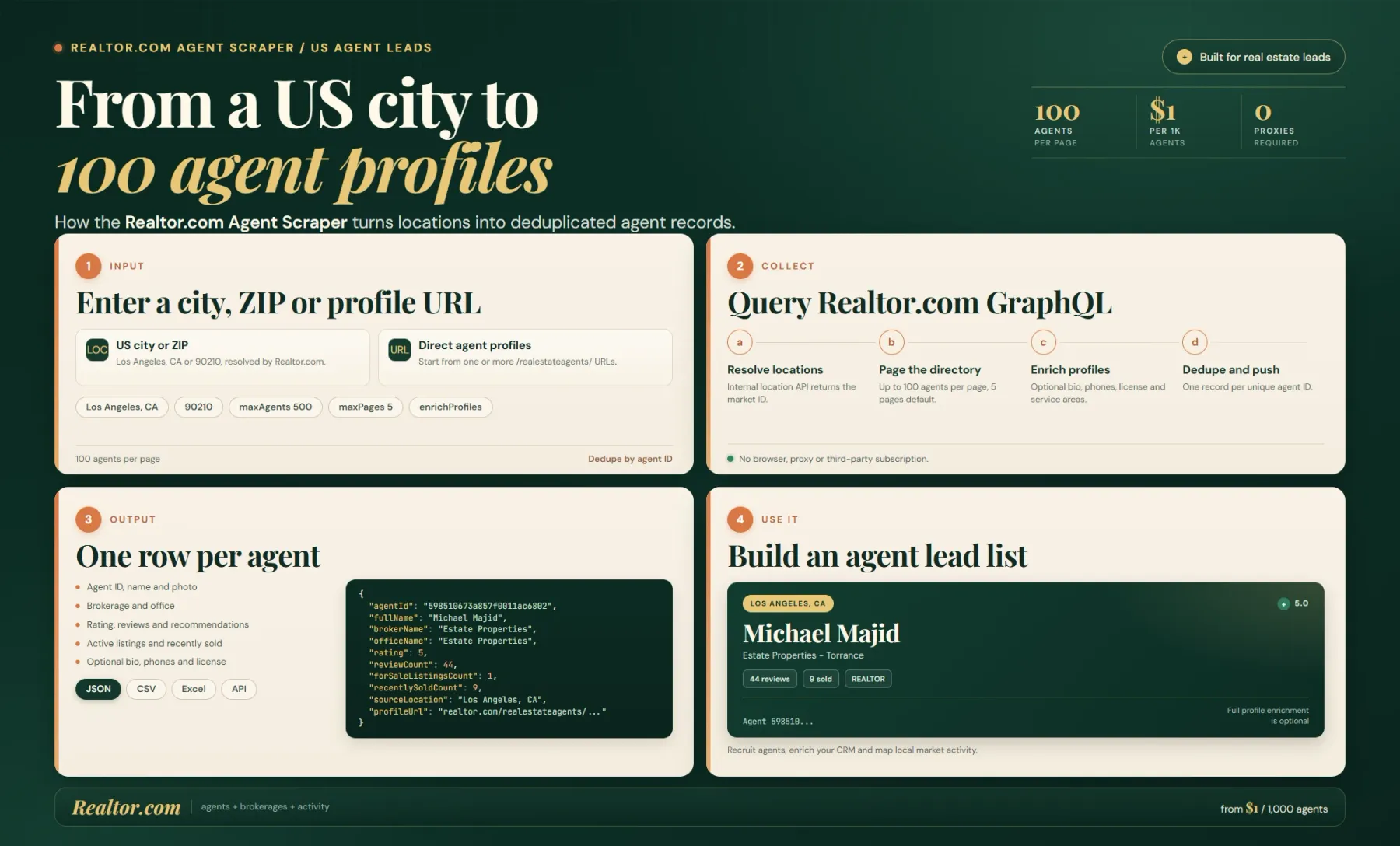
The Actor resolves each US city or ZIP through Realtor.com's autocomplete, then pages the agent directory through the site's internal GraphQL endpoint at up to 100 agents per page. Profiles are deduplicated by Realtor.com ID; optional enrichment fetches each agent's full public profile.
Each row includes name, brokerage, office, phones, ratings, reviews, transactions, license data, languages, specialties, service areas and profile URL. Full-profile enrichment is off by default; when enabled it adds bio, direct contact details and licensing fields. No proxy is required.
- Enter one or more US locations (city names like
Austin, TXor ZIP codes like90210). - The Actor resolves each location through Realtor.com's internal autocomplete API, then pages through the agent directory via GraphQL — up to 100 agents per page.
- With enrichment enabled (recommended), each agent is fetched individually to pull their full profile: bio, direct phones, license, languages, specializations and service areas.
- Every agent is deduplicated by their Realtor.com profile ID, so each record appears exactly once in your dataset.
- Results are stored in your Apify dataset — downloadable as JSON, CSV, Excel or via API/webhook.
Free tier: non-paying users are preview-capped at 10 agents per run. Paying users get the full
maxAgents.
Extract Real Estate Agents With Phone Numbers & Ratings
Realtor.com does not offer a public API for agent data. This Actor works around that by calling the site's own private GraphQL endpoints — returning full agent profiles without a browser, proxy or third-party subscription. Each record includes phone numbers (office, mobile), rating, review count, brokerage name, office address, license number, service areas and market activity stats (active listings, recently sold).
Input
Pulled directly from the Actor's input schema.
| Field | Type | Required | Default | Notes |
|---|---|---|---|---|
locations | string[] | Yes* | ["Los Angeles, CA"] | US cities (Austin, TX, Miami) or ZIP codes (90210, 78701). Resolved via Realtor.com's autocomplete, then paginated through the directory. |
startUrls | {url: string}[] | No | — | Optional direct agent profile URLs (https://www.realtor.com/realestateagents/{id}). |
maxAgents | integer | No | 100 | Stop after this many unique agents across all locations (min 1, max 10,000). |
maxPagesPerLocation | integer | No | 5 | Pagination cap per location (each page returns up to 100 agents, min 1, max 100). |
enrichProfiles | boolean | No | true | Fetch each agent's full profile (bio, phones, license, languages, specializations, service areas). Disable for triple throughput when you only need names/brokerages/ratings. |
*At least one of locations or startUrls is required.
Example Input
Output
Each dataset item is one agent record:
Output Fields
| Category | Fields |
|---|---|
| Identity | agentId, fullName, profileUrl, photoUrl, isRealtor |
| Contact | phones[] (number + type), primaryPhone, officePhone, email, website |
| Brokerage | brokerName, officeName, office (name/email/website/slogan/phone) |
| Address | addressLine, city, stateCode, postalCode |
| Profile | bio, languages[], specializations[], designations[], licenseNumber, mlsName |
| Service Areas | serviceAreas[], serviceZipCodes[] |
| Reputation | rating, reviewCount, recommendationsCount |
| Activity | forSaleListingsCount, recentlySoldCount |
| Source | source (directory or url), sourceLocation, scrapedAt |
Build Real Estate Agent Lead Databases At Scale
Each page returns up to 100 agents via the GraphQL API — no pagination scraping or CAPTCHA solving. With enrichProfiles enabled, the Actor makes roughly 2 API calls per agent (directory card + profile), so a run of 1,000 agents finishes in minutes for well under $0.50 of compute. No proxy traffic at all.
Los Angeles alone has 55,000+ agents on Realtor.com — use maxAgents plus maxPagesPerLocation to slice it, or split by ZIP lists for precise market coverage.
Integrations & Automation
- REST API / Apify API — call the Actor programmatically and pull the dataset with
get-dataset-items - Webhooks — trigger downstream workflows when a run completes
- Google Sheets / Airtable — export agent data to spreadsheets
- CRM / sales tools — push agent contacts into HubSpot, Salesforce or custom pipelines
- Zapier / Make — automate outreach workflows from scraped agent data
- Schedule it — run weekly on your farm markets and diff outputs to spot newly listed agents and market changes. Recurring runs improve your Apify Store recommendation signals.
Related Actors
| Actor | Description |
|---|---|
| Realtor.com Agents Scraper | Realtor.com agent contact data — names, phones, offices, ratings, reviews and listings by city or ZIP code |
| Realtor.com Scraper | Broader Realtor.com scraper — homes, prices, listings and agent leads |
| Realtor.com Agent Scraper | Agent profiles with contact details, service areas, experience, listings and performance metrics |
| Zillow Agent Data Scraper | Agent details, active/sold listings, reviews and search results from Zillow |
| Google Maps Real Estate Agent Scraper | Real estate agents from Google Maps by location, niche and search terms |
FAQ
Why use this Actor instead of the official Realtor.com API?
Realtor.com does not offer a public API for agent data. This Actor calls the site's own internal GraphQL endpoints (frontdoor/graphql), so it requires no API key, no rate-limit tiers, and no official integration. Every response is structured JSON from the same API that powers the website.
What are alternatives to this Actor / to Realtor.com data?
For US real estate agent data you can also scrape Zillow (see Zillow Agent Data Scraper), Google Maps (see Google Maps Real Estate Agent Scraper), or access pre-built databases from providers like DataForSEO, LeadsPlease or ContactOut. This Actor gives you raw, structured Realtor.com agent profiles for your own analysis.
Do I need proxies?
No. The Actor exclusively uses Realtor.com's internal GraphQL API, which accepts datacenter traffic. There are no proxy settings because none are needed.
How fast is the scraping?
Each GraphQL page returns up to 100 agents. With enrichProfiles enabled, each agent requires one additional API call — so roughly 2 requests per agent. A run of 1,000 agents finishes in minutes. Disable enrichment for triple throughput when you only need directory-level data.
Why do some bios contain odd characters?
Realtor.com's own data sometimes contains encoding artifacts; the Actor stores values as-is.
Is scraping Realtor.com legal?
You are responsible for complying with Realtor.com's Terms of Service and applicable privacy laws (TCPA/CAN-SPAM for commercial outreach, CCPA for California residents' data). Do not spam scraped contacts and respect rate limits.
SEO Keywords
realtor agent scraper, real estate agent contact data, realtor.com scraper, real estate lead generation, realtor agent leads, us real estate agents, real estate agent phone numbers, realtor api alternative, real estate agent database, realtor lead generation tool, real estate market research, realtor agent directory, agent contact information, real estate agent ratings, realtor crm enrichment, real estate agent data extraction, real estate agent recruiter, realtor.com graphql api, zillow agent scraper alternative, real estate agent directory scraping
For AI Agents & LLM Apps
This Actor is callable via the Apify API and the Apify MCP server (it's a standard serverless Actor).
Purpose: returns structured Realtor.com agent profiles — name, phone numbers, brokerage, office, address, license, bio, ratings, reviews, service areas, specializations and market activity — as one JSON record per agent in the default dataset.
Minimal working input:
Variant input (with enrichment disabled for speed):
Output fields: agentId, fullName, profileUrl, photoUrl, phones (array of {number, type}), primaryPhone, bio, isRealtor, brokerName, officeName, office (object), addressLine, city, stateCode, postalCode, serviceAreas, specializations, languages, designations, licenseNumber, rating, reviewCount, recommendationsCount, forSaleListingsCount, recentlySoldCount, sourceLocation, scrapedAt.
Behaviors an agent should know:
locationsis the primary input — accepts US city names ("Los Angeles, CA") or 5-digit ZIP codes ("90210"). Direct profile URLs go instartUrls.- Free (non-paying) accounts are hard-capped at 10 agents per run, regardless of
maxAgents. Paying accounts get the fullmaxAgents. enrichProfiles: falseskips the per-agent profile API call, returning only directory card data (name, brokerage, rating). This triples throughput when full bio/phone/license data isn't needed.- Results are deduplicated by
agentId— the same agent appearing in multiple locations is pushed only once. - When both
locationsandstartUrlsare provided,startUrlsare processed first, then locations. - Agents with no data found for a location are skipped silently; if zero agents are found across all inputs, the run throws an error.
Billing model: pay-per-event — the Actor is not pay-per-result; billing is based on Apify compute usage. Free users are capped at 10 agents per run.
Legal & Compliance Disclaimer
This Actor is an independent tool and is not affiliated with, endorsed by, or sponsored by Realtor.com, Move, Inc., or the National Association of REALTORS®. It accesses only publicly visible agent directory pages and Realtor.com's own internal API; it does not log into private accounts, bypass authentication, or solve CAPTCHAs.
Users are solely responsible for ensuring their use of scraped data complies with Realtor.com's Terms of Service and applicable data-protection law. Agent contact data returned by this Actor may include names, phone numbers, office addresses and email addresses; such data must not be used for unsolicited commercial outreach in violation of laws such as the CAN-SPAM Act, the Telephone Consumer Protection Act (TCPA), the California Consumer Privacy Act (CCPA), or GDPR. This content is provided for informational purposes only and is not legal advice.


