

SAP SuccessFactors Scraper [$1.50/1K 💰] | Jobs
Pricing
from $1.40 / 1,000 results
SAP SuccessFactors Scraper [$1.50/1K 💰] | Jobs
Scrape SAP SuccessFactors career sites: job titles, requisition IDs, employers, locations, departments, employment types, dates, descriptions and apply links. $1.50 per 1,000 jobs.
Pricing
from $1.40 / 1,000 results
Rating
0.0
(0)
Developer

Ahmed Jasarevic
Maintained by CommunityActor stats
0
Bookmarked
2
Total users
1
Monthly active users
6 days ago
Last modified
Categories
Features
Share
SAP SuccessFactors Career Scraper – Public Job Listings
Scrape public job postings from SAP SuccessFactors career sites, including classic careerN.successfactors.eu tenants and branded Career Site Builder boards such as basf.jobs, careers.ey.com and jobs.fraunhofer.de. Get titles, requisition IDs, employers, locations, departments, employment types, dates, descriptions and apply links. $1.50 per 1,000 jobs.
SAP And SuccessFactors Job Data
This Actor collects publicly advertised vacancies from SAP SuccessFactors career sites. It is built for recruiters, job-board operators, talent-intelligence teams, HR analysts, market researchers and AI dataset builders who need clean, structured hiring data.
- Job aggregation — collect openings from multiple employers.
- Recruitment analytics — compare roles, locations and departments.
- Talent intelligence — track hiring activity over time.
- Job-board enrichment — add vacancy data to your platform.
- AI datasets — build structured job-posting corpora.
How It Works
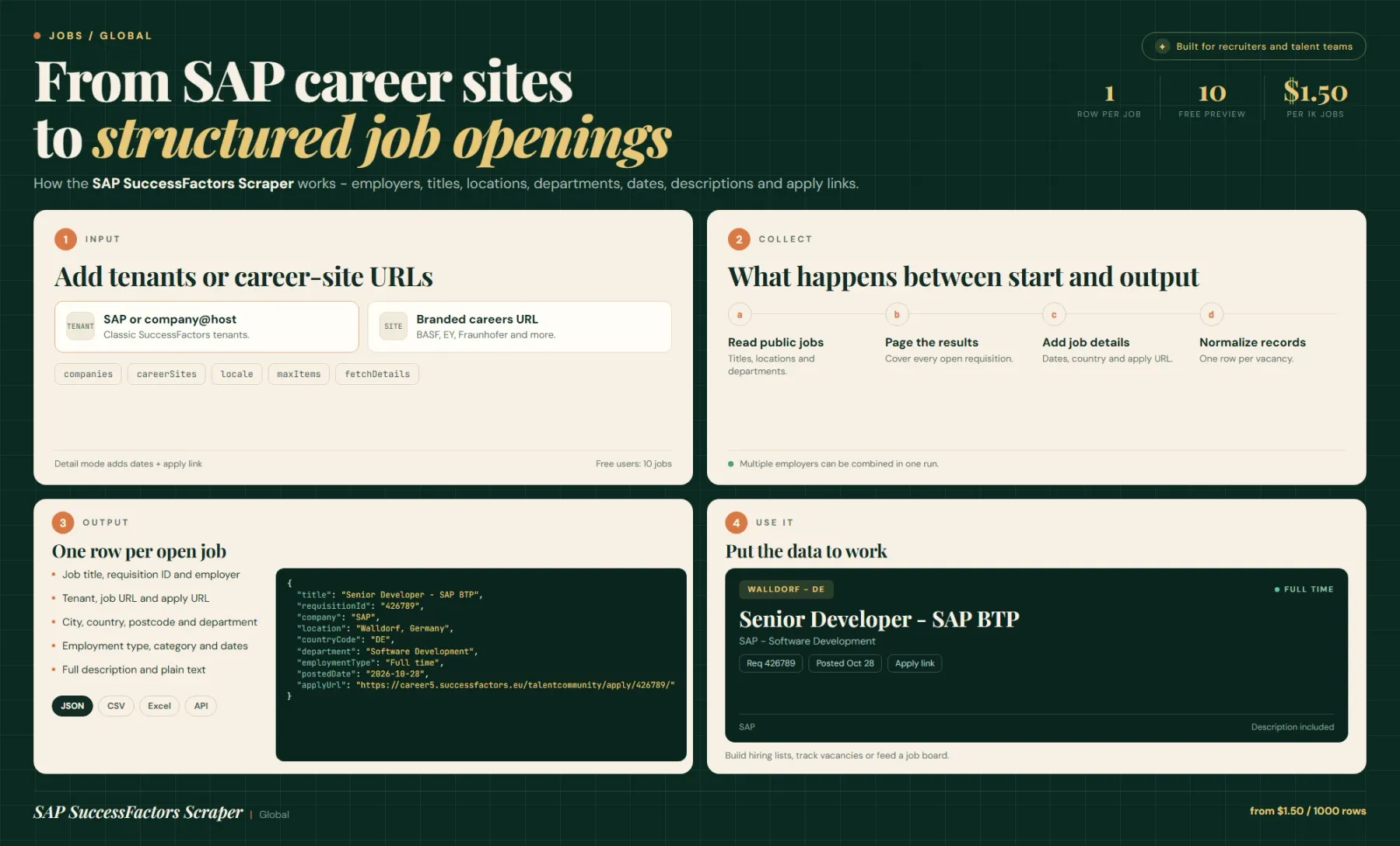
Add tenant IDs or career-site URLs, set a locale and choose whether to load full job details. The Actor reads public listings, merges duplicate postings and writes one row per vacancy.
- Classic tenants and branded career sites supported.
- One row per open position.
- Optional detail enrichment for dates, country and apply URL.
- Free users get a 10-job preview.
- No login or candidate account required.
Supported Career Sites
- Classic SuccessFactors tenants — use the tenant ID, such as
SAP. - Tenant and host pairs — use
company@hostwhen the tenant runs on a specific data centre. - Full career URLs — paste a public SuccessFactors career-site URL.
- Branded Career Site Builder boards — use domains such as
basf.jobs,careers.ey.comorjobs.fraunhofer.de. - Multiple employers — combine tenants and career sites in one run.
Job Fields
Each row can include the job title, requisition ID, employer, tenant, location string, parsed city, country, country code, postal code, department, employment type, employment category, posted date, expiration date, full description, plain-text description, job URL, apply URL, locale, source and scrape time.
Some employers do not publish a posted date, expiration date or employment type. Those fields stay null rather than being guessed.
Input – Configure A SAP Jobs Run
| Field | Type | Default | Notes |
|---|---|---|---|
companies | array | — | Classic tenant IDs, company@host values or full career URLs |
careerSites | array | — | Branded career-site URLs or hostnames |
locale | string | en_US | Preferred career-site locale |
maxItems | integer | 100 | Maximum jobs saved across all employers; max 5,000 |
fetchDetails | boolean | true | Add dates, country, employment type and exact apply URL |
proxy | object | Off | Optional connection settings for large batches |
At least one of companies or careerSites must be provided. Free users receive a 10-job preview.
Output – Job Fields
- Job identity —
title,requisitionId,jobUrl,applyUrl - Employer —
company,tenant - Location —
location,city,country,countryCode,postalCode - Classification —
department,employmentType,employmentCategory - Dates —
postedDate,expirationDate - Content —
descriptionHtml,descriptionText - Provenance —
locale,source,scrapedAt
Example Input – SAP And Two Branded Career Sites
Example Output – One Job Posting
Export Jobs And Schedule Updates
Download JSON, CSV, Excel or HTML from Apify Console, or connect the dataset to Google Sheets, Airtable, BigQuery, Make, Zapier, n8n or a webhook. Schedule daily or weekly runs to track new vacancies and hiring trends.
Related Actors
- Recruitee Scraper — add Recruitee openings
- Jobs Teamtailor Scraper — add Teamtailor job boards
- Multi ATS Jobs Scraper — add employer career sites
- Indeed Job Scraper — add job postings
FAQ
Which career sites are supported?
Classic SuccessFactors tenants and branded Career Site Builder domains, as long as the jobs are publicly advertised.
Do I need a SuccessFactors account?
No. The Actor only reads public vacancy pages and does not log in.
How do I use a specific data-centre host?
Pass company@host, for example SAP@career5.successfactors.eu, or provide the full public career URL.
Why is a posted date missing?
Some employers do not publish a posting date or employment type. The Actor returns null instead of inventing a value.
What does fetchDetails add?
It opens each public job page to add posted date, employment type, country and the exact apply URL. Disable it for a faster listing-only run.
Can I combine employers?
Yes. Add multiple tenant IDs and branded career sites in the same run; maxItems applies across all of them.
Why are some jobs skipped?
A few very large career sites may be unavailable or may not publish a complete public list. Those jobs cannot be returned.
How much does it cost?
FREE and BRONZE users pay $0.0015 per job ($1.50 per 1,000). SILVER pays $0.00145 and GOLD+ pays $0.0014 per job, plus a small Actor Start event.
For AI Agents & LLM Apps
Returns one row per public job posting with employer, location, classification, dates, description and apply links.
Minimal working input:
Output fields: title, requisitionId, company, tenant, location, city, country, countryCode, postalCode, department, employmentType, employmentCategory, postedDate, expirationDate, descriptionHtml, descriptionText, jobUrl, applyUrl, locale, source, scrapedAt.
Behaviors an agent should know:
postedDate,expirationDateandemploymentTypecan benull.fetchDetails: falseskips the extra detail-page fields while keeping the core job row.maxItemsis enforced across every employer in the run.- Free users get a 10-job preview.
Billing: $0.0015 per job on FREE/BRONZE ($1.50 per 1,000), $0.00145 on SILVER and $0.0014 on GOLD+, plus a small Actor Start event.
Legal & Compliance Disclaimer
This Actor is an independent tool. It is not affiliated with, endorsed by or sponsored by SAP, SuccessFactors or any employer whose vacancies appear in the dataset.
It collects publicly advertised job information only. Users are responsible for complying with career-site terms, applicable employment law and data-protection rules. Job details can change or expire without notice; verify critical information with the employer.
SEO Keywords
sap successfactors scraper, sap jobs scraper, successfactors jobs, career site scraper, job listings data, job postings api, sap careers data, recruitment data, hiring data, job board scraper, job market data, job vacancy data, talent acquisition data, career scraper, job data extraction, sap careers, job search data, employment data


