

The Org Scraper [$0.90/1K💰] | Org Charts & People
Pricing
from $0.80 / 1,000 results
The Org Scraper [$0.90/1K💰] | Org Charts & People
Scrape The Org company profiles, org charts, teams, people and reporting lines. Get headcount, funding stage, offices, manager relationships and profile links in one dataset.
Pricing
from $0.80 / 1,000 results
Rating
0.0
(0)
Developer

Ahmed Jasarevic
Maintained by CommunityActor stats
0
Bookmarked
1
Total users
1
Monthly active users
6 days ago
Last modified
Categories
Features
Share
The Org Scraper
Scrape The Org (theorg.com) company profiles, org charts, teams, people and reporting lines — including headcount, offices, titles, managers and profile links — from public company pages.
Build Org Charts And Company People Lists
- Map public org charts and manager-report relationships
- Collect company profiles with industry, headcount, funding stage and offices
- Export people with titles, departments, seniority, teams and profile URLs
- Emit optional team rows with headcounts and descriptions
- Power B2B prospecting, recruiting research, competitor mapping or account planning
How It Works
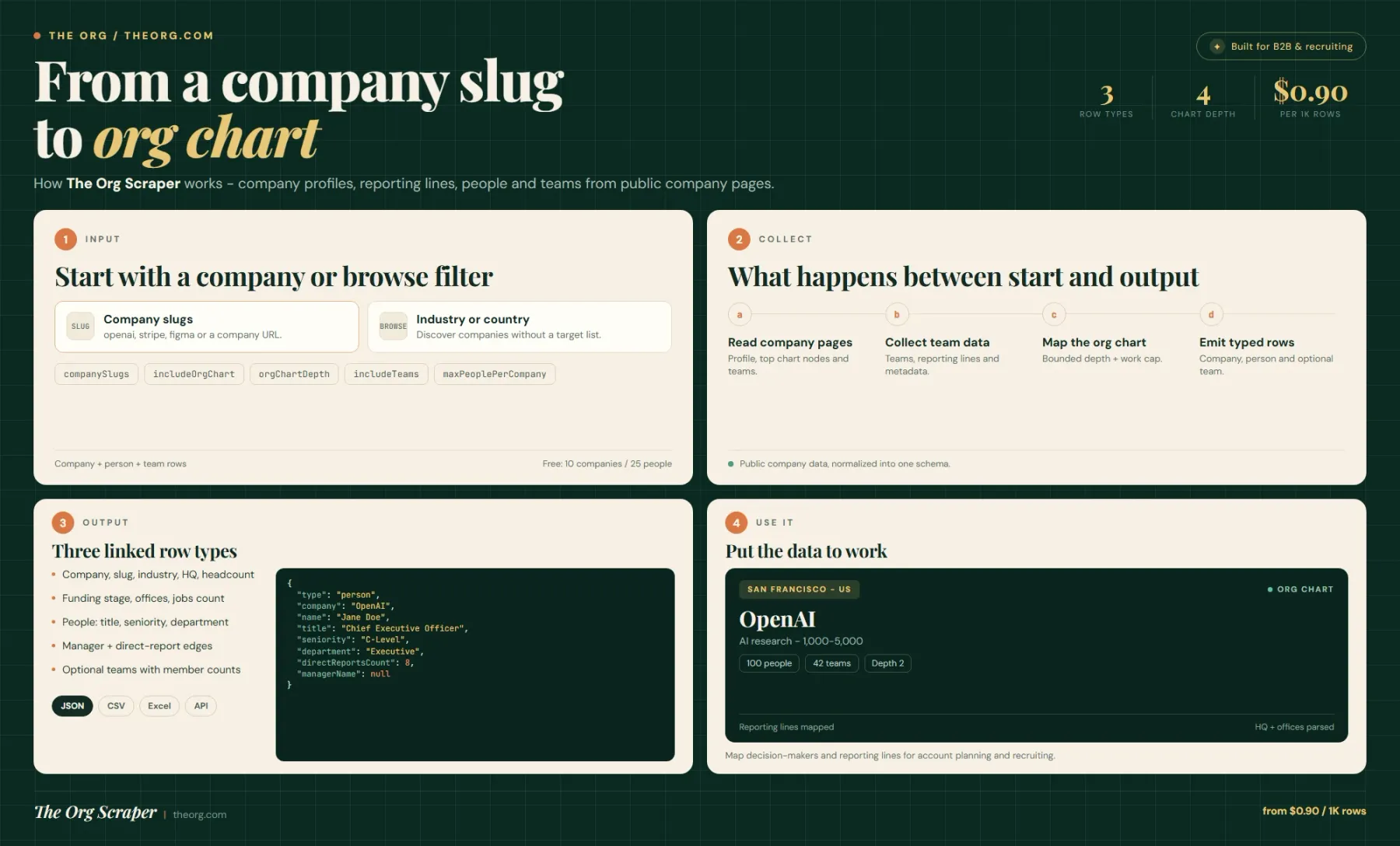
The Actor collects publicly available The Org company, team, people and org-chart data and normalizes it into one schema. Provide company slugs or URLs, or a browse filter; the Actor collects company profiles, team previews, reporting lines and people rows, with optional team and location enrichment.
includePeopleemits one person item per person;includeOrgChartexpands reporting lines;includeTeamsadds team rows.orgChartDepthcontrols management levels (default 2, maximum 4);maxOrgChartRequestscaps per-company work.enrichLocationsadds individual location, level and bio where published.
Scrape Company Profiles, Org Charts And Reporting Lines
Supply companySlugs or companyUrls for targeted runs. The UI is prefilled with openai and stripe; replace those with your targets.
To discover companies instead, set one browse filter:
browseIndustry— industry slug such asai-ml,fintechorsaasbrowseCountry— country slug such asunited-statesorgermanybrowseEmployeeRange—1-10,10-50,50-200,200-500,500-1000,1000-5000,5000-10000or>10000browseLetter—atoz
Only the first browse filter is used, in the order industry → country → employee range → letter. maxCompanies caps the run. includePeople emits one person item per person; includeOrgChart walks reporting lines from the top nodes; includeTeams adds team items.
orgChartDepth controls how many management levels are expanded (default 2, maximum 4). maxOrgChartRequests is a per-company work cap (default 25, maximum 200).
Enrich People, Teams And Locations
By default, person rows use the company HQ as their location. Set enrichLocations: true to fetch individual profile pages for the most senior maxEnrichedPeople people per company. Enrichment adds individual location, level and bio where The Org publishes them.
Team rows are optional. Large departments may be sampled, so team membership can be incomplete; team headcounts (memberCount) are still exact. Seniority and department are inferred from titles and team names because The Org does not expose a normalized seniority field.
Input
| Field | Type | Default | Description |
|---|---|---|---|
companySlugs | array | prefilled openai, stripe | The Org slugs or full company URLs. |
companyUrls | array | empty | Full company URLs. |
browseIndustry | string | empty | Industry slug for discovery. |
browseCountry | string | empty | Country slug for discovery. |
browseEmployeeRange | string | empty | Headcount bucket for discovery. |
browseLetter | string | empty | Company name initial for discovery. |
maxCompanies | integer | 20 | Maximum companies processed. Free users are capped at 10. |
includePeople | boolean | true | Emit person items. |
maxPeoplePerCompany | integer | 100 | People emitted per company. Free users are capped at 25. |
includeOrgChart | boolean | true | Walk reporting lines. |
orgChartDepth | integer | 2 | Management levels to expand (maximum 4). |
maxOrgChartRequests | integer | 25 | Per-company work cap (maximum 200). |
includeTeams | boolean | false | Emit team items. |
enrichLocations | boolean | false | Collect person profiles for location, level and bio. |
maxEnrichedPeople | integer | 25 | Profile records per company (maximum 500). |
proxy | object | disabled | Optional Apify Proxy configuration. |
A targeted run:
A browse run:
Output
One dataset item per company, one per person and, optionally, one per team. Use type to split them.
Company item:
Person item:
| Type | Key fields |
|---|---|
company | name, slug, url, description, industries, headquarters, headcount, headcountExact, fundingStage, foundedYear, teamsCount, officesCount, jobsCount, website, social links, offices, teamHeadcounts, peopleCount, orgChartEdges, topPeople |
person | name, firstName, lastName, title, seniority, department, teams, location, locationSource, photoUrl, profileUrl, managerId, managerName, directReportsCount, level, description |
team | name, slug, memberCount, description, url |
Pricing
Each dataset item is billed at $0.0009, or $0.90 per 1,000 items. A standard Actor Start event costs $0.00005 per run. Pricing tiers: $0.0009 on FREE and BRONZE, $0.00085 on SILVER, $0.0008 on GOLD, PLATINUM and DIAMOND.
Billing counts every emitted row, not every company. A 20-company run with 100 people per company produces about 2,020 company and person items, or roughly $1.82 in result charges, plus optional team rows and the start event. Turn off includePeople for a company-only run, or lower maxPeoplePerCompany to control cost.
Free users get up to 10 companies and 25 people per company. Paying users can process up to 500 companies and 2,000 people per company. The default run uses 4 GB of memory, so compute cost stays low.
Schedule Org Chart Monitoring
- Quarterly refresh — re-run a target company list and diff
orgChartEdgesand person titles to spot leadership changes. - Hiring and team growth — compare
headcountExact,teamHeadcountsandjobsCountacross snapshots. - Account planning — enrich CRM accounts with decision-makers and reporting lines.
- Browse discovery — run a new industry or country slice each week to find companies that match your ICP.
- Deduplication — use
companySlug+ personidas the stable key when runs overlap.
Related Actors
- TheOrg Org Chart People Scraper — alternative TheOrg people scraper.
- TheOrg Decision Makers & Company Contacts Scraper — decision-maker focused TheOrg scraper.
- Company Org Chart by Domain — org chart lookup by company domain.
- The Org Company Profiles & People Scraper — company profiles and people from The Org.
FAQ
Does the Actor require an account?
No. It collects publicly available company, team and people data and does not need a The Org login.
Why is everyone's location the company HQ?
Individual locations are published on person profiles. Set enrichLocations: true to collect those pages for the most senior maxEnrichedPeople people per company. Otherwise locationSource is company_hq.
Why are some teams incomplete?
Large teams may be sampled, so the member list can be incomplete. memberCount is exact even when the member list is not.
How complete is the org chart?
Completeness depends on what The Org publishes and on orgChartDepth and maxOrgChartRequests. The Actor expands a bounded number of levels rather than an entire chart.
Is fundingStage a funding-round database?
No. It mirrors The Org's stage field, such as startup, established or other. It is not a funding-round history.
Why are seniority and department sometimes inferred?
The Org does not expose normalized seniority or department fields for every person. The Actor infers them from job titles and team names, so treat them as derived labels.
Is there a free preview?
Yes. Free users get up to 10 companies and 25 people per company. Paying users get the full input limits.
Can I scrape private companies?
The Actor reads public The Org profiles. If a company or person is not published, it cannot return that data.
For AI Agents & LLM Apps
Returns The Org data as one row per company, person or team; use type to split.
Minimal company run:
Org-chart run:
Browse run:
Output fields: company rows include name, slug, url, description, industries, headquarters, headcount, headcountExact, fundingStage, foundedYear, teamsCount, officesCount, jobsCount, website, social links, offices, teamHeadcounts, peopleCount, orgChartEdges, topPeople; person rows include name, firstName, lastName, title, seniority, department, teams, location, locationSource, photoUrl, profileUrl, managerId, managerName, directReportsCount, level, description; team rows include name, slug, memberCount, description, url. Every row has type and scrapedAt.
Behaviors an agent should know:
typeiscompany,personorteam.companySlug+ personidis the stable key for deduplication.- Locations default to company HQ unless
enrichLocationsis enabled. - Team membership may be sampled;
memberCountis exact. - Billing counts every emitted row, including each person and optional team.
- Free runs stop at 10 companies and 25 people per company.
Legal & Compliance Disclaimer
This Actor is independent and is not affiliated with, endorsed by or sponsored by The Org. It reads publicly reachable company pages; it does not log in, bypass a paywall or access private account data. The Org's public pages can change without notice. People data can include personal information, so handle it in line with applicable data-protection law and The Org's terms of use. You are responsible for how you store, republish or commercialize the data.
SEO Keywords
the org scraper, theorg scraper, theorg api, org chart scraper, company org chart data, org chart api, company people data, employee directory scraper, reporting lines data, org chart csv, theorg dataset, company headcount data, decision makers data, b2b org chart, company hierarchy data, team structure data, org chart json, theorg people scraper, company profile scraper, org chart scraping tool


