
![Viator Reviews Scraper [💰$0.9/1K] | TripAdvisor | Tours avatar](https://images.apifyusercontent.com/LQY3lMM8PtCUnp1ovYPu6zGm5KvH6w9QRikTPqMFEZ4/rs:fill:250:250/cb:1/aHR0cHM6Ly9hcGlmeS1pbWFnZS11cGxvYWRzLXByb2QuczMudXMtZWFzdC0xLmFtYXpvbmF3cy5jb20vZHRSN3FuVGJRck5pU0NtajctYWN0b3ItbmtUbW9DR21rMmdtbkdhdzctZUxZQkQ3cm9zSi11bm5hbWVkXyUyODIlMjkucG5n.webp)
Viator Reviews Scraper [💰$0.9/1K] | TripAdvisor | Tours
Pricing
from $0.80 / 1,000 results
Viator Reviews Scraper [💰$0.9/1K] | TripAdvisor | Tours
[💰$0.9/1K] |Scrape Viator and TripAdvisor tour reviews with ratings, dates and traveler data from two sources at once. Build review databases, attraction comparisons and tourism market research.
Pricing
from $0.80 / 1,000 results
Rating
0.0
(0)
Developer

Ahmed Jasarevic
Maintained by CommunityActor stats
1
Bookmarked
20
Total users
1
Monthly active users
2 days ago
Last modified
Categories
Share
Viator Reviews Scraper (Dual-Source from TripAdvisor)



Extract tour and activity reviews from Viator and TripAdvisor with ratings, dates, and traveler insights in structured format.
Hook
Travel reviews are gold mines for understanding customer satisfaction and tour quality. Viator Reviews Scraper pulls reviews from both Viator and TripAdvisor sources, giving you comprehensive traveler feedback on tours and activities worldwide. Ideal for tour operators, travel agencies, and hospitality analysts.
Use Cases
| Use Case | Description |
|---|---|
| Tour Quality Analysis | Evaluate tour performance through traveler reviews |
| Competitor Benchmarking | Compare your tours against competitor offerings |
| Customer Sentiment Tracking | Monitor review trends and sentiment over time |
| Travel Agency Research | Identify top-rated tours for client recommendations |
| Product Improvement | Extract insights for enhancing tour experiences |
| Market Research | Understand traveler preferences across destinations |
How It Works
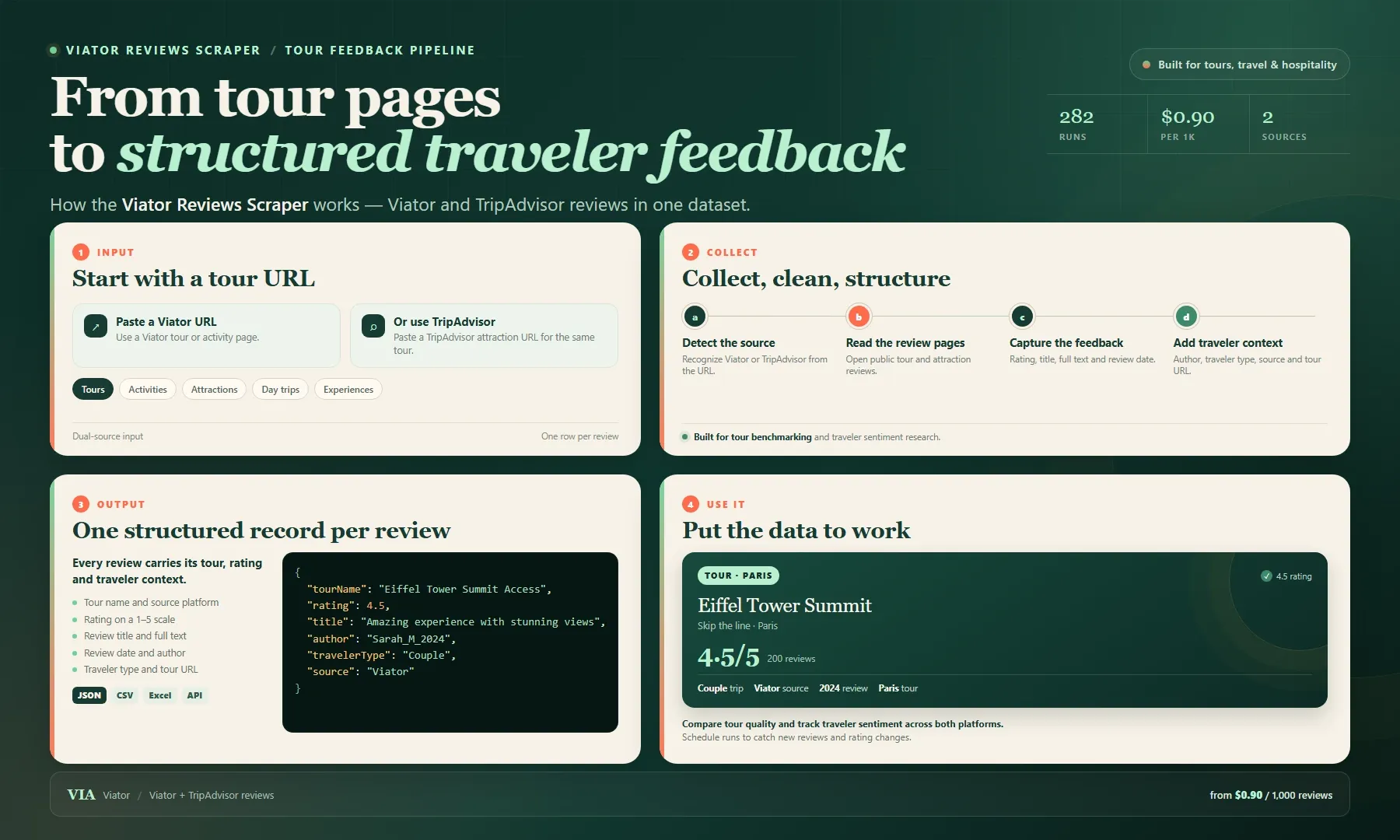
Looking for a Viator reviews scraper or a practical Viator API alternative? Paste a Viator or TripAdvisor tour URL and get structured traveler reviews for tour quality analysis, competitor benchmarking and sentiment tracking. Each record includes tour name, rating, title, full text, date, author, traveler type, source and URL.
Use the dataset to compare tours, monitor review trends and find what travelers value most. Export as JSON, CSV or Excel, or pull results through the Apify API. Start with one tour, then pay from $0.90 per 1,000 reviews.
Input
| Field | Type | Required | Default | Description |
|---|---|---|---|---|
startUrl | string | ✅ | — | Viator or TripAdvisor tour page URL |
maxReviews | integer | ❌ | 100 | Maximum reviews to scrape per tour |
Output
| Field | Type | Description |
|---|---|---|
tourName | string | Tour or activity name |
rating | number | Review rating (1-5) |
title | string | Review title |
text | string | Full review text |
date | string | Review date (YYYY-MM-DD) |
author | string | Reviewer name |
travelerType | string | Traveler type (Solo, Couple, Family, Friends) |
source | string | Data source (Viator or TripAdvisor) |
url | string | Tour page URL |
Example Input
Example Output
Integrations
- Google Sheets: Export reviews for collaborative analysis
- TripAdvisor Manager: Feed data to reputation management tools
- Slack: Alert on new negative reviews
- Zapier: Connect to CRM or analytics platforms
- Webhooks: Real-time review notifications
Related Actors
| Actor | Description |
|---|---|
| TripAdvisor Scraper | Extract restaurant and hotel reviews |
| Booking.com Reviews Scraper | Collect hotel guest reviews |
| Airbnb Reviews Scraper | Extract Airbnb listing reviews |
| Google Maps Reviews Scraper | Pull reviews from Google Maps |
FAQ
Q: Does this scrape from both Viator and TripAdvisor?
A: Yes! The dual-source capability automatically detects the platform and extracts reviews from both Viator and TripAdvisor.
Q: Can I scrape multiple tours?
A: Yes, simply provide multiple tour URLs and the actor will process each sequentially.
Q: What languages are supported?
A: Reviews are extracted in their original language. The actor handles all languages available on Viator and TripAdvisor.
Q: How accurate is the rating data?
A: Ratings are extracted directly from the platform and match the displayed values exactly.
Q: Is there a daily limit?
A: There is no hard limit from the Actor. For very large runs, a residential proxy can improve reliability.
SEO Keywords
Viator reviews scraper, TripAdvisor reviews extractor, tour reviews data, activity reviews scraper, travel review data, Viator API alternative, TripAdvisor data extraction, tour operator reviews, travel sentiment analysis, review aggregator tool, Viator bulk scraper, TripAdvisor bulk extractor, tour quality data, traveler feedback scraper, travel review analytics, Viator automation, TripAdvisor automation, tour reviews API, activity data scraper, travel intelligence tool
For AI Agents
Purpose: Extract tour and activity reviews from Viator and TripAdvisor for travel industry analysis, tour quality assessment, and customer sentiment tracking.
Minimal Input JSON:
Output Fields: tourName, rating, title, text, date, author, travelerType, source, url
Behaviors:
- Auto-detects source platform (Viator or TripAdvisor)
- Handles pagination for large review sets
- Returns consistent schema regardless of source
- Preserves original review language
Billing: $0.002 per result item
Legal Disclaimer
This Actor is developed independently and is not affiliated with, endorsed by, or sponsored by Viator or TripAdvisor. All data extracted is publicly available on these platforms. Users are solely responsible for ensuring their use of this tool complies with Viator's Terms of Service, TripAdvisor's Terms of Service, and all applicable local, state, federal, and international laws. The developer assumes no liability for misuse of this tool.


